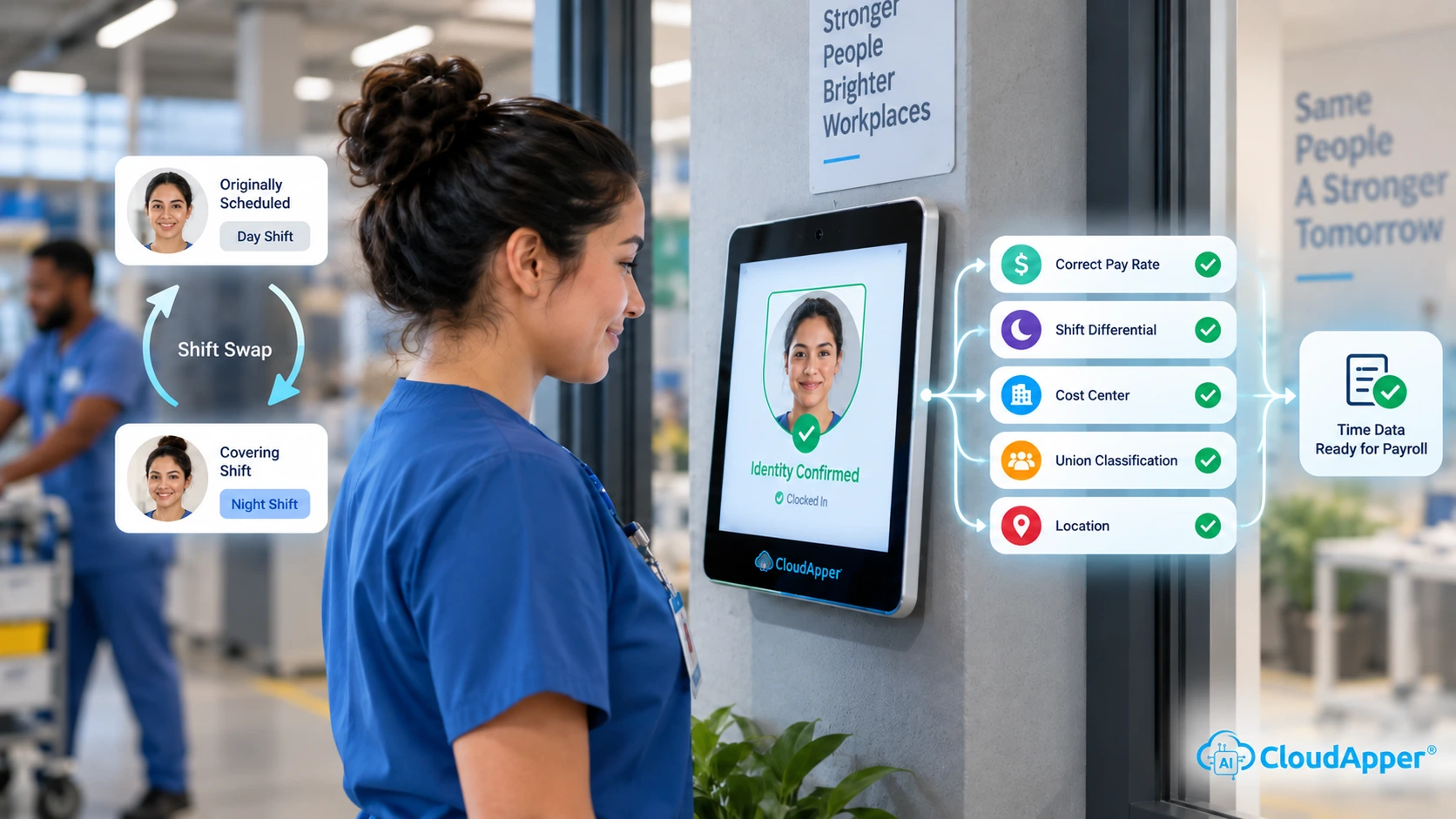
CloudApper hrPad revolutionizes job transfers by automating processes, reducing manual bottlenecks, and enhancing productivity. Its user-friendly interface and AI-driven insights streamline HR operations, ensuring smooth transitions and improved employee satisfaction.


Table of Contents
- Quick answer: what’s the most productive way to manage job transfers?
- What counts as a “job transfer” in real life?
- Why job transfers are suddenly harder than they used to be
- The hidden productivity killers inside most transfer processes
- What a modern job transfer workflow looks like
- Where CloudApper hrPad fits in this process
- A realistic example: what changes when transfers become guided
- What to measure so you know it’s working
- FAQ
- Closing: job transfers should feel like momentum, not disruption
When a job transfer goes smoothly, employees stay focused and teams keep moving. When it doesn’t, momentum slips fast. People lose system access. Pay rules don’t update on time—schedules mismatch. HR gets flooded with “Who do I ask?” messages. Payroll gets stuck cleaning up retro fixes.

This matters more than most leaders realize because work is already crowded with coordination overhead. Asana’s research on “work about work” shows that a large share of time is consumed by status chasing, duplicative effort, and administrative overhead instead of skilled work. That’s exactly the type of drag a messy transfer creates. A smarter job transfer process is one of the simplest ways to protect productivity, reduce avoidable payroll errors, and improve the employee experience. CloudApper hrPad is built for that reality, especially for organizations with frontline teams that need self-service access, clear steps, and fast answers.
Quick answer: what’s the most productive way to manage job transfers?
The most productive job transfer process does three things consistently:
-
It treats transfers as a workflow, not a form.
That means approvals, effective dates, validations, and system updates happen in a predictable sequence. -
It updates the “rules” automatically at the effective date.
Job code, location, supervisor, pay rule, time policy, schedule rules, and access should switch cleanly without manual chasing. -
It supports employees in the moment.
People need a simple self-service way to confirm what changed, what they need to do next, and where to go for help.
hrPad supports this by turning tablets (or shared devices) into HR kiosks for self-service and guided workflows, with an always-available assistant for common questions and a structured way to capture feedback after the move.
What counts as a “job transfer” in real life?
In HR systems, “job transfer” can mean several different changes, and that’s where issues begin. A transfer might include:
- A new job code or role
- A new department or cost center
- A new location (which can trigger different policies)
- A new manager or supervisor
- A new shift or schedule pattern
- A different pay type (hourly to salaried, or vice versa)
The problem is that each of these changes can affect time rules, payroll calculations, approvals, security roles, reporting, and compliance. So even when the change sounds simple (“Same employee, new role”), the operational impact is not.
Why job transfers are suddenly harder than they used to be
Most organizations are dealing with faster movement and shorter tenure than they’re used to. The U.S. Bureau of Labor Statistics reported median employee tenure was 3.9 years in January 2024, the lowest since 2002. In plain terms, people move more, and organizations need processes that can keep up.
At the same time, retention pressure is real. Work Institute estimates that in 2023, almost 45 million workers voluntarily left their employer, which they frame as roughly 27% of the U.S. workforce.
That’s not just a hiring challenge. It’s a workflow challenge. If internal moves feel chaotic, employees start looking externally.
And there’s a cost angle too. SHRM benchmarking has cited an average cost-per-hire of around $4,700, before you even account for productivity loss while roles are open or backfilled.
So if internal transfers can fill needs faster, they’re worth protecting.
The hidden productivity killers inside most transfer processes
Most transfer slowdowns come from predictable failure points. Here are the ones that show up repeatedly across industries:
1) Effective dates that don’t match reality
A transfer might be “effective Monday,” but the schedule changed Saturday, or the employee started training earlier. When timing is off, you get missed punches, incorrect premiums, or messy retro pay.
2) Pay rules and time rules don’t switch cleanly
Different roles often mean different overtime rules, differentials, rounding rules, break policies, and approval paths. If the switch is manual, it gets delayed. Then payroll becomes the cleanup team.
3) Access and approvals lag behind the move
Employees can’t see the right schedule. Managers can’t approve time. HR gets a flood of tickets. Nobody feels confident.
4) Location-based compliance gets overlooked
If a transfer includes a location change, compliance obligations can change too. The process needs to “know” the location and automatically apply the correct job codes and rules.
5) No one closes the loop with the employee
Employees finish the move still unsure: “Who approves my time now?” “Which policy applies to me?” “Where do I check my details?” That uncertainty becomes downtime.
What a modern job transfer workflow looks like
A high-performing job transfer workflow is simple, but it’s strict about sequence. Here’s a clean model you can follow.
Step 1: Capture the transfer request with the minimum required facts
You don’t need a long form. You need the right inputs:
Role/job code, location, effective date/time, manager, and any pay-rule or schedule-change flags.
Step 2: Route approvals automatically
Transfers often require multiple approvals (HR, the current manager, the new manager, finance, or operations). A workflow should route approvals based on policy, not memory.
Step 3: Validate policy impacts before the change goes live
This is where many organizations stumble. The workflow should confirm:
- Which time policy and pay rule should apply
- What supervisor chain changes
- Whether schedule rules or premiums change
- Whether the location triggers a different compliance setup
Step 4: Execute system updates at the effective date
This is the “no surprises” moment. When it’s done right, the employee starts their new role and everything already matches:
their schedule view, their manager approvals, and the rules behind their time and pay.
Step 5: Confirm to the employee in plain language
Don’t just update a database. Tell the employee what changed and what to do next:
where to clock in, where to view schedule, who approves, and where to ask questions.
Step 6: Run a short post-transfer check-in
This is a missed opportunity in many organizations. A short check-in 7–14 days later catches issues early and improves retention.
LinkedIn’s research continues to show internal mobility is rising, with Global Talent Trends reporting internal mobility increased year-over-year and positioning it as a strategic lever when done well.
But “mobility” only works if the transfer experience is actually smooth.
Where CloudApper hrPad fits in this process
CloudApper hrPad is useful when you want job transfers to feel guided and immediate for employees, while staying structured and controlled for HR.
Here’s how it supports the workflow above:
Tablets become HR kiosks for self-service and speed
Instead of forcing employees (especially deskless teams) to wait for an email chain or find a shared PC, hrPad can run as a kiosk experience. Employees can complete steps, confirm details, and access what they need where they work.
Location-based job codes help reduce misalignment
When job transfers include location changes, job codes and policies often shift. A location-aware setup reduces the chance of assigning the wrong policy bundle.
Built-in assistance reduces the “where do I go now?” noise
Transfers create the same repeat questions every time. hrPad’s assistant can handle routine questions on demand, so HR and managers don’t get pulled into avoidable back-and-forth.
Employee feedback becomes actionable, not random
A simple post-transfer survey is more than “How was it?” Done properly, it reveals friction you can fix:
confusing steps, training gaps, schedule issues, access problems, or approval delays.
This aligns with what the broader market is seeing: LinkedIn’s Workplace Learning Report notes many organizations are still early in internal mobility maturity, and employee confidence in making internal moves isn’t universal.
The smoother you make transfers, the more confidence rises.
A realistic example: what changes when transfers become guided
Imagine a 400-employee manufacturing company with multiple departments and shift patterns.
Before:
Transfers are handled via email + spreadsheets. HR updates job codes manually. Supervisors often forget time policy changes. Payroll fixes errors after the fact.
After introducing a guided workflow through hrPad:
Transfers follow a consistent sequence. Employees see clear confirmation of what changed. Managers get the right approvals automatically. HR gets fewer repeat questions. Payroll sees fewer retro adjustments.
The biggest difference isn’t “automation.” It’s predictability. People stop guessing, and work stops stalling.
What to measure so you know it’s working
You don’t need 30 metrics. Track a few that reflect reality:
- Time-to-transfer completion (request to fully active in new role)
- Transfer-related payroll corrections (count and hours)
- HR inquiries tied to transfers (trend line)
- Manager approval delays after transfers
- Post-transfer satisfaction (simple 1–2 question pulse)
If those numbers move in the right direction, productivity improves naturally because people spend less time fixing avoidable issues.
FAQ
What is the fastest way to process internal job transfers?
The fastest approach is a standardized workflow that captures only essential details, routes approvals automatically, validates policy impacts (pay rules, time rules, manager chain), and executes updates at the effective date. Adding a self-service layer, like an HR kiosk experience, reduces delays caused by back-and-forth communication.
Why do job transfers create payroll mistakes?
Payroll mistakes usually happen when effective dates, time policies, pay rules, or manager approvals don’t switch cleanly. A role change can also change premiums, schedules, or compliance rules. When updates are manual, they often lag behind the employee’s real start date, creating retro corrections.
How can hrPad help employees during a role transition?
hrPad can provide a guided self-service experience so employees can confirm what changed, what they should do next, and where to get help. It also reduces routine HR questions by offering always-available answers for common issues that pop up right after a transfer.
Do job transfers improve retention?
They can, when the experience is smooth and employees feel supported. Research consistently ties internal mobility to stronger retention outcomes, and internal mobility is rising year-over-year as more organizations rely on internal movement to fill needs.
What’s a simple first step to improve job transfers this quarter?
Start by standardizing inputs and effective dates, then add a clear employee confirmation step that explains “what changed” in plain language. From there, automate approvals and policy validations so payroll and managers aren’t forced into cleanup mode.
Closing: job transfers should feel like momentum, not disruption
Job transfers are no longer rare events. They’re a regular part of how teams adapt, reskill, and retain people in a changing market. When the process is messy, productivity drops and trust erodes. When it’s structured and employee-friendly, transfers become a competitive advantage.
CloudApper hrPad helps teams get there by making transfers guided, accessible, and consistent, especially for frontline and distributed workforces that can’t afford slow, manual handoffs.
Contact Us to see how hrPad can fit into your internal transfer workflow.
What is CloudApper AI Platform?
CloudApper AI is an advanced platform that enables organizations to integrate AI into their existing enterprise systems effortlessly, without the need for technical expertise, costly development, or upgrading the underlying infrastructure. By transforming legacy systems into AI-capable solutions, CloudApper allows companies to harness the power of Generative AI quickly and efficiently. This approach has been successfully implemented with leading systems like UKG, Workday, Oracle, Paradox, Amazon AWS Bedrock and can be applied across various industries, helping businesses enhance productivity, automate processes, and gain deeper insights without the usual complexities. With CloudApper AI, you can start experiencing the transformative benefits of AI today. Learn More
- Useful Links:
- Agentic AI
- No-Code/Low-Code
- Custom Software
- HCM Personalization
- iPaaS
- FedRAMP

Brochure
CloudApper hrPad
Empower Frontline Employees with an AI-Powered Tablet/iPad Solution
Download Brochure
CloudApper AI Solutions for HR



- Works with








- and more.
Similar Posts

Stop Piece-Rate Pay Disputes on Payday: Let Workers Confirm Daily…

Certified Payroll Compliance: Why Davis-Bacon Failures Start at the Time…