Most frontline employees don’t sit in email or intranets all day. The “digital front door” redefines how HR reaches them—using employee self-service kiosks as a shared, on-site hub for timekeeping, communication, training, and real-time feedback. This article explains what the digital front door really means, why kiosks are becoming the frontline communication center, and how hrPad fits naturally into a holistic workplace experience.

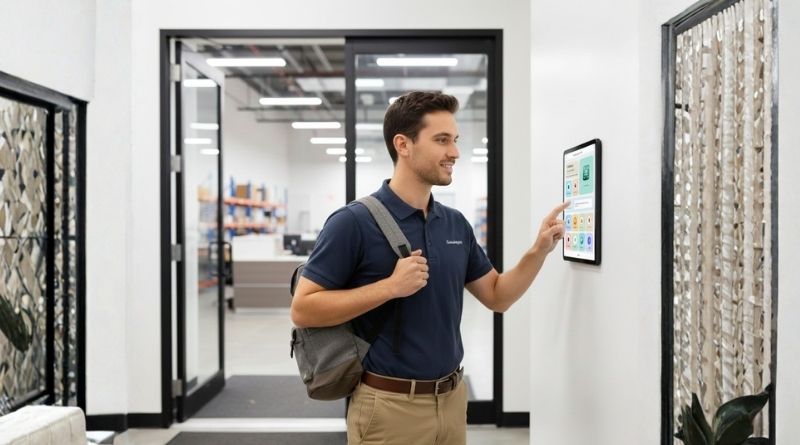
Table of Contents
- What is the “Digital Front Door” in a workplace context?
- Why kiosks are becoming the frontline communication hub (not just a clock)
- The modern ESS kiosk: less “HR terminal,” more “frontline experience station”
- What “holistic workplace experience” looks like on a kiosk
If you’re hearing people call employee self-service (ESS) kiosks the “digital front door,” here’s what they mean: the kiosk becomes the first (and most reliable) place employees go to start their day, get the right updates, complete required actions, and get help—right where work happens. That shift matters because most of the global workforce is deskless. They’re not sitting in email all day, and many don’t have consistent access to corporate portals. Multiple sources estimate deskless/frontline roles represent roughly 80% of the workforce (about 2.7B people).

So when HR leaders say “we posted it on the intranet,” many employees never see it.

What is the “Digital Front Door” in a workplace context?
In plain terms: it’s a single, shared, physical touchpoint (usually a tablet kiosk at a site entrance) that consolidates:
- timekeeping and shift tasks
- safety training and acknowledgements
- wellness check-ins and attestations
- company announcements and policy updates
- quick pulse surveys and feedback
Instead of scattering important messages across email, posters, managers’ phones, and “hope someone tells the night shift,” the front door model makes information and actions impossible to miss.
That’s the direction hrPad fits into naturally.
CloudApper hrPad is already designed as an employee self-service kiosk for frontline teams—timekeeping, PTO, schedules, forms, attestations, and a 24/7 HR assistant—running on regular tablets and syncing with your HR system.
Why kiosks are becoming the frontline communication hub (not just a clock)
This trend is accelerating for a straightforward reason: the cost of being “out of the loop” is real.
Gallup has tracked a drop in role clarity over the last few years—only 46% of employees say they clearly know what’s expected of them, down from 56% in 2020.
When expectations aren’t clear, you don’t just get lower engagement. You get missed steps, inconsistent compliance, and managers doing cleanup all day.
On top of that, Microsoft’s Work Trend Index reporting on frontline workers has highlighted a tech-equity gap: about one-third of frontline workers say they don’t have the right tech tools to do their job effectively, and many have had to adopt digital tools “on the fly” without training.
So organizations are looking for a simple move that works everywhere, for every shift: one shared interface in the flow of work.
The modern ESS kiosk: less “HR terminal,” more “frontline experience station”
Here’s what the next-generation kiosk experience looks like when it’s done right.
1) Timekeeping becomes the entry point, not the whole product
Employees come to the kiosk to clock in and out. That’s the habit.
The “digital front door” approach uses that habit to deliver the other things that matter, like:
- a one-tap acknowledgement of a policy update
- a quick safety reminder relevant to today’s shift
- a pulse question that takes 10 seconds
- a targeted announcement (site-specific, role-specific, language-specific)
hrPad supports that broader kiosk model because it’s already positioned beyond punches—PTO requests, accrual checks, shift actions, forms, HR Q&A, and configurable workflows.
2) Safety training fits into real life with microlearning
Frontline training fails when it demands long, uninterrupted attention in a job built around movement and urgency.
Microlearning (short modules) is growing because it matches reality:
- One industry summary reports microlearning completion rates around 80%, compared to about 20% for long-form modules.
- Another 2025 stat roundup cites 89% of employees saying microlearning is more engaging for compliance training.
The “Digital Front Door” for Holistic Workplace Experience
A kiosk is a perfect delivery mechanism for this, because it’s already present in breakrooms and shift-change choke points.With hrPad, the practical play is simple: put short training modules (or acknowledgements tied to training)
3) Wellness check-ins become normal, not awkward
Wellness doesn’t need to be a big survey once a year. For frontline teams, it works better as a lightweight check-in.
A kiosk can prompt:
- “How’s your energy today?”
- “Any safety concerns you want to flag?”
- “Do you have what you need for this shift?”
Because hrPad supports customizable prompts and forms on the kiosk, you can design wellness check-ins that match your culture and your privacy requirements (for example: aggregated reporting by site, not named responses).
4) Announcements stop relying on “manager telephone.”
Corporate updates often travel like a rumor: HQ tells regional, regional tells site leads, site leads tell supervisors, supervisors tell whoever happens to be around.
The kiosk flips that. It becomes a controlled, consistent channel:
- The same message appears for every shift
- People can confirm they saw it
- Updates can be site-specific (weather closures, PPE changes, visitor rules, etc.)
That’s how you close the HQ-to-floor information gap without adding more meetings.
What “holistic workplace experience” looks like on a kiosk
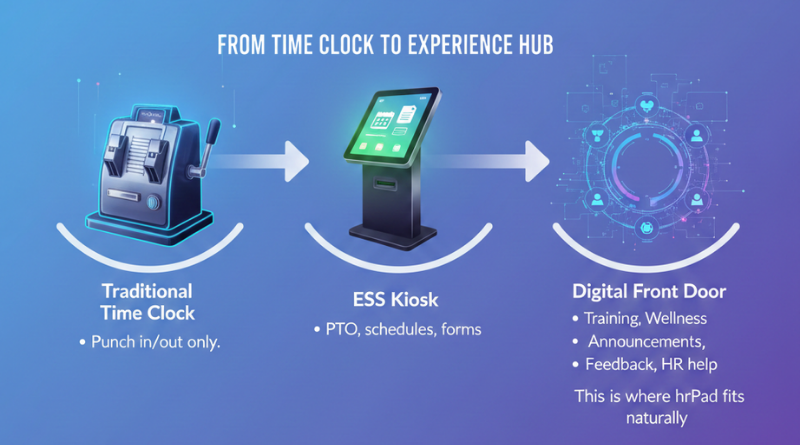
If you want this to feel like a true “digital front door,” design the kiosk experience around a few predictable moments.
Moment A: Clock-in (fast + focused)
Goal: Don’t slow people down. Keep it to essentials.
Examples:
- Clock in
- Show one high-priority announcement (optional acknowledge)
- One safety prompt relevant to today’s work
- Done
Moment B: Mid-shift (optional touchpoint)
Goal: Give employees a place to handle small tasks without hunting someone down.
Examples:
- Request PTO
- Check accrual balance
- Ask the HR assistant a policy question
- View schedule or confirm a shift change
hrPad is built for exactly these tasks—self-service without needing a personal device or a manager as a middleman.
Moment C: Clock-out (feedback loop)
Goal: Capture signals while the shift is fresh.
Examples:
- “Was staffing adequate today?” (1–5)
- “Any safety issue to report?” (quick form)
- “Any tools missing?” (checkboxes)
Kiosk-based pulse surveys are specifically designed to collect real-time input from employees who don’t use email.
Where hrPad fits naturally as the “digital front door”
hrPad becomes the digital front door when you stop thinking of it as “a device for punches” and start thinking of it as:
- a shared employee experience hub on a tablet
- a self-service station for time and HR actions
- a consistent communications channel for every shift
- a guided workflow for tasks that usually create back-and-forth
- a 24/7 HR assistant for repetitive questions (so employees get answers without waiting)
Also, because the kiosk is placed on-site (shop floor, breakroom, field office), it aligns with what Microsoft has called out: frontline teams often don’t have the same tech access as desk-based roles, and that gap affects effectiveness.
hrPad is one of the most practical ways to close that gap without rolling out complex individual device strategies.
Quick answers
What is a “digital front door” kiosk?
A digital front door kiosk is a shared, on-site tablet station that employees use to clock in, access updates, complete training, submit requests, and get help—right where work happens.
Why use a kiosk for training and pulse surveys?
Because frontline employees are more likely to complete short actions when they’re embedded into their daily flow. Microlearning has higher reported completion rates than long modules, and kiosk surveys can capture real-time feedback without email access.
How does hrPad support this model?
hrPad combines timekeeping with employee self-service workflows—PTO, accruals, forms, shift actions—and includes an always-available HR assistant on a shared kiosk device that syncs with your HR system.
FAQs
Is an employee self-service kiosk only for payroll and time tracking?
Not anymore. Many organizations are using kiosks as a central “front door” for frontline experiences—announcements, training acknowledgements, wellness check-ins, and quick surveys—because it reaches every shift reliably.
Where should we place the kiosk to make it effective?
Put it where routines already exist: near entrances, breakrooms, locker rooms, or next to existing time clocks. The best location is the one every shift naturally passes.
Will this slow down clock-ins?
It doesn’t have to. Keep clock-in flows short and reserve optional items (surveys, training) for clock-out or mid-shift touchpoints.
What’s the biggest win from a digital front door approach?
Consistency. The same message, training, and self-service access reaches every employee—especially the people who rarely see email or the intranet.
What is CloudApper AI Platform?
CloudApper AI is an advanced platform that enables organizations to integrate AI into their existing enterprise systems effortlessly, without the need for technical expertise, costly development, or upgrading the underlying infrastructure. By transforming legacy systems into AI-capable solutions, CloudApper allows companies to harness the power of Generative AI quickly and efficiently. This approach has been successfully implemented with leading systems like UKG, Workday, Oracle, Paradox, Amazon AWS Bedrock and can be applied across various industries, helping businesses enhance productivity, automate processes, and gain deeper insights without the usual complexities. With CloudApper AI, you can start experiencing the transformative benefits of AI today. Learn More
- Useful Links:
- Agentic AI
- No-Code/Low-Code
- Custom Software
- HCM Personalization
- iPaaS
- FedRAMP

Brochure
CloudApper hrPad
Empower Frontline Employees with an AI-Powered Tablet/iPad Solution
Download Brochure
CloudApper AI Solutions for HR



- Works with








- and more.
Similar Posts

How to Notify Frontline Employees About Unpaid Leave Before They…
Why UKG Pro Employee Self Service Adoption Struggles and How…