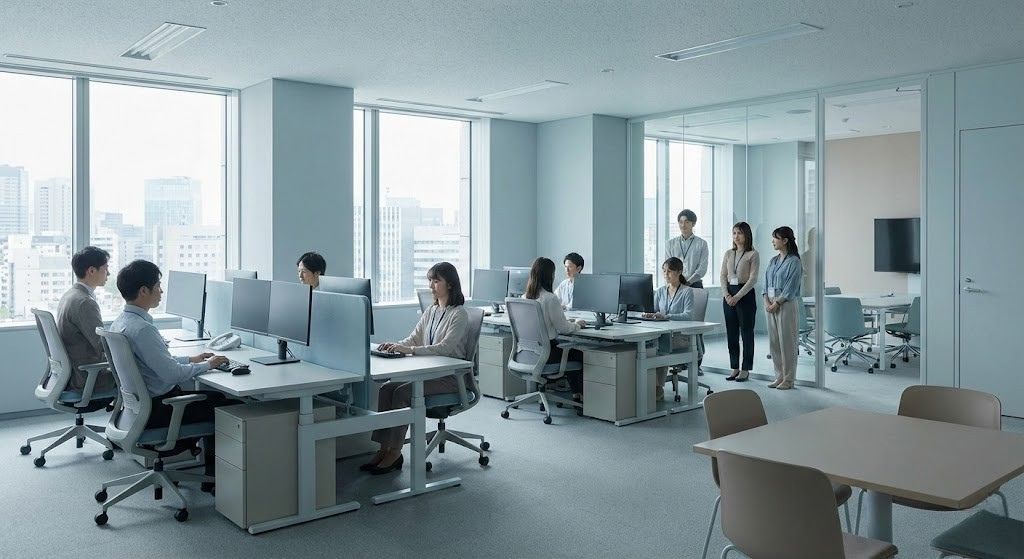
Frontline employees often experience a very different workplace culture than their desk-based peers—not by intent, but by design. This article explores how a unified HR kiosk ecosystem can bridge that gap by delivering equal access to information, recognition, feedback, and self-service—without sacrificing trust or humanity.

Table of Contents
- What a “unified ESS ecosystem” actually means
- Why the “two-culture gap” shows up so fast in frontline environments
- Why hardware-agnostic kiosks are gaining momentum
- The difference between a “time clock kiosk” and an “HR digital hub”
- How to deploy kiosks without triggering the “dehumanizing HR” backlash
- Where hrPad fits in a unified ESS strategy
- FAQs
- The HR leader takeaway
If you manage a workforce where some people sit behind laptops and others run the floor, you already know the “two cultures” problem is real — even when no one says it out loud.
Desk-based employees get a steady stream of communication, recognition, updates, surveys, policy reminders, and self-service HR tools. Frontline employees often get a bulletin board, a manager relay, and a shared device that only exists to punch in and out. Over time, that difference becomes more than inconvenience. It becomes a signal: who the organization is “built for.”

Recent reporting and research has started to put numbers to what many HR leaders have felt for years. HR Dive, citing UKG survey data, reported that 47% of frontline employees said there are two separate cultures at their workplace — one for frontline workers and one for everyone else. That’s not a minor sentiment issue. It’s a trust issue. And trust is what retention is made of.
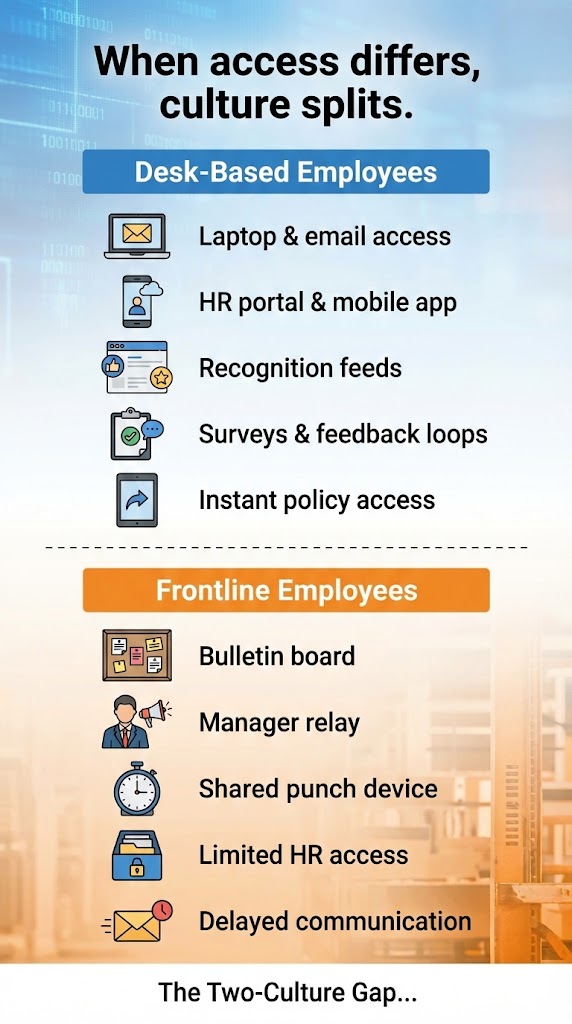
At the same time, the conversation is shifting from “How do we give frontline workers access?” to “How do we give them the same experience?” That’s where unified employee self-service (ESS) ecosystems come in — especially hardware-agnostic kiosks that can deliver the same HR touchpoints desk workers get through email and mobile apps.
The promise is powerful: one HR ecosystem, multiple access paths, equal dignity.
The risk is also real: if kiosks are deployed as “automation machines” instead of “access and support hubs,” they can backfire — feeding skepticism that HR is trying to replace people with screens. That anxiety shows up in online conversations, especially where biometrics, monitoring, or workforce reduction narratives are involved.
As HR leaders, our job isn’t to pick a side between “human” and “digital.” Our job is to make sure our operating model doesn’t quietly create a two-tier culture — and that includes how we design ESS for the frontline.
What a “unified ESS ecosystem” actually means
A unified ESS ecosystem is not “we have an app, and we also have a kiosk.” That’s two channels. Unity is when the experience is consistent across channels:
- the same HR knowledge base and policy answers
- the same workflows (PTO requests, schedule actions, feedback)
- the same visibility into news and recognition
- the same ability to be heard (surveys, pulse, issue reporting)
- the same level of privacy and trust
The goal is simple: access parity.
This matters because frontline employees are frequently excluded by design, not by intent. Many don’t have corporate email addresses. Some aren’t allowed personal phones on the floor. Others share devices or work in environments where mobile isn’t practical. When ESS is “email-first,” you’ve already created a barrier.
Industry voices keep calling this the digital divide in employee experience — the gap between desk workers who are over-instrumented and deskless workers who are under-served.
Why the “two-culture gap” shows up so fast in frontline environments
From a people-operations standpoint, frontline work has three realities that desk-based HR tooling often ignores:
1) Time is tighter, so friction is louder
If an employee needs to ask about PTO balance, shift rules, or a payroll question and the only path is “call HR during business hours” or “log into an employee portal you can’t access,” you’re not just creating inconvenience. You’re creating accumulated resentment.
The UKG survey summarized by HR Dive also highlights burnout and financial pressure among frontline employees — conditions where friction feels personal.
2) Culture is experienced through systems
Culture isn’t only values on a wall. It’s whether you can get information, whether recognition is visible, whether your feedback is collected, and whether policies are applied consistently. If the desk population has an always-on HR ecosystem and the frontline doesn’t, the culture will feel split — even if leadership messaging is unified.
3) “Automation” triggers a trust question
There’s a growing push to use AI in workforce operations. HR Dive coverage of SHRM’s research notes both accelerating AI integration and concerns about over-automation sidelining human input. Employees are picking up on that tension — and when they see kiosks appear, some will interpret it as “HR is going fully automated.”
That interpretation isn’t always fair, but it’s predictable. HR has to design for the perception and the reality.
Why hardware-agnostic kiosks are gaining momentum
When companies talk about “frontline ESS,” they usually mean mobile. Mobile can be great — if employees can use it.
But hardware-agnostic kiosks solve a different problem: shared access without personal credentials or personal devices.
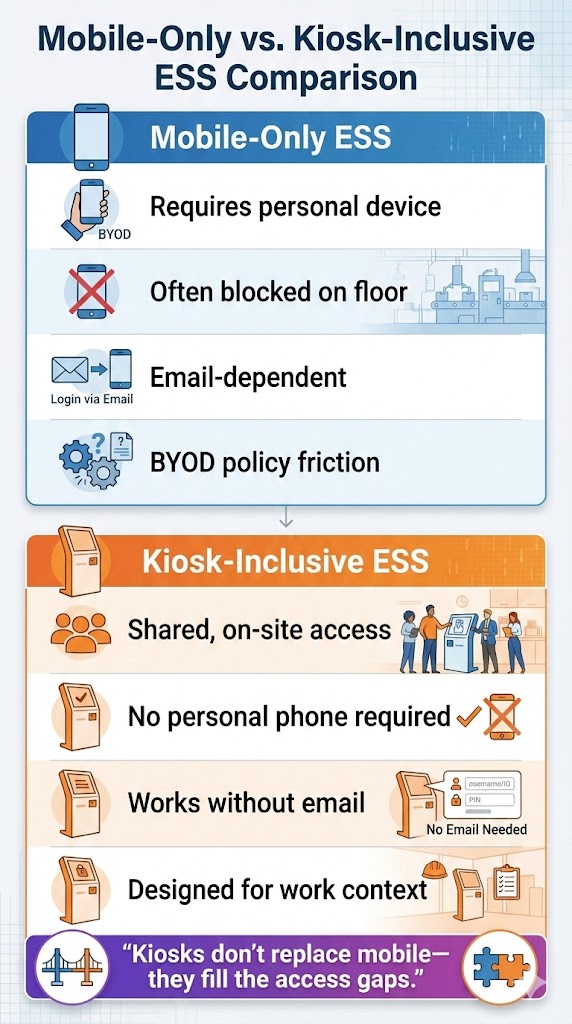
In practice, that looks like a kiosk placed where work happens (plant entry, break room, nurse station, warehouse staging), designed to offer the same essentials a mobile ESS app provides.
Some platforms are explicitly building kiosk experiences for deskless populations (for example, ServiceNow’s Employee Center kiosk experience). The trend is clear: organizations want frontline access that doesn’t depend on email, laptops, or BYOD policies.
This is also where solutions like CloudApper hrPad fit — not as “a time clock replacement,” but as a kiosk layer that can unify HR service delivery for employees who are otherwise left out.
hrPad is designed to run on standard devices (iOS, Android, Windows) and supports self-service workflows plus an AI assistant that can answer HR questions based on company policies. It also supports identity verification options (including Face ID and badges like QR/NFC) which matters when kiosks provide personalized access.
The key, though, is how you use a kiosk.
The difference between a “time clock kiosk” and an “HR digital hub”
If your kiosk only does punches, you haven’t unified anything. You’ve digitized one transaction.
A unified HR kiosk ecosystem treats the kiosk as a digital hub for frontline employees — a place where they can not only manage time but also participate in the organization.
That means building “social and engagement features” into kiosk-based ESS, not just administrative functions:
Company news that doesn’t require email
Frontline workers should see announcements, operational updates, safety notices, and benefits reminders in the same rhythm as desk-based employees — not a week later through word-of-mouth.
Recognition that is visible and equitable
Desk workers often get recognition baked into platforms (shout-outs, badges, newsletters). Frontline recognition is too often private or inconsistent. When recognition is visible at shared access points, it signals that appreciation is part of the operating system, not dependent on a manager’s personality.
LinkedIn conversations around frontline experience keep returning to this theme: flexibility and recognition are signals of trust that need to reach every role, not just those behind a desk.
Feedback loops that don’t exclude the frontline
If your pulse survey requires a corporate inbox link, you’ve already biased your data. Kiosk-enabled surveys, micro-feedback, and quick sentiment check-ins (done responsibly) can bring frontline voices into the same feedback system as office staff.
HR answers that reduce waiting and ticket volume
Frontline employees often need quick answers: “How do I swap a shift?” “What’s the PTO rule?” “When does overtime kick in for my state or union rule?” When your kiosk can deliver policy-based answers instantly, you’re not “dehumanizing HR.” You’re removing bottlenecks — as long as humans remain accessible for exceptions and sensitive issues.
This is where AI assistance can be genuinely helpful — and also where trust can be lost if it’s implemented as a wall instead of a support layer.
How to deploy kiosks without triggering the “dehumanizing HR” backlash
Employee skepticism about kiosks is not irrational. People have watched self-service rollouts in other industries become labor reduction narratives, and biometrics can raise privacy concerns fast. Online discussions often frame face-scanning clocks and automated kiosks as surveillance or as a signal that humans are being replaced.
If you want kiosks to unify culture rather than split it, your rollout needs guardrails:
Lead with fairness and access, not efficiency
Yes, kiosks reduce HR workload and repetitive questions. But your frontline employees don’t wake up hoping HR tickets go down. They wake up wanting predictable schedules, fair pay, and to be treated like insiders.
Frame kiosks as an equity move: “You should have the same access to HR and company resources as everyone else.”
Make privacy explicit and non-negotiable
If identity verification is used, explain:
- what data is captured
- what it is used for
- who can access it
- how long it is retained
- what alternatives exist (when possible)
hrPad, for example, positions identity verification as a way to enable personalized services and protect privacy on shared devices (Face ID, QR, NFC options). But the governance model is what makes people trust it — not the feature itself.
Keep humans available and visible
The fastest way to create “dehumanizing HR” is to hide behind automation. A kiosk should handle routine questions and workflows, but escalation paths should be clear:
- “Need help? Here’s how to reach a person.”
- “Sensitive issue? Here’s a confidential channel.”
- “Complex case? Here’s how we route it.”
This aligns with broader HR concerns about over-automation sidelining humans — a tension even CHROs are talking about.
Measure culture outcomes, not just usage
Track adoption, sure. But also track:
- speed of resolution (not just ticket deflection)
- survey participation by worker group
- frontline recognition frequency
- perception of fairness in access
- retention and internal mobility by population
Remember: HR Dive’s frontline survey data explicitly flags a perceived lack of mobility opportunities. If kiosks don’t help close that gap — by making learning, internal postings, referrals, or manager communication more accessible — you haven’t unified culture.
Where hrPad fits in a unified ESS strategy
Most HR leaders don’t need another platform. They need a way to extend what they already have to the people who are underserved by default.
That’s why the “kiosk layer” approach is resonating.
In that model, hrPad acts as a hardware-agnostic access point that can:
- run on common devices (iOS/Android/Windows)
- provide frontline self-service flows beyond timekeeping (PTO, accruals, attendance workflows, shift actions)
- offer a 24/7 HR assistant for policy-based answers
- support identity verification methods appropriate for shared kiosks
The strategic point isn’t “kiosks are the future.” The point is: frontline access parity is the future, and kiosks are one of the most practical ways to get there when mobile-only fails.
FAQs
What is the “two-culture gap” in HR?
It’s the growing divide between desk-based employees who have consistent access to HR tools, communication, and recognition, and frontline employees who often don’t — leading to a perceived two-tier workplace culture.
Why are companies deploying employee self-service kiosks now?
Because many frontline employees lack corporate email access, can’t use personal phones at work, or don’t have a practical way to use mobile ESS — and companies want an access path that doesn’t depend on personal devices.
How do you prevent kiosks from feeling “dehumanizing”?
Design them as access and support hubs, keep humans visible and reachable, be transparent about privacy, and ensure kiosk ESS includes engagement features (news, recognition, feedback) — not just transactions.
The HR leader takeaway
The “two-tier culture” problem isn’t solved by adding another tool. It’s solved by designing a unified employee experience where access isn’t determined by whether you have a laptop, corporate email, or permission to carry a phone.
Kiosks can be a genuine bridge — especially hardware-agnostic kiosks that mirror mobile ESS capabilities — but only if they’re built to include, not to extract efficiency.
If you want to prevent a two-tier workforce culture, treat frontline ESS as a culture system, not an IT project. And make sure the frontline gets the same level of information, recognition, voice, and support that desk-based employees already take for granted.
What is CloudApper AI Platform?
CloudApper AI is an advanced platform that enables organizations to integrate AI into their existing enterprise systems effortlessly, without the need for technical expertise, costly development, or upgrading the underlying infrastructure. By transforming legacy systems into AI-capable solutions, CloudApper allows companies to harness the power of Generative AI quickly and efficiently. This approach has been successfully implemented with leading systems like UKG, Workday, Oracle, Paradox, Amazon AWS Bedrock and can be applied across various industries, helping businesses enhance productivity, automate processes, and gain deeper insights without the usual complexities. With CloudApper AI, you can start experiencing the transformative benefits of AI today. Learn More
- Useful Links:
- Agentic AI
- No-Code/Low-Code
- Custom Software
- HCM Personalization
- iPaaS
- FedRAMP

Brochure
CloudApper hrPad
Empower Frontline Employees with an AI-Powered Tablet/iPad Solution
Download Brochure
CloudApper AI Solutions for HR



- Works with








- and more.
Similar Posts

How to Notify Frontline Employees About Unpaid Leave Before They…
Why UKG Pro Employee Self Service Adoption Struggles and How…