When vacation accruals depend on bonuses or compensation plan targets, most HR teams end up doing the same thing: exporting a Workday report, calculating the percentage in Excel, and entering the result back into payroll by hand. This article explains why that manual loop exists — and how to eliminate it.

Most organizations set up vacation accruals once and forget about them. Time worked goes in, PTO balance comes out. Simple.
But some workforces are more complicated. Employees earn bonuses. They get regional premiums. They have target pay built into their compensation packages. And in a growing number of organizations, the vacation owed to an employee — especially at termination — isn’t just based on hours. It’s based on what they earned.
That’s where things get messy.
The “Static” vs. “Variable” Problem
Workday’s absence management is built around time. How many hours did someone work? How many pay periods have passed? How many years have they been with the company? Those inputs are stable and predictable, so the system handles them well.
Variable compensation is different. A bonus paid in March. A regional premium that changes with a contract renewal. A target incentive that varies by role, region, and performance tier. These numbers move. And Workday — by design, not by deficiency — doesn’t automatically connect “what this employee earned last month in bonuses” to “what their vacation balance should be right now.”
That gap isn’t a flaw. It’s just the reality of what any standard HCM platform is built to do at scale. The problem is what happens when organizations try to bridge that gap on their own.
The Manual Gap: Excel in the Middle
Here’s what the process typically looks like without automation:
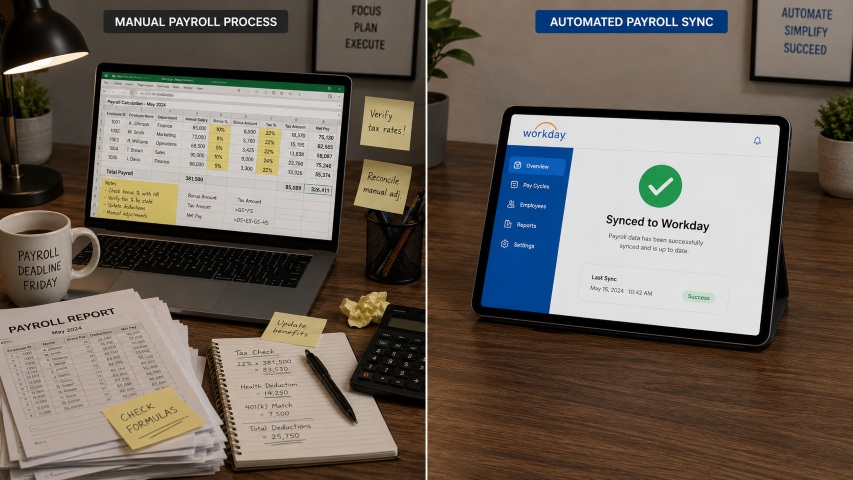
An HR manager — or a payroll analyst, or sometimes both — pulls a report from Workday showing YTD earnings for a specific group of employees. They export it. They open Excel. They apply the 4% calculation manually. They check the numbers. They go back to Workday and enter the results by hand.

That process runs on a schedule — monthly, quarterly, or at termination. Every time, it’s the same loop: export, calculate, re-enter.
It works, in the same way that a handwritten ledger works. But it creates problems that compound quietly over time:
Errors. Manual calculations are manual. A wrong cell reference, a missed employee, a formula that doesn’t account for a mid-year hire — these mistakes are easy to make and hard to catch.
Delays. When a termination is rushed, or a bonus payout lands on the same day as a payroll close, the manual process creates a bottleneck that holds up final paychecks.
Audit exposure. A spreadsheet is hard to audit. If a terminated employee disputes their payout, explaining a manually maintained Excel file to a labor attorney is not a comfortable conversation.
Scaling pain. This process doesn’t get easier as headcount grows. More employees means more rows, more chances for errors, and more time spent on a calculation that should run automatically.
Two Scenarios Where This Comes Up Most
Scenario 1: Vacation payout at termination, based on what the employee actually earned
An employee leaves in October. During the year, they received two bonus payments totaling $10,000 and a regional premium of $300 per month — $3,000 for the ten months they worked. The company’s policy is to pay out 4% of those earnings as part of the final vacation settlement.
That’s $520 in additional payout, on top of whatever PTO balance remains. Under a manual process, someone has to calculate that number, confirm it’s correct, and enter it into payroll before the termination check runs. If they miss it — or get it wrong — the company is either short-paying a departing employee or overpaying.
Scenario 2: Front-loaded vacation based on the coming year’s compensation targets
Every January 1st, eligible employees receive a vacation credit based on a percentage of their target bonus and regional allowance for the year ahead. A worker with a $20,000 target bonus and a $3,600 regional allowance gets 4% of $23,600 = $944 loaded into their balance at the start of the year.
The logic is straightforward. But running it for dozens or hundreds of employees — each with different compensation plan values — is entirely a manual job without automation. Someone has to pull each worker’s compensation data, run the calculation, and load the results.
hrPad: The “Middle Brain” Between Compensation and Absence
CloudApper hrPad employee self service kiosk sits alongside Workday and handles the calculation layer that connects compensation data to absence management — automatically.
Think of it as the part of the workflow that Workday doesn’t need to do natively, but still needs to happen reliably. hrPad reads the PTO balance directly from Workday. It pulls the relevant earnings — YTD bonus totals, allowance plan figures, compensation targets. It applies the percentage calculation your policy defines. And it sends the result back into Workday payroll as an earning, ready to process.
No export. No Excel. No manual entry.
For the termination scenario, hrPad fires when the termination event occurs in Workday — calculating the earnings-based payout in real time and routing it into the final paycheck. For the annual front-load scenario, it runs on schedule for all eligible workers on the same date, every year.
The HR team defines the rules once — which earning codes count, what percentage applies, which workers are eligible. After that, the process runs on its own.
What Changes (and What Doesn’t)
The most important thing to understand about this approach: nothing in your Workday configuration changes. Your absence plans, earning codes, and compensation setups stay exactly as they are. hrPad reads from Workday and writes back only the calculated earnings. Your tenant is untouched.
What does change is the manual work. The export-calculate-re-enter loop goes away. The payroll team sees the earnings in the normal queue. Termination payouts close on time. Annual front-loads run without anyone opening a spreadsheet.
| What used to happen | What happens with hrPad |
| Manual report export from Workday | Automatic data pull at the right moment |
| Excel calculation, per employee | Rule-based calculation engine |
| Manual re-entry into payroll | Earnings written back to Workday automatically |
| Risk of errors at every step | Single configured rule, consistent output |
| Process breaks at scale | Runs the same for 50 employees or 5,000 |
A Practical Example
Take the termination scenario from above. An employee leaves October 15th. Their YTD variable earnings total $13,000. Their remaining PTO balance is 24 hours at $35 per hour — $840.
The 4% earnings-based accrual adds $520. Total termination payout: $1,360.
With hrPad, that calculation happens automatically when the termination is recorded in Workday. The payroll team doesn’t receive a spreadsheet. They receive an earning code in the queue — verified, documented, and ready to process.
Why This Matters Beyond Efficiency
Getting these calculations right isn’t just an operational convenience. In several U.S. states, accrued vacation is treated as earned wages under state labor law. An error in a termination payout — especially one that’s systematically underpaying a specific class of employee — carries compliance risk that goes well beyond a spreadsheet mistake.
Automating the calculation doesn’t just save time. It creates a defensible, auditable record of exactly how every payout was calculated, what data it used, and when it ran. That’s a meaningful protection for HR teams, payroll teams, and the organization as a whole.
FAQ
Q: Can Workday calculate vacation accruals as a percentage of bonus or allowance earnings?
Workday handles time-based accruals — hours worked, pay periods elapsed, tenure — very well. Accruals that require reading specific YTD payroll earning codes or compensation plan targets and applying a custom percentage calculation typically need a complementary automation layer to handle that logic automatically.
Q: What is the difference between a standard PTO payout at termination and an earnings-based payout?
A standard termination payout covers the remaining balance of accrued time off. An earnings-based payout adds a separate calculation — a percentage of variable pay earned during the year — on top of that balance. Both amounts are combined into the final paycheck.
Q: Does adding this kind of automation require changing anything in Workday?
No. Solutions like CloudApper hrPad operate alongside Workday without modifying the tenant configuration. They read the data they need from Workday and write back only the resulting earnings — everything else stays in place.
Q: What happens if an employee’s compensation changes mid-year before the January front-load?
That depends on policy design. Some organizations lock the calculation based on compensation as of a specific date. Others prorate based on changes during the year. Either approach can be built into the automation rules when the workflow is configured.
Q: Is an earnings-based vacation accrual legally required?
Not universally — but many organizations adopt this model as part of their compensation policy or collective bargaining agreement. In states where accrued vacation is treated as earned wages, the obligation to pay it out accurately at termination is legally enforceable. Always confirm your specific policy with legal counsel.
Q: How quickly can this be set up with CloudApper hrPad?
hrPad connects natively to Workday and is typically running in production within days of kickoff. The calculation logic — earning codes, percentage rates, eligible workers — is configured through a visual workflow builder without any developer involvement.
Conclusion
Vacation accruals tied to variable compensation aren’t a niche problem. They show up wherever bonus structures, premiums, or performance pay are part of how people get compensated. The calculation itself is usually simple — 4% of this number. The hard part is getting that number automatically, at the right time, and back into payroll without anyone touching a spreadsheet.
That’s exactly what hrPad is built to handle. The math isn’t complicated. The automation is what makes it reliable.
What is CloudApper AI Platform?
CloudApper AI is an advanced platform that enables organizations to integrate AI into their existing enterprise systems effortlessly, without the need for technical expertise, costly development, or upgrading the underlying infrastructure. By transforming legacy systems into AI-capable solutions, CloudApper allows companies to harness the power of Generative AI quickly and efficiently. This approach has been successfully implemented with leading systems like UKG, Workday, Oracle, Paradox, Amazon AWS Bedrock and can be applied across various industries, helping businesses enhance productivity, automate processes, and gain deeper insights without the usual complexities. With CloudApper AI, you can start experiencing the transformative benefits of AI today. Learn More
- Useful Links:
- Agentic AI
- No-Code/Low-Code
- Custom Software
- HCM Personalization
- iPaaS
- FedRAMP

Brochure
CloudApper hrPad
Empower Frontline Employees with an AI-Powered Tablet/iPad Solution
Download Brochure
CloudApper AI Solutions for HR



- Works with








- and more.
Similar Posts

Certified Payroll Compliance: Why Davis-Bacon Failures Start at the Time…
Shift Swap Pay Rate Accuracy: Confirming Who Actually Worked Before…