Table of Contents
Why Adding a Chatbot to Workday Matters
If you use Workday for recruiting, you already know it’s a powerful system. It handles job postings, tracks candidates, manages interviews, and keeps everything organized in one place. But here’s the thing: Workday alone can’t answer candidate questions at 2 AM. It can’t automatically screen 500 applications while you sleep. It can’t text candidates to schedule interviews instantly.
This is where an AI recruitment chatbot changes everything. And the best part? You don’t need to hire programmers or wait months for custom development. Today’s chatbot platforms connect to Workday without any coding, letting you add powerful automation in days instead of months.
For healthcare systems hiring nurses around the clock, retail companies processing hundreds of seasonal applications, and manufacturing facilities with continuous hiring needs, a chatbot isn’t a luxury—it’s how you stay competitive. Let’s talk about why this matters and how to make it happen.
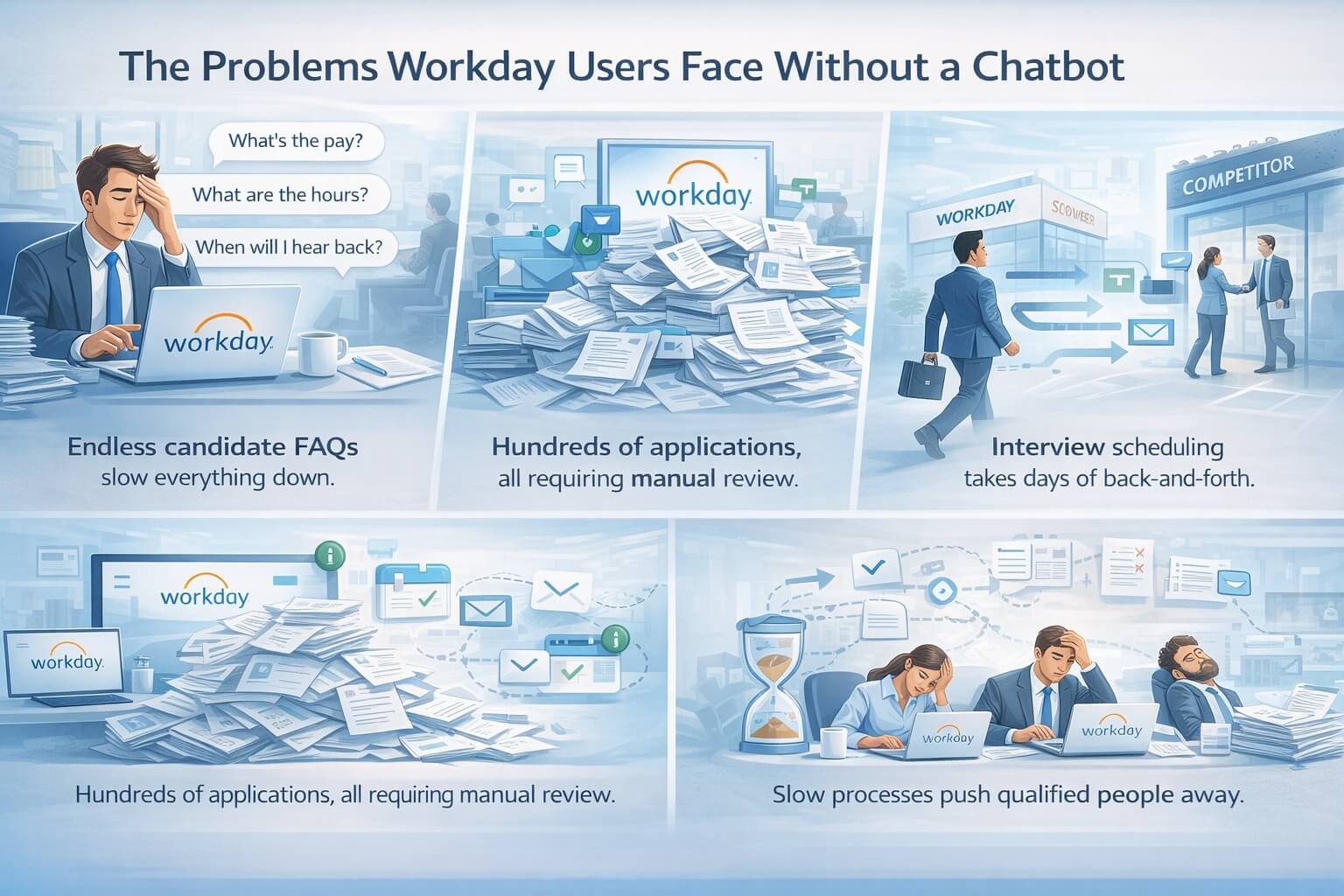
The Problems Workday Users Face Without a Chatbot
Candidates Ask the Same Questions Over and Over
“What’s the starting pay?” “What are the hours?” “When will I hear back?” Your recruiting team answers these same questions dozens of times every day. This takes time away from actually reviewing candidates and conducting interviews. Meanwhile, candidates who apply at night or on weekends wait days for answers—and many accept other jobs while waiting.
Applications Pile Up Faster Than You Can Review Them
When you post a nursing job, retail position, or manufacturing role, applications flood in. Workday stores them all, but someone still needs to open each one, read the resume, check if they meet basic requirements, and decide who moves forward. With 300, 500, or 1,000 applications per job, this manual screening becomes impossible to keep up with.
Scheduling Takes Forever
After you find qualified candidates, the real headache begins: scheduling interviews. You email the candidate. They respond two days later with their availability. You check your hiring manager’s calendar. You send possible times. The candidate picks one. You send a confirmation. Then someone needs to reschedule, and the whole process starts over. For one interview, this might take a week of back-and-forth emails.
Qualified Candidates Slip Away
The best candidates—experienced nurses, reliable retail workers, skilled manufacturing technicians—get multiple job offers. If your process takes two weeks from application to first contact, they’re already working somewhere else. Speed matters more than ever, but manual processes keep you slow.
Your Team Burns Out on Repetitive Work
Your recruiters didn’t go into HR to copy and paste the same email responses or manually compare resumes to job requirements. They want to talk with people, assess fit, and make smart hiring decisions. But when 80% of their time goes to administrative tasks, burnout happens fast.
What Is a No-Code Chatbot Integration?
Before we go further, let’s make sure we’re on the same page about what “no-code” means.
Traditional software integration requires programmers to write custom code that connects two systems. This takes months, costs tens of thousands of dollars, and requires ongoing maintenance whenever either system updates.
No-code integration is completely different. Modern chatbot platforms come with pre-built connections to Workday. They’re ready to go right out of the box. You don’t write code—you just configure settings through simple menus and forms. It’s like connecting your phone to Bluetooth speakers: you select the device, click connect, and it works.
Here’s what “no-code” means in practice:
- No programmers needed: Your HR team handles the setup themselves
- No long development timeline: Set up in days, not months
- No expensive custom development: Pay for the platform, not for custom coding
- No technical maintenance: The chatbot provider handles updates automatically
This makes chatbot integration accessible to companies of all sizes, not just enterprises with big IT budgets.
How AI Chatbots Work With Workday Reruiting
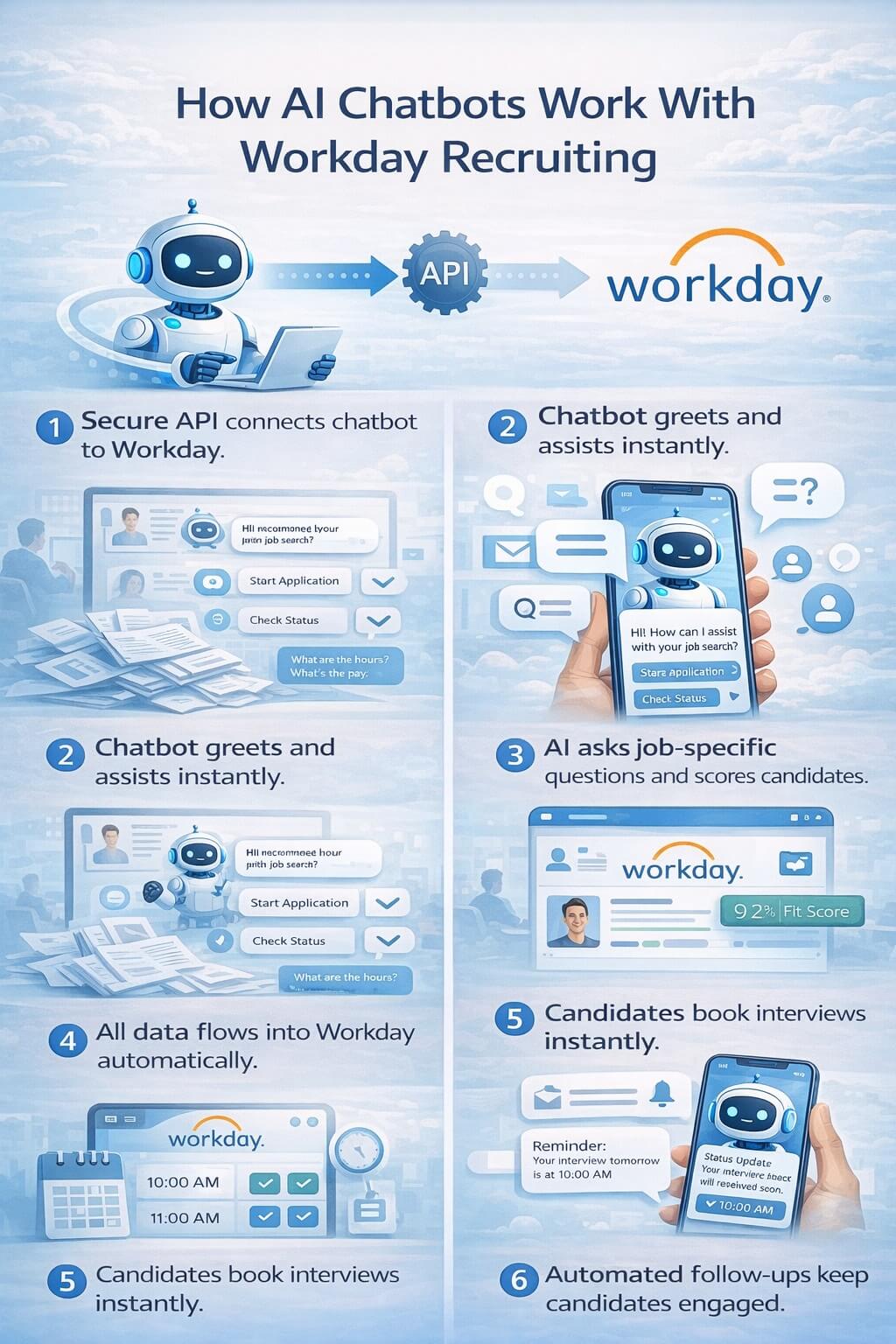
Here’s what happens when you add a chatbot to your Workday recruiting system:
Step 1: The Connection
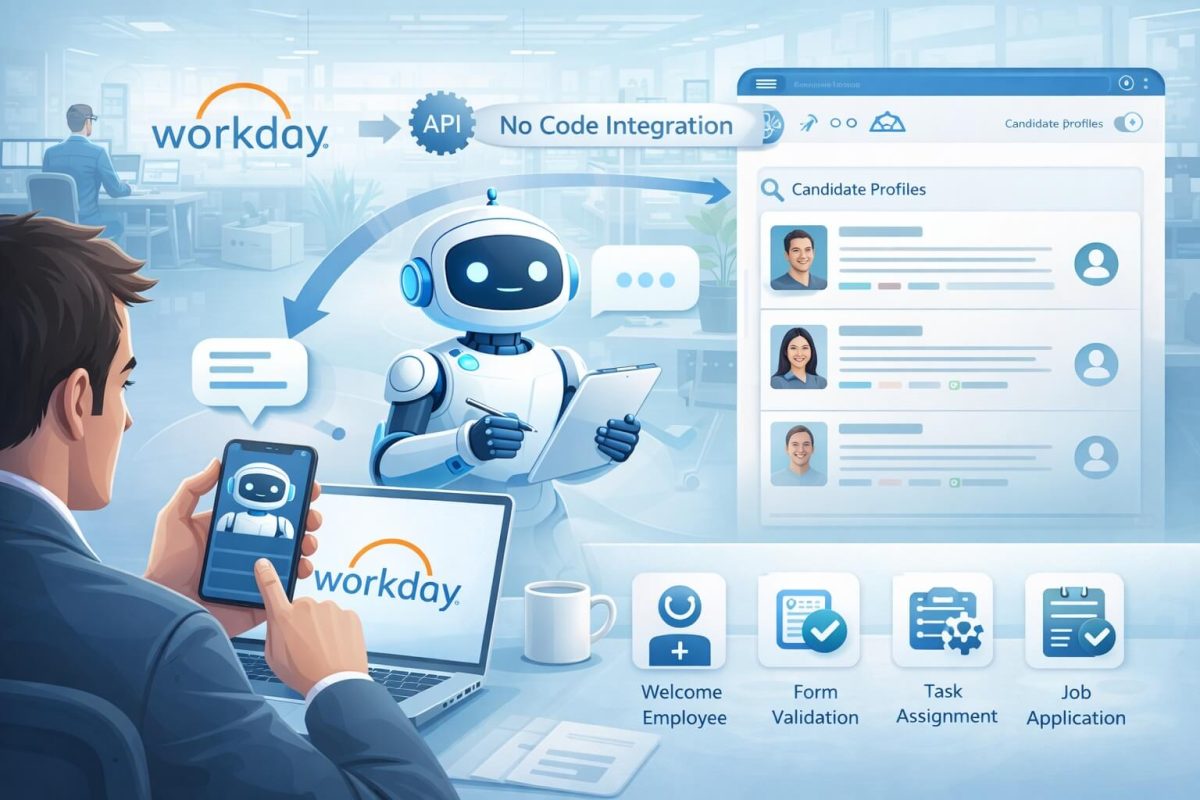
The chatbot platform connects to Workday through something called an API (Application Programming Interface). Think of this as a secure door between the two systems. The chatbot can look into Workday to see job openings and applications, and it can send information back to Workday when candidates interact with it.
You set this up by logging into the chatbot platform, entering your Workday credentials, and clicking a few buttons. The platform handles all the technical details behind the scenes.
Step 2: Candidate Interaction Begins
When someone visits your careers page or applies for a job, the chatbot greets them immediately. It can appear as a chat window on your website, send a text message, or show up as a conversation on their phone.
The chatbot introduces itself and asks how it can help. Candidates can ask questions, start an application, check their status, or schedule an interview—all through natural conversation, just like texting a friend.
Step 3: Smart Screening Happens Automatically
The chatbot asks qualifying questions based on the job requirements you’ve set up. For a nursing job, it might ask: “Do you have an active RN license in this state?” For retail: “Can you work evenings and weekends?” For manufacturing: “Can you lift 50 pounds regularly?”
Candidates answer through the chat, and the AI understands their responses even if they don’t use exact words. Someone who says “Yeah, I’m good with weekends” gets marked the same as someone who says “Weekend availability is fine.”
Step 4: Data Flows Back to Workday
Everything the candidate shares—their answers, their resume, their contact information—automatically saves in Workday. You don’t copy and paste anything. When you log into Workday, you see the candidate’s profile already updated with their screening responses and a score showing how well they match the job.
Step 5: Scheduling Happens Instantly
For qualified candidates, the chatbot looks at your calendar (connected through Microsoft Outlook, Google Calendar, or Workday’s own scheduling) and shows available interview times. The candidate picks a time that works for them. The interview gets scheduled immediately, everyone receives calendar invites, and reminders go out automatically before the interview.
Step 6: Ongoing Communication
The chatbot keeps candidates engaged throughout the hiring process. It answers follow-up questions, provides status updates, and sends reminders. All of this happens automatically, without you lifting a finger.
Meanwhile, in Workday, you see a clean, organized pipeline of candidates who have already been screened, scored, and scheduled for interviews. You focus on the interviews themselves and making hiring decisions—the parts that actually need human judgment.
Benefits of Adding a Chatbot to Workday
Instant Candidate Support 24/7
Your chatbot never sleeps, takes breaks, or goes on vacation. Candidates who apply at midnight get immediate responses. Questions get answered instantly. This keeps candidates engaged and shows your company is modern and responsive—which matters when you’re competing for talent.
Healthcare facilities hiring night shift nurses can engage candidates during off-hours. Retail companies can handle holiday hiring surges without overwhelming their team. Manufacturing facilities can maintain constant communication with their talent pipeline.
Screen Hundreds of Applications in Minutes
Instead of spending hours reading resumes, you let the AI do the initial screening. It reviews every application consistently, asks the right qualifying questions, and ranks candidates based on how well they match your requirements.
A healthcare system hiring 50 nurses can process 500 applications in the time it used to take to screen 20. A retail chain preparing for seasonal hiring can handle 1,000 applications without adding temporary recruiting staff.
Schedule Interviews Automatically
The back-and-forth email dance of interview scheduling disappears completely. Candidates pick their own interview times from your available slots. The system handles confirmations, reminders, and even reschedules if needed. What used to take a week of coordination now happens in two minutes.
Never Miss a Qualified Candidate
The chatbot reviews every single application thoroughly. It doesn’t get tired after the 100th resume. It doesn’t accidentally skip someone because their resume is formatted differently. Every qualified person gets noticed and moved forward.
Free Your Team for Important Work
When the chatbot handles screening, answering questions, and scheduling, your recruiters have time for what they do best: conducting great interviews, assessing cultural fit, building relationships with hiring managers, and improving your overall hiring strategy.
Many teams report that adding a chatbot feels like adding two or three extra recruiters—without the salary costs.
Improve Candidate Experience
Today’s job seekers expect modern, convenient hiring experiences. They want to apply from their phones, get instant responses, and pick interview times that work for them. A chatbot delivers all of this, making your company stand out as an employer that respects candidates’ time.
Better candidate experience means more completed applications, fewer people dropping out of your process, and stronger employer branding that helps with future hiring.
Reduce Time-to-Hire by 60-80%
When screening happens instantly, scheduling happens automatically, and candidates stay engaged throughout, your hiring process speeds up dramatically. Positions that used to take 45 days to fill now take 15 days. In fast-moving industries like healthcare and retail, this speed advantage helps you win top talent before competitors.
Get Better Hiring Data
Chatbot platforms provide detailed analytics showing where candidates drop off, which questions cause confusion, how long each stage takes, and which recruiting sources bring the best candidates. This data helps you continuously improve your hiring process.
Industries That Benefit Most
Healthcare Hiring
Hospitals, nursing homes, home health agencies, and medical clinics face constant hiring needs. Licensed positions require credential verification. Night shifts need coverage. Patient care can’t wait for slow hiring processes.
A chatbot can verify nursing licenses instantly, confirm shift availability, screen for required certifications, and keep qualified candidates engaged until they start. Healthcare organizations using chatbots report cutting nursing hiring time from 60 days to 20 days.
Retail Recruitment
Seasonal surges, high turnover, and entry-level positions create massive application volume. Retail needs speed and efficiency to staff stores quickly, especially during holidays.
Chatbots make applying easy (often just texting a number or scanning a QR code), screen for availability and experience, and move qualified candidates to interviews within hours instead of weeks. Retail chains report filling stores 3X faster with chatbot automation.
Manufacturing Talent Acquisition
Production schedules depend on having fully staffed teams. Safety certifications matter. Shift work requires specific availability. Turnover creates constant hiring needs.
Chatbots verify certifications, confirm shift availability, assess safety knowledge, and maintain talent pipelines so production never slows due to staffing shortages. Manufacturing facilities report always having pre-screened, qualified candidates ready when positions open.
How to Actually Set This Up (Simple Steps)
You don’t need to be technical to add a chatbot to Workday. Here’s what the process actually looks like:
Step 1: Choose Your Chatbot Platform
Look for platforms that specifically mention Workday integration. The best ones have it as a pre-built feature. During demos, ask to see the Workday connection in action—not just hear about it.
Key things to look for:
- Pre-built Workday integration (not custom development)
- Easy configuration without coding
- Clear pricing that fits your budget
- Good customer support during setup
- Quick implementation timeline (days to weeks, not months)
Step 2: Define What You Want to Automate
Before setup, think about your biggest pain points. Do you spend the most time answering candidate questions? Screening resumes? Scheduling interviews? Prioritize automating whatever takes the most time or causes the most frustration.
Start with one or two job categories rather than trying to automate everything at once. For example, begin with your highest-volume positions like nursing assistants, retail associates, or production workers.
Step 3: Connect the Platforms
The chatbot provider will guide you through connecting to Workday. Usually, this involves:
- Creating an integration user in Workday (the vendor provides instructions)
- Granting specific permissions (read jobs, write candidate data, etc.)
- Entering connection details in the chatbot platform
- Testing the connection to make sure data flows correctly
This typically takes 1-2 hours with guidance from the chatbot vendor’s support team. Many platforms offer to do this step for you.
Step 4: Configure Your Screening Questions
Using simple forms or menus in the chatbot platform, you set up the questions you want candidates to answer. The platform usually provides templates for common jobs that you can customize.
For each job, you specify:
- Must-have requirements (deal-breakers if the answer is “no”)
- Preferred qualifications (nice to have but not required)
- How to score answers (which responses get higher points)
No coding required—just filling out forms like you’d create a survey.
Step 5: Set Up Interview Scheduling
Connect your calendar system (Outlook, Google Calendar, or Workday’s calendar) so the chatbot can see your availability. Set rules like “only offer morning slots on Mondays” or “leave 30 minutes between interviews.”
The chatbot uses these rules to show candidates appropriate time options.
Step 6: Test Everything
Before going live, go through the candidate experience yourself. Apply for a job, answer screening questions, schedule an interview. Make sure everything flows smoothly and information shows up correctly in Workday.
Most platforms let you test in a sandbox environment that doesn’t affect your real recruiting data.
Step 7: Launch and Monitor
Start with one job posting to make sure everything works as expected. Monitor the first few days closely. Check that candidate data is flowing to Workday correctly, interviews are scheduling properly, and the chatbot is answering questions accurately.
Once you’re confident, expand to more positions. Most companies are fully operational within 2-4 weeks from starting setup.
Step 8: Improve Based on Data
After a few weeks, review the analytics. Which questions cause candidates to drop off? What topics generate the most questions? Where do candidates get confused?
Use this data to refine your screening questions, improve your chatbot’s responses, and optimize your hiring process. The best part about automation is you can continuously improve it based on real data.
Real Results Companies See
Let’s look at what actually happens when companies add chatbots to Workday:
Time Savings: Teams report saving 15-25 hours per week on screening and scheduling. For a team of three recruiters, that’s like adding a fourth recruiter without the salary cost.
Faster Hiring: Time-to-hire typically drops by 60-80%. Positions that took 6-8 weeks to fill now take 2-3 weeks.
More Completed Applications: When applying is easy and candidates get instant responses, completion rates jump from 40% to 80% or higher.
Better Candidate Quality: Consistent screening catches qualified candidates who might be missed in manual reviews. Less screening fatigue means fewer mistakes.
Higher Acceptance Rates: Fast, professional processes impress candidates. Companies report 20-30% higher offer acceptance rates after adding chatbots.
Cost Reductions: Lower cost-per-hire (typically 40-60% reduction), less overtime, fewer agency fees, and reduced turnover from better hiring quality.
Frequently Asked Questions
Do we need developers or IT staff to set this up?
No. Modern chatbot platforms are designed for HR teams to set up themselves. The platform provides step-by-step instructions, and their support team helps if you get stuck. Many companies have their chatbot running within a week without involving IT at all. However, some companies prefer to have IT review the security and permissions—that’s fine too, but it’s not required.
How long does implementation really take?
Most companies are fully operational within 2-4 weeks. The actual technical connection to Workday takes just a few hours. The rest of the time is spent configuring your screening questions, setting up calendars, and testing everything. Some companies go even faster—launching in under a week—while others take more time to perfect their setup before going live.
What if candidates don’t want to talk to a chatbot?
This is rarely an issue in practice. Candidates care about fast responses and easy processes—they don’t care whether the initial screening is done by a person or AI. In fact, most candidates prefer chatbots because they get instant answers instead of waiting days for email responses. Plus, qualified candidates still talk to real people during interviews—the chatbot just handles the administrative stuff.
Can we customize the chatbot for different jobs?
Absolutely. You set up different screening questions, requirements, and scoring for each job or job category. A nursing position asks different questions than a retail position. The chatbot adapts to whatever you configure. Most platforms make this easy with templates you can customize.
What happens when the chatbot doesn’t know an answer?
Good chatbot platforms handle this gracefully. If the chatbot encounters a question it can’t answer, it tells the candidate it will have someone follow up, collects their contact information, and alerts your team. You can also teach the chatbot new answers over time as you see what candidates are asking about.
Is our candidate data secure?
Yes. Reputable chatbot platforms that integrate with enterprise systems like Workday follow strict security standards. Look for certifications like SOC 2, GDPR compliance, and encryption of data in transit and at rest. The chatbot platforms often have better security than homegrown solutions because it’s their core business and they’re audited regularly.
Can small companies afford this?
Chatbot platforms have become surprisingly affordable. Many start at $200-500 per month for small teams, with pricing increasing based on your hiring volume. When you consider that it saves your team 15-25 hours per week, the ROI is clear even for small companies. You’re essentially paying a fraction of a recruiter’s salary to add automation that works 24/7.
What if we’re already using other recruiting tools?
Most chatbot platforms integrate with multiple systems, not just Workday. If you use job boards, background check services, or other recruiting tools, the chatbot can often connect to those too. This creates a complete automated workflow rather than just automating one piece.
Can we try before buying?
Most platforms offer demos where they show you exactly how the chatbot works with Workday. Some offer free trials or pilot programs where you can test with real jobs before fully committing. Take advantage of these to make sure the platform meets your needs.
Do chatbots work for specialized or professional positions?
Yes, though they’re especially powerful for high-volume hiring. For specialized positions, you might use the chatbot differently—perhaps just for scheduling and answering basic questions rather than full screening. But many companies successfully use chatbots for all positions, adjusting the level of automation based on the role.
Making the Decision
Adding an AI chatbot to Workday isn’t about replacing your recruiting team or turning hiring into a completely automated process. It’s about removing the repetitive, time-consuming tasks that slow everything down and frustrate everyone involved.
Your recruiters get to focus on what they do best: talking with people, assessing fit, and making smart hiring decisions. Candidates get a fast, modern experience that respects their time. Your hiring managers get positions filled quickly. And your company saves money while hiring better people faster.
The technology is proven, the setup is straightforward, and the results are measurable. Companies across healthcare, retail, and manufacturing are already using these tools to win the talent war.
The question isn’t whether chatbots will become standard in recruiting—they already are. The question is whether your company will adopt them now and gain a competitive advantage, or wait and fall behind while competitors snap up the best candidates with faster, better hiring processes.
With no-code integration, you can start small, test with a few positions, and expand as you see results. There’s minimal risk and huge potential upside. Your Workday system is already good—a chatbot just makes it faster, smarter, and more efficient at exactly the time when speed matters most.
The companies winning the war for talent aren’t the ones with the biggest recruiting budgets. They’re the ones who move fastest, provide the best candidate experience, and use technology to make their teams more effective. A chatbot integrated with Workday is how you become one of those companies.

What is CloudApper AI Platform?
CloudApper AI is an advanced platform that enables organizations to integrate AI into their existing enterprise systems effortlessly, without the need for technical expertise, costly development, or upgrading the underlying infrastructure. By transforming legacy systems into AI-capable solutions, CloudApper allows companies to harness the power of Generative AI quickly and efficiently. This approach has been successfully implemented with leading systems like UKG, Workday, Oracle, Paradox, Amazon AWS Bedrock and can be applied across various industries, helping businesses enhance productivity, automate processes, and gain deeper insights without the usual complexities. With CloudApper AI, you can start experiencing the transformative benefits of AI today. Learn More