Nondiscretionary bonuses belong in the regular rate, so overtime in the period they reward is owed an extra half-time premium after payment. This guide covers what Workday retro processing does, where bonus classification and coverage dates break down, and how CloudApper AI for HCM Personalization and Extensibility captures them first.

TL;DR
Attendance, safety, quality, and pre-announced production bonuses are nondiscretionary under Department of Labor guidance, so they belong in the regular rate and trigger an extra half-time overtime premium for the period they reward. Workday's FLSA retro processing describes calculating that premium when a bonus carries coverage dates reaching back to an earlier period. The gap sits upstream: bonus approvals and classification often happen outside the tenant, so coverage dates arrive late. Classify every bonus against the DOL test, require coverage dates, test retro results, and check premium tax treatment. CloudApper AI for HCM Personalization and Extensibility can capture classification and coverage dates in a workflow before payment, alongside Workday.
Table of Contents
- What Workday Does Natively
- Where the Friction Shows Up
- What to Do Within Workday First
- Where Native Tools Run Out
- How CloudApper AI for HCM Personalization and Extensibility Closes the Gap
- Frequently Asked Questions
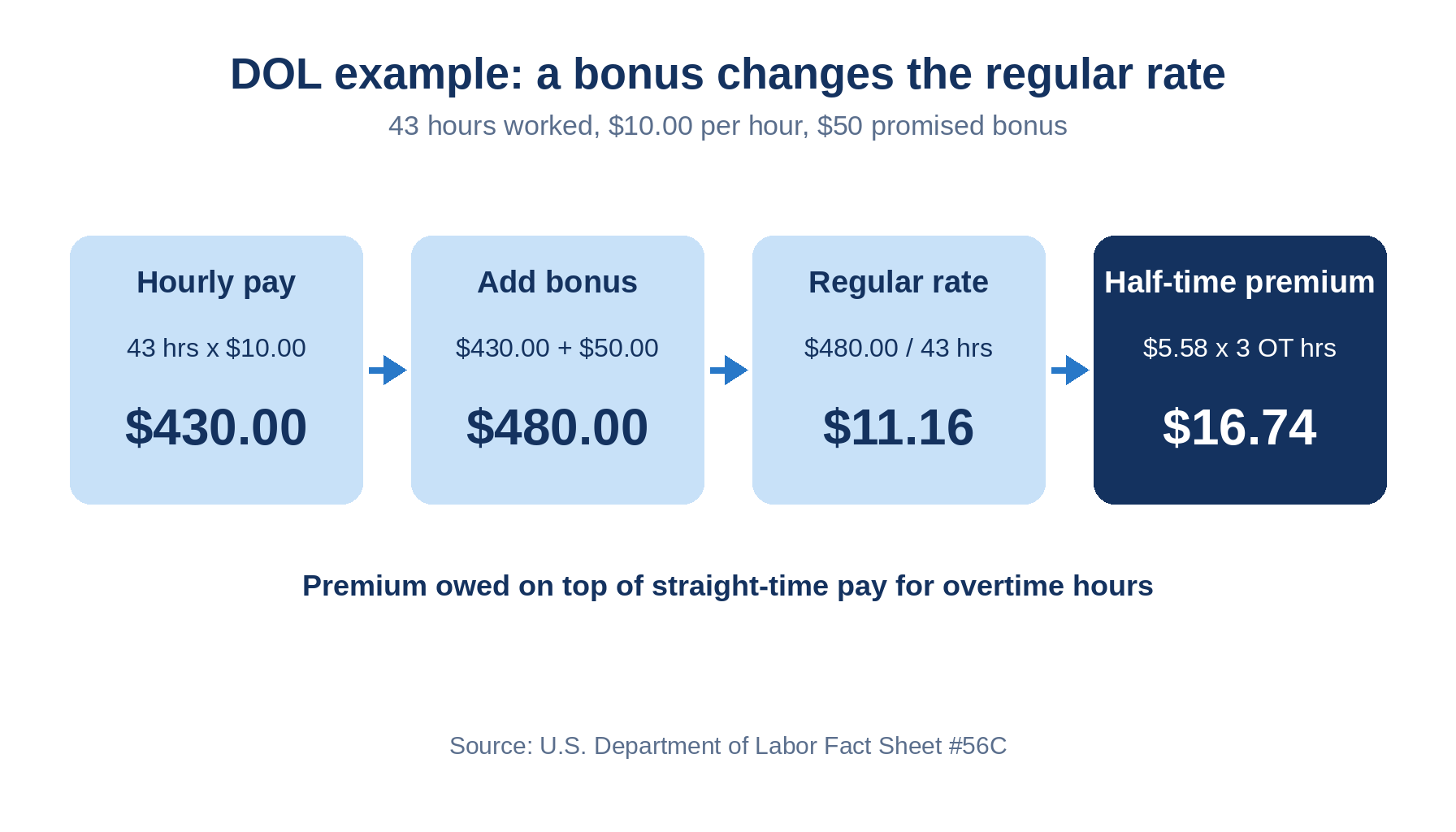
The label on a Workday bonus earning code decides nothing about overtime. Department of Labor Fact Sheet #56C puts attendance, safety, quality, and pre-announced production bonuses in the regular rate, so overtime hours in the period they reward are owed an extra half-time premium once the bonus is paid. Workday can calculate that premium, and CloudApper AI for HCM Personalization and Extensibility handles the decision that comes before it: which bonuses trigger it.
What Workday Does Natively
Workday’s FLSA retro processing supports this case. In its administrator documentation on FLSA and retro, Workday describes a worker paid an FLSA bonus with coverage dates reaching back to an earlier period. Workday then calculates premium adjustments for the overtime in that period and pays them in the current one.
Where the Friction Shows Up
- A bonus keyed without coverage dates gives retro processing no earlier weeks to work from.
- The label does not settle classification: a bonus announced in advance fails DOL’s discretion test.
- The premium has tax consequences. Per Workday’s documentation, premium adjustments are taxed under the current tax authority unless you specify a worktag override on the source result, and manual tax adjustments may be needed.
- The regular rate holds more than the bonus. DOL’s examples add a $1.00 hourly evening differential to the rate, so a shift differential and a bonus compound.
What to Do Within Workday First
Run this review before the next bonus cycle:

- List every bonus earning in use and classify each as discretionary or nondiscretionary against the DOL test.
- Require coverage dates on every nondiscretionary bonus, using a custom field if the entry has no place for them.
- Rerun last quarter’s bonuses through retro pay and compare the premium with DOL’s method.
- Check premium tax treatment, including any worktag override.
- Name one owner for the classification decision.
Multi-position and piece-rate workers need the same check, since blended overtime rates and piece-rate overtime use the same regular rate logic.
Where Native Tools Run Out
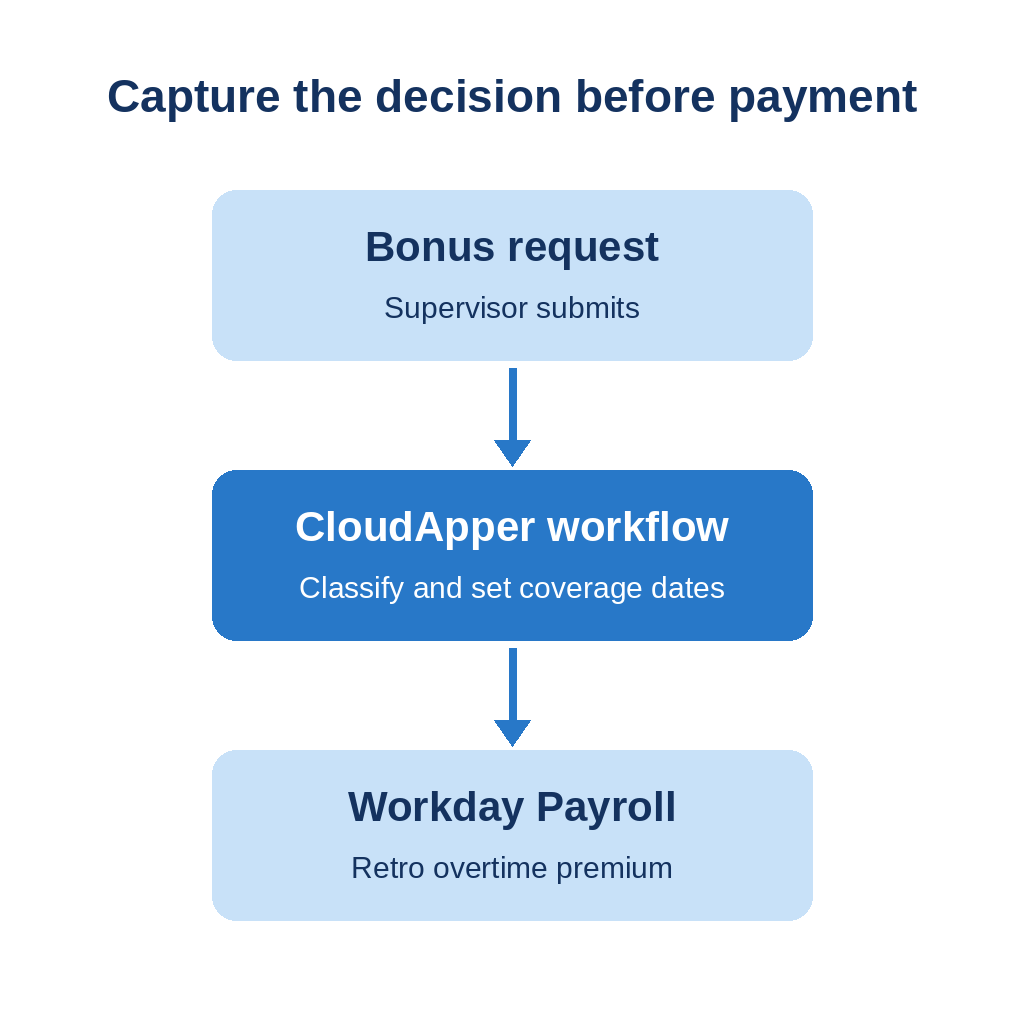
Workday calculates the premium once a bonus arrives with the right coverage dates. It cannot see the decisions made before that: a supervisor promising an attendance bonus, a site setting a quarterly safety incentive. Those approvals live outside the tenant, so classification and coverage dates arrive late. CloudApper AI for HCM Personalization and Extensibility can capture that decision at the source.
How CloudApper AI for HCM Personalization and Extensibility Closes the Gap
The platform is no-code with a configurable workflow system, and CloudApper’s Workday offering lists compliance management and piece rate calculations. Applied here, a bonus request workflow can require a classification and coverage dates before payment, route approval to compensation or payroll, and hand Workday a complete entry. Workday still calculates the premium, and counsel still decides classification. CloudApper AI for HCM Personalization and Extensibility works alongside Workday, not instead of it.
Frequently Asked Questions
Q: Do bonuses count toward overtime in Workday?
Nondiscretionary bonuses do. The Department of Labor requires them in the regular rate, so overtime hours in the period the bonus covers are owed an additional half-time premium.
Q: How do you calculate overtime on a nondiscretionary bonus?
Divide the week’s total pay, bonus included, by hours worked to get the regular rate, then pay half that rate for each overtime hour. In DOL’s example, 43 hours at $10.00 plus a $50 bonus gives $11.16 and a $16.74 premium.
Q: What makes a bonus discretionary?
The employer must keep sole discretion over whether and how much to pay until near the end of the period, with no prior promise.
Q: Does Workday recalculate overtime when a bonus covers an earlier pay period?
Workday’s documentation describes an FLSA bonus with earlier coverage dates, with premium adjustments calculated for that period’s overtime and paid in the current one.
Q: How is the retro overtime premium taxed in Workday?
Workday taxes premium adjustments under the current tax authority unless you specify a worktag override on the source result. Manual tax adjustments may be needed.
If bonus approvals still happen outside Workday and you want classification and coverage dates captured first, talk to the CloudApper team about a workflow built for your programs.

What is CloudApper AI Platform?
CloudApper AI is an advanced platform that enables organizations to integrate AI into their existing enterprise systems effortlessly, without the need for technical expertise, costly development, or upgrading the underlying infrastructure. By transforming legacy systems into AI-capable solutions, CloudApper allows companies to harness the power of Generative AI quickly and efficiently. This approach has been successfully implemented with leading systems like UKG, Workday, Oracle, Paradox, Amazon AWS Bedrock and can be applied across various industries, helping businesses enhance productivity, automate processes, and gain deeper insights without the usual complexities. With CloudApper AI, you can start experiencing the transformative benefits of AI today. Learn More
- Useful Links:
- Agentic AI
- No-Code/Low-Code
- Custom Software
- HCM Personalization
- iPaaS
- FedRAMP
Brochure
CloudApper AI TimeClock
For accurate & touchless time capture experience.
Download Brochure
CloudApper AI Solutions for Workday


- Works with







- and more.
Similar Posts

Workday Paid Sick Leave Pay Rates: State Rules, Regular Rate,…

Workday Overpayment Recovery: State Limits for Hourly Workers