A practical 7-step guide that shows recruiters how to screen resumes effectively, reduce bias, handle high applicant volume, and find top candidates faster using a clear, repeatable process supported by AI where it matters most.

TL;DR
- Define 5–6 must-have requirements and separate them from nice-to-haves before you screen a single resume.
- Use a simple, weighted scoring rubric so every candidate is evaluated consistently, not by gut feel.
- Start with a fast initial scan for basic fit, then focus deeper review only on candidates who pass the first filter.
- Look for measurable outcomes and achievements, and document decisions to stay fair, consistent, and compliant.
- When volume is high, use tools like CloudApper AI Recruiter to standardize resumes, score candidates, flag risks, and rank top fits faster.
Table of Contents
- The Resume Screening Challenge
- The 7-Step Process to Screen Resumes Effectively
- Common Resume Screening Mistakes to Avoid
- Your Resume Screening Checklist
Your recruiting team just posted openings for five critical roles. Within 72 hours, you’re looking at 1,200+ applications across all positions. Your recruiters are buried. One is spending entire days just screening resumes and falling behind on interviews. Another admitted they’re only giving each resume 15 seconds because there’s no other way to keep up. Your VP of Operations is asking why it’s taking so long to fill the engineering manager role when “there are so many applicants.” You know great candidates are getting lost in the volume, but your team is already working overtime just trying to get through the pile.
I’ve worked with dozens of talent acquisition leaders facing this exact situation. The problem isn’t that your team isn’t working hard enough. The problem is that manual resume screening simply doesn’t scale. Modern TA teams use tools like CloudApper AI Recruiter to automate the heavy lifting while maintaining quality and eliminating bias. Whether you’re screening manually or using AI, you need a systematic process that actually works at high volume. This guide shows you the 7-step framework on how to screen resumes effectively, help your team find top talent faster, and stop losing qualified candidates in the chaos.
The Resume Screening Challenge
Let’s be honest about what resume screening really looks like. The average recruiter spends 23 hours per week just reviewing resumes. That’s more than half your work week gone before you even talk to a single candidate.
When you’re screening manually, you can realistically review about 25-30 resumes per hour if you’re moving quickly. For a role with 200 applications, that’s nearly 7 hours of pure screening time. And that’s assuming you maintain consistent quality throughout, which almost nobody does.

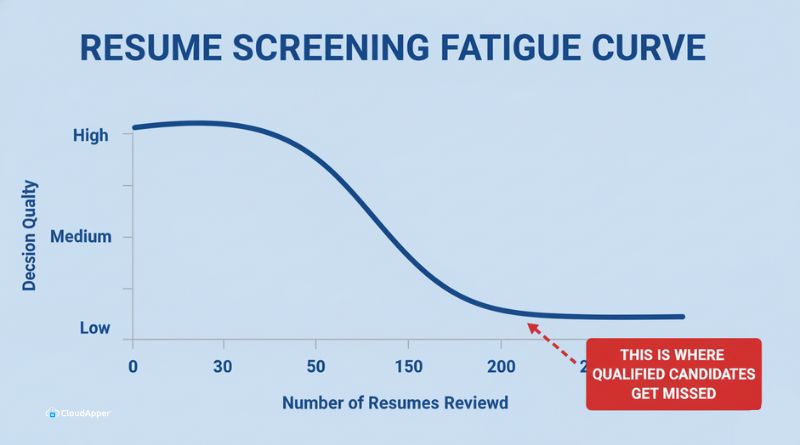
Here’s what actually happens. The first 30 resumes get your full attention. You read carefully, take notes, compare qualifications. Then fatigue sets in. By resume 100, you’re making snap judgments based on formatting and school names. By resume 150, you’re basically looking for reasons to say no so you can get through the pile faster.
The worst part? Research shows that 75% of qualified candidates get overlooked in high volume screening. Not because they’re unqualified, but because they’re resume 247 and you’re exhausted.
Manual Screening Reality:
- 2-4 hours to screen 100 resumes thoroughly
- 75% of qualified candidates missed in high volume
- Average 42-day time-to-hire for manual processes
- Unconscious bias enters 90%+ of manual reviews
This isn’t a productivity problem. It’s a process problem. Here’s how to fix it with a systematic approach that works whether you’re handling 50 applications or 500.
The 7-Step Process to Screen Resumes Effectively
Every effective resume screening process follows the same basic framework. The difference is whether you’re doing each step manually or using AI to handle the repetitive parts while you focus on decision-making.
Quick Summary Table:
| Step | What You’re Doing | Time Required (Manual) | Time with AI |
| 1. Define Job Requirements | Create must-haves vs. nice-to-haves | 30 mins | 15 mins (one-time setup) |
| 2. Set Up Screening Criteria | Build an evaluation framework | 45 mins | 10 mins |
| 3. Initial Resume Review | Quick filter for basics | 2-4 hours/100 resumes | 2 mins/100 resumes |
| 4. Score Against Criteria | Evaluate skills and experience | 1-2 hours | Automatic |
| 5. Check for Red Flags | Identify gaps, errors, and job-hopping | 30 mins | Automatic |
| 6. Rank and Categorize | Sort into Yes/Maybe/No | 30 mins | Automatic |
| 7. Create Shortlist | Final review and selection | 20 mins | 5 mins |
Let’s break down each step so you can implement this process immediately.
If your team is already stretched, this is where automation turns the framework into something you can actually execute.
Step 1: Define Clear Job Requirements (Before You Touch a Resume)
Most resume screening problems start before you even open the first application. You’re working from a vague job description that lists 15 “required” qualifications when maybe 5 are actually critical.
Start by separating what you truly need from what would be nice to have. Sit down with the hiring manager and ask direct questions. What skills does this person need on day one? What can they learn on the job? What’s the actual minimum experience level?
Create two clear lists:
Must-haves are non-negotiable. If a candidate doesn’t have these, they can’t do the job. This might be specific technical skills, required certifications, or a particular type of experience. Keep this list short. If you have more than 5-6 must-haves, you’re being too restrictive.
Nice-to-haves are preferences. These are skills or experiences that make someone a stronger candidate but aren’t deal-breakers. This is where you put things like “experience with our specific industry” or “knowledge of particular software platforms.”
Common mistakes to avoid:
Don’t require a bachelor’s degree unless the job legally requires it or the skills genuinely can’t be obtained another way. You’re eliminating talented people who learned through experience, bootcamps, or self-study.
Don’t put “5+ years of experience required” when what you really mean is “must be proficient in these specific skills.” Someone with 3 years of focused experience might be better than someone with 8 years of tangential experience.
Don’t use vague terms like “team player,” “self-starter,” or “good communicator” as requirements. These mean nothing during resume screening. Define what these actually look like for your role.
How CloudApper AI Recruiter handles this:
CloudApper AI Recruiter lets you define these criteria once during setup. You specify your must-haves and nice-to-haves, assign weights to different qualifications, and the AI evaluates every candidate against your exact requirements. No variation, no fatigue, no drift from your original criteria after reviewing 100 resumes.
The system asks you specific questions about the role to build the screening framework. What skills are required? What experience level? What type of background? Then it uses those answers consistently across every single application.
Step 2: Develop Objective Screening Criteria
Now that you know what you’re looking for, you need a way to evaluate it consistently. This is where most manual screening falls apart. You use different standards for each candidate without realizing it.
Build a simple scoring system. I recommend a 1-5 scale where 3 means “meets requirements,” 4 means “exceeds requirements,” and 5 means “exceptional.” Don’t overthink this. The goal is consistency, not perfect precision.
Assign weights to different criteria based on importance:
- Technical skills match: 40%
- Relevant experience: 30%
- Industry knowledge: 15%
- Education and certifications: 15%
These percentages will vary by role. For a senior technical position, you might weight skills at 50% and experience at 35%. For an entry-level role, you might care more about education and aptitude than direct experience.
The key is removing subjective measures that let bias creep in. “Good culture fit” is not a screening criterion. “Demonstrates collaborative work through cross-functional project experience” is a criterion you can actually evaluate.
Focus on quantifiable achievements:
When you’re scoring experience, look for specific results. “Managed social media accounts” tells you nothing. “Grew Instagram following from 5K to 50K in 6 months while increasing engagement rate by 120%” tells you this person delivers results.
You want to see numbers, percentages, and concrete outcomes. These are much harder to fabricate than vague responsibility statements.
With CloudApper AI Recruiter:
You set up these scoring criteria once. The AI automatically evaluates every resume using the same standards. No variation between candidates. The Screening Agent screens resumes for the specific criteria you defined. It looks for quantifiable achievements, matches technical skills, evaluates experience relevance, and scores everything consistently. Every candidate gets the same fair evaluation.
Step 3: Do a Quick Initial Scan (The 10-Second Filter)
Now you’re actually looking at resumes. Start with a fast first pass to catch obvious fits and obvious mismatches.
In your 10-second scan, check for:
Contact information is complete and professional. You need to be able to reach them.
Job titles and companies are clearly listed. You should be able to see their career progression at a glance.
Dates are present and make sense. Are there unexplained gaps? Does the timeline add up?
The resume is professionally formatted and free of obvious errors. This tells you about attention to detail and communication skills.
They have relevant experience in the general ballpark. You’re not looking for a perfect match yet. Just “is this person in the right industry and level?”
The bias risk with manual scanning:
This is where unconscious bias hits hardest. Your brain processes names, schools, and formatting before you even realize it. You spend three extra seconds on a resume from your alma mater. You subconsciously dismiss a candidate with a “foreign-sounding” name. You favor clean, modern formatting over content.
You’re not a bad person for this. Your brain is doing what brains do, making quick pattern matches based on past experience. But it results in qualified candidates getting screened out for irrelevant reasons.
How AI eliminates this bias:
CloudApper AI Recruiter standardizes all resumes during this initial scan. The system removes names, photos, school names, and other identifying information that triggers unconscious bias. The Screening Agent looks only at skills and qualifications.
The AI filters for your basic requirements without any demographic information influencing the decision. It’s purely: Does this candidate meet the minimum qualifications? Yes or no. Nothing else factors into that initial filter.
Only after candidates pass this objective screening do you see full profiles with names and backgrounds. By then, you’re evaluating people who have already proved they can do the job on paper.
Read our complete guide on how to reduce hiring bias to learn more.
Step 4: Score Candidates Against Your Criteria
This is the most time-consuming part of manual screening and where consistency matters most.
For each candidate who passed your initial scan, evaluate them against every criterion in your framework. Don’t skip criteria. Don’t combine them. Score each one individually.
Technical skills: Do they have the specific tools, platforms, or methodologies you need? How many of your required skills do they possess? What’s their proficiency level based on how they describe their experience?
Relevant experience: How closely does their background match what you’re hiring for? Have they done this specific type of work before? Were they successful at it based on their achievements?
Industry knowledge: Do they understand your sector? Have they worked with similar customer bases, regulations, or business models?
Education and certifications: Do they have the credentials you specified as requirements? Are there additional qualifications that strengthen their candidacy?
Look for quantifiable achievements:
This is critical. Resumes full of responsibilities tell you what someone was supposed to do. Resumes with achievements tell you what they actually accomplished.
“Responsible for customer onboarding” versus “Onboarded 200+ enterprise customers with 95% satisfaction rating and 80% retention after one year.”
“Managed development team” versus “Led team of 8 developers to deliver project 2 weeks early and 15% under budget while reducing bug count by 40%.”
The second version gives you real data to evaluate. The first version could describe someone excellent or someone mediocre.
The manual challenge:
Scoring 100+ candidates consistently is nearly impossible by hand. Your standards drift. You get tired. You start rushing. Candidate 10 gets 10 minutes of evaluation time. Candidate 90 gets 90 seconds.
You also miss details. That achievement buried in the third paragraph of their second job? You probably skimmed right past it. The relevant project mentioned in a bullet point? Didn’t register because you were already mentally moving to the next resume.
CloudApper’s automated scoring:
CloudApper AI Recruiter’s candidate scoring system evaluates every resume against your predefined criteria with identical attention and standards. The AI doesn’t get tired. It doesn’t rush. It doesn’t miss details buried in dense paragraphs.
The system finds and weighs quantifiable achievements. It understands context, so it recognizes that “led cross-functional initiatives” and “project management” indicate similar skills even though the wording differs.
Each candidate gets scored on the same dimensions. The scoring is documented and explainable. You can see exactly why someone scored 4.2 versus 3.8 on technical skills. Complete transparency.
The platform integrates with your existing ATS, whether that’s Workday, Greenhouse, UKG, Bullhorn, or any other major system. Scored candidates flow directly into your current workflow. You’re not managing data in multiple places.
Read our guide on AI Resume Screening vs Traditional ATS Filters and learn how AI doesn’t replace your existing ATS but enhances it.
Step 5: Check for Red Flags and Deal-Breakers
Not every concern should disqualify a candidate, but you need to know what to watch for and what questions to ask if they move forward.
Employment gaps: Look for periods of 6+ months without listed employment. These aren’t automatic disqualifiers. People take time off for family, health, education, or career transitions. But you should flag them to ask about during interviews.
Frequent job changes: Three or more jobs in two years might indicate someone who doesn’t stick around. Or it might indicate bad luck with startups, contract roles, or companies that went under. Context matters. Flag it, don’t auto-reject.
Typos and errors: One typo on a resume is human. Five typos suggest this person doesn’t proofread their work. For roles requiring attention to detail, this is a legitimate concern.
Missing key qualifications: If they don’t have a must-have requirement, this is a deal-breaker. Don’t waste their time or yours moving forward.
Inconsistent information: Dates that don’t add up, job titles that don’t match company sizes, or claims that seem exaggerated. These warrant scrutiny.
Overqualification: Someone with 15 years of senior experience applying for a junior role is likely a flight risk. They’ll leave as soon as something appropriate opens up. This is a real concern worth flagging.
Important nuance on gaps:
Employment gaps have become incredibly common. The pandemic disrupted millions of careers. People take time for caregiving, education, health issues, or simply because they got laid off in a tough market.
Don’t automatically screen out anyone with a gap. That’s outdated thinking and you’ll miss great candidates. Flag the gap so you can have a conversation about it if they’re otherwise strong.
How CloudApper handles red flags:
The AI flags potential concerns. You get alerts like “employment gap detected: 8 months between March 2023 and November 2023” or “experience level below stated requirement of 5 years.”
This gives you the information to make informed decisions without letting edge cases slip through. The system catches things you might miss during manual review, especially when you’re hiring in high volume.
If spotting gaps, inconsistencies, and risks depends on tired eyes, you are leaving too much to chance.
Step 6: Rank and Categorize Resumes (Yes, Maybe, No)
You’ve reviewed and scored all candidates. Now organize them so you know who to focus on.
The three-pile system:
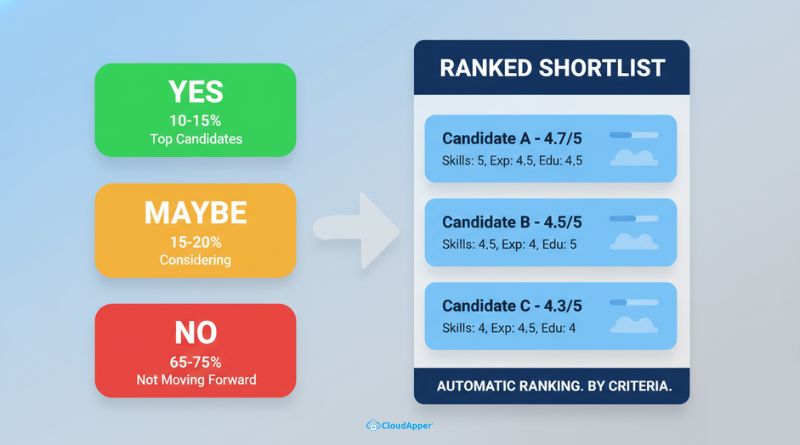
Yes pile: These candidates meet all must-have requirements and score well on your criteria. They’re clear fits worth phone screening. This should be your top 10-15% of applicants.
Maybe pile: These candidates meet most requirements but have some gaps or questions. They’re worth considering if your Yes pile doesn’t produce enough strong candidates. This is typically 15-20% of applicants.
No pile: These candidates don’t meet minimum requirements or have deal-breaker issues. They’re not moving forward. This is usually 65-75% of applicants for most roles.
Be ruthless with the No pile:
If someone doesn’t meet your must-have requirements, they go into the No-Pile. Don’t waste time reconsidering. Don’t make exceptions because you feel bad. Your must-haves exist for a reason.
If someone is clearly overqualified and likely using this as a placeholder, they go in No. You’re not doing them a favor by wasting their time on a role they’ll leave in three months.
If someone has obvious deal-breakers like severe resume errors for a detail-oriented role, they go in No.
The Maybe pile trap:
The Maybe pile becomes a dumping ground when you’re screening manually. You put people there because you’re not sure, because they’re borderline, because you feel guilty about rejecting them. Then you never actually go back and review the Maybe pile properly.
Keep your Maybe pile small and specific. These should be candidates who are genuinely borderline, not everyone you’re uncertain about.
CloudApper’s automated ranking:
CloudApper AI Recruiter provides ranked shortlists of the best candidates automatically. You don’t need to manually sort into piles. The system orders candidates by fit score based on your criteria.
You get a clear ranking: Candidate A scored 4.7 out of 5, Candidate B scored 4.5, Candidate C scored 4.3, and so on. Each score is broken down by category so you understand exactly where each person excels or falls short.
The recruiter dashboards show you top candidates with detailed scoring breakdowns. You can filter by specific criteria if you want to prioritize particular skills. You can compare candidates side by side to make final selections.
No more guessing which Maybe candidates deserve another look. The data tells you clearly who your strongest applicants are.
Step 7: Create Your Final Shortlist
You’ve narrowed down to your top candidates. Now select who actually gets phone screens or first-round interviews.
Review your top 10-15 candidates from the Yes pile:
Compare them side by side using your scoring framework. Don’t start from scratch. Use the scores and notes you already created.
Look for variety in your shortlist. Do all your top candidates come from the same type of background? That might indicate unconscious bias in how you weighted criteria or evaluated experience.
Select 5-8 candidates for the next stage. This gives you enough options to find a great hire without overwhelming your interview schedule.
Final quality checks before moving forward:
Do they genuinely meet all must-have requirements? Double-check this. It’s easy to let someone through who’s close but not quite there.
Do they show concrete achievements relevant to this role? Look at those quantifiable results again. These are your best predictor of future success.
Is there diversity in your shortlist? If all your top candidates look the same demographically or have identical backgrounds, pause. You might be unconsciously favoring similarity over actual qualifications.
Have you documented why each candidate was selected? You need this for compliance, fairness, and explaining decisions to hiring managers.
With CloudApper AI Recruiter:
The recruiter dashboards let you compare top candidates side by side with all their scores, notes, and AI-generated summaries visible at once. You see exactly why each candidate ranked where they did.
The system provides complete transparency in decision-making. You’re not working from gut feelings or half-remembered details from resume reviews days ago. All the data is right there.
You can add your own notes and flags to AI-scored candidates. The AI handles objective evaluation, you add human judgment about factors that require nuance.
Common Resume Screening Mistakes to Avoid
I have seen these mistakes damage resume screening quality across many hiring teams. Avoiding them makes your process fairer, faster, and more consistent.
- Screening for culture fit too early: Culture fit is subjective and often biased. Resumes cannot show working style or values. Focus on skills and qualifications first. Assess culture fit later during interviews.
- Requiring unnecessary qualifications: Every extra requirement shrinks your talent pool. Question degrees, years of experience, and industry background. Keep only what directly impacts job success.
- Relying only on basic ATS keyword matching: Keyword matching misses qualified candidates who describe the same skills differently. Use screening methods that understand context and equivalent experience, not just exact phrases.
- Failing to document screening decisions: Without notes, decisions become hard to explain or defend. Documentation supports compliance, consistency, and clearer communication with hiring managers.
- Screening without defined criteria: Gut-feel decisions lead to inconsistency and bias. Set clear, objective screening criteria before reviewing resumes and apply them equally to every candidate.
- Manually screening high application volume: Manual screening breaks down as volume increases. Fatigue leads to rushed decisions and missed talent. Automation becomes necessary to maintain fairness and quality at scale.
Your Resume Screening Checklist
Use this checklist for every role you’re hiring for. It ensures you don’t skip critical steps in the screening process.
Before You Start Screening:
- Define must-have qualifications (5-6 maximum)
- Define nice-to-have qualifications
- Create objective scoring criteria
- Assign weights to different criteria
- Set up the evaluation framework
Tip: CloudApper AI Recruiter lets you configure these criteria once, so every resume is evaluated the same way, without drift or fatigue.
During Resume Screening:
- Do an initial 10-second scan for basic fit
- Score each candidate against all defined criteria
- Look for quantifiable achievements, not just responsibilities
- Flag red flags, but don’t automatically reject
- Document notes on each candidate
- Categorize into Yes/Maybe/No piles
Tip: Using AI here removes inconsistency. CloudApper AI Recruiter scores every resume using the same standards, even when you are screening hundreds at once.
After Screening, Before Interviews:
- Compare top candidates side by side
- Review the shortlist for diversity and unconscious bias
- Verify that all selected candidates meet the must-have requirements
- Document specific reasons for selections
- Select 5-8 candidates for the next stage
- Move forward quickly before candidates accept other offers
Tip: AI-ranked shortlists make this step faster by clearly showing which candidates best match your criteria and why.
Screen Smarter, Not Harder
The seven-step framework in this guide works whether you’re screening 30 resumes or 300. The difference is that manual screening breaks down at scale while AI-powered screening maintains quality regardless of volume.
CloudApper AI Recruiter handles the repetitive, time-consuming parts of resume screening so your team can focus on what humans do best: having conversations with top candidates and making final hiring decisions. The AI screens, scores, and ranks candidates based on your specific criteria in minutes instead of days.
You now have the process. The next step is making it work at real hiring volume without burning out your team.

What is CloudApper AI Platform?
CloudApper AI is an advanced platform that enables organizations to integrate AI into their existing enterprise systems effortlessly, without the need for technical expertise, costly development, or upgrading the underlying infrastructure. By transforming legacy systems into AI-capable solutions, CloudApper allows companies to harness the power of Generative AI quickly and efficiently. This approach has been successfully implemented with leading systems like UKG, Workday, Oracle, Paradox, Amazon AWS Bedrock and can be applied across various industries, helping businesses enhance productivity, automate processes, and gain deeper insights without the usual complexities. With CloudApper AI, you can start experiencing the transformative benefits of AI today. Learn More
- Useful Links:
- Agentic AI
- No-Code/Low-Code
- Custom Software
- HCM Personalization
- iPaaS
- FedRAMP
CloudApper AI Solutions for HR



- Works with








- and more.
Similar Posts

How to Assess Candidate Communication Skills Before the First Interview

How to Reduce Interview Rounds Without Lowering Your Hiring Standards