- What “Duplicate Pre-Hire” Actually Means in Workday
- Can Workday Prevent Duplicate Records Natively?
- Why Duplicates Still Slip Through at Scale
- Business Impact of Duplicate Worker Records
- How to Prevent Duplicate Pre-Hire Records in Workday: Step by Step
- Best Practices for Clean Worker Data at Scale
- How CloudApper hrPad Adds a Point-of-Entry Duplicate Guardrail
- Example Workflow: A High-Volume Hospitality Employer
- Frequently Asked Questions
- Conclusion
A duplicate person record almost never announces itself. It starts quietly — a returning seasonal worker entered as a brand-new pre-hire, the same candidate submitted by two staffing agencies, a rushed manual entry during a hiring surge. One extra record. Then that record moves downstream, and the small data problem becomes an operational one: headcount that doesn’t reconcile, provisioning that fires twice, benefits and pay tied to the wrong profile, and reports that quietly overcount.

For organizations running high-volume, high-turnover hiring — hospitality, tourism, food service, retail, staffing — the math is unforgiving. When you’re creating hundreds or thousands of pre-hires a season, even a low duplication rate produces a steady stream of records that someone has to find, investigate, and clean up after the fact. The cleanup is expensive, but the real cost is upstream: every duplicate that reaches payroll, provisioning, or reporting is a correction waiting to happen.
The goal most HRIS and talent-acquisition leaders actually want is simple to state: one person, one record — enforced as early as possible, ideally before a duplicate is ever created. This article walks through how Workday helps you get there natively, why duplicates still slip through at scale, and how organizations managing large frontline workforces add an extra guardrail at the exact moment a record is entered.
What “Duplicate Pre-Hire” Actually Means in Workday
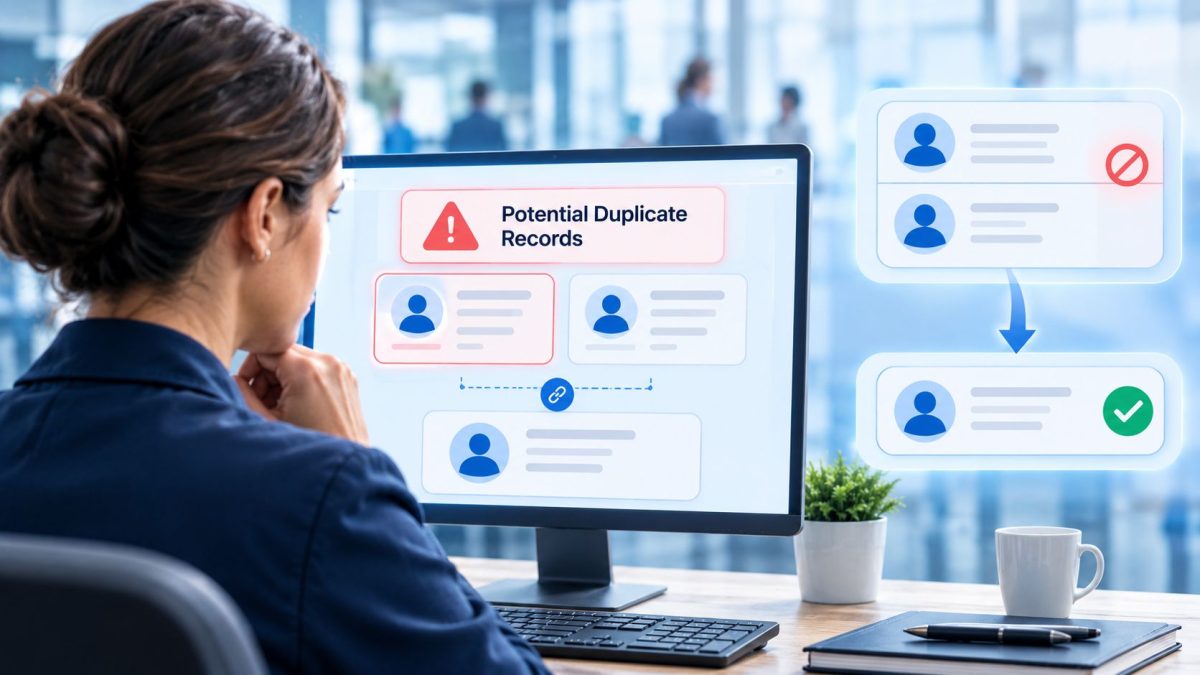
A pre-hire is a person record created in Workday before someone becomes a worker — used during recruiting and the hire process to hold a candidate’s identity. A duplicate occurs when the same real person ends up with more than one pre-hire or worker record in the tenant.
Duplicates typically originate in a few predictable places:
- Rehires and boomerang employees entered as new people because a prior record wasn’t found.
- In-flight hires — a pre-hire already exists or a hire is already in progress, so a standard search doesn’t surface it.
- Multiple intake channels — recruiters, agencies, bulk loads, and integrations each creating records without seeing the others.
- Search misses — a slightly different name spelling, a maiden vs. married name, or a typo means a quick search comes back empty even though the person exists.
Email address is often the single most reliable signal that two records are the same human — people reuse the same personal email across applications and rehires far more consistently than they reproduce an exact name or ID. That’s exactly why email-based matching is such a valuable guardrail.
Can Workday Prevent Duplicate Records Natively?
Yes — Workday provides a capable, configurable framework for this, and it should be your first line of defense before adding anything on top.
Workday’s Duplicate Management (delivered through its duplicate detection and management framework) is designed around the principle of one person, one record. It can compare an incoming person against existing records using configurable match attributes, and modern configurations support matching on a range of data points — including full name, date of birth, national ID, phone number, physical address, and email address. Organizations define match rules that combine these attributes and decide whether a potential match should be flagged for review or handled automatically.
Critically, duplicate detection can be surfaced inside recruiting and hiring workflows, and can be configured so a candidate cannot progress to “Ready for Hire” until a flagged potential duplicate is reviewed and resolved. Used well, that turns duplicate management from a cleanup activity into a checkpoint earlier in the process.
Workday also gives you supporting tools: robust search (searching People or All of Workday rather than relying on the hire-process search alone will surface existing pre-hires even when a person is already active or a hire is in progress), and duplicate management reports and tasks to identify and merge records that do slip through.
So the honest answer is that a well-configured Workday tenant can catch a great deal of duplication — including on email — before it becomes a worker. The nuance is where in the flow the check lands and how the record gets entered in the first place.
Why Duplicates Still Slip Through at Scale
If native duplicate management is this capable, why do organizations still wrestle with duplicate people records? A few practical reasons — none of them a shortcoming of the platform, and all of them amplified by high-volume hiring.
- Detection often happens after the record is created. Much of the value of duplicate management shows up once a pre-hire exists and is evaluated or reported on. That means the duplicate is already in the tenant — the workflow catches it downstream rather than stopping the keystroke that created it.
- The person entering data may not see the warning in time. A recruiter or coordinator moving quickly through a hiring surge wants a clear, immediate signal at the point of entry — “this email already exists” — not a task that surfaces later in the process.
- Records arrive through many doors. Manual entry, agency submissions, bulk uploads, and integrations each create pre-hires. A guardrail configured for one path doesn’t automatically govern the others.
- Match rules are a balancing act. Tighten them and you generate false-positive noise; loosen them and real duplicates pass. Email is a strong signal, but the check is only as good as the moment it runs and the discipline of the people entering data.
- Volume multiplies every edge case. At seasonal hiring peaks, the sheer number of records — and the pressure to move fast — is exactly when duplicates are most likely and manual searching is least reliable.
The pattern is consistent: the native framework is strong at identifying and resolving duplicates, and organizations at scale often want an additional guardrail that warns or blocks at the front door, before a duplicate record is ever created.
Business Impact of Duplicate Worker Records
For high-volume industries, unmanaged duplication has outsized downstream consequences:
| Impact area | What happens when duplicate records are created |
|---|---|
| Headcount accuracy | Duplicates inflate worker counts, distorting workforce planning and reporting. |
| Payroll & benefits | Pay, deductions, and benefits can attach to the wrong profile, creating rework and risk. |
| Provisioning & access | Downstream systems provision accounts and access twice, adding IT cleanup and security exposure. |
| Reporting & analytics | Metrics quietly overcount, eroding trust in the numbers leaders rely on. |
| Remediation cost | Finding, investigating, and merging duplicates consumes HRIS hours every cycle. |
| Candidate experience | Confusion across duplicate records can slow onboarding for the very people you’re trying to hire fast. |
The objective isn’t only clean data. It’s a control that runs automatically, catches duplicates before they spread, and spares teams the recurring hunt-and-fix work.
How to Prevent Duplicate Pre-Hire Records in Workday: Step by Step
Configure your native guardrails as far as they’ll take you before adding anything on top. A practical sequence:
- Define the uniqueness policy first. Write it in plain language before touching configuration. Example: “A personal email address should map to exactly one person record. If an incoming email matches an existing record, the user is warned before a new pre-hire is created.” Configuration should follow policy, not the other way around.
- Add email to your match attributes. Review your Duplicate Management setup and ensure email address is included among the attributes used to detect potential duplicates, alongside name, date of birth, and national ID as appropriate.
- Build match rules that reflect real duplication patterns. Combine attributes so common cases are caught — for example, matching email or a name-plus-date-of-birth combination — and decide which matches are auto-handled versus flagged for human review.
- Gate the hire on duplicate resolution. Configure the process so a flagged potential duplicate must be reviewed before the candidate can reach Ready for Hire, keeping unresolved duplicates from advancing.
- Standardize the pre-entry search. Train everyone who creates pre-hires to search People or All of Workday (not just the hire-process search) before entering anyone, so existing and in-flight records surface reliably.
- Govern every intake channel. Make sure agency submissions, bulk loads, and integrations are subject to the same duplicate checks as manual entry — the front door isn’t just the recruiter’s screen.
- Schedule duplicate management reviews. Use Workday’s duplicate management reports and tasks to catch and merge anything that slips through, especially during and after hiring peaks.
- Test with real scenarios. Build a test matrix — exact rehire, same email/different name spelling, agency double-submission, bulk-load collision — and confirm each produces the warning or block your policy calls for.
If native configuration fully satisfies your policy, you may not need more. Organizations with large, seasonal, multi-channel hiring often find they want a real-time check at the exact moment of entry — a warning or block before the record is created, across every intake path. That’s where a complementary validation layer helps.
Best Practices for Clean Worker Data at Scale
Whatever combination you land on, keep these principles central:
- Catch duplicates as early as possible. The cheapest duplicate to fix is the one that’s never created. Push the check toward the point of entry.
- Treat email as a primary identity signal. It’s more consistently reused across applications and rehires than exact names — lean on it, without relying on it alone.
- Standardize entry. Consistent search and data-entry habits prevent more duplicates than any single rule.
- Govern every channel equally. Manual, agency, bulk, and integration intake all need the same guardrail.
- Keep a clear audit trail. Log what was matched, warned, or blocked so data-integrity decisions are reviewable.
- Review continuously. Re-run duplicate reports on a cadence, particularly around high-volume hiring, to confirm the controls are holding.
How CloudApper hrPad Adds a Point-of-Entry Duplicate Guardrail
Duplicate detection is only as effective as the moment it runs. When the check happens after a record already exists, the duplicate is already in the tenant — and someone still has to find and merge it. When intake is spread across recruiters, agencies, kiosks, and bulk loads, a single native rule doesn’t always govern every door. At high volume, those gaps are exactly where duplicate people records are born.
CloudApper hrPad is a Workday self-service and data-capture layer that connects directly to your Workday environment, syncing in real time with Workday as the system of record. Because CloudApper is a configurable process layer rather than a fixed feature, organizations can add a real-time validation step at the point of entry — one that checks an incoming email address (and other identifiers) against existing Workday records and warns or blocks before a new pre-hire is created, complementing Workday’s native duplicate management rather than replacing it.
For preventing duplicate worker and pre-hire records specifically, this front-door approach helps organizations:
- Validate before the record exists. Check email uniqueness against Workday at the moment of entry, so the person entering data gets an immediate “this already exists” signal instead of a downstream task.
- Warn or block by policy. Configure whether a matching email produces a soft warning (proceed with confirmation) or a hard stop — matched to how strict your data-integrity policy needs to be.
- Govern multiple intake paths. Apply the same validation logic across manual entry and custom intake forms, so duplicates are caught regardless of which door the record comes through.
- Reduce downstream cleanup. Fewer duplicates created means fewer records to find, investigate, and merge — and fewer corrections reaching pay, benefits, provisioning, and reporting.
- Keep an audit-ready trail. Every check, warning, and override is logged against Workday records, supporting data-governance and compliance requirements.
- Fit high-volume hiring. Configurable, no-code validation can be tailored to seasonal surges and industry-specific intake without waiting on long development cycles.
Workday remains your authoritative system of record and your engine for identifying and merging duplicates. hrPad and the CloudApper platform add a configurable enforcement point around it — catching duplicates at the front door so fewer ever reach the cleanup queue.
Example Workflow: A High-Volume Hospitality Employer
Consider a hospitality group hiring seasonal staff across dozens of properties, sourcing candidates through in-house recruiters and multiple staffing agencies. Their policy: a personal email should map to exactly one person record, and anyone entering a candidate should be warned before creating a duplicate.
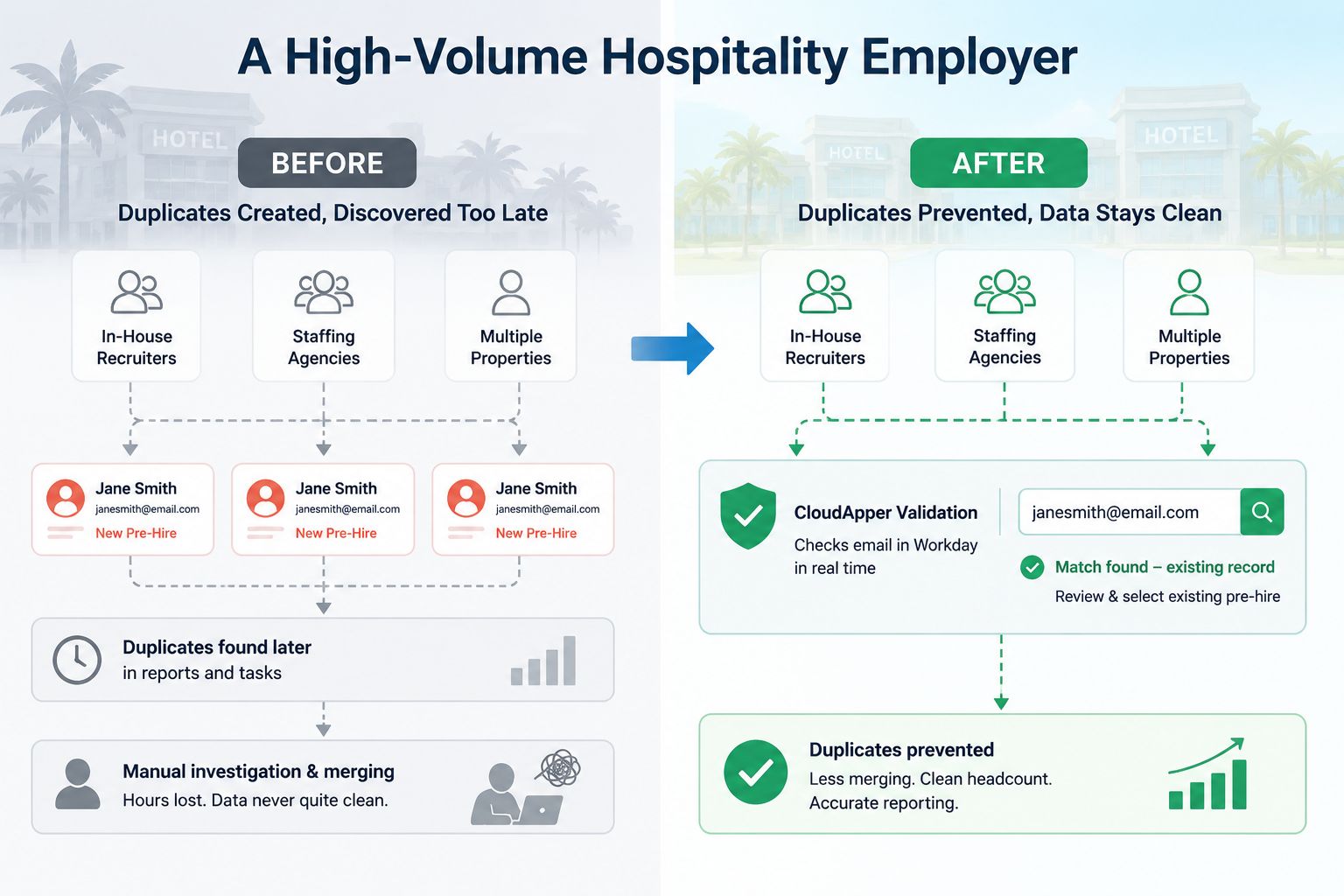
Before: During peak hiring, the same returning worker was frequently entered as a new pre-hire — sometimes by a recruiter who couldn’t find the prior record, sometimes by two agencies submitting the same candidate. Duplicates surfaced later in reports and duplicate-management tasks, after they’d already touched provisioning and headcount. HRIS spent hours each cycle investigating and merging records, and the numbers leadership saw were never quite clean.
After: The team tightened Workday’s duplicate management to include email in its match rules and required duplicate resolution before Ready for Hire, then added a CloudApper validation step at intake that checks each incoming email against Workday in real time. Now, when a coordinator or agency-submitted record carries an email that already exists, the system flags it immediately — before a new pre-hire is created. Duplicate creation drops sharply, HRIS spends far less time on merges, and headcount and reporting reconcile cleanly through the hiring surge.
Frequently Asked Questions
Can Workday detect duplicate worker records by email address? Yes. Workday’s duplicate management framework supports configurable match attributes, and modern configurations can include email address alongside name, date of birth, and national ID. You define match rules that flag or resolve potential duplicates, and can require resolution before a candidate reaches Ready for Hire.
Why do duplicate pre-hires still get created if Workday has duplicate management? Detection frequently evaluates a record after it’s created, the person entering data may not see the signal at the exact moment of entry, and records arrive through multiple channels (manual, agency, bulk, integration). High hiring volume multiplies each of these, so some duplicates still slip through.
What’s the best way to stop duplicate records before they’re created? Combine native controls — email in your match rules, a Ready-for-Hire gate, and standardized People searches — with a point-of-entry validation step that checks email uniqueness in real time and warns or blocks before the pre-hire is created, across every intake path.
Does CloudApper replace Workday’s duplicate management? No. CloudApper hrPad complements Workday by adding a configurable validation layer at the point of entry. Workday remains the authoritative system of record and your tool for identifying and merging duplicates; CloudApper helps prevent duplicates from being created in the first place.
Is email a reliable way to identify duplicate people? Email is one of the strongest identity signals because people reuse the same personal address across applications and rehires more consistently than they reproduce an exact name or ID. It works best combined with other attributes, such as name and date of birth, to reduce false positives.
How do duplicate records affect payroll and reporting? Duplicates can attach pay, deductions, and benefits to the wrong profile, cause downstream systems to provision access twice, and inflate headcount — quietly distorting the reports leaders rely on and creating recurring rework for HRIS and payroll teams.
Conclusion
Preventing duplicate worker and pre-hire records is fundamentally a data-integrity decision made at the front door. Workday gives you a strong native foundation — configurable match attributes including email, match rules, a Ready-for-Hire gate, and duplicate management reports — and configuring those deliberately will catch a great deal of duplication before it spreads. For organizations hiring at high volume through many channels, the remaining gap is timing and coverage: catching the duplicate at the exact moment of entry, across every path a record can come from. A configurable validation layer that checks email uniqueness in real time closes that gap, so fewer duplicates are ever created and teams spend less time cleaning up after them.
Every duplicate a team never has to hunt down is time returned to people with better work to do — and a headcount leaders can finally trust. That’s the quiet payoff of getting one person, one record right at the source.
See how CloudApper hrPad helps Workday teams catch duplicate records at the point of entry and keep worker data clean at scale. Book a demo or talk to our team about your duplicate-prevention and data-integrity goals.
What is CloudApper AI Platform?
CloudApper AI is an advanced platform that enables organizations to integrate AI into their existing enterprise systems effortlessly, without the need for technical expertise, costly development, or upgrading the underlying infrastructure. By transforming legacy systems into AI-capable solutions, CloudApper allows companies to harness the power of Generative AI quickly and efficiently. This approach has been successfully implemented with leading systems like UKG, Workday, Oracle, Paradox, Amazon AWS Bedrock and can be applied across various industries, helping businesses enhance productivity, automate processes, and gain deeper insights without the usual complexities. With CloudApper AI, you can start experiencing the transformative benefits of AI today. Learn More
- Useful Links:
- Agentic AI
- No-Code/Low-Code
- Custom Software
- HCM Personalization
- iPaaS
- FedRAMP