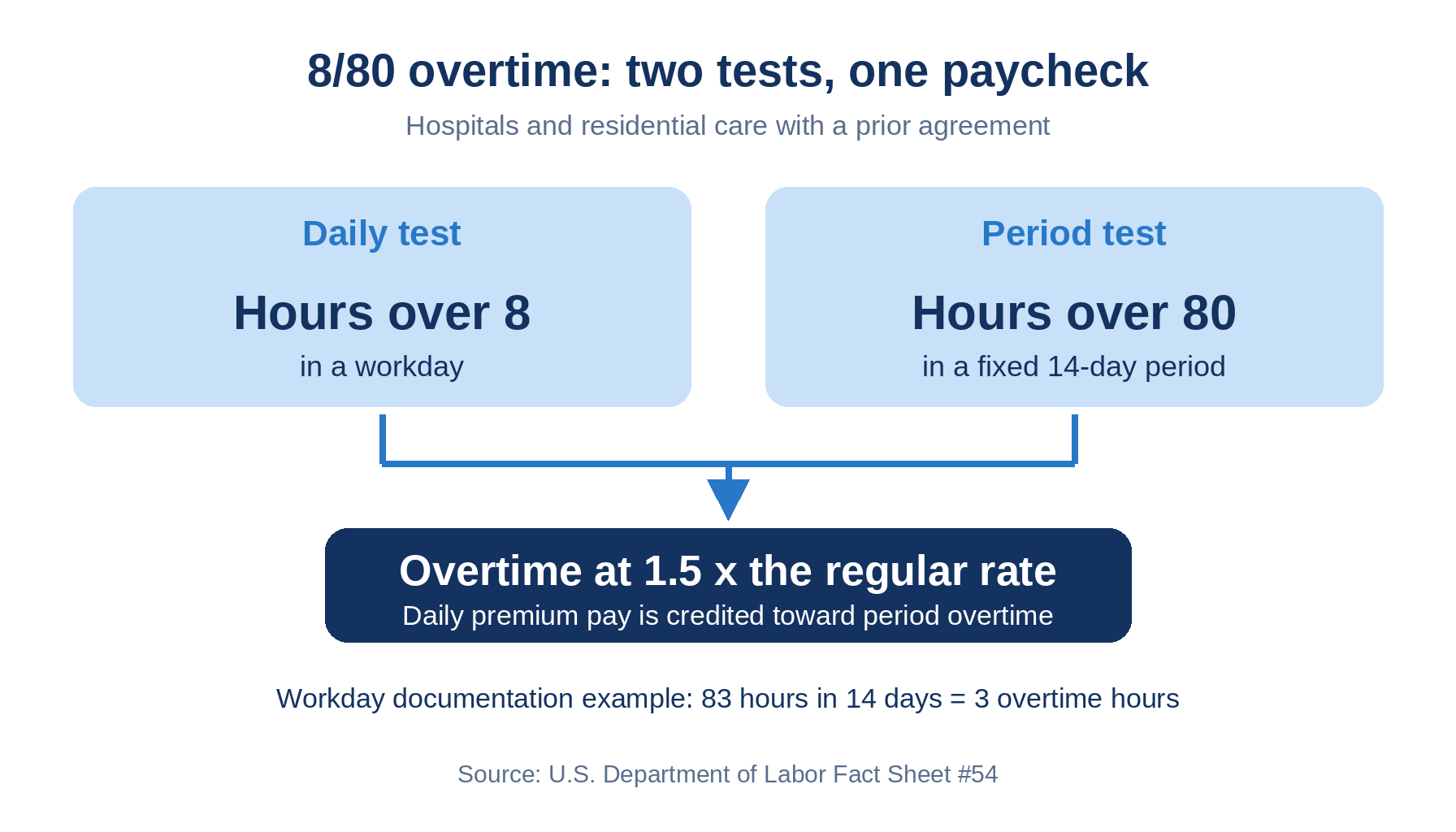
Hospitals using the FLSA 8/80 option owe overtime for hours over eight in a day and over 80 in 14 days, without paying any hour twice. This guide covers what Workday's 14-day work period does, where eligibility, calendars, and rates break down, and how CloudApper AI for HCM Personalization and Extensibility verifies results.

TL;DR
The FLSA 8/80 option lets hospitals and residential care establishments with a prior agreement pay overtime for hours over eight in a workday and over 80 in a fixed 14-day period, crediting daily premium pay toward period overtime. Workday documents a 14-day work period type and the delivered Standard 14-day Workweek for employers subject to 8/80, plus FLSA status reports. Friction appears in per-worker eligibility, expiring work period calendars, daily credit, and regular rate inputs such as shift differentials and bonuses. Match workers to agreements, create calendars early, and recompute sample nurses by the Department of Labor method. CloudApper AI for HCM Personalization and Extensibility can add an independent check before payroll closes, alongside Workday.
Table of Contents
- What Workday Does Natively
- Where the Friction Shows Up
- What to Do Within Workday First
- Where Native Tools Run Out
- How CloudApper AI for HCM Personalization and Extensibility Closes the Gap
- Frequently Asked Questions
Workday 8/80 overtime starts with a number in Workday’s own documentation: 83 hours across 14 days, three overtime hours. That example shows one of two tests in the rule, hours over 80 in the period. The other, hours over eight in a day, runs beside it, and a hospital must pay each without paying the same hour twice. CloudApper AI for HCM Personalization and Extensibility can check that interaction alongside Workday.
What Workday Does Natively
Workday’s Setup Considerations for FLSA payroll lists a 14-Day work period type for healthcare workers on a standard 80-hour, 14-day workweek and points employers subject to the 8/80 rule to the delivered Standard 14-day Workweek. Workday also supports FLSA work periods that cross pay periods and offers FLSA status reports.
Where the Friction Shows Up
- Eligibility is per worker. The Department of Labor requires a prior agreement or understanding before the work is performed, and one employee cannot be on both systems, so work period assignment must follow the agreement.
- Calendars expire. Workday recommends creating FLSA work period calendars each year, and its update task flags only calendars expiring within 90 days.
- Daily credit is easy to miss. DOL lets daily premium pay count toward overtime owed for hours over 80, while Workday’s example shows only the 80-hour test.
- The regular rate holds more than base pay. DOL’s example lifts an RN’s $22 base to $22.91 with two shift differentials. Workday’s page does not mention differentials, and an FLSA bonus earning must be amount-based, so a percentage retention bonus needs the bonus overtime check.
What to Do Within Workday First
- Match each worker’s work period type to a signed 8/80 agreement.
- Create next year’s FLSA work period calendars now, not at the 90-day flag.
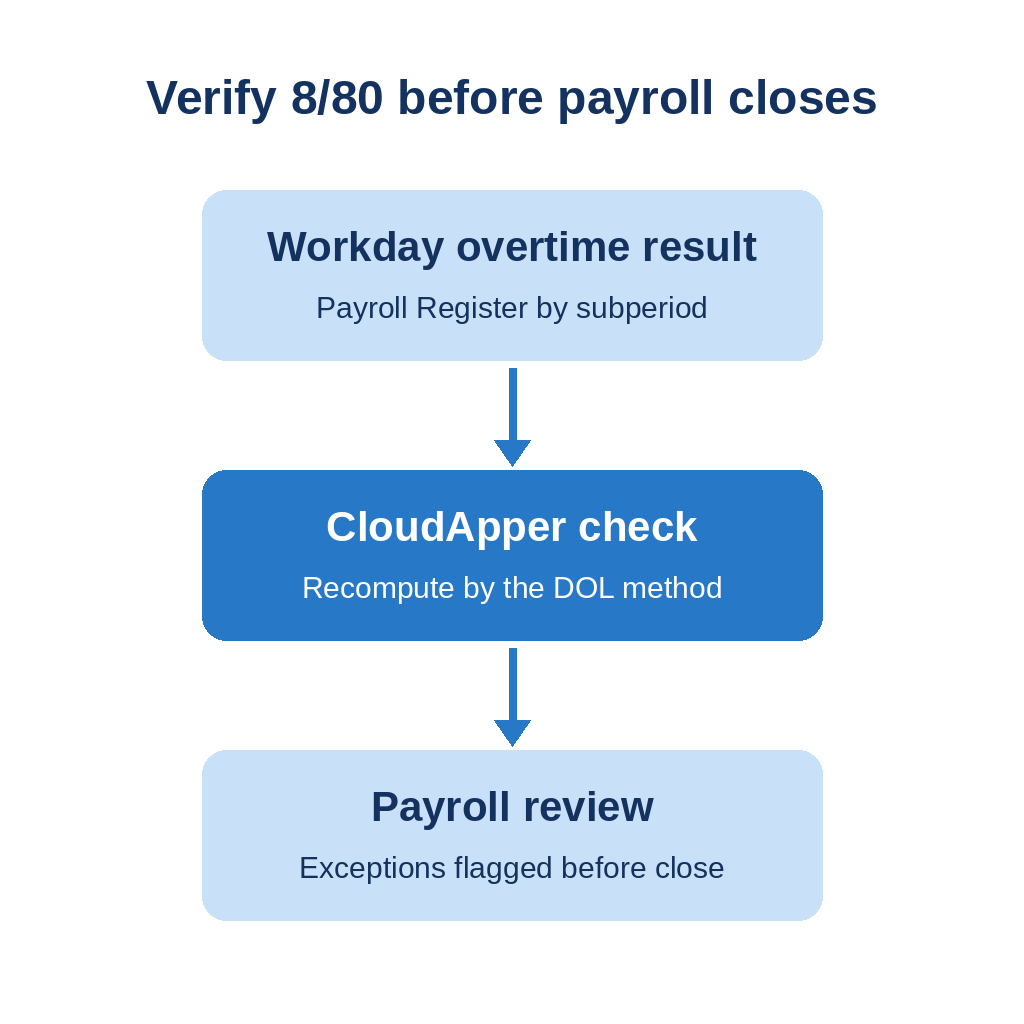
- Pull the Payroll Register by subperiod for a 12-hour-shift nurse and recompute it by DOL’s method.
- Confirm shift differentials and eligible bonuses appear in the regular rate.
- Review FLSA Processing Status for Group of Workers every payroll.
Float and multi-position nurses need extra care because blended overtime rates apply, and union work rules may define daily and period overtime differently.
Where Native Tools Run Out
Workday documents the 14-day work period type and its reports. It does not show an independent check that daily and period overtime were paid once per worker across per diem, float, and union populations. A retro correction after a lapsed calendar or rate change is how the gap usually surfaces. CloudApper AI for HCM Personalization and Extensibility can build that check.
How CloudApper AI for HCM Personalization and Extensibility Closes the Gap
The platform is no-code with configurable workflows, and CloudApper’s Workday offering lists compliance management and piece rate calculations. For 8/80, a configured check can recompute each nurse’s 14-day period by DOL’s method, compare it with Workday’s result, and flag exceptions for payroll review before the run closes. Workday still calculates and pays overtime, and counsel confirms agreements and union terms. CloudApper AI for HCM Personalization and Extensibility works alongside Workday, not instead of it.
Frequently Asked Questions
Q: Does Workday support 8/80 overtime?

Workday’s FLSA documentation points healthcare employers subject to the 8/80 rule to its delivered Standard 14-day Workweek work period type. Confirm in your tenant how daily overtime is calculated alongside it.
Q: What is the 8/80 overtime rule?
It lets a hospital or residential care establishment with a prior agreement pay time and one-half the regular rate for hours over eight in a workday and over 80 in a fixed 14-day period.
Q: Who can use the 8/80 system?
Hospitals and residential care establishments, including nursing and assisted living facilities, can use it. The agreement must exist before the work is performed, and one employee cannot be on both the 8/80 and 40-hour systems.
Q: Do shift differentials count in the 8/80 regular rate?
Yes. DOL includes shift differentials and nondiscretionary bonuses in the regular rate.
Q: How do you check 8/80 overtime in Workday?
Review the Payroll Register by subperiod for sample workers and recompute their results by DOL’s method.
If you want 8/80 results verified before payroll closes, talk to the CloudApper team about a check built for your agreements.

What is CloudApper AI Platform?
CloudApper AI is an advanced platform that enables organizations to integrate AI into their existing enterprise systems effortlessly, without the need for technical expertise, costly development, or upgrading the underlying infrastructure. By transforming legacy systems into AI-capable solutions, CloudApper allows companies to harness the power of Generative AI quickly and efficiently. This approach has been successfully implemented with leading systems like UKG, Workday, Oracle, Paradox, Amazon AWS Bedrock and can be applied across various industries, helping businesses enhance productivity, automate processes, and gain deeper insights without the usual complexities. With CloudApper AI, you can start experiencing the transformative benefits of AI today. Learn More
- Useful Links:
- Agentic AI
- No-Code/Low-Code
- Custom Software
- HCM Personalization
- iPaaS
- FedRAMP
Brochure
CloudApper AI TimeClock
For accurate & touchless time capture experience.
Download Brochure
CloudApper AI Solutions for Workday


- Works with








- and more.
Similar Posts

Workday Paid Sick Leave Pay Rates: State Rules, Regular Rate,…

Workday Overpayment Recovery: State Limits for Hourly Workers