Workday workweek overtime depends on the work schedule calendar, the day breaker, and the shift date setting, not the pay period. This guide covers what Workday does, where overnight shifts and multiple calendars cause trouble, what to check first, and how CloudApper audits calendars alongside Workday.

TL;DR
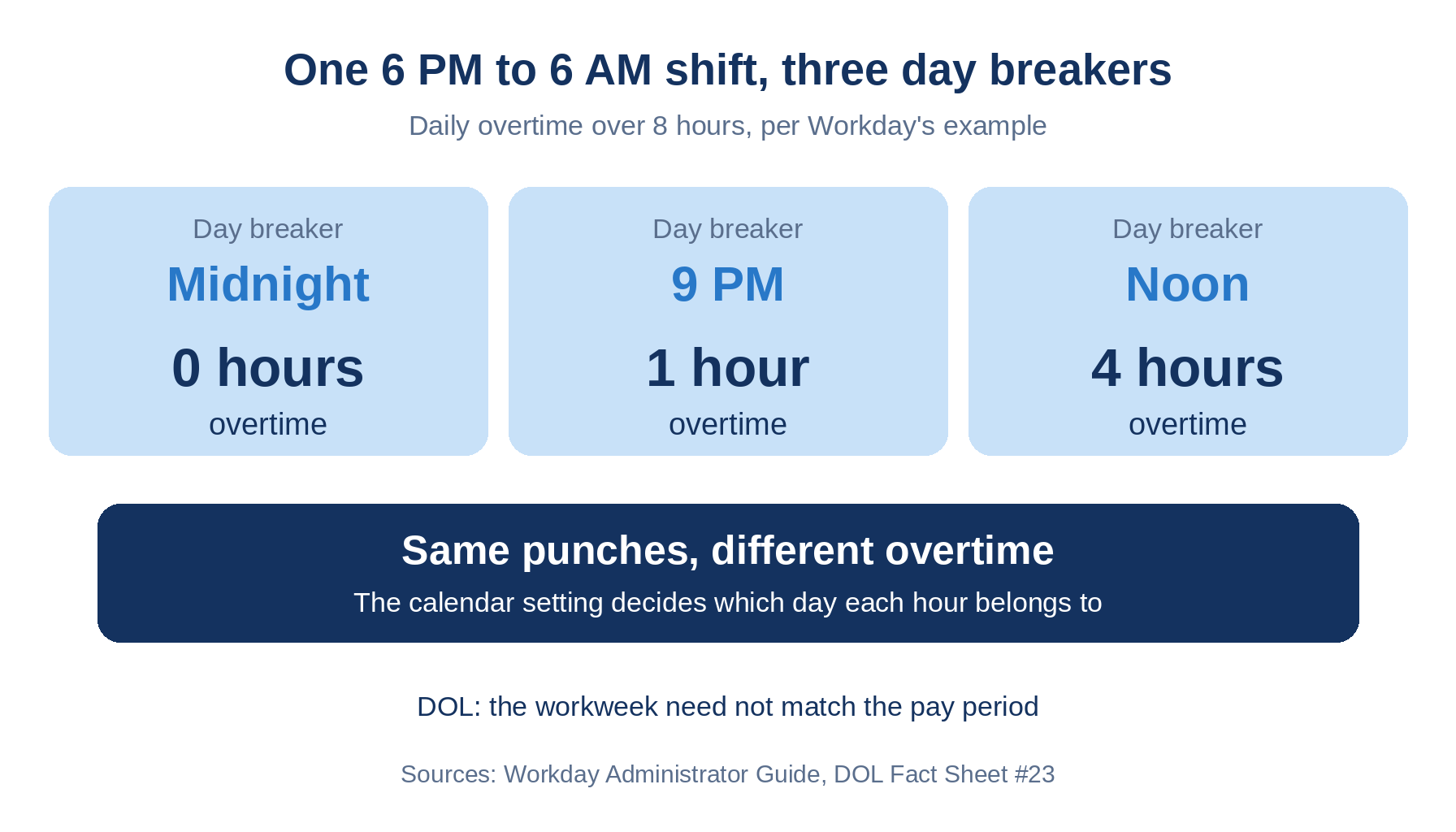
The FLSA workweek is a fixed 168 hours that need not match the pay period, and Department of Labor guidance does not say how a shift crossing the week boundary is allocated, so your Workday configuration is the rule. Workday's documentation shows the same 6 PM to 6 AM shift producing 0, 1, or 4 overtime hours depending on the day breaker, and a tenant setting controls how eligibility changes resolve across weeks. Friction grows when acquired entities, union units, or other groups bring different calendars. List every calendar, document shift date versus calculated date, and test a Saturday night shift. CloudApper AI for HCM Personalization and Extensibility can audit calendars against policy alongside Workday.
Table of Contents
- What Workday Does Natively
- Where the Friction Shows Up
- What to Do Within Workday First
- Where Native Tools Run Out
A Saturday night shift can belong to Saturday, to Sunday, or to both, and Workday workweek overtime follows whichever your calendar says. That choice decides which week an hour lands in. CloudApper AI for HCM Personalization and Extensibility helps audit those choices once more than one calendar is in play.
What Workday Does Natively
Workday’s standard overtime calculation offers weekly, biweekly, daily, rolling 24 hour, and configurable periods. Biweekly periods start from a date set on the work schedule calendar, and “Time Day Based On” picks the calculated date or the shift date. For a 6 PM to 6 AM block, Workday’s own example gives 1 overtime hour with a 9 PM day breaker, none with midnight, and 4 with noon.
Where the Friction Shows Up
- The Department of Labor defines the workweek as a fixed 168 hours that need not match the pay period and bars averaging across weeks. It does not say how a shift crossing the boundary is allocated, so your configuration is the rule.
- DOL allows different workweeks for different employee groups. Acquired entities and union units often bring their own week start.
- Eligibility can change mid-shift. In Workday’s crossing-weeks concept, the tenant setting Run Time Calculation Eligibility Day by Day decides whether a job change resolves as of the week end date or day by day.
- A night shift differential can switch on at 3 AM Sunday, so one shift carries two sets of tags, and blended overtime rates add another.
What to Do Within Workday First
- List every work schedule calendar in use with its week start, day breaker, and worker count.
- Document why each population uses shift date or calculated date.
- Review the day by day eligibility setting against how your job changes are effective dated.
- Run a Saturday night shift through a job change and the week boundary, and check it by hand.
- Before changing a week start, confirm it is permanent and compute the transition under 29 CFR 778.301 and 778.302 with counsel.
Rules that differ by group need the same pass: union work rules, acquired employees, and any retro correction that reruns a closed week.
Where Native Tools Run Out
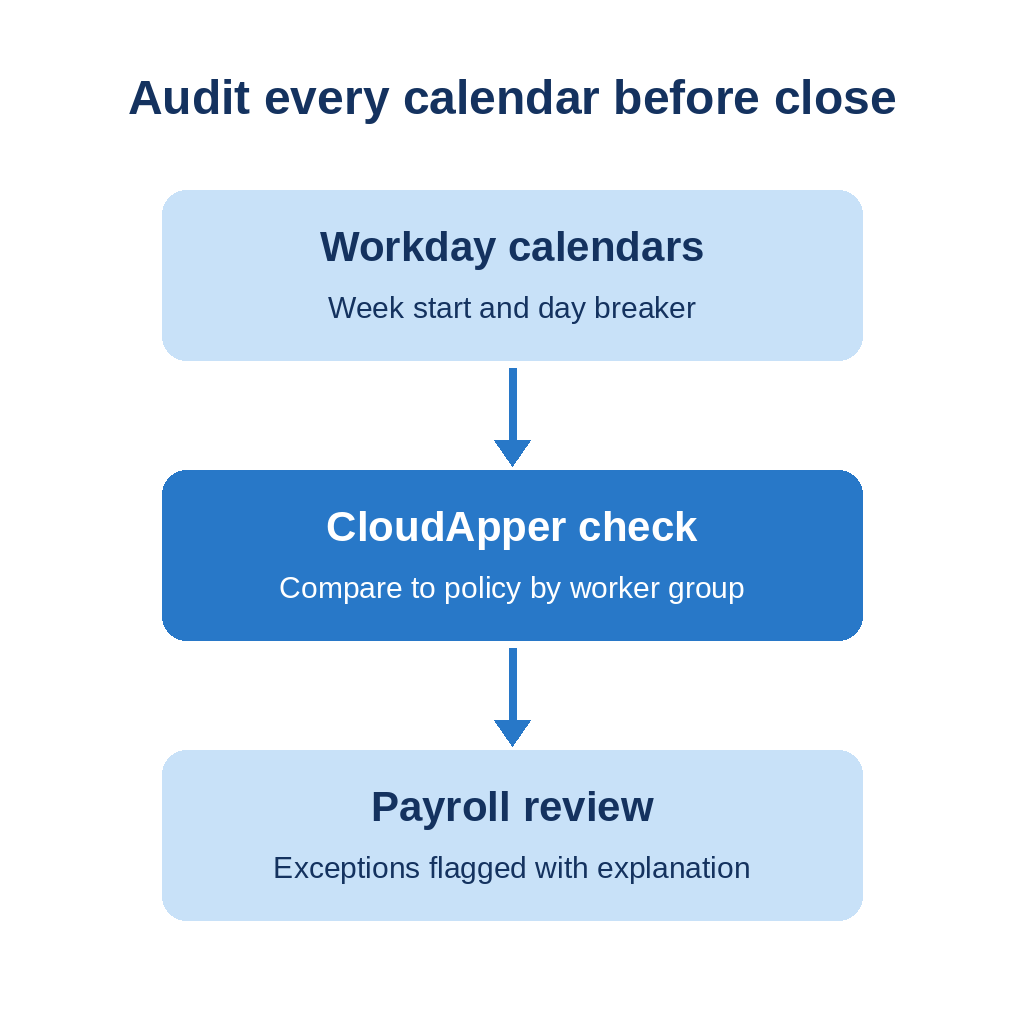
Workday calculates correctly inside each calendar. Its documentation does not show a view of every worker whose effective week differs from the pay period or a union definition, or a same-day explanation for a worker asking why part of an overnight shift counted. CloudApper AI for HCM Personalization and Extensibility can build that view.
How CloudApper Closes the Gap
The platform is no-code. A configured check can list workers by calendar, compare week start and day breaker to policy, flag crossing shifts that allocate differently than the agreement says, and give timekeepers a shift-level explanation. Workday still calculates and pays overtime. CloudApper AI for HCM Personalization and Extensibility works alongside Workday, not instead of it.
Frequently Asked Questions
Q: What is the FLSA workweek?

It is a fixed, regularly recurring period of 168 hours, seven consecutive 24 hour periods. It may start on any day and hour and need not match the calendar week or the pay period.
Q: How does Workday handle an overnight shift that crosses the workweek?
It depends on the work schedule calendar, the day breaker, and the Time Day Based On option. Workday’s example allocates a Saturday to Sunday shift by shift date and calculated date.
Q: Does the pay period determine the overtime week?
No. DOL says the workweek need not coincide with the pay period.
Q: Can an employer change the workweek start day?
Yes, if the change is intended to be permanent and not designed to evade overtime. Transition overtime is computed under 29 CFR 778.301 and 778.302.
Q: Can different employees have different workweeks?
Yes. DOL allows different workweeks for different employees or groups, so confirm each calendar’s week start and day breaker.
If more than one workweek lives in your tenant and you want it audited, talk to the CloudApper team about a check built for your calendars.

What is CloudApper AI Platform?
CloudApper AI is an advanced platform that enables organizations to integrate AI into their existing enterprise systems effortlessly, without the need for technical expertise, costly development, or upgrading the underlying infrastructure. By transforming legacy systems into AI-capable solutions, CloudApper allows companies to harness the power of Generative AI quickly and efficiently. This approach has been successfully implemented with leading systems like UKG, Workday, Oracle, Paradox, Amazon AWS Bedrock and can be applied across various industries, helping businesses enhance productivity, automate processes, and gain deeper insights without the usual complexities. With CloudApper AI, you can start experiencing the transformative benefits of AI today. Learn More
- Useful Links:
- Agentic AI
- No-Code/Low-Code
- Custom Software
- HCM Personalization
- iPaaS
- FedRAMP
Brochure
CloudApper AI TimeClock
For accurate & touchless time capture experience.
Download Brochure
CloudApper AI Solutions for Workday


- Works with








- and more.
Similar Posts

Workday Paid Sick Leave Pay Rates: State Rules, Regular Rate,…

Workday Overpayment Recovery: State Limits for Hourly Workers