Workday on-call pay involves three separate records: the stipend, the call-back, and hours worked. This guide covers what Workday time entry codes and calculation tags do, where call-back capture and minimums break, DOL rules to confirm, and how CloudApper captures the call before it reaches payroll.

TL;DR
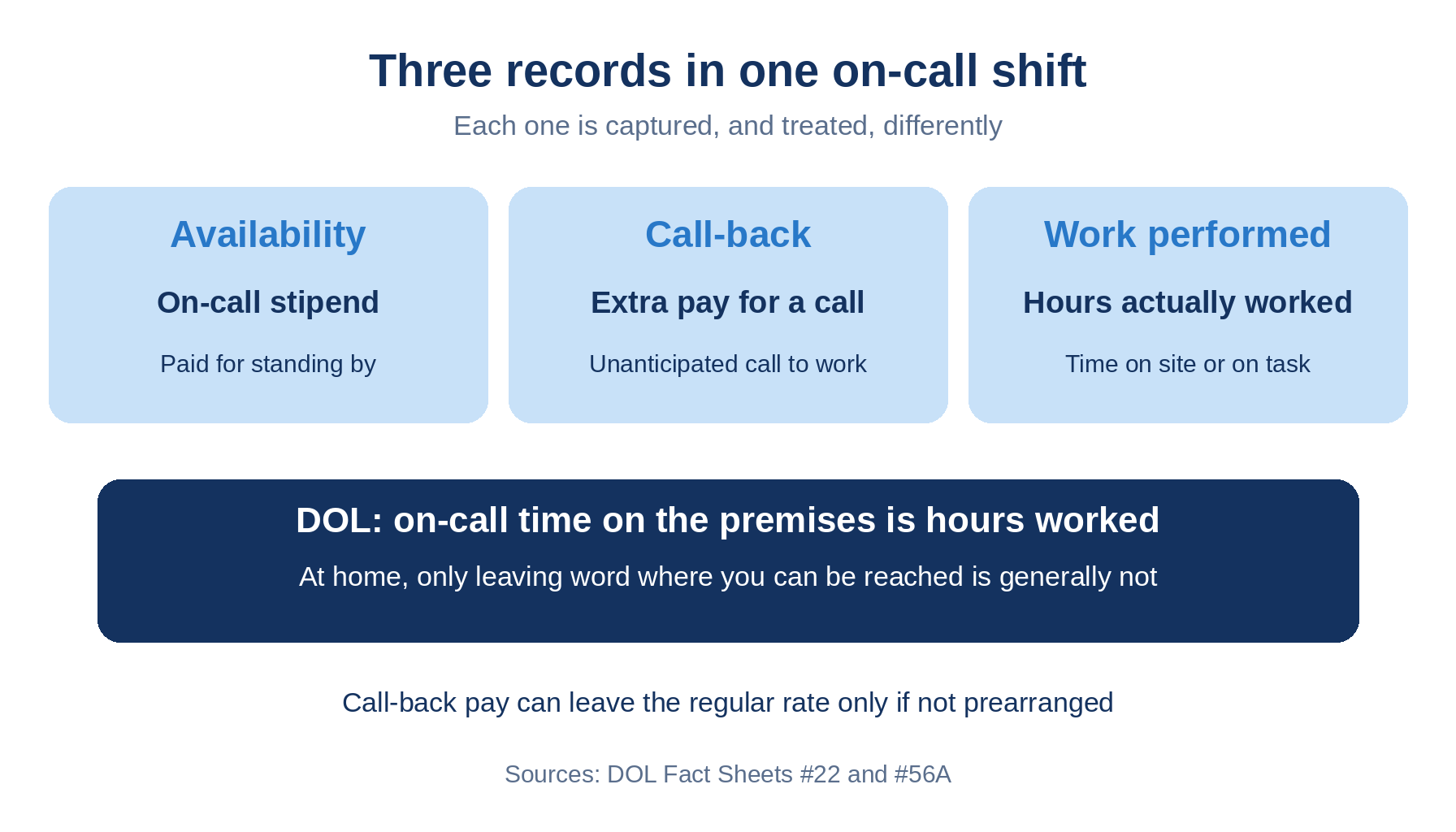
On-call pay involves three records, the availability stipend, the call-back, and hours actually worked, and each can be treated differently under Department of Labor guidance. Workday's documentation lists On Call as an example time entry code driven by calculation tags, and its conditional calculations act on existing time blocks rather than creating new ones. The gap sits before time entry: the call arrives by phone, and who took it, when, and which minimum applies are rarely captured. Classify each on-call group, separate the codes, assign who enters them, and test call-backs that cross midnight. CloudApper AI for HCM Personalization and Extensibility can capture call-back details before Workday posts pay, alongside Workday.
Table of Contents
- What Workday Does Natively
- Where the Friction Shows Up
- What to Do Within Workday First
- Where Native Tools Run Out
Payroll asks what an on-call hour pays. Auditors ask who recorded the call and when. Workday on-call pay turns on the second question, because a stipend, a call-back, and hours worked are three records, and the call happens by phone before anyone opens a timesheet. CloudApper AI for HCM Personalization and Extensibility exists for that pre-timesheet gap.
What Workday Does Natively
Workday’s time entry code documentation uses “On Call” as an example code. A code carries default calculation tags that decide which calculations apply. Time block conditional calculations can tag existing blocks to pay a premium, but per Workday’s description they act on existing blocks and do not split or create new ones.
Where the Friction Shows Up
- Classification comes first. The Department of Labor treats on-call time on the premises, or so close that it cannot be used personally, as hours worked. At home, leaving word where you can be reached is generally not, unless added constraints apply.
- A call-back minimum is a block that was never punched. Workday’s pages do not show a guaranteed minimum, so teams improvise. Bowdoin College’s Workday job aid has managers key a pager premium, while Oregon State’s timekeeping FAQ has workers key a call-back code.
- The regular rate shifts by category. DOL Fact Sheet 56A allows call-back pay to be excluded only if not prearranged, and Fact Sheet 56B says on-call pay required by state or local law is typically included, as with a bonus in the regular rate.
- Late logging corrupts the record. A call taken by phone and entered Monday carries a guessed start time, which matters for off-the-clock work and overtime.
What to Do Within Workday First
- Classify each on-call group: premises, restricted home, or free home.
- Build separate time entry codes for the stipend, the call-back minimum, and work performed.
- Decide who enters each code, using the self service edit restriction where a manager must.
- Test a call-back that crosses midnight and the week boundary, including for workers with blended overtime rates.
- Confirm regular rate treatment with payroll counsel.
Workers covered by union work rules need the agreement’s call-back language mapped to these codes, and state and contract terms, not federal law, set most minimums.
Where Native Tools Run Out
Workday documents the codes and tags. It does not show when the call was received, who took it, or a minimum enforced when the job is cancelled en route. That data starts by phone, so no calculation can reconstruct it. CloudApper AI for HCM Personalization and Extensibility can capture it at the source.
How CloudApper Closes the Gap
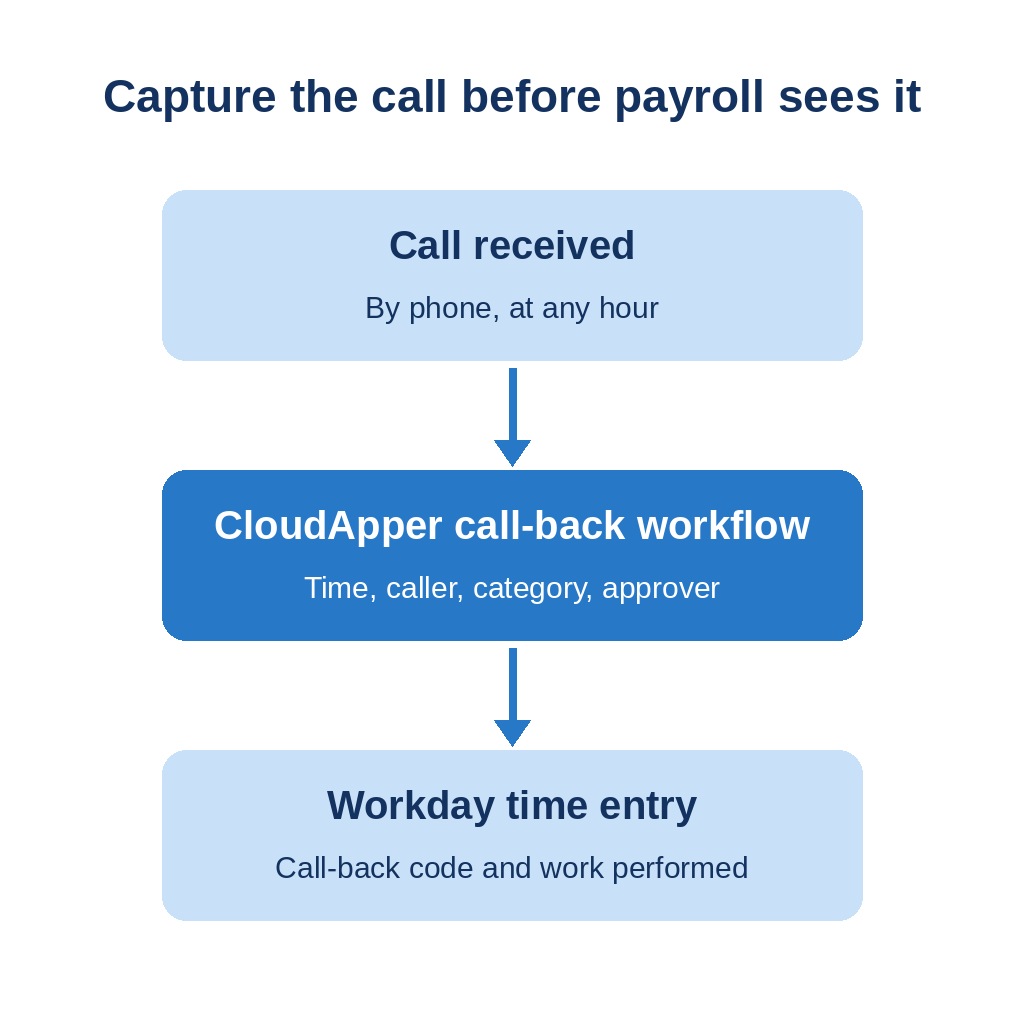
The platform is no-code. A call-back workflow can require call time, caller, policy category, and approver before the entry reaches Workday. CloudApper AI TimeClock for Workday runs on iOS and Android tablets, and its configurable attestations can ask a worker arriving at the site whether the shift is a call-back. Workday still calculates pay. CloudApper AI for HCM Personalization and Extensibility works alongside Workday, not instead of it.
Frequently Asked Questions
Q: Does Workday support on-call pay?

Workday’s documentation lists On Call as an example time entry code. Its pages do not describe a built-in call-back feature, so confirm the design in your tenant.
Q: Is on-call time paid under the FLSA?
It depends on restrictions. DOL treats on-call time on the premises as hours worked, while on-call time at home with only a duty to leave word is generally not, unless added constraints apply.
Q: What is call-back pay?
DOL describes it as extra compensation for responding to an unanticipated call to work. It may be excluded from the regular rate only if the call-back was not prearranged.
Q: Do on-call stipends count in the regular rate?
DOL says on-call pay required by state or local law is typically included in the regular rate.
Q: How do you record a call-back in Workday?
Use one time entry code for the call-back and another for work performed, and decide in advance whether the worker or the manager enters them.
If call-backs are still logged by phone and entered later, talk to the CloudApper team about capturing them before they reach Workday.

What is CloudApper AI Platform?
CloudApper AI is an advanced platform that enables organizations to integrate AI into their existing enterprise systems effortlessly, without the need for technical expertise, costly development, or upgrading the underlying infrastructure. By transforming legacy systems into AI-capable solutions, CloudApper allows companies to harness the power of Generative AI quickly and efficiently. This approach has been successfully implemented with leading systems like UKG, Workday, Oracle, Paradox, Amazon AWS Bedrock and can be applied across various industries, helping businesses enhance productivity, automate processes, and gain deeper insights without the usual complexities. With CloudApper AI, you can start experiencing the transformative benefits of AI today. Learn More
- Useful Links:
- Agentic AI
- No-Code/Low-Code
- Custom Software
- HCM Personalization
- iPaaS
- FedRAMP
Brochure
CloudApper AI TimeClock
For accurate & touchless time capture experience.
Download Brochure
CloudApper AI Solutions for Workday


- Works with








- and more.
Similar Posts

Workday Paid Sick Leave Pay Rates: State Rules, Regular Rate,…

Workday Overpayment Recovery: State Limits for Hourly Workers