The Workday mobile app brings self-service to hourly workers, but required training, onboarding forms and approvals finished off the clock can be compensable under the FLSA. This guide covers what counts as work, what DOL guidance requires, what to configure in Workday, and how CloudApper hrPad keeps required tasks on paid time.

TL;DR
Viewing pay slips or schedules in the Workday mobile app is generally not work, but completing required training, onboarding forms or approvals off the clock generally is. Under 29 CFR 785.13 a policy against off-the-clock work is not enough, and DOL Field Assistance Bulletin 2020-5 says employers must pay for work they know or have reason to know about. Give required tasks paid time, publish a reporting procedure, and compare task timestamps with punches. CloudApper hrPad moves required tasks to a kiosk used while workers are punched in.
Table of Contents
- What Workday Handles Natively
- Where Off-the-Clock Exposure Starts
- What to Configure in Workday First
- Where Native Controls Stop
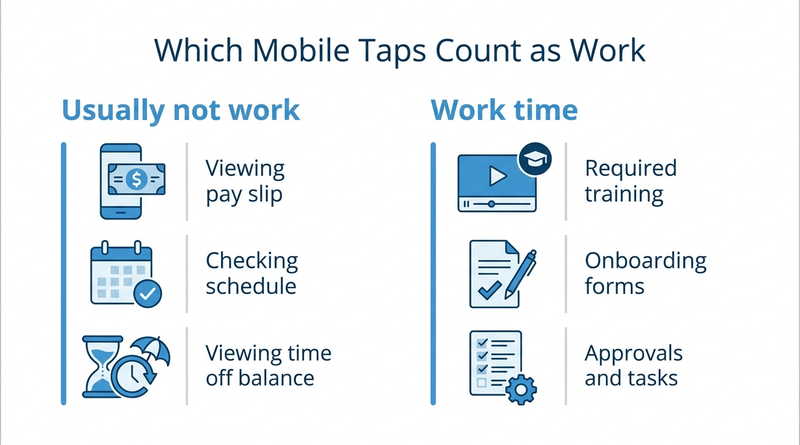
Off-the-clock work in the Workday mobile app is an FLSA problem for only some tasks, and the line between them is easy to draw. Checking a pay slip or viewing next week’s schedule on a Sunday is not compensable work. Finishing a required safety module from the couch, or answering a supervisor’s task notification at 9 p.m., is.

Those last two create Fair Labor Standards Act exposure for hourly employers, because the app makes them easy and nothing records the time. CloudApper adds a layer alongside Workday that moves the work part of mobile self-service back onto paid time.
What Workday Handles Natively
The Workday mobile app gives hourly workers pay slips, schedules, time off, tasks and learning on their own phones. Admins control which security groups can use mobile access through authentication policies and security configuration. For many organizations the app is the only way self-service reaches the frontline, since email notifications rarely reach hourly employees.
Where Off-the-Clock Exposure Starts
Under 29 CFR 785.13, work an employer suffers or permits is paid time, and a written rule against it is not enough. Management has to enforce the rule. The Department of Labor’s Field Assistance Bulletin 2020-5 adds that employers must pay for work they know or have reason to know about. The app creates that knowledge, because every completed task carries a timestamp. Three patterns show up most:
- Required training assigned with a due date and completed at home, which is the problem behind tracking compliance training for frontline workers.
- Onboarding forms new hires finish on their phones before day one, a common workaround when onboarding tasks stall for frontline new hires.
- Hourly leads approving time or answering inbox tasks after their shift, the same pressure covered in Workday time approvals.
What to Configure in Workday First
Keep pay slips, schedules and balances on mobile, and review which business process steps give hourly workers tasks that take real time. Give training and onboarding tasks paid time blocks, or a time entry code workers use when they complete them. Publish a reporting procedure for any work done off the clock, as FAB 2020-5 describes, and don’t let managers discourage it. Compare task completion timestamps with punch data to find work done outside paid hours.
Where Native Controls Stop
Workday can restrict mobile access or tell workers to log off-clock tasks, but it can’t make the required work happen while the worker is on paid time. Shutting off mobile access just pushes workers back to unread email. This is where CloudApper puts task completion on paid time at the site instead of on a personal phone at home.
How CloudApper Keeps Required Tasks on Paid Time
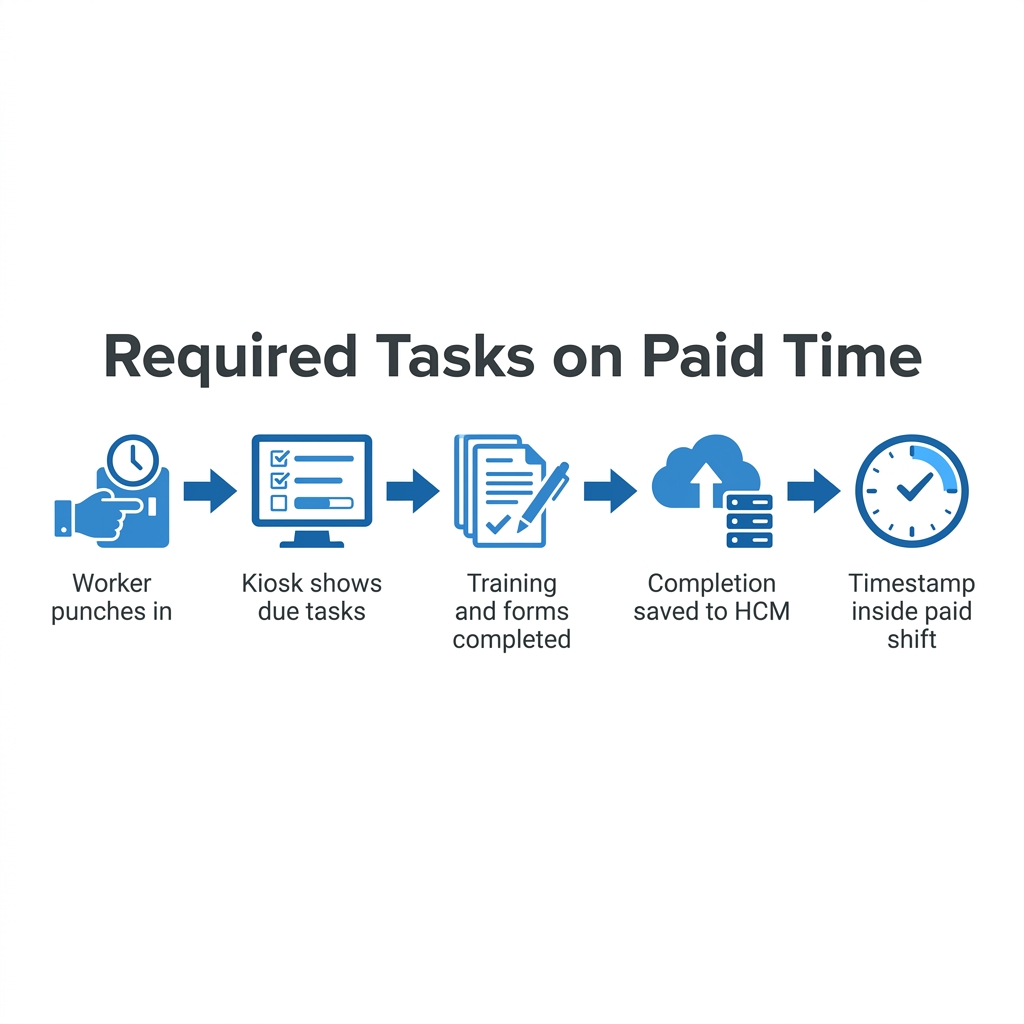
CloudApper hrPad for Workday puts required training, onboarding forms and acknowledgments on a kiosk next to the time clock. Workers complete them while punched in, and completion writes back to Workday with a timestamp inside a paid shift. The phone keeps view-only access to pay slips for hourly workers and schedules, which carries no wage exposure.
Frequently Asked Questions
Q: Is checking the Workday app off the clock compensable work?
Viewing pay slips or schedules usually isn’t. Completing required tasks such as training, forms or approvals generally is work time for nonexempt employees.
Q: Do I have to pay hourly employees for training completed at home?
Required, job-related training is generally compensable under the FLSA, even when completed outside scheduled hours.
Q: Is a policy against off-the-clock work enough?
No. Under 29 CFR 785.13, management must enforce the rule, not just publish it.
Q: What does DOL Field Assistance Bulletin 2020-5 say?
Employers must pay for work they know or have reason to know about, and a reasonable reporting procedure for unscheduled time helps meet that duty.
Q: Can I restrict hourly workers’ Workday mobile access?
Yes. Authentication policies and security configuration can limit mobile access by security group.
Q: How do I find tasks completed off the clock in Workday?
Compare business process completion timestamps with time punches for nonexempt workers.
Q: How can frontline workers complete required tasks on paid time?
Schedule paid time blocks, or provide an onsite kiosk used while punched in.
If your hourly workers are finishing required Workday tasks at home, talk to the CloudApper team about moving that work back onto paid time, alongside Workday.

What is CloudApper AI Platform?
CloudApper AI is an advanced platform that enables organizations to integrate AI into their existing enterprise systems effortlessly, without the need for technical expertise, costly development, or upgrading the underlying infrastructure. By transforming legacy systems into AI-capable solutions, CloudApper allows companies to harness the power of Generative AI quickly and efficiently. This approach has been successfully implemented with leading systems like UKG, Workday, Oracle, Paradox, Amazon AWS Bedrock and can be applied across various industries, helping businesses enhance productivity, automate processes, and gain deeper insights without the usual complexities. With CloudApper AI, you can start experiencing the transformative benefits of AI today. Learn More
- Useful Links:
- Agentic AI
- No-Code/Low-Code
- Custom Software
- HCM Personalization
- iPaaS
- FedRAMP

Brochure
CloudApper AI TimeClock
For accurate & touchless time capture experience.
Download Brochure
CloudApper AI Solutions for Workday



- Works with








- and more.
Similar Posts

How to Rehire in Workday: Service Dates, I-9 and ACA…

January 1 Minimum Wage Increases in Workday: How to Update…