At least nine states raise their minimum wage on January 1, 2027, and each change can move exempt thresholds, grade ranges and pay differentials. This guide covers Workday mass compensation changes, where compression and local rates break the update, what to do before December, and how CloudApper keeps wage rules running.

TL;DR
At least nine states raise their minimum wage on January 1, 2027, and California's exempt salary floor rises with it to $72,384. Workday handles effective-dated mass changes through compensation loads, but an EIB only applies the numbers it is given. Differentials for leads, city minimums and union formulas live in spreadsheets, and a missed row becomes a retro pay correction. CloudApper AI for HCM Personalization and Extensibility stores those rules as logic and sends calculated changes into Workday's compensation process.
Table of Contents
- What Workday Handles Natively
- Where the Update Breaks
- What to Do in Workday Before December
- Where Native Mass Changes Stop
A January 1 minimum wage increase in Workday is rarely a single rate change, because each new floor can also move exempt salary thresholds, pay ranges and the gap between new hires and tenured staff. California shows the math: the state sets its exempt floor at twice the minimum wage for full-time work, so the $17.40 minimum on January 1 means $17.40 × 2 × 2,080 = $72,384 for 2027.

According to OnPay’s state tracker, at least nine states raise their minimum on January 1, 2027, including Washington to $17.73 and Michigan to $15.00. CloudApper adds rule-based wage logic alongside Workday for the part of this update that native mass changes don’t cover.
What Workday Handles Natively
Workday stores hourly pay through compensation plans and grades, with effective-dated changes. A mass update usually runs as a Request Compensation Change load through an EIB, dated January 1, with grade and range updates loaded alongside it. The EIB versus integration trade-offs apply. Reports by location and compensation plan find every worker below the new minimum.
Where the Update Breaks
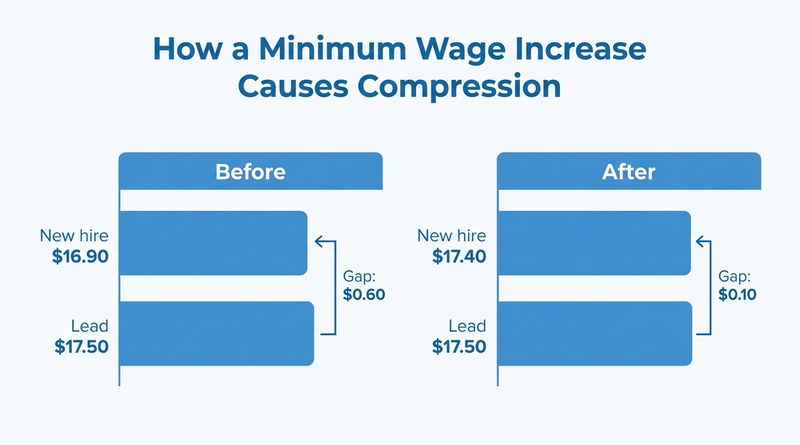
Raising everyone under $17.40 to $17.40 creates compression. A lead at $17.50 who made $0.60 more than new hires now makes ten cents more. Local minimums in cities and counties sit above state rates, so multi-location configurations need a separate rate table for each jurisdiction. Union contracts often tie rates to the minimum plus a fixed amount, which the collective bargaining rules in Workday have to reflect. Exempt employees under a state’s new salary floor need a decision before January 1, not after.
What to Do in Workday Before December
- Pull every hourly worker by work location and compare against the 2027 state and local rates.
- Update compensation grade ranges first, so the new minimum isn’t outside the range.
- Decide your differential policy, for example keeping leads a fixed amount above entry, and apply it in the same load.
- Report exempt employees by state against each new salary threshold.
- Test the load in a sandbox, and confirm shift premiums calculated as a percentage still produce the right amount, as covered in shift differential configuration.
Where Native Mass Changes Stop
An EIB applies the numbers you give it. It doesn’t know that a lead must stay $1.00 above entry, that a city rate overrides the state rate, or that a contract adds $0.75 to whatever the minimum becomes. Those rules live in a spreadsheet rebuilt every December, and a missed row becomes a retro pay correction in February. This is the gap CloudApper fills, by keeping the rules running alongside Workday instead of in a spreadsheet.
How CloudApper Keeps Wage Rules Running
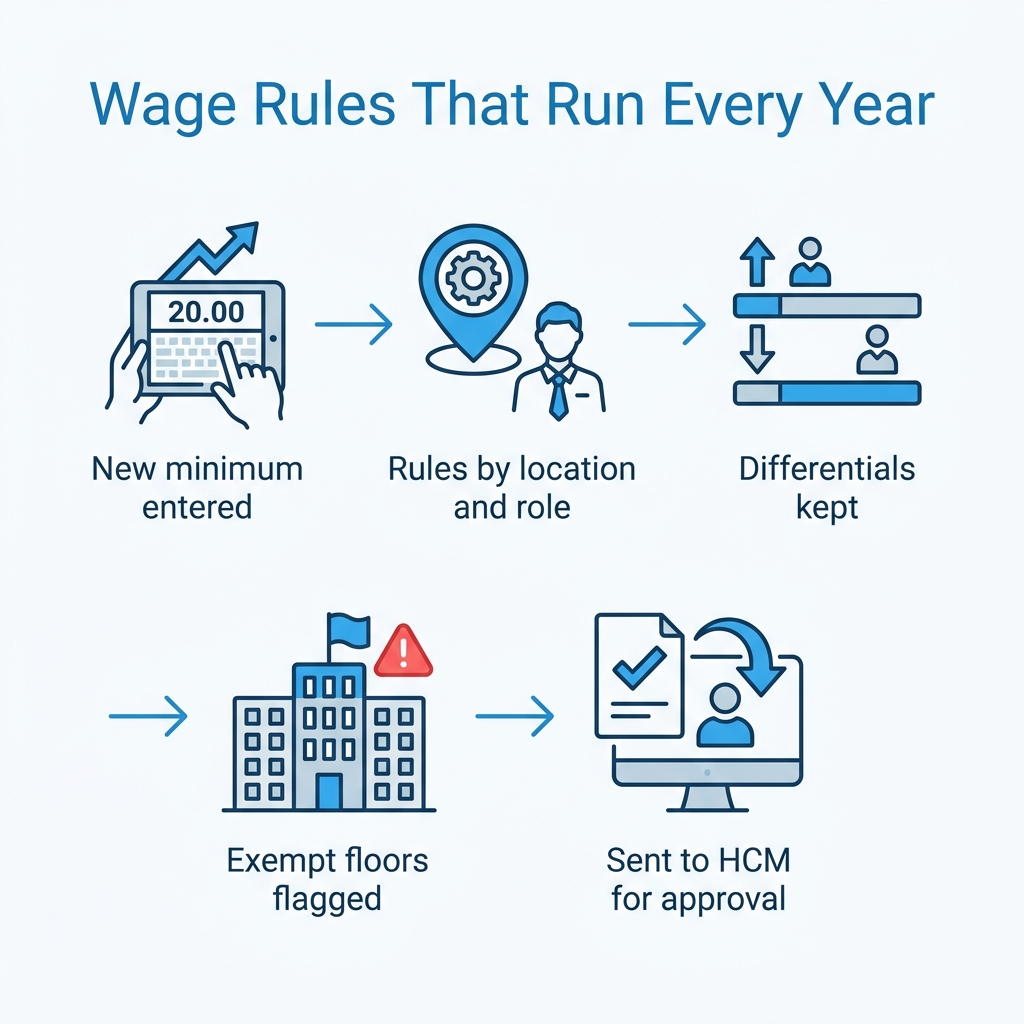
CloudApper AI for HCM Personalization and Extensibility stores your wage rules as logic: the minimum by jurisdiction, required differentials by role, and contract formulas. When a new rate is entered, it calculates every affected worker’s new rate, flags compression and exempt threshold issues, and sends the result into Workday’s compensation process for approval. The same rules handle July 1 city increases.
Frequently Asked Questions
Q: How do I do a mass pay rate change in Workday?
Load Request Compensation Change through an EIB with a January 1 effective date, update grade ranges in the same cycle, and route the changes through your compensation approvals.
Q: Which states raise the minimum wage on January 1, 2027?
OnPay’s tracker lists California, Colorado, Connecticut, Maine, Michigan, New Jersey, Ohio, Rhode Island and Washington, with Virginia and Nebraska pending final figures.
Q: What is wage compression?
Wage compression happens when raising the lowest rates shrinks the gap between new hires and experienced or lead employees.
Q: Does a minimum wage increase affect exempt employees?
It can. California sets its exempt salary floor at twice the state minimum wage for full-time work, so the floor rises with the minimum.
Q: How do I handle city minimum wages in Workday?
Report workers by work location and maintain a rate for each jurisdiction where the local minimum exceeds the state rate.
Q: What happens if a minimum wage update is missed in payroll?
Underpaid hours need a retro or off-cycle correction, and the employer may face back pay liability.
If your minimum wage update still runs on a December spreadsheet, talk to the CloudApper team about keeping wage rules running alongside Workday.

What is CloudApper AI Platform?
CloudApper AI is an advanced platform that enables organizations to integrate AI into their existing enterprise systems effortlessly, without the need for technical expertise, costly development, or upgrading the underlying infrastructure. By transforming legacy systems into AI-capable solutions, CloudApper allows companies to harness the power of Generative AI quickly and efficiently. This approach has been successfully implemented with leading systems like UKG, Workday, Oracle, Paradox, Amazon AWS Bedrock and can be applied across various industries, helping businesses enhance productivity, automate processes, and gain deeper insights without the usual complexities. With CloudApper AI, you can start experiencing the transformative benefits of AI today. Learn More
- Useful Links:
- Agentic AI
- No-Code/Low-Code
- Custom Software
- HCM Personalization
- iPaaS
- FedRAMP

Brochure
CloudApper AI TimeClock
For accurate & touchless time capture experience.
Download Brochure
CloudApper AI Solutions for Workday



- Works with








- and more.
Similar Posts

How to Rehire in Workday: Service Dates, I-9 and ACA…

The Workday Mobile App and Off-the-Clock Work: Which Hourly Tasks…