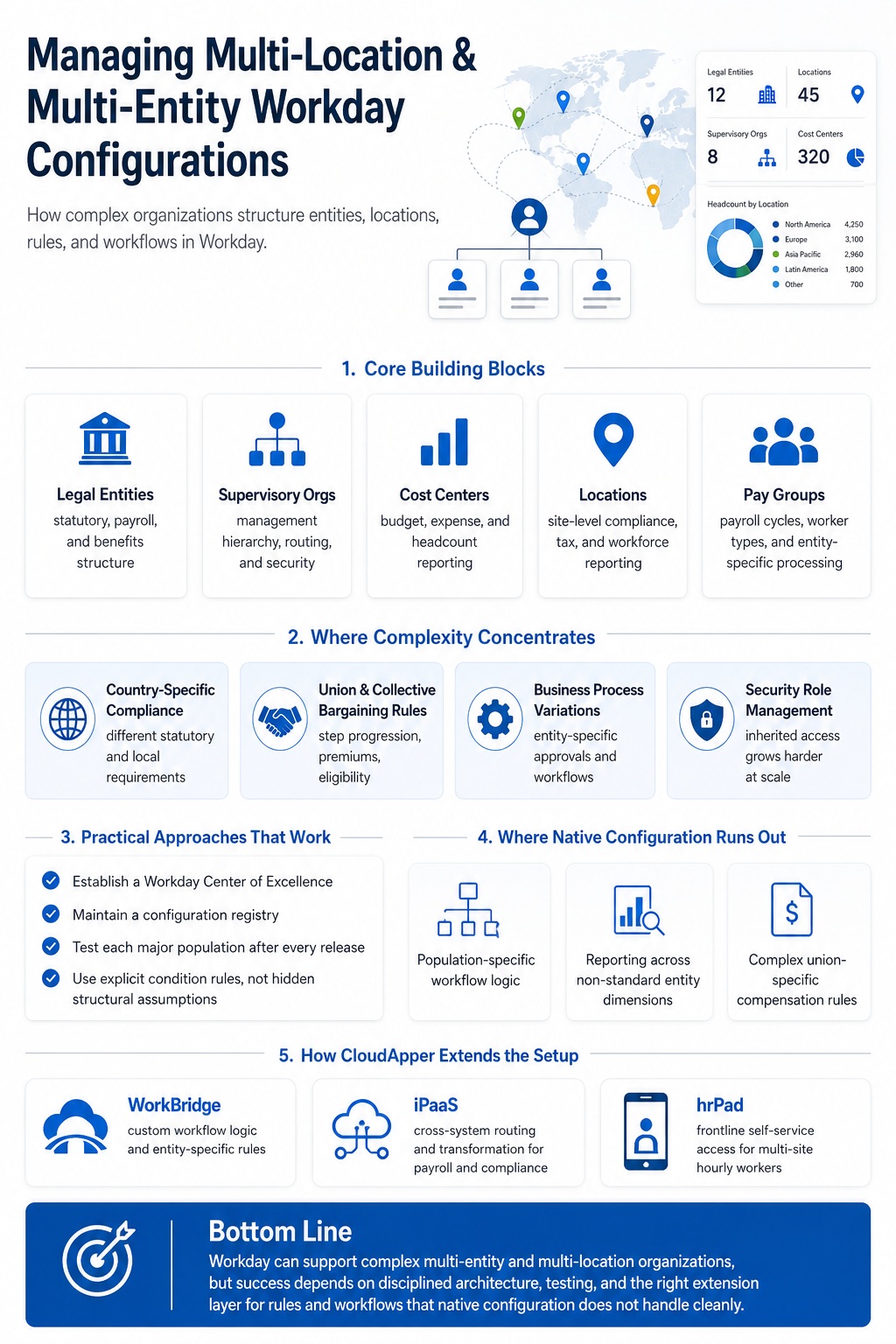
- Workday’s Core Building Blocks for Complex Organizations
- Where Multi-Entity Configuration Gets Hard
- Practical Approaches That Work
- Where Native Configuration Runs Out
Workday handles multi-entity and multi-location configuration well, but how the tenant is architected early in implementation decides how painful every later change becomes. Each added legal entity, union agreement, country-specific rule or location with its own payroll and shift rules raises complexity in ways that are rarely linear.

That is daily reality for manufacturers with salaried engineers and unionized production workers in one tenant, and for health systems with facilities across many states. Where native configuration reaches its ceiling, extending the platform is usually more practical than customizing or replacing it. CloudApper is an HCM software personalization platform that adds custom apps, workflow logic and integrations as an extension layer alongside Workday, without touching the core tenant.
Workday’s Core Building Blocks for Complex Organizations
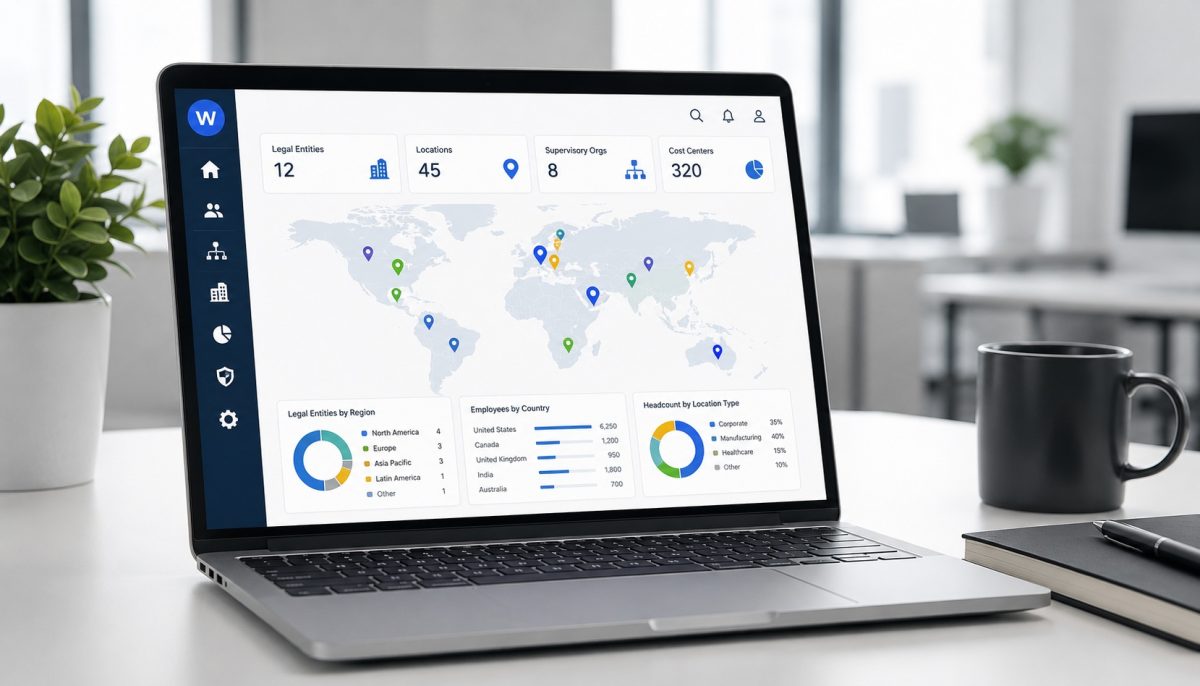
Workday’s organizational model is built around a set of structural objects that, when configured correctly, allow a single tenant to represent a genuinely complex enterprise. Understanding what each one does — and where it fits — is the starting point for any serious multi-entity or multi-location discussion.
Legal Entities
In Workday, a Legal Entity represents a company or organization that has legal standing — it’s the structure used for statutory reporting, payroll, and compliance obligations that vary by jurisdiction. Organizations with multiple incorporated entities (subsidiaries, holding companies, joint ventures) configure each as a separate Legal Entity within the same Workday tenant.
Legal Entities in Workday connect to:
- Company-level payroll processing, where payroll runs are associated with the Legal Entity that employs the worker
- Country-specific statutory reporting, including alternate chart of accounts for local regulatory requirements
- Benefits eligibility, where benefit plans can be scoped to specific Legal Entities or populations within them
One tenant can hold multiple Legal Entities. This is the standard architecture for organizations with subsidiaries or operating entities in multiple countries or jurisdictions. What it doesn’t automatically solve is the workflow logic that varies between those entities — different approval chains, different leave rules, different pay structures — which requires separate configuration work even within a single shared tenant. This is one of the patterns where organizations increasingly turn to platforms like CloudApper: rather than building entity-specific workflow logic inside the Workday tenant — where it accumulates maintenance debt across every release cycle — they build it in an AI-native layer that sits alongside Workday, reads from it, and writes back to it. The Workday configuration stays clean; the entity-specific logic stays portable.
Supervisory Organizations
Supervisory Organizations are the backbone of Workday’s HCM structure. They define the management hierarchy — who reports to whom, how approval routing works, what security access flows down from which position. For multi-location organizations, Supervisory Organizations typically mirror the operational org chart, with each location or business unit having its own Supervisory Organization structure.
The critical thing to understand about Supervisory Organizations is that they’re not just org chart decoration — they drive Workday’s approval routing, security access inheritance, and reporting rollups. Misconfiguring a Supervisory Organization structure (particularly during M&A, reorganization, or rapid geographic expansion) creates downstream problems in approval workflows, security role assignments, and compensation reporting that can take significant effort to untangle.
Cost Centers and Cost Center Hierarchies
Cost Centers track where budget and expense are attributed. In multi-entity organizations, they typically align with Legal Entities and operational business units, and they feed directly into financial reporting and headcount analytics. For organizations that run both Workday HCM and Workday Financials, the Cost Center hierarchy is the connective tissue between workforce and financial data.
For multi-location organizations, the Cost Center structure also matters for how workforce analytics slice and report by site — which is increasingly important as organizations try to understand labor cost and productivity at a location level rather than just a company level.
Locations
Workday’s Location object represents a physical place of work. For multi-site organizations, Locations are configured for each site and connected to workers’ positions. They’re used for compliance purposes (site-specific labor law, break requirements, geofencing for time tracking), payroll tax calculations (especially critical in multi-state US deployments, where tax withholding depends on work location), and reporting that needs to break down workforce data by physical site.
Pay Groups and Payroll Configuration
For organizations running Workday Payroll natively, Pay Groups segment the workforce by payroll processing frequency, pay type, or Legal Entity. A manufacturing organization with salaried staff on semi-monthly cycles and hourly workers on weekly cycles needs separate Pay Groups configured correctly — and the intersection of Pay Groups with Legal Entities, union agreements, and location-specific rules is where payroll configuration in multi-entity Workday deployments gets genuinely complex.
Where Multi-Entity Configuration Gets Hard
Workday’s organizational model is capable. The challenge is that the complexity of a real enterprise doesn’t always map cleanly onto these objects, and the places where it doesn’t map cleanly tend to be the same places that cause the most ongoing administrative friction.
Country-Specific Compliance at Scale
Workday provides pre-configured setups for 55 countries, with country-specific configurations covering statutory reporting, tax declaration frameworks, and local regulatory requirements. For organizations in those supported countries, this is a genuine advantage over platforms that treat international compliance as an afterthought.
Where it gets complicated is at the intersection of country-specific rules and organization-specific policies. A manufacturing company operating in Germany needs to comply with both German statutory requirements (Works Council involvement, collective agreements) and its own internal compensation structures. The statutory rules are in Workday’s country configuration; the organization-specific overlay has to be built on top of it. At scale — multiple countries with overlapping requirements — the tenant configuration required to represent all of this is substantial and requires ongoing maintenance as both regulations and organizational structures evolve.
Union Agreements and Collective Bargaining Rules
This is one of the most commonly underestimated configuration challenges in multi-entity Workday deployments. Union agreements define pay rules, step progression, premium calculations, and eligibility conditions that are frequently specific enough that Workday’s standard compensation and benefit plan structures can’t accommodate them without significant custom configuration.
The specific points where union rules strain native Workday:
Step progression logic: Union contracts often define promotion and step advancement based on a combination of seniority, performance criteria, and contract-specific timelines. Workday’s standard compensation grade ladder supports some of this, but union-specific rules — particularly multi-factor progression with contract-defined exceptions — often require workarounds or supplementary logic outside the core compensation module.
Premium pay calculations: Shift differentials, hazard pay, and contract-specific premium rules that apply conditionally (based on hours worked, location, or classification) are configured in Workday’s time calculation framework, but complex union agreements can require premium stacking logic that pushes beyond what’s natively configurable without significant development effort.
Grievance and seniority tracking: Some union agreements require tracking seniority at a granularity (by classification, by location, by unit) that doesn’t align with Workday’s standard position or job profile structure. Organizations that try to accommodate this entirely within native Workday often end up with configurations that are difficult to explain, audit, and maintain.
Eligibility rules by contract population: Where different union agreements apply to different worker populations within the same organization, each agreement’s eligibility conditions for benefits, time off, and compensation need to be represented separately. At a certain level of complexity, the number of benefit plans, compensation grades, and eligibility rules required to represent all populations accurately becomes operationally unwieldy.
Business Process Variations Across Entities
Business process configuration in Workday is powerful but global-by-default. A hire approval workflow configured in Workday applies across the tenant unless it’s explicitly conditioned by organization, location, or other attributes. For multi-entity organizations where different Legal Entities have different hiring approval structures — or where union-represented positions require additional review steps that non-union positions don’t — configuring the right workflow conditions for each population requires careful architecture and ongoing governance to prevent configurations from drifting over time.
Security Role Management at Complexity
Role-based security in Workday inherits through the Supervisory Organization hierarchy. For small, single-entity deployments, this is elegant. For large multi-entity deployments with many organizational layers, security role management becomes one of the most time-consuming ongoing administrative tasks — particularly during reorganizations, where positions and supervisory relationships change in ways that ripple through access rights across the tenant.
The combination of multi-entity, multi-country, and union populations often means that a single tenant has dozens of distinct security role configurations, each needing to be verified after each of Workday’s bi-annual releases.
Practical Approaches That Work
Organizations managing complex multi-entity Workday configurations have developed patterns that reduce ongoing friction. Most of these aren’t heroic — they’re discipline about how configuration decisions get made and documented.
Establish a Workday Center of Excellence with explicit multi-entity ownership: Configuration decisions that affect multiple Legal Entities or locations need a governing body that reviews them before implementation. Without this, individual teams within the organization make configuration choices that are locally logical but globally inconsistent — and untangling the inconsistency later is expensive.
Build and maintain a configuration registry: A documented map of which business processes, compensation plans, benefit plans, and security roles apply to which populations — cross-referenced against the Legal Entities, Supervisory Organizations, and locations they cover — is a baseline requirement for managing a complex tenant. This doesn’t exist automatically; it has to be built and kept current.
Test after every Workday release, at the population level: Bi-annual Workday releases can affect configuration behavior in non-obvious ways, particularly for conditional business process logic and complex benefit eligibility rules. Organizations with multi-entity tenants need regression test suites that cover each significant population, not just the common-case employee experience.
Use condition rules explicitly, not implicitly: Workday’s condition rules allow business processes and eligibility rules to branch based on organizational attributes. Explicit, documented condition rules are far easier to maintain than configurations that rely on structural assumptions (e.g., “this plan only applies to workers in this Supervisory Organization because of how the hierarchy is built”) — which break silently when the hierarchy changes.
Where Native Configuration Runs Out
Even with disciplined governance, multi-entity Workday deployments hit walls in consistent places.
Population-specific workflows that require logic Workday can’t condition natively
When a workflow needs to branch based on data that lives outside Workday’s standard data model — a custom classification, a contract type tracked in a separate system, a certification status that determines process eligibility — the native condition rule framework doesn’t have the right inputs. The choice becomes either capturing that data inside Workday as a Custom Object (which then carries its own maintenance overhead) or building the logic somewhere else that can read from Workday.
Reporting that needs to cut across entities in non-standard ways
Workday’s report writer is powerful, but reporting that requires organization-specific dimensions — a field that means something different in one legal entity than another, a calculation that applies only to a specific union population — often requires composite reports or supplementary calculations that are difficult to build and maintain without dedicated Workday reporting expertise.
Custom rules that are too specific for native compensation configuration
Union contract rules that require step progression based on multiple factors, with conditional exceptions for specific classifications or locations, regularly exceed what Workday’s native compensation framework configures cleanly. The workaround is either a complex configuration that approximates the rule or an external calculation that feeds the result back into Workday.
How CloudApper AI and iPaaS Address These Gaps
For multi-entity and multi-location organizations, two patterns emerge most consistently as the right approach to extending Workday’s native capabilities.
Population-specific workflow logic in an external layer
CloudApper AI allows organizations to build custom workflow logic — union-specific step progression calculations, location-specific eligibility conditions, entity-specific approval chains — in an AI-native layer that sits alongside Workday rather than inside the tenant. When the logic lives in CloudApper AI rather than in Workday’s business process framework, it can be updated without touching the Workday tenant, which removes the regression risk that accumulates when complex union or entity-specific configuration lives inside the core.
A representative use case: a manufacturing organization with three union agreements, each with different step-advancement formulas and premium pay stacking rules. Building those formulas natively in Workday requires Custom Objects, complex condition rules, and significant tenant configuration. Building them in CloudApper AI keeps the tenant clean and lets HR operations staff modify the formula parameters when contracts are renegotiated — without a Workday development engagement every time.
Cross-system data flow for multi-entity payroll and compliance
In multi-entity organizations, HR data needs to flow to different downstream systems for different populations — country-specific payroll vendors, statutory reporting tools, different ERP cost center structures. CloudApper iPaaS handles the routing and transformation logic for each population: the same Workday termination event might need to trigger a deprovisioning workflow in one country’s systems, a different payroll notification in another, and a statutory reporting update for a third — all with different field mappings and timing requirements.
For frontline workers across multiple locations, CloudApper hrPad extends Workday self-service to employees who don’t have a regular path into the portal, which is a common gap in manufacturing, healthcare, and retail multi-site organizations where a significant share of the workforce is hourly and deskless. Rather than creating Workday logins for workers who need only occasional HR access, hrPad kiosks at each site give those employees a physical access point that connects to Workday without requiring individual credentials.
Frequently Asked Questions
Can Workday manage multiple legal entities in one tenant?
Yes. Workday is designed to support multiple Legal Entities within a single tenant, each with its own payroll processing, statutory reporting, and benefits configuration. This is the standard architecture for organizations with subsidiaries, international operations, or multiple incorporated entities.
How does Workday handle union agreements and collective bargaining rules?
Workday accommodates union rules through its compensation grade, benefit plan, and business process configuration framework. Standard patterns (shift differentials, eligibility by worker type) are manageable. Complex union-specific step progression formulas, premium stacking rules, and contract-specific exceptions often require significant custom configuration or supplementary logic outside the native framework.
What is a Supervisory Organization in Workday and why does it matter for multi-location companies?
A Supervisory Organization defines Workday’s management hierarchy — who reports to whom, how approvals route, and what security access is inherited. For multi-location organizations, Supervisory Organizations typically represent the operational structure by site or business unit. Misconfiguring this structure creates downstream problems in approval routing, security access, and reporting that can be difficult to correct without significant rework.
How do you manage country-specific HR compliance in Workday across multiple countries?
Workday provides pre-built country configurations for 55 countries, covering statutory reporting requirements, tax declarations, and local regulatory frameworks. Organization-specific policies that overlay country-specific rules require additional configuration on top of these pre-built setups. For organizations operating in countries outside the 55 with pre-built configurations, custom setup is required.
What happens to multi-entity Workday configuration when the company is reorganized or acquires another entity?
Reorganizations affecting Supervisory Organizations have downstream effects on approval routing, security role inheritance, and reporting. Entity additions (through acquisition) require new Legal Entity configuration, potential new payroll setup, and integration of the acquired population into existing benefit and compensation structures. Both scenarios require planned configuration work — they don’t resolve automatically and shouldn’t be treated as post-merger cleanup.
Can complex union-specific workflow logic be managed outside Workday’s native configuration?
Yes. Building union-specific step progression, premium calculations, and eligibility logic in an external layer — such as CloudApper AI — and syncing results back to Workday via API keeps the Workday tenant cleaner and allows contract-specific logic to be updated without a Workday development engagement. This is increasingly common among organizations that renegotiate union contracts on multi-year cycles and need to update the governing logic without a major configuration project.
What is the recommended approach when Workday’s native reporting can’t accommodate multi-entity dimensions?
Build a documented map of the dimensions that differ by entity and determine whether they can be represented as Custom Objects within Workday or whether they need to live in an external data layer. For reporting that needs to combine Workday data with entity-specific data from other systems, an integration or analytics layer that pulls from Workday’s API and joins it with the entity-specific data is usually more maintainable than attempting to represent everything inside the Workday tenant.
What to Do Next
The most common multi-entity Workday problem isn’t that the platform can’t handle the complexity. It’s that the complexity was underestimated during implementation, which means configuration choices were made for the simple case that now constrain the organization’s ability to add entities, accommodate new union agreements, or expand geographically without significant rework.
If your organization is approaching a major reorganization, an acquisition, a new union agreement, or a geographic expansion into a country where your current configuration wasn’t designed to operate — that’s the moment to assess the configuration architecture before the business need arrives, not after.
If you’d like to talk through your specific multi-entity setup and where the constraints are likely to surface, the CloudApper team is available here.

What is CloudApper AI Platform?
CloudApper AI is an advanced platform that enables organizations to integrate AI into their existing enterprise systems effortlessly, without the need for technical expertise, costly development, or upgrading the underlying infrastructure. By transforming legacy systems into AI-capable solutions, CloudApper allows companies to harness the power of Generative AI quickly and efficiently. This approach has been successfully implemented with leading systems like UKG, Workday, Oracle, Paradox, Amazon AWS Bedrock and can be applied across various industries, helping businesses enhance productivity, automate processes, and gain deeper insights without the usual complexities. With CloudApper AI, you can start experiencing the transformative benefits of AI today. Learn More
- Useful Links:
- Agentic AI
- No-Code/Low-Code
- Custom Software
- HCM Personalization
- iPaaS
- FedRAMP