Punches that never reach the tenant produce no Workday error, because Workday can only report on what arrived. This guide covers what native integration monitoring shows, the failure modes that hide behind a successful run, a two-part daily count check that exposes silent loss, and where the tenant's visibility structurally stops.

TL;DR
Missing punches at payroll close are usually not rejected events, they are events that never reached Workday to be rejected. Native integration monitoring reports whether a run succeeded and which records failed validation, but Workday has no knowledge of what the device recorded, so dropped events, retry-mangled duplicates, offset errors, and partial batches reported as complete all leave a green log entry. The practical control is a daily two-part count check: compare the clock vendor's punch count per device-day against posted time clock events, and report workers with an odd number of events where no vendor log exists. Run it daily rather than at close, while the source data still exists. Where loss happens during capture, CloudApper AI TimeClock queues punches locally and replays them with original timestamps, and confirms each punch back to the worker at the device.
Table of Contents
- What Workday Shows You Natively
- The Failures That Hide Behind a Successful Run
- The Reconciliation Check Worth Running
- Where Native Visibility Stops
Missing Workday time clock events often trace to an integration that reports success on every run while some punches never land. Timekeepers catch it two days before the period locks, when workers who were clearly on site show a missing clock-out or a missing shift, and they key the punches by hand from the schedule without logging why.

That pairing of a clean integration log and manual backfill is what to examine first. Only after that does it make sense to consider a capture layer like CloudApper AI TimeClock working alongside Workday Time Tracking.
What Workday Shows You Natively
Time clock events from a third-party clock, badge reader, or mobile app arrive through a web service call, an EIB, or a vendor connector. Workday records the integration event, and the process monitor shows whether the run completed, how many records processed, and which were rejected with a message.
Rejections are legible. An event for an inactive worker, a punch dated before a position’s effective date, or a load into a locked period fails loudly and lands in an exception report you can subscribe to. That layer works.
The Failures That Hide Behind a Successful Run
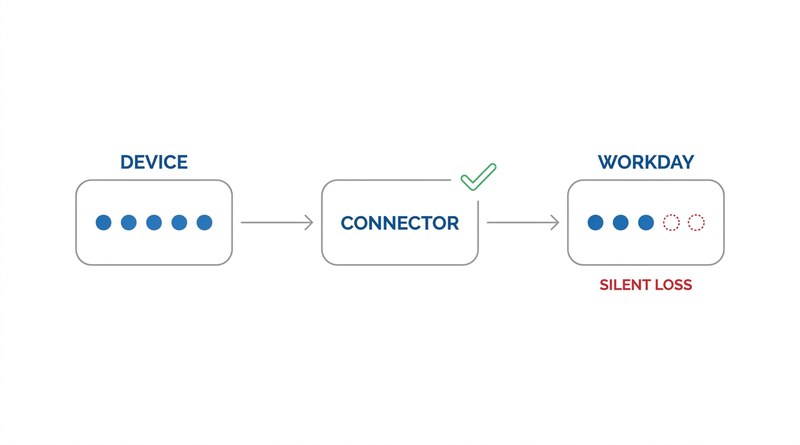
The events that cause payroll-close work are the ones that never reached Workday to be rejected.
Dropped events. A device that loses network during a shift may buffer punches locally, or may not. If the buffer overflows or the device is power-cycled, those punches are gone at the source.
Duplicate suppression. Retry logic firing after a partial success resubmits the batch, and vendor-side deduplication sometimes keeps the wrong copy, leaving a record stamped with the retry time rather than the punch time.
Timezone and DST offsets. A punch stamped in device-local time and loaded without the offset lands an hour off, or on the previous day, where it reads as an unmatched in-punch rather than an error. Workers rarely catch it, because most have no practical way to see their hours in Workday mid-shift.
Partial batches reported complete. A connector that posts 480 of 500 events and returns batch-level success leaves twenty missing punches and a green log entry.
The Reconciliation Check Worth Running
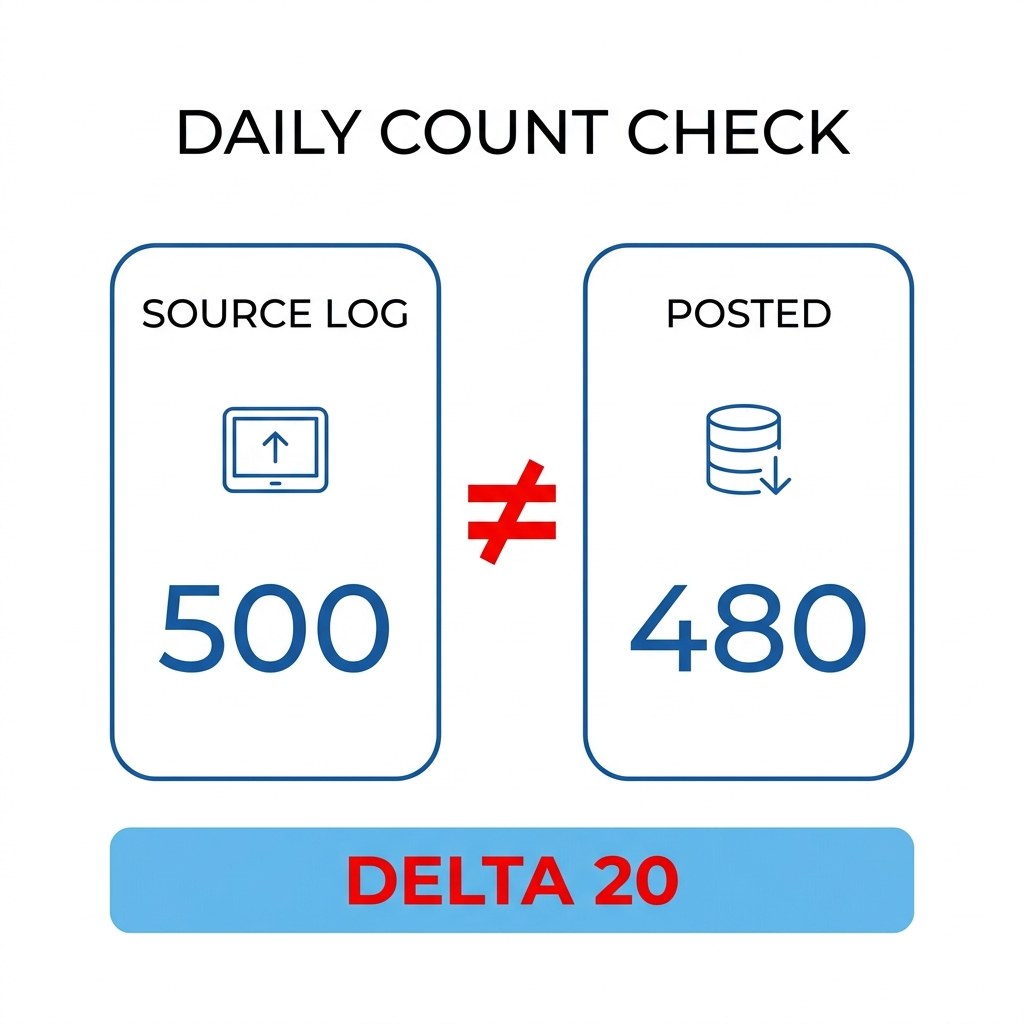
Native monitoring answers whether the run succeeded. It does not answer whether every punch that happened arrived. Close that gap with two counts, run daily rather than at period close:
- Source versus posted. Pull the punch count per device per day from the clock vendor’s log, then pull posted time clock events for the same window from a custom report grouped by capture source and date. A non-zero delta on any device-day is the signal, whatever the integration event says.
- Odd-punch detection. Without the vendor log, report workers with an odd number of clock events on a day. An unmatched in or out is the most common footprint of a dropped event, and needs no external data.
Both belong on a scheduled report with a subscription, so the finding arrives before anyone fills gaps from memory or re-enters a timesheet by hand.
Where Native Visibility Stops
Workday has no built-in job correlating device-generated punch counts against posted events, because it has no knowledge of what the device recorded. That is a boundary rather than a defect: the tenant can only validate what arrives at its door. Everything upstream is yours to reconcile, which is why integration monitoring and alerting catches failed runs but not silent loss.
The cost is measurable and usually uncounted. HR Dive put the annual cost of missing or incorrect time punches at roughly $78,700 per 1,000 employees. Most surfaces as timekeeper hours and retro pay corrections, not as an integration incident, so it rarely reaches whoever owns the integration.
Where CloudApper Fits
CloudApper AI TimeClock addresses the loss where it happens. Punches queue locally when the network drops and replay with their original timestamps when it returns, so a connectivity gap delays delivery rather than destroying the record. Each punch is confirmed back to the worker at the device, which turns a silent drop into something a person notices during the shift rather than a discrepancy reconstructed later, and it removes the guesswork that also drives wrong time entry code selection.
Where punch data crosses several systems before reaching payroll, CloudApper iPaaS carries the record counts and an audit trail through each hop, so the reconciliation above runs on logged data rather than on a manual export. Workday remains the system of record throughout.
Frequently Asked Questions
Q: How do I troubleshoot missing time clock punches in Workday?
Start by separating rejected events from absent ones. Check the integration event and process monitor for rejections with messages, then run a count comparison between the clock vendor’s log and posted time clock events for the same device and date range. Punches that were rejected appear in exception reports; punches that never arrived only show up as a count difference or as an odd number of events for a worker.
Q: Why does a Workday integration report success when punches are missing?
Most connectors report status at the batch level, so a run that processes most records and fails on a subset can still return success overall. Workday reports on what it received, not on what the device recorded, so events lost upstream of the web service call produce no error anywhere in the tenant.
Q: What causes duplicate punches in Workday Time Tracking?
Retry logic after a partial failure is the usual cause. When a batch is resubmitted, records that posted the first time arrive again, and deduplication may keep the retry copy with its later timestamp instead of the original punch time. Reconciling counts daily catches this while the source log still holds the original.
Q: Can Workday detect an unmatched clock-in automatically?
Yes, through a custom report on time clock events that flags workers with an odd number of events on a given day. This is the most reliable native signal for a dropped punch, and it requires no data from the clock vendor.
Q: Should punch reconciliation run daily or at payroll close?
Daily. At close, the device log may have rotated and the worker’s memory of the shift is the only remaining source, which is how manual backfill becomes the default. A daily count check keeps the correction inside the window where the original punch data still exists.
If timekeepers are entering punches by hand in the last days of a period, the useful question is not why the integration failed but whether anyone would know if it had. Build the count comparison, subscribe someone to it, and see how many device-days return a delta. If the loss traces to capture rather than the load, the CloudApper team can walk through how local queuing and device-level confirmation change that. You can reach them through the CloudApper contact page.

What is CloudApper AI Platform?
CloudApper AI is an advanced platform that enables organizations to integrate AI into their existing enterprise systems effortlessly, without the need for technical expertise, costly development, or upgrading the underlying infrastructure. By transforming legacy systems into AI-capable solutions, CloudApper allows companies to harness the power of Generative AI quickly and efficiently. This approach has been successfully implemented with leading systems like UKG, Workday, Oracle, Paradox, Amazon AWS Bedrock and can be applied across various industries, helping businesses enhance productivity, automate processes, and gain deeper insights without the usual complexities. With CloudApper AI, you can start experiencing the transformative benefits of AI today. Learn More
- Useful Links:
- Agentic AI
- No-Code/Low-Code
- Custom Software
- HCM Personalization
- iPaaS
- FedRAMP

Brochure
CloudApper AI TimeClock
For accurate & touchless time capture experience.
Download Brochure
CloudApper AI Solutions for Workday



- Works with








- and more.
Similar Posts

Workday Biometric Time Clock Compliance: Consent, Retention, and Deletion Rules…

Workday Kiosk Security: Protecting Pay Slips and PII on Shared…