Frontline workers pick the wrong Workday time entry code because correct selection depends on rules the entry screen never shows them. This guide covers what Workday Time Tracking handles natively, the template and calculated-time levers worth pulling first, why adding validations moves the cost rather than removing it, and where capture at the device closes the gap.

TL;DR
Time entry code errors on the frontline are not a training problem. Correct selection depends on eligibility rules, union clauses, and physical context that the Workday entry screen cannot surface at the moment the worker has to choose, so shared-device defaults win under time pressure. Most tenants can remove the majority of these decisions by trimming time entry templates per population and pushing every derivable premium into calculated time rather than worker selection. Adding validation rules on top does not eliminate the cost, it relocates it from the payroll correction queue to an exception queue that someone still has to clear. Where correct selection depends on context the tenant does not hold, CloudApper AI TimeClock handles identification, eligibility filtering, and contextual prompting at the device and writes clean time into Workday Time Tracking.
Table of Contents
- What Workday Time Tracking Actually Does With Time Entry Codes
- Where the Wrong Code Actually Comes From
- The Levers Inside Workday Worth Pulling First
- Where the Validation Strategy Turns On You
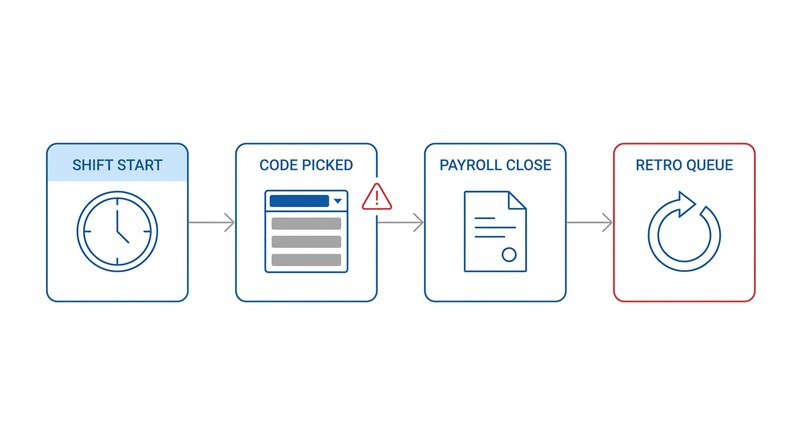
Workers pick the wrong Workday time entry codes at shared terminals because they choose under time pressure from a long list, not because they were poorly trained. A maintenance technician back after a 2 a.m. callback faces fourteen codes, two of them mentioning callback, and takes the one at the top so he can get to the line. Eleven days later payroll finds it and sends a correction to the retro queue.
Workday has levers for that moment, and they are worth pulling first. Where native controls stop helping, teams look at an extension layer like CloudApper platform for Workday to handle capture at the device instead of correction after the fact.
What Workday Time Tracking Actually Does With Time Entry Codes
A time entry code classifies a time block: regular, overtime, on-call, callback, training, worked holiday, and whatever else your organization has defined. Codes carry the mapping into payroll earnings, so the classification made at entry determines what the worker is paid and how the hours are costed.
Time entry templates control what a population sees. Templates are assigned through eligibility rules and govern which codes appear, whether the worker enters clock times or hours, and whether work tags are exposed. Two workers in the same building can see entirely different code lists.

Time calculations sit on top of raw time blocks and derive results without asking the worker anything. Daily and weekly overtime, consecutive-day premiums, shift differentials tied to a time range, and meal penalties can all be produced from clock times and worker attributes. Every rule you can express as a calculation is a rule the worker never has to know.
Work tags carry the costing dimension and default from position or get entered per block when labor moves between funding sources. Validations round out the model, with critical rules that block submission and warnings that flag it. That is a real toolkit, and most of what admins ask for on this topic is already possible inside it. The problem is not capability.
Where the Wrong Code Actually Comes From
Ask a payroll team why the wrong code gets picked and you will usually hear some version of “they need more training.” The correction pattern says otherwise: the same populations make the same category of error month after month, clustered around a few conditions.
The default wins. A shared entry screen has to open in some state, and whatever code appears first becomes the path of least resistance for someone with a line waiting on them. Misclassification concentrates on shared terminals and thins out among desk-based workers using the same template on their own laptop.
The rule the worker needs is not on the screen. Callback eligibility usually depends on whether the worker had left the premises and how long elapsed since the scheduled shift ended. Worked-holiday premium may depend on completing the shifts either side of the holiday. None of that is visible in a dropdown of code names. The worker is applying a rule they have never read, at the moment they are least able to look it up.
Multi-position workers guess. A nurse picking up shifts in two units sees position selection as an extra field rather than the rate-determining decision it is. Pick the wrong one and hours are costed to the wrong department at the wrong rate and roll into the blended overtime calculation on the wrong base, a failure that takes far longer to find than a wrong earning code.
Unclaimed premiums stay invisible. When a differential requires the worker to select a specific code and nobody selects it, nothing looks wrong at payroll close. It surfaces months later as a back-pay claim. If your shift differential and premium pay configuration depends on worker-declared codes rather than derived calculations, you have exposure you are not measuring.
The downstream cost is documented even where the specific cause is not. EY’s 2022 payroll survey found that one in five US payrolls contains an error, that a typical organization processes roughly 15 corrections per pay period, and that resolving a single error costs about $291. HR Dive put the annual cost of missing or incorrect time punches alone at roughly $78,700 per 1,000 employees. Neither figure isolates code selection, and no public dataset does. But for hourly populations, when a correction log tags each retro by originating error type, code selection is usually the largest or second-largest bucket.
The Levers Inside Workday Worth Pulling First
There is real ground to cover inside the tenant before anyone proposes new tooling. Work these in order, because the early ones often make the later ones unnecessary.
Cut the code list per population, and rename what remains. Templates accumulate codes over years of requests and nobody removes anything. Report time blocks by code for the last four quarters, filtered to one template, and find the codes used fewer than a dozen times. A frontline template showing fourteen options where four are used is producing errors by construction. Split the template rather than adding a validation, then fix the labels: “CALLBK-NS” means something to the person who built it, “Called in outside my shift” means something to the technician at 5:52 a.m.
Move every derivable rule into calculated time. This is the highest-leverage item here. If a premium can be determined from clock times, location, position, or schedule, calculate it rather than asking for it. A differential tied to hours worked after 18:00 does not need a worker-facing code. Ask of every code on the template whether Workday could work it out on its own. Each yes removes a decision from the device.
Default work tags from position, and drive entry from the schedule. Per-block costing override belongs only to populations that actually transfer labor across cost centers, and where scheduling is in Workday, pre-populating from the scheduled shift turns an open-ended selection into a confirmation.
Build the correction audit report you are missing. Most tenants cannot answer “which codes generate the most corrections, by location and supervisor” without manual work. A custom report on time blocks joined to correction history, grouped by original and corrected code, is a few hours of build and it tells you where to aim everything above. Without it you are guessing, and the guess is usually wrong about which population is worst.
Where the Validation Strategy Turns On You
The usual next step, once configuration work is done, is to add validations. If workers pick callback when they should not, block it with a condition rule. This is where the plan quietly stops working, and it is the part most discussions of this topic skip.
A validation does not remove the cost of a bad selection. It relocates it. A critical validation converts a silent misclassification into a blocked submission, which becomes a worker stuck at a terminal, a supervisor call, and an entry payroll makes on the worker’s behalf. A warning converts it into an exception someone reviews. Either way the hours still get entered and the judgment call still gets made; the labor just moves from the correction queue to the exception queue. For a few hundred workers that is a fair trade. For several thousand hourly workers on shared devices it is often a worse one.
Condition rules also have a specific blind spot. They evaluate fields on the time block, attributes of the worker, and the schedule. What they cannot evaluate is context. A rule cannot know that the technician physically left the site and came back, only that the clock times imply a gap, and it cannot read the clause governing whether that gap qualifies. Teams managing union work rules and collective bargaining agreements in Workday hit this constantly: the rule that determines the correct code lives in a contract, applies differently by local, and changes on a bargaining cycle that does not match your configuration release calendar. Add fifteen validations across several templates and their conflicts start producing entries that cannot be submitted under any code, so payroll unblocks them by hand.
Native configuration can remove most of the decisions and constrain most of the rest, but it cannot supply the worker with knowledge at the moment of entry. When correct selection depends on context the tenant does not hold, that is the boundary, and it is where CloudApper AI TimeClock is designed to work alongside Workday rather than in place of it.
How CloudApper Closes the Moment-of-Entry Gap
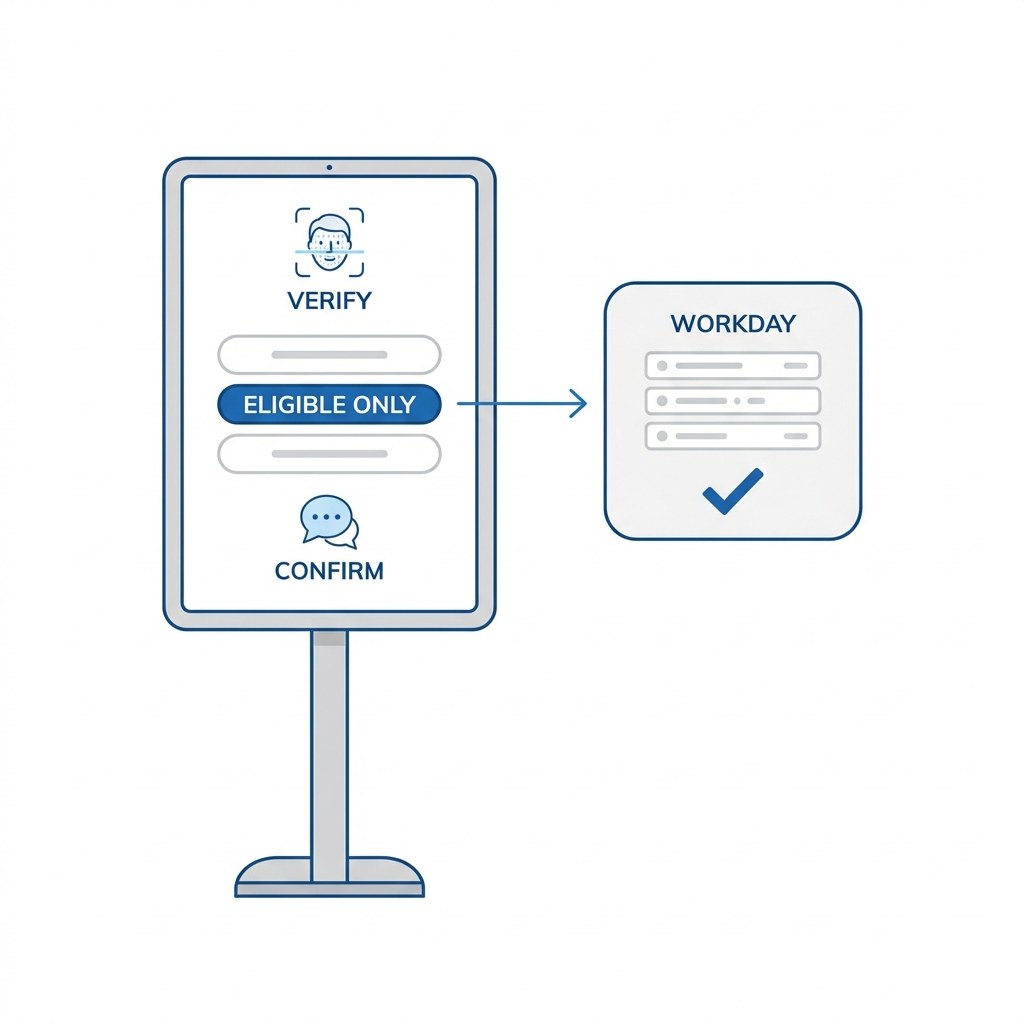
CloudApper AI TimeClock runs on a tablet at the point of capture and writes time into Workday Time Tracking. Codes, calculations, eligibility, and payroll mapping stay where they are. What changes is the ten seconds before the time block is created.
There is no shared-device default, because there is no shared session. The worker is identified individually through face, fingerprint, badge, or PIN before the screen is drawn, so the entry screen is built for that person rather than left in whatever state the previous worker abandoned. The largest source of misclassification on shared terminals is removed by construction rather than blocked by a rule.
The list shows only what that worker is eligible for right now, evaluated against their position, location, schedule, and assigned rules at the moment of the punch. Someone holding two positions sees the position the schedule expects, pre-selected. Someone with no callback eligibility never sees a callback option to pick by accident.
The device asks the question instead of expecting the worker to know the rule. When a punch does not match the scheduled shift, the tablet prompts in plain language: were you called in outside your scheduled hours? did you leave the site between shifts? The answers drive the code and are captured as an attestation, which turns a disputed retro into a documented one. Prompts and org-specific logic are configured without a Workday development cycle, in the same way teams add custom fields around Workday without touching the core system, and rules that vary by local or site are maintained per group rather than as condition rules nobody wants to touch before a payroll run.
Workers also check hours and accrued balances at the same device, reducing the traffic HR absorbs from a population with no practical way to see their hours in Workday during a shift; CloudApper hrPad extends the same hardware into self-service beyond time. The outcome is upstream: fewer corrections reach payroll because fewer wrong blocks are created, which does more for a close calendar than processing retro pay and off-cycle corrections faster after the fact. If you still rely on workers to remember which code applies when they submit a timesheet in Workday, correction volume is a permanent operating cost rather than a backlog you can work down.
Frequently Asked Questions
Q: What is a time entry code in Workday?
A time entry code classifies a time block in Workday Time Tracking and determines how those hours map to payroll earnings. Common codes include regular, overtime, on-call, callback, training, and worked holiday. Which codes a worker sees is controlled by the time entry template assigned to them through eligibility rules.
Q: How do I control which time entry codes an employee sees in Workday?
Time entry templates govern the visible code list, and templates are assigned through eligibility rules based on attributes such as position, location, worker type, or union membership. To narrow what a population sees, create a separate template containing only the applicable codes rather than adding validations on top of an oversized list.
Q: Can Workday automatically assign the right time entry code instead of asking the worker?
Partly. Anything derivable from clock times, worker attributes, or the schedule should be handled by time calculations rather than worker selection, which covers most overtime, shift differential, and consecutive-day premium scenarios. Codes that depend on facts the tenant does not hold, such as whether a worker physically left the site before returning, still require input at entry.
Q: Will adding validation rules stop incorrect time entry code selection?
Validation rules prevent an entry from being saved but do not resolve the underlying decision. A blocked submission becomes a supervisor call and a manual entry by payroll, so effort shifts from the correction queue to the exception queue rather than disappearing. Validations suit a small number of clear-cut rules and work poorly as a general strategy across large hourly populations.
Q: How much do time entry errors cost at payroll close?
EY’s 2022 payroll survey found that one in five US payrolls contains an error, with an average resolution cost of about $291 and roughly 15 corrections per pay period at a typical organization. HR Dive has reported the annual cost of missing or incorrect time punches at approximately $78,700 per 1,000 employees. Neither source isolates code selection, so the practical measure is a correction report from your own tenant.
Q: Does CloudApper AI TimeClock replace Workday Time Tracking?
No. Workday remains the system of record for time blocks, calculations, and payroll processing. CloudApper AI TimeClock runs at the point of capture, identifies the worker individually, presents only eligible codes, and writes clean time into Workday Time Tracking.
If time entry code corrections are a recurring line item on your payroll close checklist, the useful first step is measuring where they originate rather than adding another rule. Build the correction report, group it by code and location, and see whether the pattern points at template design or at the moment of entry. If it is the latter, the CloudApper team can walk through how AI TimeClock handles eligibility and prompting at the device for your populations. You can reach them through the CloudApper contact page.

What is CloudApper AI Platform?
CloudApper AI is an advanced platform that enables organizations to integrate AI into their existing enterprise systems effortlessly, without the need for technical expertise, costly development, or upgrading the underlying infrastructure. By transforming legacy systems into AI-capable solutions, CloudApper allows companies to harness the power of Generative AI quickly and efficiently. This approach has been successfully implemented with leading systems like UKG, Workday, Oracle, Paradox, Amazon AWS Bedrock and can be applied across various industries, helping businesses enhance productivity, automate processes, and gain deeper insights without the usual complexities. With CloudApper AI, you can start experiencing the transformative benefits of AI today. Learn More
- Useful Links:
- Agentic AI
- No-Code/Low-Code
- Custom Software
- HCM Personalization
- iPaaS
- FedRAMP

Brochure
CloudApper AI TimeClock
For accurate & touchless time capture experience.
Download Brochure
CloudApper AI Solutions for Workday



- Works with








- and more.
Similar Posts

Workday Biometric Time Clock Compliance: Consent, Retention, and Deletion Rules…

Workday Kiosk Security: Protecting Pay Slips and PII on Shared…