Biometric time clocks connected to Workday keep face templates with the clock vendor, not in Workday. Learn the BIPA, Colorado, and Texas retention rules, what to settle before go-live, how to tie template deletion to Workday terminations, and how CloudApper AI TimeClock supports opt-out punching.
TL;DR
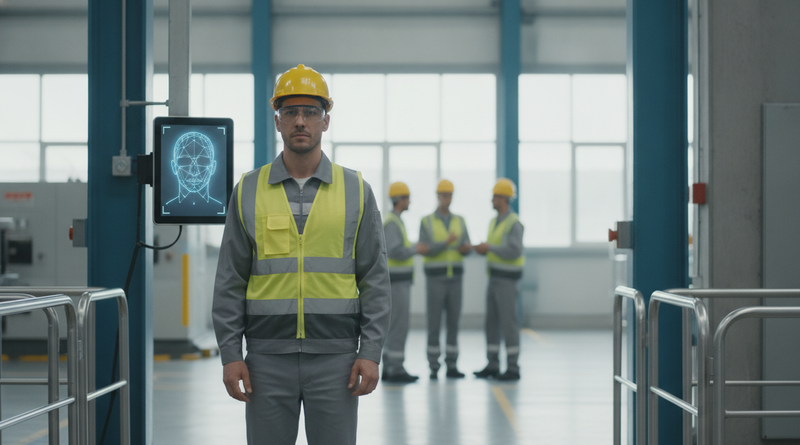
When a biometric time clock connects to Workday, Workday holds the worker record and termination date while the clock vendor holds the face or fingerprint template. Illinois BIPA, Colorado's 2025 biometric amendment, and Texas CUBI each set consent and deletion deadlines, so the policy, consent capture, opt-out method, and termination-driven deletion must be settled before go-live. CloudApper AI TimeClock supports this with facial recognition plus QR, barcode, and NFC punching for workers who decline, all synced to Workday Time Tracking.
Table of Contents
- What Workday Handles Natively
- Where Compliance Breaks Down
- What to Settle Before Go-Live
- Where Native Tools Run Out
Illinois allows three years. Colorado allows 24 months. Texas allows one year after the purpose expires. Those are the outer limits for keeping a worker’s face or fingerprint data, and the countdown starts at an event Workday records but your clock vendor may never hear about: termination. A Workday biometric time clock rollout needs its consent, retention, and deletion policy finished before the first enrollment. CloudApper deploys facial recognition clocks that sync with Workday, and this is the policy work we ask customers to settle first.
What Workday Handles Natively
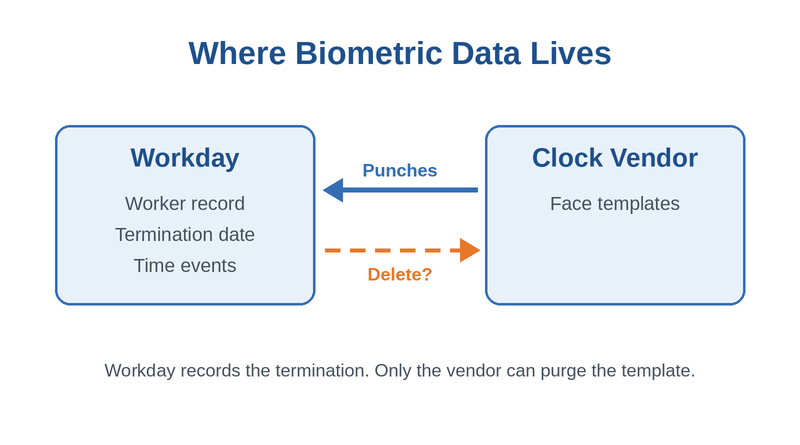
Workday is the system of record for the worker, the hire date, the termination date, and the time events that reach payroll. It does not capture biometrics itself. The Workday Time Kiosk app identifies workers by employee ID, and facial or fingerprint matching happens on clock partner devices, which send check-in and check-out events into Workday Time Tracking. That keeps templates out of your tenant and puts the data your policy governs with a vendor.
Where Compliance Breaks Down
Illinois BIPA requires a written release before collection and a public retention schedule. Its 2024 amendment, signed August 2, 2024, made repeated scans of the same person one violation instead of one per punch, which lowers exposure but does not remove it. Colorado’s biometric amendment, effective July 1, 2025, requires a written policy and deletion at the earliest of the purpose ending, 24 months after the last interaction, or 45 days after storage is no longer needed, according to SHRM’s analysis. New York bars requiring fingerprints as a condition of employment.

The common failure is operational. A worker is terminated in Workday, their access is removed as described in our termination access guide, and their template stays on the clock indefinitely.
What to Settle Before Go-Live
- Publish a written policy with a retention schedule that meets your strictest state.
- Collect signed or electronic consent before enrollment, and store it with the worker record.
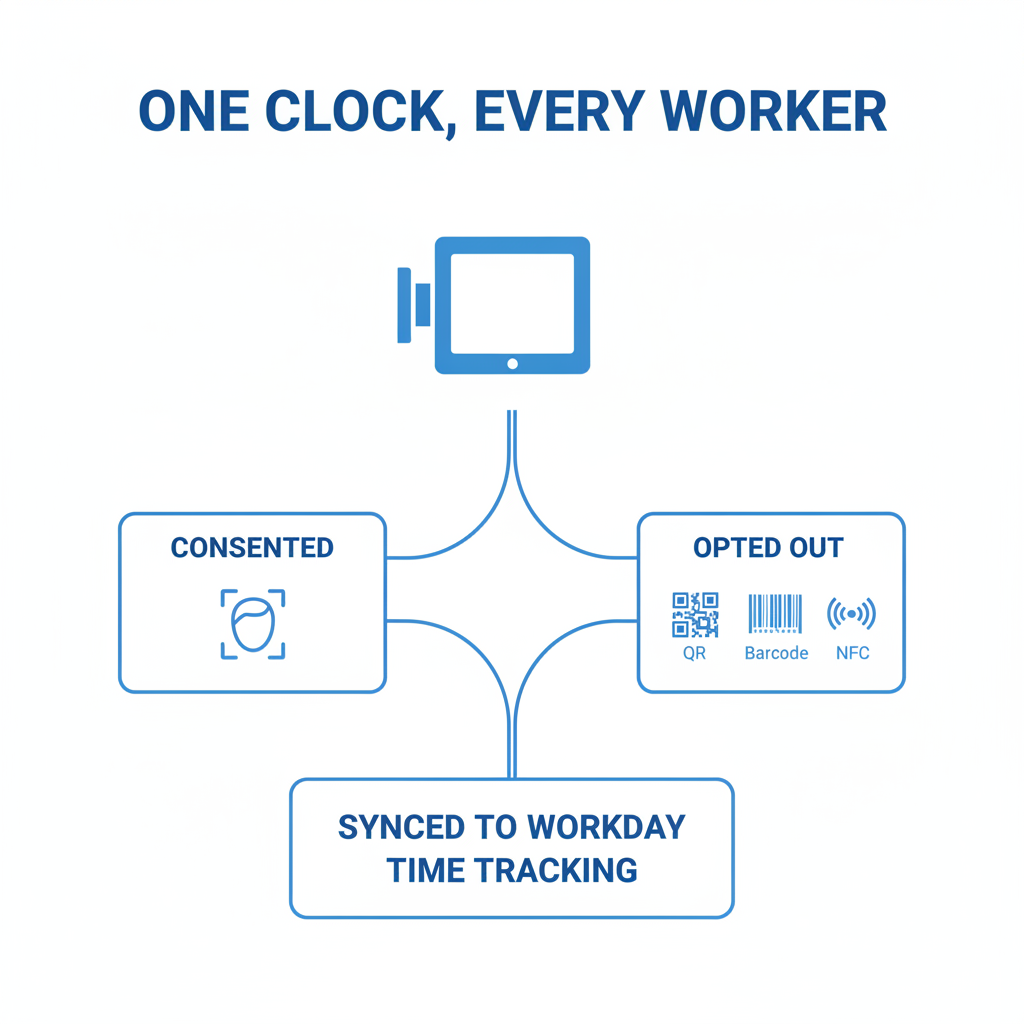
- Offer a non-biometric punch method for workers who decline or where state law limits collection.
- Tie template deletion to the Workday termination date, with a named owner.
- Confirm in the vendor contract where templates are stored and how deletion is proven.
Review the vendor’s Workday connection with our integration system user review.
Where Native Tools Run Out
Workday knows when someone leaves but has no native process that reaches into a vendor’s device database to purge a template. Clock data and Workday already drift apart, as missing time clock events show. This is where the choice of CloudApper AI TimeClock, and how it is configured, matters.
How CloudApper AI TimeClock Fits the Policy
CloudApper AI TimeClock runs on standard iOS and Android tablets and captures punches with touchless facial recognition, which addresses buddy punching. The same clock accepts QR codes, barcodes, and NFC, so workers who decline biometric consent still have a compliant way to punch. Time syncs to Workday Time Tracking, Payroll, and Absence Management, including punches captured offline.
Frequently Asked Questions
Q: Does Workday store biometric data from time clocks?
No. Workday receives time events from clock partners. Face or fingerprint templates stay with the clock vendor, which is why your retention policy must cover the vendor.
Q: How long can an employer keep biometric data under BIPA?
BIPA requires destruction when the purpose is satisfied or within three years of the individual’s last interaction, whichever comes first.
Q: Can employers require biometric time clocks in Colorado?
Colorado allows consent as a condition of employment for recording the start and end of the workday, among a few other purposes. Consent must still be specific, informed, and unambiguous.
Q: What should happen to biometric data when an employee is terminated?
Deletion should be scheduled from the termination date in Workday, within the shortest deadline among the states where you operate.
Q: Do employees have to use a biometric time clock?
Not always. Several states limit forced collection, so offering a non-biometric punch method is the safer default.
If you are planning a biometric clock rollout with Workday, talk to the CloudApper team about consent capture, opt-out options, and deletion before go-live. This article is general information, not legal advice.

What is CloudApper AI Platform?
CloudApper AI is an advanced platform that enables organizations to integrate AI into their existing enterprise systems effortlessly, without the need for technical expertise, costly development, or upgrading the underlying infrastructure. By transforming legacy systems into AI-capable solutions, CloudApper allows companies to harness the power of Generative AI quickly and efficiently. This approach has been successfully implemented with leading systems like UKG, Workday, Oracle, Paradox, Amazon AWS Bedrock and can be applied across various industries, helping businesses enhance productivity, automate processes, and gain deeper insights without the usual complexities. With CloudApper AI, you can start experiencing the transformative benefits of AI today. Learn More
- Useful Links:
- Agentic AI
- No-Code/Low-Code
- Custom Software
- HCM Personalization
- iPaaS
- FedRAMP

Brochure
CloudApper AI TimeClock
For accurate & touchless time capture experience.
Download Brochure
CloudApper AI Solutions for Workday



- Works with








- and more.
Similar Posts

Workday Kiosk Security: Protecting Pay Slips and PII on Shared…
Workday Integration System User Security: What to Review Before Approving…