- Why This Gap Exists in the First Place
- Option 1: Native or Vendor-Built Connectors
- Option 2: Enterprise Middleware (MuleSoft, Boomi, and Similar Platforms)
- Option 3: Custom API Development
- Option 4: No-Code iPaaS Platforms
- How CloudApper iPaaS Fits This Pattern
- Choosing the Right Approach
- Frequently Asked Questions
- What to Do Next
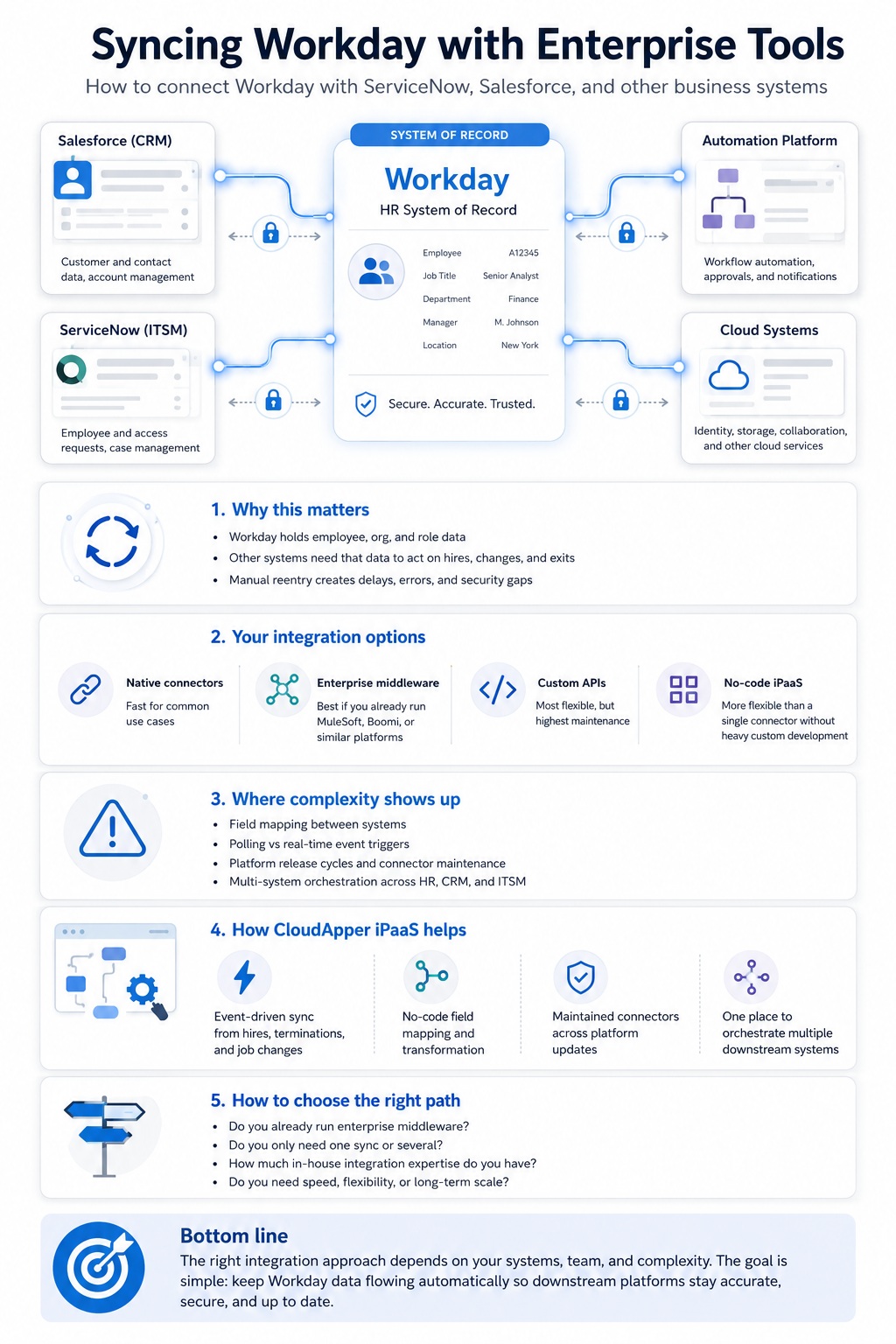
Workday is the source of truth for who works at your organization, and tools like ServiceNow and Salesforce each need a current copy of that truth. If you do not sync Workday with them automatically, data gets reentered by hand and the gap between systems becomes a liability.

A new hire starts without IT access because ServiceNow never heard about them. A terminated employee’s Salesforce account stays active for weeks because offboarding triggered nothing outside Workday. These are the predictable result of treating Workday as an island. CloudApper’s iPaaS connects Workday to downstream ITSM and CRM tools so worker changes flow without a custom build.
Why This Gap Exists in the First Place
Workday and ServiceNow are complementary, not competing, systems. Workday is the system of record for HR data — employee profiles, compensation, job titles, org hierarchies. ServiceNow is the system of action for IT and HR service workflows — provisioning, ticketing, asset management. The same logic applies to Salesforce: Workday knows who an employee is; Salesforce needs to know who owns which account, who’s on which sales team, and whose access should be revoked the moment they leave.
The technical reality is that Workday exposes its data primarily through web services — historically SOAP-based for HCM operations, with REST endpoints expanding over time. Getting that data into ServiceNow, Salesforce, or another system requires either a pre-built connector, a custom integration, or a middleware layer that handles the translation between Workday’s data model and the receiving system’s structure.
None of this is unusual for enterprise software. But the specific combination of Workday’s API structure, twice-yearly release cycle, and the downstream system’s own release cadence is where integrations tend to accumulate maintenance debt if nobody owns them clearly.
Option 1: Native or Vendor-Built Connectors
ServiceNow’s Workday HR Spoke
ServiceNow offers a pre-built integration application — the Workday HR Spoke — available through the ServiceNow Store. It’s the fastest path to integration for organizations already running ServiceNow’s HR Service Delivery module, and it includes a substantial set of out-of-the-box actions: pulling worker profiles, syncing organizational structure, mapping job classifications, and supporting both scheduled polling and Workday webhooks for real-time triggers on events like new hires or terminations.
The tradeoff is configuration depth. The Spoke uses a polling-based architecture by default, with a master sync flow that calls Workday’s API on a schedule — typically daily, off-hours. Real-time webhook triggers are supported but require both Workday business process configuration and Workday Studio setup, which is a meaningfully more technical lift than the polling approach.
Salesforce’s ServiceNow Connectivity
For Salesforce-to-ServiceNow specifically, ServiceNow’s IntegrationHub includes a Salesforce Spoke, and Salesforce-side options range from native connectors to custom API development. The pattern is similar to the Workday Spoke: pre-built actions cover common scenarios (case-to-incident sync, field mapping, bidirectional status updates), but complex or non-standard workflows usually require some custom configuration on top.
What These Connectors Are Good For
If your integration needs map closely to what the connector was built for — standard onboarding/offboarding triggers, basic profile sync, common field mappings — these pre-built options get you most of the way there quickly. Organizations using ServiceNow’s Workday Spoke report meaningfully faster integration deployment compared to fully custom builds.
Where They Run Out
Pre-built connectors are built for the common case. The moment your organization’s needs diverge — non-standard field mappings, multi-instance ServiceNow architectures, complex approval logic tied to org-specific business rules, or syncing more than two systems — you’re customizing the connector, which requires real Workday and ServiceNow integration experience on staff or on contract.
There’s also a maintenance reality worth naming directly: Workday releases major updates twice yearly, and ServiceNow releases quarterly. An integration that works cleanly today needs a maintenance owner who tracks both release cycles and verifies the connector still behaves correctly after each one.
Option 2: Enterprise Middleware (MuleSoft, Boomi, and Similar Platforms)
If your organization already runs enterprise integration middleware, building a Workday-to-Salesforce or Workday-to-ServiceNow connection is usually a matter of using existing connectors within that platform rather than introducing new infrastructure.
MuleSoft, for example, offers pre-built Anypoint Connectors for Workday alongside Salesforce, ServiceNow, SAP, Oracle, and a wide range of other enterprise systems, along with templates for common integration patterns like Workday-to-ITSM provisioning.
What this is good for: Organizations with an existing middleware investment and a dedicated integration team get a consistent platform for managing all their cross-system data flows, not just the Workday connection. The tooling is mature, well-documented, and built specifically for this kind of enterprise orchestration.
Where it runs out: If you don’t already have MuleSoft or Boomi deployed, you’re not buying a Workday integration — you’re buying an enterprise integration platform and then building the Workday connection on top of it. That’s a significant commitment in licensing cost and specialized development skill for what might be a single integration use case. It’s the right call when you have multiple systems to connect on an ongoing basis; it’s overkill for a single Workday-to-ServiceNow sync.
Option 3: Custom API Development
For organizations with very specific requirements that pre-built connectors and middleware templates don’t cleanly support, building directly against Workday’s REST and SOAP APIs gives full control over the integration logic.
What this is good for: Maximum flexibility. If your business logic genuinely doesn’t fit any standard pattern — unusual approval chains, multi-system orchestration with conditional logic specific to your organization — custom development is sometimes the only path that actually works.
Where it runs out: This requires meaningful ongoing investment. Workday’s API throttling limits (historically around 10,000 SOAP calls per hour per tenant, though this varies) need to be designed around for high-volume syncs. Someone has to own this code, understand both platforms’ API changes across releases, and maintain it indefinitely. For most organizations, this is the most expensive and highest-maintenance option, reserved for genuinely unique requirements rather than a default starting point.
Option 4: No-Code iPaaS Platforms
A newer category of integration tooling — iPaaS — sits between “use the vendor’s pre-built connector” and “build everything custom.” These platforms offer connectors to common enterprise systems with a no-code configuration layer for field mapping, business rules, and orchestration logic, aimed at reducing the technical lift compared to custom development while offering more flexibility than a single vendor’s pre-built Spoke.
What distinguishes a genuinely capable iPaaS platform for this use case is breadth and depth simultaneously: connectors that cover Workday, ServiceNow, Salesforce, and other systems in your stack, with the configuration depth to handle non-standard field mappings and multi-system orchestration without falling back to custom code.
How CloudApper iPaaS Fits This Pattern
CloudApper iPaaS is built for this category of problem — connecting Workday to the other enterprise systems that need accurate employee data, without requiring a dedicated Workday Studio developer or a separate middleware platform investment.
What this looks like in practice for Workday-to-ServiceNow or Workday-to-Salesforce sync:
Event-driven sync, not just scheduled polling: Rather than relying solely on nightly batch jobs, CloudApper iPaaS can trigger syncs based on Workday business process events — a new hire, a termination, a job change — so downstream systems reflect changes close to real time rather than waiting for the next scheduled run.
No-code field mapping and transformation: The translation between Workday’s data structures and what ServiceNow or Salesforce expects — including conditional logic and derived fields — is configured in a workflow builder rather than written in code, which means the person maintaining the integration doesn’t need to be a certified integration developer.
Maintained connectors through both platforms’ release cycles: Workday updates twice yearly; ServiceNow updates quarterly. CloudApper maintains its connectors against both, which removes one of the most common sources of integration breakage — an API change on either side that nobody caught until something silently stopped syncing.
Multi-system orchestration in one place: If your organization needs to sync Workday data to both ServiceNow and Salesforce — or add a third system later — the same platform handles all of it, rather than standing up separate point-to-point integrations for each pair.
A representative example: an organization with separate Workday-to-ServiceNow provisioning and Workday-to-Salesforce account ownership sync needs configured both within the same iPaaS workflow builder, with job changes in Workday triggering updates in both downstream systems simultaneously rather than through two disconnected integration projects.
The honest caveat: if your organization has highly unusual integration logic — multi-instance ServiceNow architectures, deeply custom approval chains tied to org-specific rules — no iPaaS platform eliminates the need to map that logic carefully. What it removes is the requirement that the person doing that mapping be a Workday-certified developer fluent in SOAP API throttling limits. They need to understand your business process, not the platform internals.
Choosing the Right Approach
A few questions help narrow this down quickly:
Do you already run enterprise middleware?
If MuleSoft, Boomi, or a similar platform is already part of your stack, extending it to cover Workday-to-ServiceNow or Workday-to-Salesforce sync is usually more efficient than introducing a separate tool.
Is ServiceNow’s HRSD module already in place?
If so, the native Workday HR Spoke is worth evaluating first — it’s purpose-built for exactly this integration and may cover your needs without additional tooling.
How many systems need Workday data, and will that number grow?
A single point-to-point connection (Workday to ServiceNow only) might justify a simpler approach. Multiple downstream systems, or an expectation that more will be added over time, make a platform built for multi-system orchestration a better long-term investment than stacking individual point solutions.
What’s your in-house integration capability?
Teams with Workday Studio and ServiceNow Flow Designer expertise have more options open to them. Teams without that specialized capability benefit most from no-code platforms that don’t require it.
Frequently Asked Questions
Can Workday integrate directly with ServiceNow?
Yes, primarily through ServiceNow’s Workday HR Spoke, a pre-built integration application that supports both scheduled polling and Workday webhooks for real-time sync of worker profiles, organizational structure, and job classifications.
Can Workday integrate directly with Salesforce?
Workday doesn’t have a single dominant native connector to Salesforce in the way it does with ServiceNow’s HR Spoke. Most Workday-to-Salesforce integrations go through enterprise middleware (like MuleSoft, which has connectors for both platforms) or a no-code iPaaS platform configured for the specific data flow needed.
What triggers an automatic IT provisioning workflow when someone is hired in Workday?
With a properly configured integration — whether through ServiceNow’s Workday Spoke, middleware, or an iPaaS platform — a new hire event in Workday can trigger an automated workflow in ServiceNow that provisions IT assets, sets up access credentials, and creates onboarding tasks, without manual handoff between HR and IT.
How often does Workday-to-ServiceNow data sync?
It depends on the integration architecture. Polling-based syncs typically run on a schedule, often nightly. Webhook-based or event-driven integrations can sync in near real time as changes happen in Workday, though webhook configuration on the Workday side requires additional setup compared to polling.
Do we need a Workday-certified developer to build this integration?
For native connector configurations (like ServiceNow’s Workday Spoke) and no-code iPaaS platforms, deep Workday Studio expertise typically isn’t required. For custom API development or advanced webhook configuration, Workday integration experience becomes necessary.
What happens to a Workday-to-ServiceNow or Workday-to-Salesforce integration after a platform update?
Both Workday and the downstream systems release updates on their own schedules. Custom integrations and unmaintained connectors carry regression risk after each release. Platforms — whether native Spokes maintained by the vendor or iPaaS connectors maintained by the provider — reduce this risk by handling compatibility updates centrally rather than leaving it to your internal team to catch silently.
What to Do Next
The cost of not syncing Workday with downstream systems doesn’t show up as a single dramatic failure — it shows up as a slow accumulation of manual reentry, delayed provisioning, and security gaps from accounts that should have been deactivated weeks earlier. Most organizations don’t notice the scale of this until they audit how many hours IT and HR spend on manual handoffs that a working integration would eliminate.
If you’re currently managing Workday-to-ServiceNow or Workday-to-Salesforce data flow manually, or running an integration nobody fully understands anymore, it’s worth mapping out what’s actually needed before choosing a path.
If you’d like to talk through your specific systems and integration requirements, the CloudApper team is available here.

What is CloudApper AI Platform?
CloudApper AI is an advanced platform that enables organizations to integrate AI into their existing enterprise systems effortlessly, without the need for technical expertise, costly development, or upgrading the underlying infrastructure. By transforming legacy systems into AI-capable solutions, CloudApper allows companies to harness the power of Generative AI quickly and efficiently. This approach has been successfully implemented with leading systems like UKG, Workday, Oracle, Paradox, Amazon AWS Bedrock and can be applied across various industries, helping businesses enhance productivity, automate processes, and gain deeper insights without the usual complexities. With CloudApper AI, you can start experiencing the transformative benefits of AI today. Learn More
- Useful Links:
- Agentic AI
- No-Code/Low-Code
- Custom Software
- HCM Personalization
- iPaaS
- FedRAMP