Final paycheck deadlines are set by state law, turn on whether the separation was voluntary, and start running at termination rather than at data entry. Workday holds every input needed to determine the deadline and does not evaluate them against it, which is why most violations are timing failures rather than calculation errors.

TL;DR
There is no federal final paycheck deadline. State law governs, the rules sort into four patterns, and which one applies depends on where the employee worked and whether the separation was voluntary. California is the strictest case: wages are due immediately at discharge under Labor Code section 201, within seventy-two hours for a quit without notice under section 202, with a waiting time penalty of one day's wages per day late up to thirty days under section 203. Workday captures the termination date, the reason code, and the work location that together determine the deadline, and supports off-cycle payment to meet it, but it has no deadline object and raises no alert as a window closes. Most violations are therefore timing failures rather than calculation errors, and the most common cause is a termination entered two days after it happened. Accrued PTO payout and permissible deductions vary by state as well, and both should be confirmed with counsel. CloudApper AI for HCM Extensibility & Personalization holds the state deadline matrix as configuration and produces a due-by timestamp with escalating alerts, while CloudApper iPaaS triggers the off-cycle payment and coordinates the rest of the offboarding sequence from the same event.
Table of Contents
- Where the Deadlines Come From
- What Workday Does Natively
- Where the Friction Shows Up
- What to Do Within Workday First
Final paycheck deadlines run from the moment of discharge in California to the next regular payday in New York, so a termination entered in Workday the same way can be routine in one state and a penalty in another. Workday holds every fact needed to apply the right rule but does not connect them into a deadline.
In California, each late day can cost one full day’s wages, for up to thirty days. Workday knows the termination date, whether the separation was voluntary, and the work location that decides which rule applies. Turning those facts into a running clock is where an extension layer like CloudApper does the work Workday leaves to a process.
Where the Deadlines Come From
There is no federal final paycheck deadline. The Fair Labor Standards Act requires that employees be paid for all hours worked but says nothing about when a final check must arrive, so the answer lives in fifty separate state rules plus the District of Columbia.
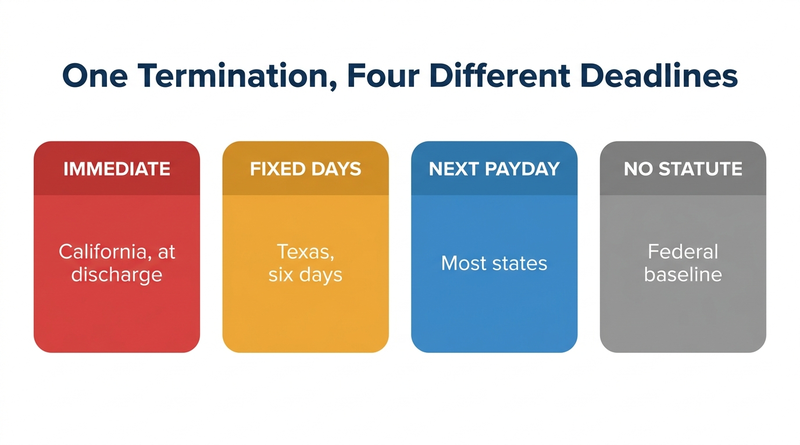
Those rules sort into four patterns. Some states require immediate or near-immediate payment on involuntary termination. Some set a fixed number of days. Most default to the next regular payday. A handful have no statute, leaving the federal baseline.

California sits at the demanding end and is worth stating precisely because it drives so much design. Under Labor Code section 201, an employee who is discharged is due all earned wages immediately at the time of termination. Section 202 covers resignations: an employee who quits without notice is due within seventy-two hours, and one who gives at least seventy-two hours’ notice is due on their last day. Section 203 provides the waiting time penalty, which accrues at the employee’s daily rate for each day payment is late, capped at thirty days. The California Division of Labor Standards Enforcement publishes the operative detail, including the requirement that discharged employees be paid at the place of discharge.
Two things ride alongside the deadline and get missed as often as the timing itself.
Accrued PTO payout varies by state and by your own policy. Some states treat accrued vacation as earned wages that cannot be forfeited, which means payout is mandatory regardless of what the handbook says. Most others require payout only where the employer’s written policy provides for it, which makes the handbook the binding document. Where a collective bargaining agreement speaks to payout, it governs on top of that.
Deductions are heavily constrained. Most states require prior written authorization for anything beyond taxes and court-ordered withholding, and several prohibit deducting for unreturned equipment or damaged property outright. Holding a final check hostage to a returned laptop is one of the more common and more expensive mistakes.
What Workday Does Natively
Workday has the pieces. The gap is that having the pieces and enforcing a deadline are different things.
The Terminate Employee business process captures the termination date, the reason code that distinguishes voluntary from involuntary, and the effective date that drives payroll. Reason codes are configurable, which matters because voluntary and involuntary carry different deadlines in most states.
Workday Payroll supports off-cycle payment for final pay, so a check can be produced outside the normal run rather than waiting for the next scheduled cycle. This is the mechanism that makes a same-day requirement achievable at all, and the mechanics overlap with what is covered in retro pay and off-cycle payroll correction workflows.
Absence and time off balances are available for payout, subject to configuration that determines which plans pay out on termination and at what rate.
Work location and legal entity are on the worker record, which is the data that determines which state’s rule applies. Organizations running multi-location or multi-entity configurations already maintain this carefully for tax purposes, as covered in multi-state payroll tax compliance.
What Workday does not ship is a rule that says this termination, in this state, with this reason code, must be paid by this timestamp. The deadline is not an object in the system.
Where the Friction Shows Up
The most common failure has nothing to do with payroll. It is that the termination reaches Workday after the deadline has already passed.
A supervisor walks someone out on Tuesday afternoon and submits the termination in Workday on Thursday. In a next-payday state that is untidy. In an immediate-payment state the violation was complete before the HRIS team knew the person had left. Payroll executed correctly on the information it had, and the penalty accrues anyway.
Retroactive terminations make this worse. Backdating the effective date to the actual last day is correct for benefits, accruals, and access, but it also means the compliance clock started on a date that had already passed when the record was created.
Then there is the final timesheet. Final pay cannot be calculated until worked hours are complete and approved, and the manager approving that timesheet is frequently the same person managing the departure. An unapproved timesheet stalls the calculation, and in an immediate-payment state there is no room in the schedule for a stall. This is the practical cost of the approval dependency described in submitting a timesheet in Workday.
The final check also has to be right, not just prompt. An employee who worked across job codes in the final week is owed overtime on the weighted average regular rate, and a final payment that is timely but short is still a wage violation.
Work location drift is a quieter problem. The state whose rule applies is generally where the employee worked, not where the company is headquartered and not necessarily the home address on file. Remote and field employees whose work location was never updated get evaluated against the wrong deadline, and nobody notices until a claim arrives.
Off-cycle payment is manual by design. Someone has to know that this particular termination needs one, and initiate it. That knowledge lives in a person’s head or a checklist, which is exactly where it fails during a reduction in force when volume spikes.
And final pay sits in the same offboarding sequence as system access revocation, covered in what happens to Workday access when an employee is terminated. Both depend on the termination event propagating promptly, and both fail for the same upstream reason.
What to Do Within Workday First
Configure reason codes so voluntary and involuntary separations are unambiguously distinguishable, and confirm that resignations with notice can be told apart from resignations without. Several state rules turn on exactly that distinction and a single generic Resignation code makes it unanswerable.
Build a report of terminations where the effective date precedes the entry date, and review it weekly. This is the single most useful control available natively, because it surfaces the late-entry problem that causes most violations.
Make final timesheet approval an explicit step in the offboarding process with a named owner and an escalation path, rather than an assumption.
Validate work location on the worker record as part of termination rather than trusting it. For remote and field populations, treat a stale location as a live compliance risk.
Document which absence plans pay out at termination, in which states, and at what rate. Have counsel confirm the state list rather than inferring it, since published sources disagree and the answer determines whether payout is discretionary or mandatory.
Publish the deadline matrix your organization actually operates against and keep it with the payroll runbook. Wage and hour practice comes up directly during the exercise in preparing for a Workday audit, and a documented, followed process is a materially better position than a described one.
Where Native Tools Run Out
Two limits are structural.
Workday has no deadline object and therefore no clock. It records that a termination occurred and it can produce an off-cycle payment, but nothing in the tenant evaluates state plus reason code plus timestamp and raises an alert at hour twenty of a seventy-two hour window. The absence of a countdown is the whole problem, because these failures are failures of timing rather than of calculation.
And Workday cannot compensate for late notification. If the system learns about a termination two days after it happened, no amount of payroll configuration recovers the elapsed time. The fix has to sit upstream, closer to the moment of separation than to the moment of data entry.
Closing the Gap with CloudApper AI and iPaaS
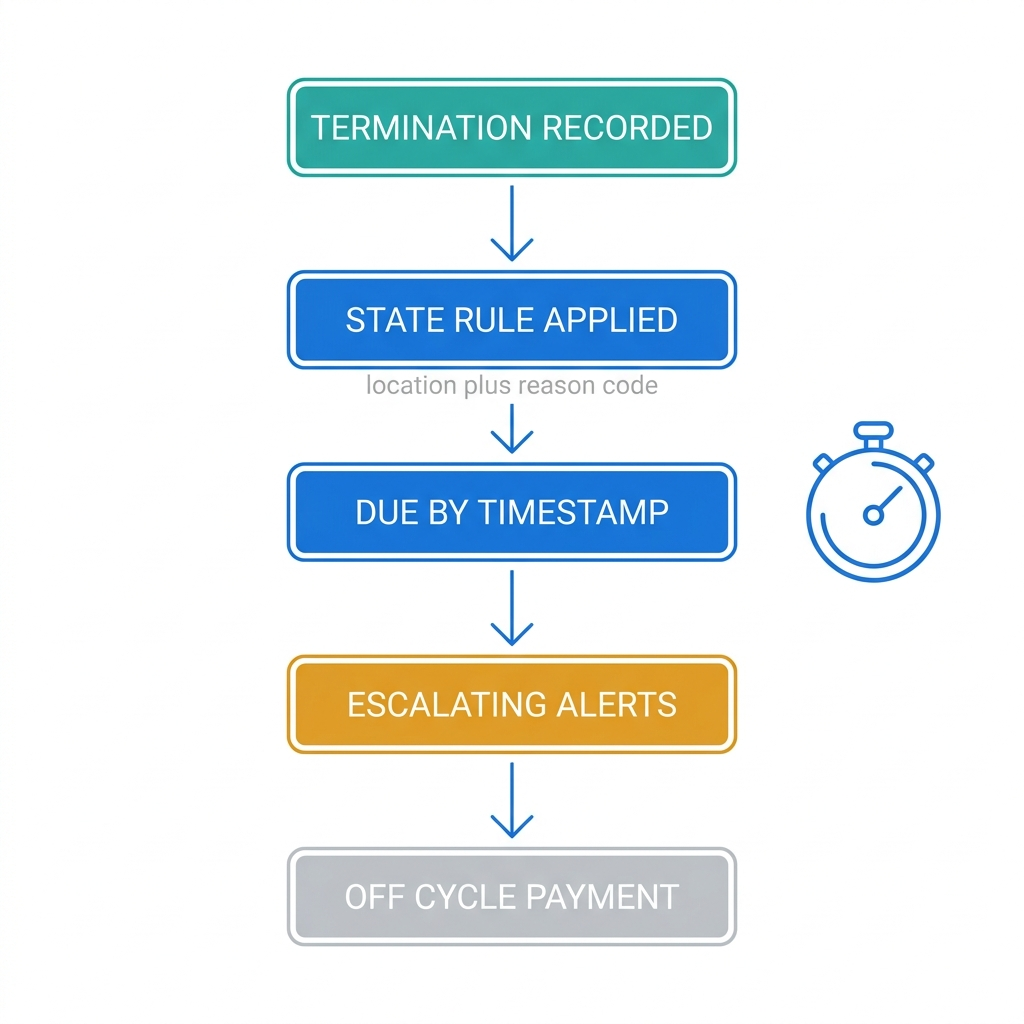
CloudApper AI supplies the rule layer Workday does not ship. It holds the state deadline matrix as configuration, evaluates each termination against the applicable rule using work location and reason code, and produces a due-by timestamp attached to the record. From there it can drive escalating alerts as the window closes, so a seventy-two hour deadline generates notice at twenty-four hours rather than a discovery at ninety-six. Because the matrix is configuration rather than code, a statutory change is a data update instead of a development cycle, which matters in an area where states amend rules regularly.
CloudApper AI can also validate the composition of the final payment against policy, confirming that accrued PTO was paid where required and that deductions taken are permissible in that jurisdiction.
CloudApper iPaaS handles the orchestration around it. It can trigger the off-cycle payment request automatically when a termination in an immediate-payment state is recorded rather than relying on someone remembering, chase the outstanding timesheet approval through the manager’s normal channel, and coordinate the same termination event outward to badge, identity, and equipment systems so the offboarding sequence runs once from a single trigger. It also produces the record of when the deadline was calculated, when payment issued, and what the gap was, which is the evidence you want if a claim is ever filed.
For organizations where the delay originates on the floor rather than in HR, CloudApper AI TimeClock closes the final timesheet gap by capturing the last worked hours accurately at the punch, so the final calculation is not waiting on a reconstruction.
None of this replaces Workday Payroll. Workday remains the system of record for the termination, the earnings, and the payment. CloudApper supplies the clock and the enforcement Workday leaves to process discipline.
Frequently Asked Questions
Q: How long do you have to give a final paycheck after termination?
It depends on the state where the employee worked and whether the separation was voluntary or involuntary. Some states require immediate payment on discharge, some set a fixed number of days, most require payment by the next regular payday, and a few have no statute and fall back to the federal next-payday baseline. There is no single federal deadline, because the FLSA governs payment for hours worked rather than the timing of a final check.
Q: What is the final paycheck rule in California?
An employee who is discharged is due all earned wages immediately at the time of termination under Labor Code section 201. An employee who quits without notice is due within seventy-two hours, and one who gives at least seventy-two hours’ notice is due on their last day, under section 202. Late payment triggers a waiting time penalty at the employee’s daily rate for up to thirty days under section 203.
Q: Can Workday issue an off-cycle final paycheck?
Yes. Workday Payroll supports off-cycle payment, which is how a final check gets produced outside the regular pay run to meet a same-day or short-window state deadline. The off-cycle payment is initiated as a deliberate action rather than triggered automatically by the termination event.
Q: Does Workday track state final paycheck deadlines?
No. Workday records the termination date, the reason code, and the work location that together determine which rule applies, but it does not evaluate them against a state deadline or raise an alert as the window closes. Organizations that need a countdown build it outside the tenant or manage it through process.
Q: Do you have to pay out accrued PTO in a final paycheck?
It depends on state law and on your own written policy. Some states treat accrued vacation as earned wages that must be paid out and cannot be forfeited, while most others require payout only where the employer’s policy provides for it, making the handbook the binding document. Confirm your state list with counsel, since the treatment of vacation, sick leave, and combined PTO differs.
Q: Can you withhold a final paycheck until company equipment is returned?
Generally no. Most states permit deductions beyond taxes and court-ordered withholding only with the employee’s prior written authorization, and several prohibit deductions for unreturned or damaged property outright. Delaying the check itself is a separate violation from the deduction question and typically carries its own penalty.
Q: Which state’s law applies for a remote employee’s final paycheck?
The applicable rule is generally the state where the employee performed the work, not where the employer is headquartered. This makes the work location on the worker record a compliance field rather than a reporting one, and a stale location for a remote or field employee means the deadline is being measured against the wrong rule.
If a supervisor terminated someone this morning in a state with a same-day requirement, it is worth knowing whether anything in your process would tell you before the day ended. The CloudApper team can walk through how terminations reach your tenant and where the timing gap sits. Start that conversation at https://www.cloudapper.ai/contact-us.

What is CloudApper AI Platform?
CloudApper AI is an advanced platform that enables organizations to integrate AI into their existing enterprise systems effortlessly, without the need for technical expertise, costly development, or upgrading the underlying infrastructure. By transforming legacy systems into AI-capable solutions, CloudApper allows companies to harness the power of Generative AI quickly and efficiently. This approach has been successfully implemented with leading systems like UKG, Workday, Oracle, Paradox, Amazon AWS Bedrock and can be applied across various industries, helping businesses enhance productivity, automate processes, and gain deeper insights without the usual complexities. With CloudApper AI, you can start experiencing the transformative benefits of AI today. Learn More
- Useful Links:
- Agentic AI
- No-Code/Low-Code
- Custom Software
- HCM Personalization
- iPaaS
- FedRAMP

Brochure
CloudApper AI TimeClock
For accurate & touchless time capture experience.
Download Brochure
CloudApper AI Solutions for Workday



- Works with








- and more.
Similar Posts

How to Rehire in Workday: Service Dates, I-9 and ACA…

The Workday Mobile App and Off-the-Clock Work: Which Hourly Tasks…