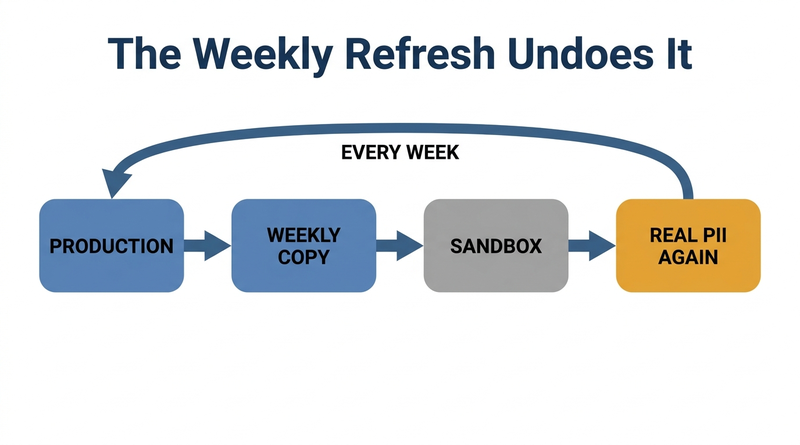
Workday refreshes Sandbox weekly from production, which overwrites any de-identification applied to it. That mechanic turns PII in non-production tenants into an architecture question rather than a masking task, and the answer involves scramble plans, a tenant that refreshes on demand, and containing what leaves through integrations.

TL;DR
Workday refreshes the Sandbox tenant weekly with production data and configuration, so scrambling Sandbox is a recurring obligation rather than a one-time project. Workday delivers a Data Scrambler Framework that permanently replaces elected fields at the storage layer and carries the fake values through into integration output, which is different from data masking, an interface-layer control that leaves the real data intact underneath and still reachable by reports and integrations. Scrambling also does not reach personal information embedded in business process comments, attachments, or free text, so a completed scramble plan is not proof a tenant is clean. The workable architecture keeps Sandbox as a tightly restricted mirror for user acceptance testing and uses a separate implementation tenant, which refreshes only on demand, as the scrambled environment where partners and developers work. Two risks remain past that: nothing reapplies your controls after a refresh, and a non-production tenant can transmit real records to real vendor endpoints because the endpoint configuration was copied along with the data. CloudApper iPaaS blocks or redirects non-production integration traffic as a rule that survives the refresh, and drives the post-refresh remediation sequence on the same schedule as the refresh itself.
Table of Contents
- What Workday Does Natively
- Where the Friction Shows Up
- What to Do Within Workday First
- Where Native Tools Run Out
Workday copies production into Sandbox every week and overwrites whatever masking you applied, so protecting Workday sandbox PII is an architecture decision rather than a setting.
Sandbox is designed to mirror production, and keeping it permanently scrubbed fights the purpose of the tenant. The better question is which tenant holds real data and who can reach it. Workday provides more native tooling for this than most teams use. Where it runs short, in the weekly repetition and in data leaving through integrations, a layer like CloudApper earns a place alongside the tenant.
What Workday Does Natively
Start with the tenant types, because the refresh behavior of each one drives everything downstream.
Sandbox is created when production goes live and is refreshed weekly with current data and configuration from production. Sandbox Preview mirrors production too, receives feature updates ahead of it, and refreshes on the twice-yearly release cadence. Implementation tenants are purchased separately and refresh on demand, which is the property that matters most for this problem: you control when, and therefore you control whether a scrambled state survives.

For the data itself, Workday delivers a Data Scrambler Framework. You build scramble plans specifying which fields to replace, then execute them against a non-production tenant. Scrambling operates at the storage layer, so the change is permanent and irreversible within that tenant, and replacement values keep realistic formatting so testing still exercises the right validation logic. Importantly, scrambled values also flow through integration output, so a file generated from that tenant carries the fake data rather than the real data.
Data masking is a different mechanism and the distinction matters. Masking obfuscates values at the interface layer so a user cannot read them on screen, while the underlying data remains intact and still reachable by reports and integrations. Masking is a viewing control. Scrambling is a data control. Choosing masking when you needed scrambling is a common and consequential mistake.
Purge Person Data handles a related obligation. You define a custom report identifying the people whose data should be removed, then select which data types to purge through the task or a purge plan. This is the mechanism for honoring erasure requests and retention limits rather than for preparing a test environment, but it belongs in the same governance conversation.
Security configuration carries over on refresh as well, which cuts both ways and is covered below.
Where the Friction Shows Up
The refresh cycle is the first and largest problem. Scrambling Sandbox is not a one-time project you complete. It is a weekly obligation, and any team treating it as a milestone will discover real employee data sitting in a broadly accessible tenant the following Monday. Configuration changes vanish on the same schedule, which is why unannounced Sandbox refreshes are a recurring source of lost work on implementation projects.
Scrambling is also less complete than the name suggests. It replaces the fields named in the plan, and personal information embedded elsewhere in the tenant survives. A worker name appearing inside a business process comment, an attachment, or free-text notes is not covered by a plan that scrambles the name field on the worker record. Anyone treating a completed scramble plan as proof the tenant is clean is over-reading it.
Then there is referential integrity across systems. Scrambling changes identifiers inside Workday while the systems Workday talks to keep the originals, so an employee who becomes one ID in the test tenant and remains another in the payroll or benefits test system breaks end-to-end testing. Fixing that means coordinating masking across every system in the chain, not just the HCM.
Access breadth is the risk people underestimate. Sandbox inherits production security configuration, but the population holding accounts is usually wider: implementation partners, integration developers, contract testers, and support staff who would never be granted equivalent production access. The tenant contains production data with a materially larger audience, and that combination is the exposure. It is worth applying the same discipline described in Workday access revocation at termination to consultants whose engagements ended months ago.
Outbound integrations from non-production are a live hazard rather than a theoretical one. A test tenant holding real data and real endpoint configuration can transmit real employee records to a real vendor, or send real notifications to real employees, because the integration does not know which tenant it is running in. The failure is silent in exactly the way described in integration monitoring and silent failure, except here a successful run is the bad outcome.
Extracts leave the boundary entirely. Once a tester exports a report to a spreadsheet for analysis, the data is outside every control the tenant provides, and no amount of scrambling applied afterward reaches it.
Development tenants used for Workday Extend builds carry the same exposure and are frequently overlooked in governance reviews because they are thought of as engineering infrastructure rather than as copies of the HR database.
What to Do Within Workday First
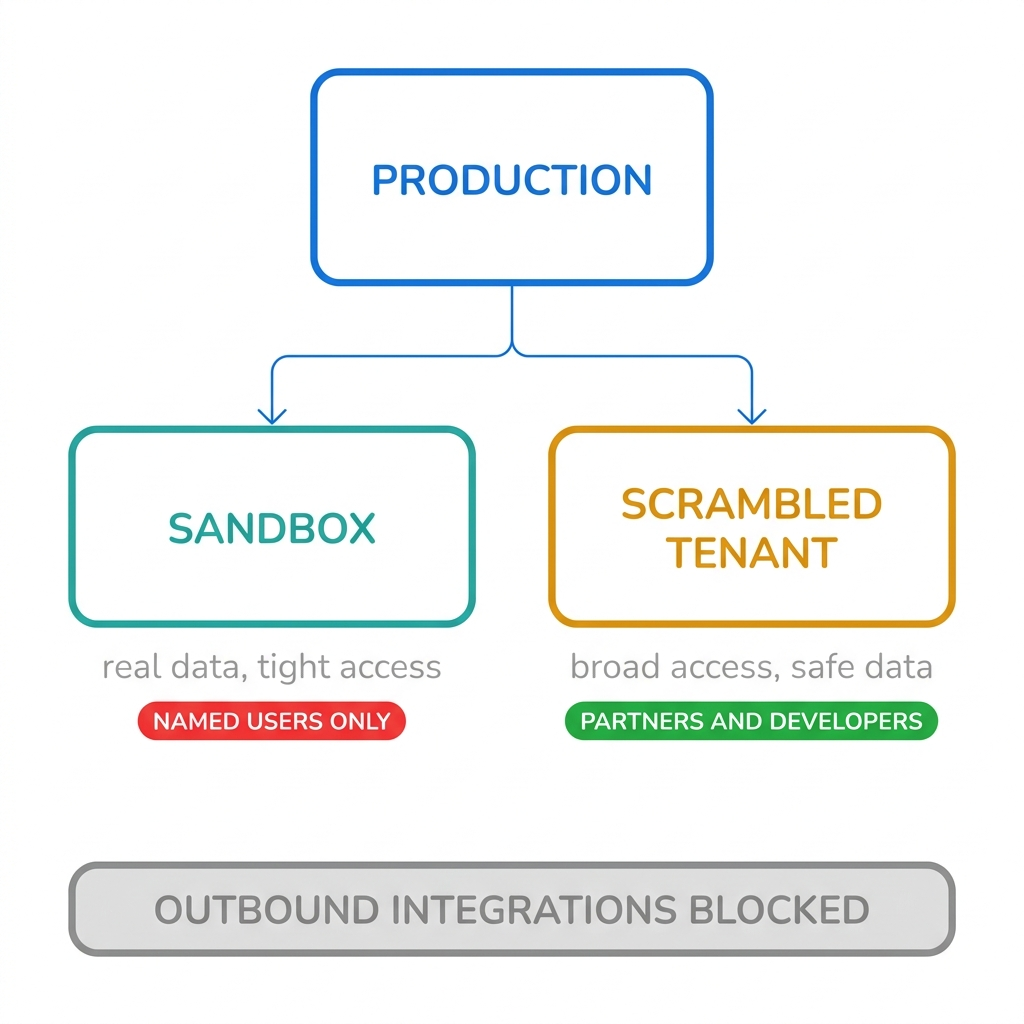
Decide which tenant is the one that holds real data, and make it a small number with a named population. The workable pattern for most organizations is to keep Sandbox as the current mirror with tightly restricted access for user acceptance testing, and to maintain a separate implementation tenant that has been scrambled and refreshes only on demand. Broad access, including partners and developers, goes to the scrambled tenant. This works precisely because implementation tenants do not refresh on a schedule you do not control.
Budget realistically for the scrambling exercise. Building and validating scramble plans across a full population is a project measured in weeks rather than an afternoon, which is another reason to do it once against a stable tenant rather than repeatedly against Sandbox.
Suppress outbound communication and disable or redirect integrations in every non-production tenant, and verify it after each refresh rather than assuming it held.
Run an access review on non-production tenants on the same cadence you run one on production. Most organizations review production carefully and have never reviewed Sandbox at all, which inverts the actual risk given that Sandbox holds the same data with a wider audience.
Confirm which legal entities and jurisdictions are represented in the copied data. Organizations running multi-entity Workday configurations may be moving EU or UK employee records into an environment accessed by parties who were never assessed for it, which engages data minimisation obligations directly.
Treat consultant and partner access as time-bound by default, with an expiry rather than a removal task somebody has to remember.
Document the whole arrangement. Non-production data handling is a standard question in security questionnaires and in the exercise covered by preparing for a Workday audit, and the ability to show which tenants hold real data and who can reach them is the answer auditors are looking for.
Where Native Tools Run Out
Two gaps persist after all of that.
Nothing in Workday reapplies your controls after a refresh. The refresh restores production data and production configuration, and the post-refresh routine of re-running scramble plans, re-suppressing notifications, and re-disabling integration endpoints falls to a person with a checklist. It is a recurring manual task with a compliance consequence attached to forgetting it, which is a poor combination.
And Workday will not tell you when a non-production tenant transmits data outward. There is no native control that recognizes an integration running in Sandbox against a production endpoint and stops it. The tenant executes what it was configured to execute, and the endpoints configured for enterprise system syncs came across in the copy along with everything else.
Closing the Gap with CloudApper iPaaS
CloudApper iPaaS is relevant to this problem in a narrower way than it is to most, and it is worth being precise about where it helps rather than claiming it solves data masking, which it does not. Scrambling is Workday’s job and the Data Scrambler Framework does it.
What CloudApper iPaaS covers is the boundary and the repetition.
Because integration traffic routes through it, iPaaS can enforce environment awareness that individual integrations lack. Traffic originating from a non-production tenant can be blocked from reaching production endpoints, or redirected to a test endpoint, as a rule that holds regardless of what the tenant’s own configuration says after a refresh restored it. That converts the most dangerous failure mode from something depending on a person remembering into something the plumbing refuses to do.
It can also drive the post-refresh routine. When the weekly refresh completes, iPaaS can trigger the sequence that follows: execute the scramble plans, reapply notification suppression, confirm integration endpoints are pointed at test targets, and report what ran and what did not. The refresh happens on a schedule, so the remediation can too.
And it produces the evidence. A log showing that non-production traffic was contained, when controls were reapplied, and which runs failed is the artifact that answers a security questionnaire, and it is not something the tenant itself will assemble.
Workday remains the system of record and the owner of the data controls. CloudApper iPaaS holds the perimeter around the tenants and automates the part that repeats every week.
Frequently Asked Questions
Q: Does the Workday Sandbox tenant contain real employee data?
Yes. Sandbox is a copy of the production tenant, refreshed weekly with current data and configuration, so it contains real employee personal information unless it has been scrambled since the most recent refresh. Because the refresh overwrites the tenant, any de-identification applied previously does not survive it.
Q: How often does the Workday Sandbox tenant refresh?
Sandbox refreshes weekly with data and configuration from production. Sandbox Preview refreshes twice per year in line with the release cycle, while implementation tenants refresh on demand, which is what makes them the practical home for a scrambled long-term testing environment.
Q: What is the difference between data masking and data scrambling in Workday?
Scrambling replaces values at the storage layer, so the change is permanent within that tenant and the replaced values also appear in integration output. Masking obfuscates values at the interface layer so they cannot be read on screen while the original data remains underneath and is still accessible to reports and integrations. Masking is a viewing control and scrambling is a data control.
Q: Can you scramble data in a Workday Sandbox tenant?
You can run scramble plans against Sandbox, but the weekly refresh restores production data and undoes the work, so it has to be repeated every cycle. Most organizations instead scramble an implementation tenant, which refreshes only on demand, and grant broad access there while restricting Sandbox to a small named group.
Q: Does Workday data scrambling remove all personal information?
No. Scrambling replaces the fields named in the scramble plan, and personal information held elsewhere in the tenant, such as names appearing inside business process comments, attachments, or free-text notes, is not covered. A completed scramble plan should not be treated as proof that a tenant is free of personal data.
Q: Can a Workday Sandbox integration send data to a live system?
Yes, and this is one of the more serious risks in non-production tenants. Integration endpoint configuration is copied from production along with everything else, so an integration launched in Sandbox can transmit real employee records to a real vendor or send notifications to real employees unless endpoints have been redirected or disabled after the refresh.
Q: Who should have access to a Workday non-production tenant?
Access to any tenant holding unscrambled production data should be as tightly scoped as production access itself and reviewed on the same cadence. Implementation partners, integration developers, and contract testers who need broad access should be working in a scrambled tenant instead, with access granted on a time-bound basis that expires rather than requiring manual removal.
If you cannot say today which of your Workday tenants hold unscrambled employee data and who currently has accounts in them, that inventory is worth building before the next security questionnaire asks for it. The CloudApper team can review how your non-production tenants are structured and where data can leave them. Start that conversation at https://www.cloudapper.ai/contact-us.

What is CloudApper AI Platform?
CloudApper AI is an advanced platform that enables organizations to integrate AI into their existing enterprise systems effortlessly, without the need for technical expertise, costly development, or upgrading the underlying infrastructure. By transforming legacy systems into AI-capable solutions, CloudApper allows companies to harness the power of Generative AI quickly and efficiently. This approach has been successfully implemented with leading systems like UKG, Workday, Oracle, Paradox, Amazon AWS Bedrock and can be applied across various industries, helping businesses enhance productivity, automate processes, and gain deeper insights without the usual complexities. With CloudApper AI, you can start experiencing the transformative benefits of AI today. Learn More
- Useful Links:
- Agentic AI
- No-Code/Low-Code
- Custom Software
- HCM Personalization
- iPaaS
- FedRAMP

Brochure
CloudApper AI TimeClock
For accurate & touchless time capture experience.
Download Brochure
CloudApper AI Solutions for Workday



- Works with








- and more.
Similar Posts

How to Rehire in Workday: Service Dates, I-9 and ACA…

The Workday Mobile App and Off-the-Clock Work: Which Hourly Tasks…