Workday Extend is the right home for custom apps that live in the Workday data model and serve Workday-licensed users, but it is a separate subscription, it needs a developer who owns PMD and orchestrations, and it cannot reach employees without Workday logins. Here is a four-question test for deciding where a build belongs.

TL;DR
Extend apps are reached through the Workday UI by users holding Workday licenses, which means a build aimed at frontline or deskless workers is wrong before it starts. Past that constraint, Workday Extend is a capable platform for custom applications that live in the Workday data model, built through App Builder, PMD, and Orchestration Builder, and it is the right call when the users are Workday licensed, you have a developer who will own PMD and release regression testing, and the timeline runs in quarters rather than weeks. It is a separately licensed subscription in Essentials and Professional editions, not something bundled with Workday HCM, and update safe at the platform level does not remove your own regression testing obligation each release window. Before anyone proposes Extend, check whether a calculated field, a business process condition rule, or an integration already solves the requirement. Where the audience sits outside Workday licensing or the rules change faster than a deployment cycle, CloudApper AI for HCM Extensibility & Personalization and hrPad extend Workday from outside the tenant while Workday remains the system of record.
Table of Contents
- What Workday Extend Actually Does
- Where the Friction Shows Up
- What to Do Within Workday First
- Where Native Tools Run Out
Extend apps are reached through the Workday UI, by users holding Workday licenses. That one fact settles more architecture decisions than any feature comparison, and it is routinely the last thing anyone checks.
Which is how a safety attestation build gets six weeks along before someone works out that the people who have to complete the attestation are second shift production staff who have never had a Workday login. Nothing was wrong with the build. The audience was wrong, and it was wrong in the first requirements meeting.
Workday Extend is a capable platform and the right answer to a real class of problems. It gets proposed for a lot of others, mostly because “can we build this in Workday?” gets asked before “who actually has to use it?” Both questions have answers. Sometimes it is Extend. Sometimes it is configuration you already own. Sometimes it is an external layer like CloudApper that reaches the people Workday licensing does not.
What Workday Extend Actually Does
Extend lets you build custom applications that run inside your existing Workday tenant, against the Workday data model, under the Workday security model. That is the entire value proposition. An Extend app is something your users reach from the Workday UI, using the security groups and worker data they already have.
The platform ships in two editions, Workday Extend Essentials and Workday Extend Professional, with Professional aimed at larger developer teams and adding access to Workday’s AI Gateway services. Agent-style functionality is buildable through those services and through orchestrations that call external AI, but what an agent is permitted to read and act on is a governance question rather than a platform one, covered separately in Workday AI agents and data governance.

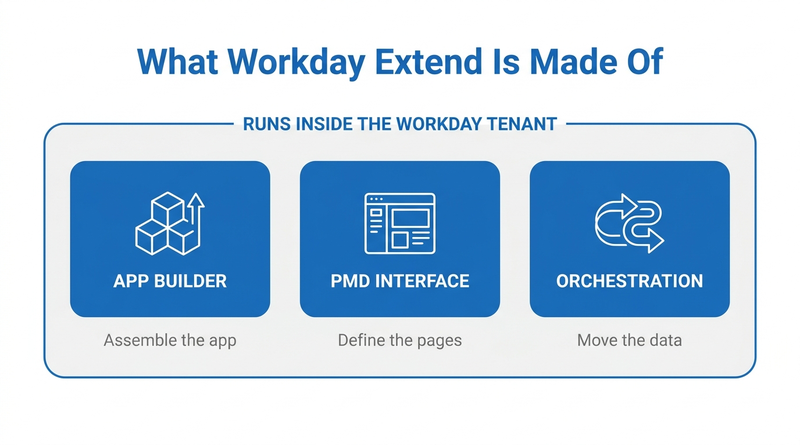
There are three build surfaces. App Builder is where the application gets assembled, and it offers both a visual mode and the underlying code. The interface itself is defined in PMD, Workday’s presentation model definition, which uses a JSON-like syntax for pages, fields, and buttons. Orchestration Builder handles logic and data movement, constructing event driven processes that pull and post data inside Workday and against external systems with exposed APIs. Workday Orchestrate comes with every Extend subscription.
Extend apps can also define their own business processes, with steps, approval routing, and condition logic. If you have wrestled with Workday business process approval configuration, this will look familiar. It is the same model.
Workday designs Extend apps to be update safe, which means the platform commits to not breaking your app across the bi-annual release cycle. Development happens in a Workday development tenant with an account on the Workday Developer Site, and apps move through App Hub before deployment.
For the right problem this is the best available answer. A custom data object that has to live natively in Workday, participate in Workday reporting, respect Workday security, and serve people who already hold Workday licenses? Build it in Extend. Nothing external will match that integration depth.
Where the Friction Shows Up
Four things tend to surprise organizations after the decision to use Extend has already been made.
The first is cost. Extend is a separate subscription, not something bundled with Workday HCM or Financials. Workday does not publish list pricing, so the number arrives through your account team and depends on edition and scope. Teams that assumed extensibility was already paid for find a line item mid-project. Anyone building the case should run it the way they would any other Workday ROI review, internal labor included.
The second is staffing. Visual mode in App Builder lowered the barrier, but PMD is scripting, orchestration design is integration engineering, and deployment runs through a development tenant and App Hub rather than a configuration screen. Your HRIS analyst is not going to absorb this alongside their day job. Organizations either hire for it, retrain an integrations developer, or pay a partner. The failure mode worth naming: the person who built the app leaves, and nobody left in the building can read the PMD.
The third is maintenance. Update safe is not the same as test free. Workday protects the platform contract across releases; it does not test your app logic against your configuration. Your team owns regression testing every release window, forever, and that recurring obligation almost never makes it into the initial estimate.
The fourth decides more architecture questions than the other three combined, and it comes up far too late. Extend apps live behind Workday authentication. The app is reached through the Workday UI, by a user with Workday credentials, holding a Workday license. For desk based staff that is not a limitation at all. For a warehouse picker who has never had a Workday login and is not going to get one, the app might as well not exist. The same wall shows up in recurring compliance training tracking for frontline workers and in Workday notifications that never reach frontline employees. Extend does not change the authentication requirement. It inherits it.
What to Do Within Workday First
Before Extend enters the conversation, exhaust what you already own.
Is this actually a custom object, or just a custom field? A surprising share of Extend proposals get solved by a calculated field, a custom report field, or an additional data field on an existing object. There is more room here than most teams use, and the options are covered in adding custom fields to Workday without touching the core system.
Is it a business process problem? Condition rules, custom validations, integration events, and notification configuration on delivered business processes resolve a large category of requests that get filed as gaps.
Is it an integration problem? If the requirement is moving data between Workday and another system, EIB, Core Connectors, and Workday Studio exist for exactly that, and the tradeoffs are laid out in syncing Workday with Salesforce, ServiceNow, and other enterprise tools. Building an Extend app to do an integration’s job is a common and expensive misdiagnosis.
And does Workday already ship it? Delivered functionality expands twice a year. More than one team has built something in a release window that Workday shipped natively in the next one.
If the requirement survives all four, it is a real extensibility question, and the next decision is where to build.
Where Native Tools Run Out
Extend is the right home for an application when you can answer yes to all four of these:
- Does it need to live in the Workday data model, participating in Workday reporting, security, and business processes?
- Are the users Workday licensed, meaning desk based employees, managers, HR, finance, or IT staff who already log in daily?
- Do you have or can you fund a developer who will own PMD, orchestrations, and release regression testing on an ongoing basis?
- Is the timeline measured in quarters rather than weeks, allowing for development tenant, build, test, App Hub, and deploy?
One no, and building inside the tenant stops being the efficient path. Question two is where most requirements break. Organizations with large frontline populations write the requirement for the whole workforce and then discover the delivery mechanism only reaches a third of it. Question three is where the rest break: the app gets built by a partner, works fine, and then nobody internally can change it. Both cases are the argument for extending Workday from outside the tenant, which is where CloudApper operates.
Closing the Gap with CloudApper CloudApper AI and hrPad
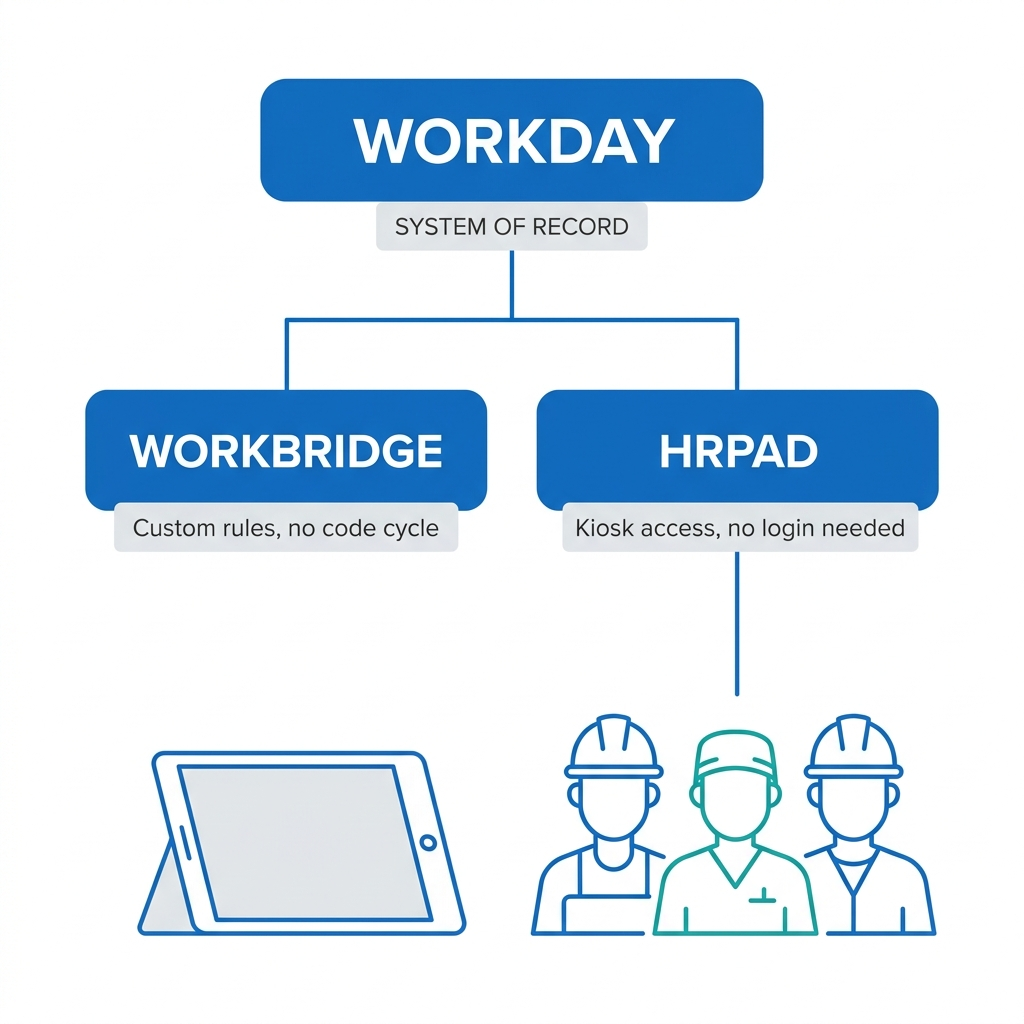
CloudApper AI covers the same category of requirement as Extend, including custom fields, custom workflow logic, and organization specific rules Workday’s delivered configuration does not model. The tradeoffs differ. CloudApper AI runs alongside Workday rather than inside it, reading and writing through Workday’s APIs, so changes get made through configuration instead of a code and deployment cycle. In practice that means an HR operations lead adjusts a rule without opening a development tenant, and nobody has to own PMD.
This matters most for logic that keeps moving. Union work rules are the clearest case. A collective bargaining agreement gets renegotiated on its own schedule, and teams that wrote that logic as code re-enter a development cycle every time a contract turns over.
CloudApper hrPad takes on the authentication constraint directly. It puts a tablet or kiosk on the production floor, in the break room, or at the clinical unit, so employees without Workday credentials can complete attestations, submit time, check PTO balances, and respond to HR tasks. The data flows to Workday, which stays the system of record. Extend cannot be configured to do this, and that is not a feature gap in Extend. It is the licensing and authentication model Extend correctly inherits from Workday.
These are complementary, and plenty of organizations run both: Extend apps for the desk based population, CloudApper for frontline reach and rules that change often. Choosing one does not preclude the other, and neither replaces Workday.
Frequently Asked Questions
Q: What is Workday Extend used for?
Workday Extend is a platform for building custom applications that run inside your existing Workday tenant, using the Workday data model, security model, and reporting framework. It is typically used for custom data objects, custom business processes, and organization-specific applications that need to sit natively within Workday rather than in a separate system.
Q: Is Workday Extend included with Workday HCM?
No. Extend is a separately licensed subscription available in Essentials and Professional editions. Workday does not publish list pricing, so the cost depends on edition and scope and is quoted through your Workday account team.
Q: Do you need a developer to use Workday Extend?
Yes, in practice. App Builder offers a visual mode that has lowered the barrier, but building a production app involves PMD scripting for the interface, orchestration design for logic and data movement, and a deployment path through a development tenant and App Hub. Most organizations assign a dedicated developer or engage a partner.
Q: What is the difference between Workday Extend and Workday Studio?
Studio is an integration development tool for moving and transforming data between Workday and external systems. Extend is an application development platform for building custom apps and business processes that run inside Workday. If the requirement is data movement, Studio or a Core Connector is usually the right tool; if the requirement is a new application with a user interface, Extend is.
Q: Can you build AI agents on Workday Extend?
Yes, within limits. Extend Professional includes access to Workday’s AI Gateway, and orchestrations can call external AI services, so agent-style functionality is buildable inside the tenant. Extend does not govern what happens once an agent’s logic or cached data moves outside Workday’s security boundary, which is the constraint enterprise IT and audit teams care about most.
Q: Can frontline employees without Workday licenses use an Extend app?
No. Extend apps are accessed through the Workday interface and inherit Workday’s authentication and security model, so a user needs Workday credentials to reach them. Organizations that need to deliver a process to deskless or hourly workers without Workday logins typically deliver it through a kiosk, tablet, or messaging channel outside the tenant that writes back to Workday.
Q: Are Workday Extend apps affected by the bi-annual release updates?
Workday designs Extend apps to be update safe at the platform level, so the underlying contract is maintained across releases. Your team still owns functional regression testing of the app’s own logic against your configuration in each release window, which is an ongoing maintenance cost worth planning for.
Q: When should you not use Workday Extend?
Avoid Extend when the requirement can be met with a calculated field, a business process condition rule, or an integration; when the primary users do not hold Workday licenses; when you have no developer resource to own the app long term; or when the underlying rules change frequently enough that a code and deployment cycle would become the bottleneck.
If you are weighing an Extend build against an external extension layer, the decision usually comes down to who the users are and how often the rules change. The CloudApper team can walk through the specific requirement with you and give an honest read on which side of that line it falls on, including the cases where building it in Extend is the right call. Start that conversation at https://www.cloudapper.ai/contact-us.

What is CloudApper AI Platform?
CloudApper AI is an advanced platform that enables organizations to integrate AI into their existing enterprise systems effortlessly, without the need for technical expertise, costly development, or upgrading the underlying infrastructure. By transforming legacy systems into AI-capable solutions, CloudApper allows companies to harness the power of Generative AI quickly and efficiently. This approach has been successfully implemented with leading systems like UKG, Workday, Oracle, Paradox, Amazon AWS Bedrock and can be applied across various industries, helping businesses enhance productivity, automate processes, and gain deeper insights without the usual complexities. With CloudApper AI, you can start experiencing the transformative benefits of AI today. Learn More
- Useful Links:
- Agentic AI
- No-Code/Low-Code
- Custom Software
- HCM Personalization
- iPaaS
- FedRAMP

Brochure
CloudApper AI TimeClock
For accurate & touchless time capture experience.
Download Brochure
CloudApper AI Solutions for Workday



- Works with








- and more.
Similar Posts

Workday W-4 Updates for Hourly Workers: Exempt Renewals, Overtime Deductions,…

Workday Access for Former Employees: How to Deliver W-2s and…