Former employees often cannot reach W-2s and pay slips after termination because SSO is removed and password resets depend on a home email that is missing or outdated. This guide covers Workday's former-worker access, the IRS retention floor, the settings to configure, and how CloudApper delivers verified documents.

TL;DR
Former employees lose SSO at termination by design, so their access to W-2s and pay slips depends on a local Workday login and the home email on file. Treasury rules require electronically furnished W-2s to stay accessible through October 15 of the following year. Capture personal contact details in the termination process, scope the former-worker group to view-only documents, and set the window to meet the IRS floor. When the email on file fails, CloudApper verifies the requester and releases only the requested document without reopening the Workday account.
Table of Contents
- Why Former Employees Get Locked Out
- What Workday Supports Natively
- What to Configure Before the Next Termination Wave
- Where the Native Setup Runs Out
Three subject lines from an HR shared inbox in the second week of February: “Need my W2.” “Can’t log into Workday, don’t work there anymore.” “Locked out, tax appointment Friday.” All three are seasonal warehouse workers who left in November, and each request now needs a manual identity check.

The policy usually isn’t the problem. The login path is, and that is where CloudApper adds a layer alongside Workday once the native setup is right.
Why Former Employees Get Locked Out
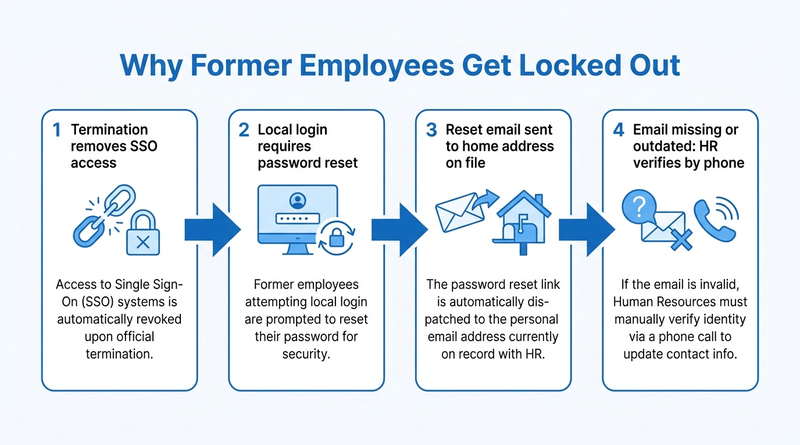
The Workday termination process removes SSO and downstream accounts on the effective date. Former workers then need a local Workday login, and the password reset goes to the home email on file. For hourly workers who used a badge or shared device, that email is often blank or outdated.
What Workday Supports Natively
Workday can keep a terminated worker’s account active and limit it to a former-worker security group, typically scoped to pay slips and tax documents for a window your organization sets. The University of Washington, for example, allows access through the separation year plus one more year.
The window has a legal floor. Under Treasury Regulation §31.6051-1(j), an employer that furnishes W-2s electronically must keep them accessible through October 15 of the following year. Employees must also be told in advance that termination can end electronic delivery.
What to Configure Before the Next Termination Wave
- Add a “confirm personal email and mobile number” task to the termination business process, and make it required.
- Set the former-worker window to at least October 15 of the year after separation.
- Scope the former-worker group to view-only pay and tax documents with no payment election changes, closing the path behind Workday direct deposit fraud.
- Send the January “IMPORTANT TAX RETURN DOCUMENT AVAILABLE” notice to the home email, not the work address.
- Run a pre-January report of terminated workers with no personal email so payroll can mail paper W-2s early.
Where the Native Setup Runs Out
Each of those steps assumes the home email is correct. When it isn’t, the only recovery path is HR verifying identity by phone and resetting the account by hand. Reactivating a full account to hand over one PDF also widens your attack surface. The people who drove the password reset load for frontline workers drive it again after leaving. This is the gap where CloudApper lets you verify the person and deliver the document without reopening the account.
How CloudApper Delivers Documents Without Reopening Accounts
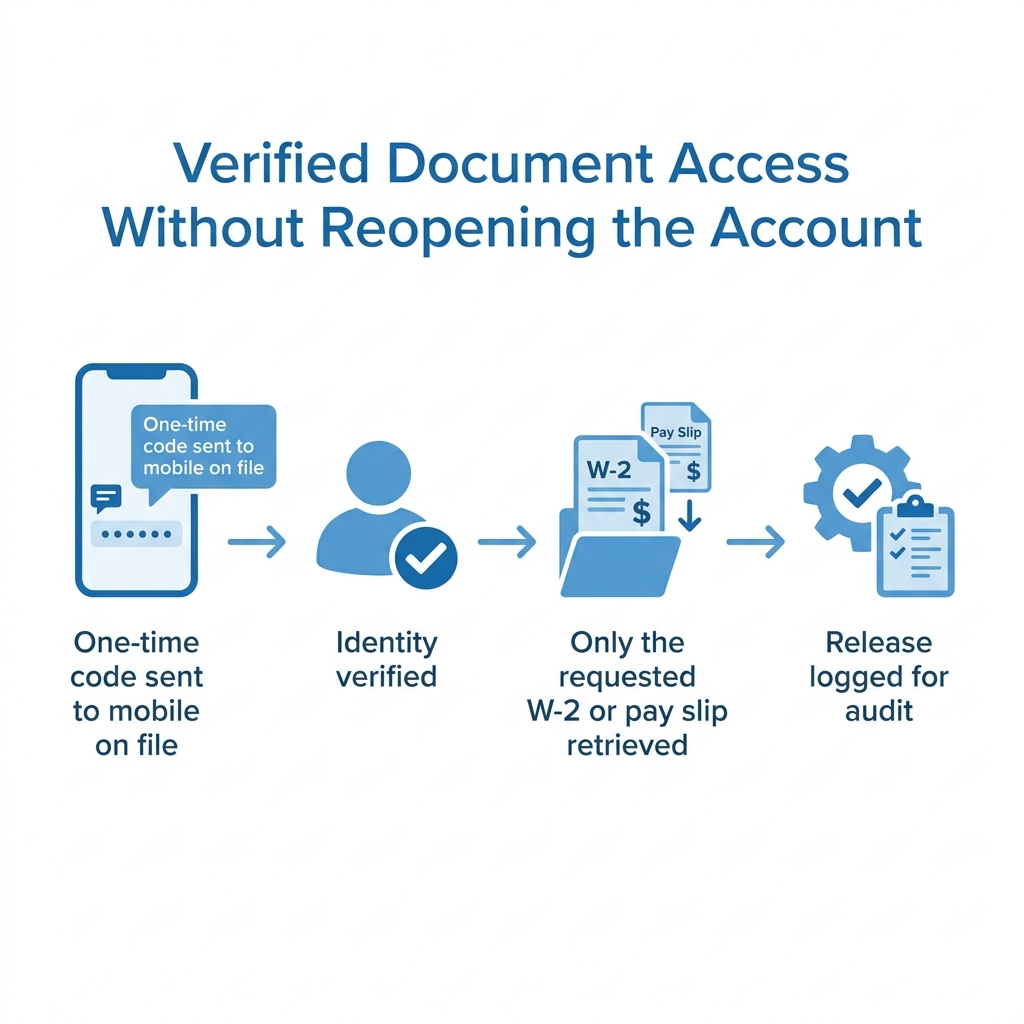
CloudApper AI for HCM Personalization and Extensibility can run a former-employee document request flow alongside Workday. The requester verifies identity with a one-time code sent to the mobile number captured at termination, and the app pulls only the requested W-2 or pay slip, logging every release. No password reset, no account reactivation. It also covers the off-cycle pay slips that follow final paycheck timing rules, and cuts follow-up during year-end W-2 reconciliation.
Frequently Asked Questions
Q: Can former employees access Workday after termination?
Yes, if the employer keeps their account active in a former-worker security group. Access is usually limited to pay slips and tax documents for a set window, usually through a local login instead of SSO.
Q: How do I get my W-2 from Workday if I no longer work there?
Use your former employer’s Workday local login page and reset your password using the personal email on file. If that email is wrong, ask HR or payroll for the form directly.
Q: How long must employers keep W-2s available online?
Under Treasury Regulation §31.6051-1(j), electronically furnished W-2s must stay accessible through October 15 of the year following the tax year.
Q: Why can’t former employees reset their Workday password?
The reset link goes to the home email recorded in Workday. If it was never captured or has changed, the reset fails and HR must verify identity manually.
Q: What should former workers be able to see in Workday?
View-only pay slips and tax documents. Blocking payment election changes for former workers removes a common payroll fraud path.
If February still brings a pile of “I can’t log in” emails, talk to the CloudApper team about verified document access that works alongside your Workday former-worker setup.

What is CloudApper AI Platform?
CloudApper AI is an advanced platform that enables organizations to integrate AI into their existing enterprise systems effortlessly, without the need for technical expertise, costly development, or upgrading the underlying infrastructure. By transforming legacy systems into AI-capable solutions, CloudApper allows companies to harness the power of Generative AI quickly and efficiently. This approach has been successfully implemented with leading systems like UKG, Workday, Oracle, Paradox, Amazon AWS Bedrock and can be applied across various industries, helping businesses enhance productivity, automate processes, and gain deeper insights without the usual complexities. With CloudApper AI, you can start experiencing the transformative benefits of AI today. Learn More
- Useful Links:
- Agentic AI
- No-Code/Low-Code
- Custom Software
- HCM Personalization
- iPaaS
- FedRAMP

Brochure
CloudApper AI TimeClock
For accurate & touchless time capture experience.
Download Brochure
CloudApper AI Solutions for Workday



- Works with








- and more.
Similar Posts

Workday W-4 Updates for Hourly Workers: Exempt Renewals, Overtime Deductions,…

Workday Direct Deposit Fraud: How to Stop Payroll Diversion Before…