
- Why Workday ROI Reviews Are Hard to Do Well
- The Five Cost Components to Map First
- The Value Metrics That Actually Move the Board Conversation
- Framing the Extend vs. Replace Decision
- How CloudApper AI Fits Into the ROI Extension Story
- Building the Slide for the Board
- Frequently Asked Questions
- What to Do Next
Renewal season is when a Workday ROI review stops being optional. A CFO reviewing the contract or a board member questioning HR tech spend wants to know what Workday has delivered, and many HR and IT leaders lack a ready answer because the ROI case was built during procurement and never revisited.
The missing value usually sits between what the system was configured to do and what the organization needed from it. Platforms like CloudApper close that distance by extending and personalizing Workday without a platform replacement or re-implementation. The sections below cover how to measure what Workday delivers, where the gaps show up, and how to frame an extend-versus-replace case for executives.
Why Workday ROI Reviews Are Hard to Do Well
Workday delivers value across a range of dimensions that aren’t all easy to quantify. Some of the gains — a single system of record instead of four, data that doesn’t have to be reconciled across HRIS and payroll — show up as avoided cost that was never fully itemized. Others — faster decision-making from real-time workforce data, reduced compliance risk — are genuine but hard to attach a dollar figure to.
The commonly cited Forrester TEI study documented a composite $1 billion revenue organization achieving meaningful ROI on Workday, but the specific value drivers in that model — HR time savings, avoided infrastructure cost, reduced audit preparation time — are composites, not specific to any one organization’s configuration or utilization.

The honest starting point for a Workday ROI review is separating two questions that often get conflated:
- Is Workday delivering the value it was configured to deliver?
- Is Workday configured to deliver the value the organization actually needs?
Both matter. An organization that implemented Workday five years ago and has maintained it since may be getting exactly what was configured — but if the workforce has grown significantly, added frontline or hourly populations, or expanded geographically, the original configuration may no longer be sufficient to serve the organization’s actual needs. The ROI gap isn’t because Workday failed; it’s because the deployment didn’t keep pace with the organization.
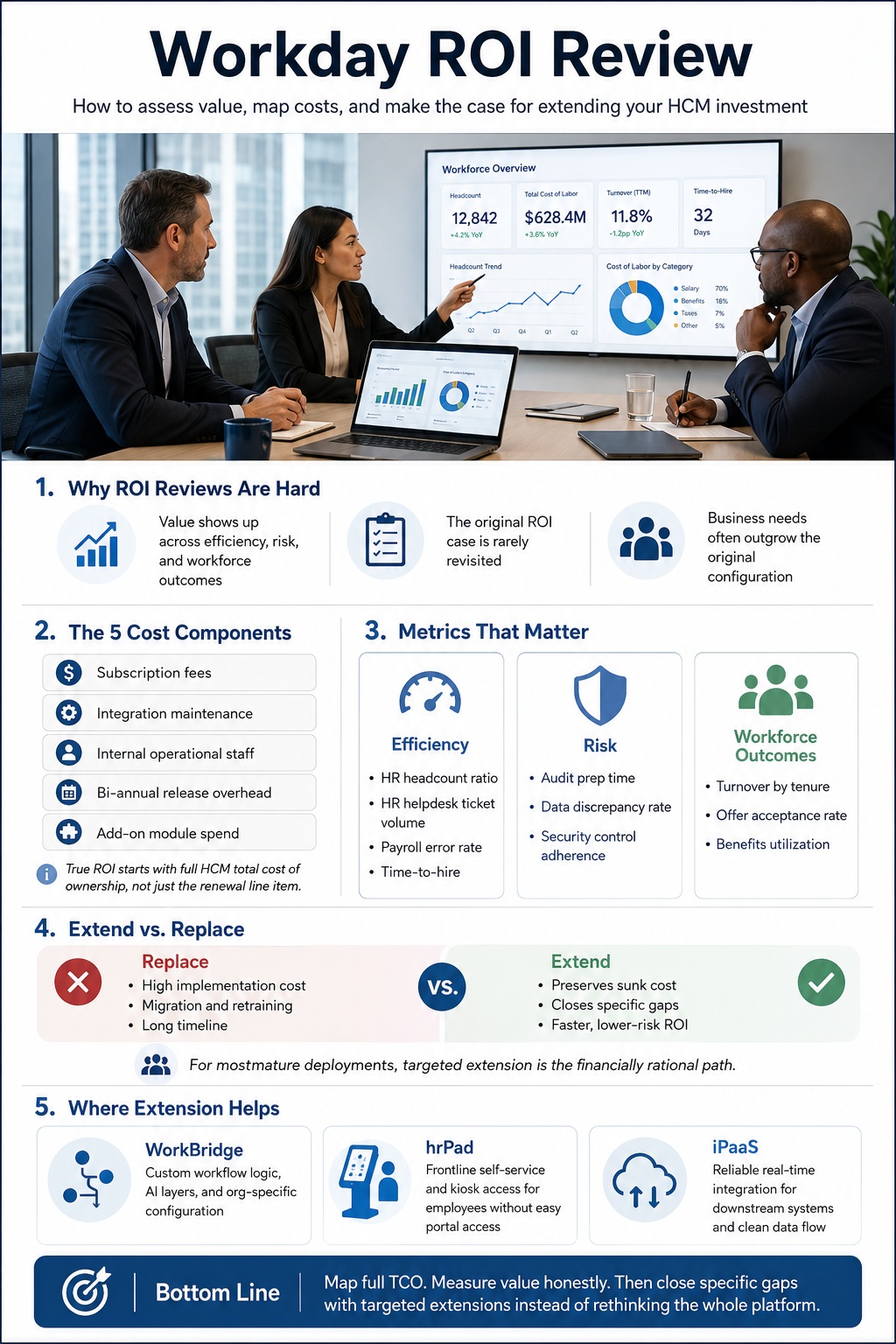
The Five Cost Components to Map First
Before measuring value, you need an honest map of what Workday costs. The subscription renewal is the number that gets reviewed; it’s also typically the smallest component of ongoing total cost of ownership.
Subscription fees are the most visible line. Per-employee annual costs vary considerably by contract, but for enterprise deployments (10,000+ employees), they commonly fall in a range that puts the subscription at roughly 35–50% of five-year TCO. This is the line that gets negotiated at renewal and the one finance usually focuses on.
Ongoing integration maintenance is consistently underestimated. Each integration point — payroll processor, benefits vendor, identity management, downstream ERP — costs $3,000 to $12,000 annually to maintain, in addition to the original development cost. An enterprise with 20 active integrations is carrying $60,000 to $240,000 in annual integration maintenance. Organizations often don’t count this as a Workday cost because it sits in IT budgets rather than on the HR tech line. This is one of the clearest areas where CloudApper iPaaS reduces ongoing TCO: pre-built, maintained Workday connectors replace point-to-point custom integrations, and the maintenance burden shifts from your internal team to the platform — with connector updates handled through Workday’s bi-annual release cycle automatically.
Internal operational staff — the Workday Center of Excellence, HRIS administrators, payroll operations, reporting analysts — represents the third-largest cost component in most deployments. Steady-state internal teams for large enterprise deployments run 6 to 15 FTEs, with an annual cost of $1 million to $2.5 million. This is internal labor, not vendor spend, which means it rarely appears in Workday cost reviews.
Bi-annual release overhead is real but frequently invisible until it accumulates. Each Workday release requires testing of tenant-specific configurations and integrations. For organizations with complex configurations or custom integrations, this is meaningful work that has to go somewhere — either internal team capacity or external professional services.
Add-on module spend includes anything licensed beyond the core HCM module: Recruiting, Learning, Time Tracking, Payroll, People Analytics, Extend, and now Illuminate AI agents (priced through Flex Credits). Organizations that have expanded their Workday footprint over time often aren’t tracking the cumulative add-on spend clearly.
Mapping these five components for your deployment — even with approximations — usually produces a TCO figure that’s meaningfully higher than what finance has been reviewing at renewal.
The Value Metrics That Actually Move the Board Conversation
Once the cost side is mapped, the ROI case requires putting value figures against it. The metrics that resonate with board and executive audiences tend to be in three categories: efficiency gains, risk reduction, and workforce outcomes.
Efficiency Metrics
HR headcount ratio: The industry benchmark is roughly 1 HR FTE per 100 employees, though this varies significantly by industry and workforce complexity. Organizations that implemented Workday without seeing meaningful improvement in HR-to-employee ratios — because manual processes persisted alongside the system, or because the self-service functionality didn’t reach the workforce it was designed for — haven’t captured the efficiency ROI that justified the initial investment.
HR helpdesk ticket volume: If employees are calling HR to ask about paystubs, PTO balances, or policy questions, self-service isn’t working. Measuring ticket volume by category — and tracking whether it’s declined since Workday implementation — is a concrete proxy for whether the employee experience value is being delivered.
Payroll error rate and correction frequency: Payroll corrections are expensive both in direct cost and in employee trust. If your payroll error rate hasn’t declined meaningfully post-Workday, it signals either a data quality problem (typically from integrations not working cleanly) or a process problem upstream of payroll processing.
Time-to-hire for key roles: If Workday Recruiting is configured and active, tracking time-to-hire before and after implementation, and by role type, tests whether the platform is delivering the recruiting efficiency value it was projected to.
Risk Reduction Metrics
Compliance audit preparation time: One of the most concrete value drivers in enterprise HCM is audit preparation — producing the documentation auditors need, demonstrating controls, generating reports on access, compensation equity, and employment law compliance. If your team is still spending weeks preparing for audits using exports and spreadsheets, the compliance ROI isn’t being captured.
Data discrepancy rate between Workday and downstream systems: Every time Workday data and payroll data, or Workday data and Active Directory, disagree with each other, someone has to reconcile the difference. Tracking this as a metric — even informally — surfaces whether integrations are working as designed.
Security control adherence: The offboarding access gap documented in recent data breach cases (where former employee accounts remained active post-termination) is a quantifiable risk exposure. Organizations that have automated Workday-triggered deprovisioning have reduced their exposure; those that haven’t have a measurable open risk.
Workforce Outcome Metrics
Voluntary turnover by tenure band: Workday’s people analytics capabilities allow you to track whether turnover is concentrated in specific tenure windows, roles, or locations — which is the kind of insight that moves the conversation from “people leave” to “here’s where and why, and here’s what we can address.” If this insight isn’t being produced, the analytics investment isn’t being fully utilized.
Offer acceptance rate: For organizations using Workday Recruiting, offer acceptance rate measures whether the pipeline is producing competitive offers in time. A high application-to-offer ratio with a low acceptance rate is a signal — either the process is too slow, the offers aren’t competitive, or both.
Benefits utilization rate: Low open enrollment completion — particularly for hourly and frontline populations — is a measurable outcome gap. If 30–40 percent of your workforce is defaulting into prior-year elections because they didn’t complete enrollment, that’s an ROI miss on the benefits administration investment.
Framing the Extend vs. Replace Decision
When a Workday ROI review surfaces gaps, the executive conversation often moves to: should we invest in fixing the gaps within Workday, or should we start evaluating alternatives?
This is where the framing matters. The accurate answer in most cases is neither “keep everything as is” nor “replace Workday.” It’s “extend the investment where there are clear gaps, and be honest about what Workday is and isn’t built to do.”
A few principles that help frame this clearly for an executive audience:
Replacement cost is substantial: Workday implementations typically cost 100–200% of the first-year subscription in professional services. A replacement cycle would replicate that cost, plus data migration, configuration rebuild, training, and the productivity impact of running two systems in parallel. For a mature Workday deployment, the cost of switching to an equivalent platform rarely makes financial sense unless the platform itself is fundamentally wrong for the organization.
The gaps are usually specific, not systemic. Most Workday ROI gaps concentrate in identifiable areas: frontline worker access (self-service isn’t reaching the employees it was built for), integration reliability (downstream systems aren’t getting clean data), recruiting speed for high-volume roles, or custom workflow requirements that outpaced native configuration. These are solvable with targeted additions rather than platform replacement. CloudApper HCM personalization platform maps directly to this pattern — purpose-built tools for each gap type that connect to Workday via API, preserve what’s already configured, and extend the platform’s reach without touching the core. The right framing for an executive audience isn’t “we need more from our HCM” — it’s “here are three specific gaps, here’s the tool that closes each one, and here’s what we expect in return.”
Extension preserves sunk cost and adds incremental value: Adding a purpose-built layer on top of Workday — for frontline self-service, AI-assisted recruiting, automated integration, or custom workflow — costs a fraction of a replacement cycle and delivers value against the specific gap, without recreating what Workday already does well.
The “extend, not replace” framing is what boards can act on: A proposal to evaluate Workday alternatives opens a multi-year project with uncertain outcomes. A proposal to close three specific gaps — with defined cost, timeline, and measurable outcomes — is something an executive team can approve in a quarter.
How CloudApper AI Fits Into the ROI Extension Story
CloudApper AI for HCM Extensibility & Personalization is built specifically for organizations that want to extend Workday’s value without replacing it — adding AI-native workflow layers, custom fields, and org-specific configuration above the Workday core.
In the context of a Workday ROI review, CloudApper AI is most relevant to the gaps that surface in three specific areas:
Custom configuration that doesn’t belong in the tenant: When organizations have workflow requirements that are too specific for Workday’s native configuration — custom scoring logic, certification tracking tied to shift eligibility, org-specific approval chains — building them in CloudApper AI keeps the Workday tenant clean and the custom logic portable. This directly addresses the maintenance and release regression cost that accumulates when complex configurations live inside the core.
Analytics gaps for workforce-specific insight: When Workday’s standard reports don’t surface the specific workforce questions leadership is asking — because the data points involve fields or relationships that Workday doesn’t capture natively — CloudApper AI can capture and surface that data without modifying Workday’s data model.
The “AI layer on Workday” that’s currently being bought as a separate add-on: As Workday prices Illuminate features through Flex Credits, organizations that need AI-assisted self-service, policy Q&A, or manager decision support are being asked to add consumption-based licensing on top of existing subscription costs. CloudApper AI provides an alternative path for organizations that need the capability now and prefer a different commercial model.
For frontline access gaps — benefits enrollment, time visibility, paystub access — CloudApper hrPad is the more direct answer: a kiosk layer that extends Workday self-service to employees who don’t have a regular path into the portal.
For integration gaps — downstream systems not receiving reliable, real-time data from Workday — CloudApper iPaaS closes the connection without requiring Workday Studio development expertise.
The ROI case for each of these additions is narrower and more defensible than the ROI case for Workday itself: here’s the specific gap, here’s the cost to close it, here’s the measurable outcome. That framing tends to move faster through approval cycles than a broad platform argument.
Building the Slide for the Board
A Workday ROI presentation that works for a board or executive audience typically covers three things in this order:
What we’ve built and what it’s costing us: A clear, honest map of the full five-component TCO — not just the subscription renewal. This is the foundation. If the board has been reviewing only the subscription line, showing the full picture is useful even before you’ve made an argument for change.
Where the platform is delivering against the original ROI case — and where it isn’t: Metrics-based, not impressionistic. Pick three to five specific measures that were in the original business case (or that the board would expect: HR headcount ratio, payroll error rate, time-to-hire, audit preparation time) and show the actual numbers, not just directional claims.
A specific proposal: here are the gaps, here’s how we close them, here’s what we expect in return: The ask should be proportional. A proposal to extend Workday with targeted additions — with defined cost, timeline, and measurable outcomes — is a credible, actionable ask. A vague proposal to “maximize Workday ROI” is not.
Frequently Asked Questions
How do you calculate the ROI of Workday HCM?
A complete Workday ROI calculation maps five-year total cost of ownership against measurable value delivered: HR efficiency gains (headcount ratio, ticket reduction, time saved), risk reduction (compliance audit preparation, data accuracy, security controls), and workforce outcomes (turnover, offer acceptance, benefits utilization). Most organizations have the cost side partially mapped but the value side only partially instrumented.
What is the total cost of ownership for Workday HCM?
For large enterprise deployments (10,000+ employees), five-year TCO typically ranges from $30 million to $50 million when subscription, implementation, ongoing integration maintenance, internal staff, and release overhead are fully counted. Subscription fees represent roughly 35–50% of five-year TCO; the remainder is distributed across the other four components, which are rarely tracked as a unified Workday cost.
How often should organizations review Workday ROI?
At minimum, a structured ROI review should accompany each contract renewal cycle. For organizations making significant add-on decisions — new modules, AI agent licensing through Flex Credits, major configuration changes — an ROI review before committing is prudent. Annual executive reviews of a three-to-five metric dashboard are more useful than intermittent deep dives.
Should we extend Workday or replace it when ROI is below expectations?
In most cases, targeted extension is the financially rational answer. Replacement involves a full implementation cycle (typically 100–200% of first-year subscription cost in professional services), data migration, configuration rebuild, and retraining. For mature deployments with specific, identifiable gaps, extending with purpose-built additions costs far less and delivers faster. Replacement makes sense when the platform is architecturally wrong for the organization — which is relatively rare for organizations that were appropriately sized for Workday when they implemented it.
What metrics should a CHRO or CIO present to the board on Workday performance?
The metrics that move board conversations are those that translate directly to business outcomes: HR-to-employee ratio (efficiency), payroll error rate (accuracy and risk), time-to-hire for key roles (talent competitiveness), voluntary turnover by tenure band (workforce health), and open enrollment completion rate (benefits investment utilization). Compliance-related metrics — audit preparation time, security control adherence, data discrepancy rate — are especially relevant for boards with audit committee oversight of HR data.
What gaps in Workday does CloudApper AI address?
CloudApper AI is most relevant to organizations that need custom workflow logic that doesn’t belong in the Workday tenant, AI-assisted self-service that complements or precedes Workday Illuminate’s native rollout, or org-specific configuration that would otherwise require Workday Extend development. It connects to Workday via API, preserves the core, and adds capability in a layer that can be modified without touching Workday tenant configuration.
What to Do Next
The ROI conversation tends to go better when it’s initiated by HR or IT rather than reacted to under pressure from finance or the board. If your organization is approaching a Workday renewal, or if an executive review of technology spend is on the horizon, a structured self-assessment against the five cost components and five to seven value metrics is a useful starting point — regardless of what the conclusion turns out to be.
The most common finding in a Workday ROI review isn’t that the platform is wrong. It’s that specific populations or use cases were underserved by the original deployment, and that targeted additions would close the gap at a fraction of the cost of rethinking the whole stack.
If you’d like to talk through your specific deployment gaps and what an extension strategy might look like, the CloudApper team is available here.

What is CloudApper AI Platform?
CloudApper AI is an advanced platform that enables organizations to integrate AI into their existing enterprise systems effortlessly, without the need for technical expertise, costly development, or upgrading the underlying infrastructure. By transforming legacy systems into AI-capable solutions, CloudApper allows companies to harness the power of Generative AI quickly and efficiently. This approach has been successfully implemented with leading systems like UKG, Workday, Oracle, Paradox, Amazon AWS Bedrock and can be applied across various industries, helping businesses enhance productivity, automate processes, and gain deeper insights without the usual complexities. With CloudApper AI, you can start experiencing the transformative benefits of AI today. Learn More
- Useful Links:
- Agentic AI
- No-Code/Low-Code
- Custom Software
- HCM Personalization
- iPaaS
- FedRAMP