Payroll diversion attacks use phished Workday logins to change payment elections and redirect paychecks. This guide covers what Workday offers natively, the controls to configure first, where session-based checks stop protecting frontline workers, and how CloudApper hrPad verifies the person behind every direct deposit change.

TL;DR
Payroll diversion attacks do not exploit Workday itself. Attackers phish an employee's password and MFA code, sign in through SSO, change payment elections, and hide Workday notifications with inbox rules. Native controls such as phishing-resistant MFA, payroll-routed notifications, new-account holds, and audit reporting should be configured first. Those controls verify the session, not the person, which leaves frontline workers on personal phones exposed. CloudApper hrPad closes that gap by verifying identity in person before a direct deposit change reaches Workday.
Table of Contents
- What the Payroll Pirate Pattern Looks Like
- What Workday Gives You Natively
- Controls to Configure This Week
- Where Native Controls Run Out
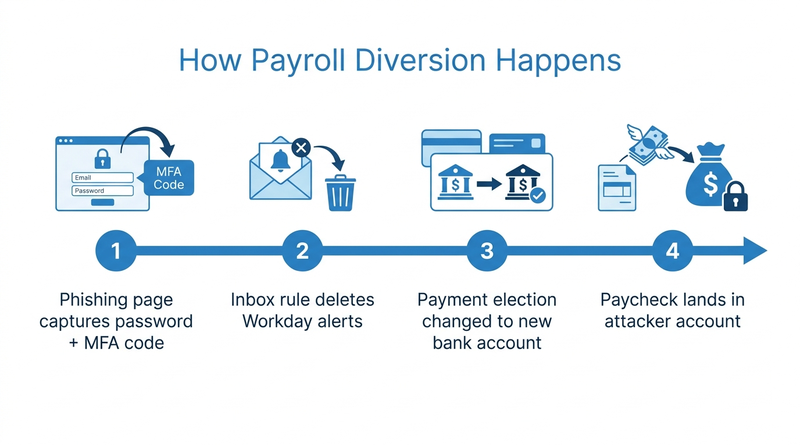
Friday: a warehouse lead calls payroll because her paycheck never landed. Wednesday: her Workday payment election was changed to a new bank account. Tuesday: an inbox rule named “….” started deleting every Workday notification she received. Monday: she entered her credentials and MFA code into a login page that looked exactly like Workday.

Read forward, the attack sits in the gap between a valid session and a verified person. That gap is where CloudApper adds a layer alongside Workday, and closing it starts with what the tenant already offers.
What the Payroll Pirate Pattern Looks Like
Microsoft Threat Intelligence tracked the actor Storm-2657 sending phishing emails to about 6,000 recipients across 25 universities in 2025. It compromised 11 accounts at 3 of them. The attackers signed into Workday through SSO, edited Payment Elections, and hid the evidence with mailbox rules. No Workday vulnerability was involved. Every change was a legitimate self-service transaction made with stolen credentials.
What Workday Gives You Natively
Workday authentication policies can require MFA for every security group that includes employees, and a phishing-resistant method removes the code-relay trick entirely. Payment election changes can send business process notifications to the worker and to payroll. Audit logs record bank account additions and election changes, which you can report on or send to your SIEM. Pair those alerts with your Workday audit preparation so every bank change has a reviewable trail.
Controls to Configure This Week
- Require phishing-resistant MFA (FIDO2 keys or passkeys) for all worker security groups, not only administrators.
- Send payment election notifications to a payroll mailbox the employee’s inbox rules cannot touch.
- Hold first deposits to a newly added account for one cycle, or run a prenote before funds move.
- Build a report that flags several election changes by one user, or changes made right before payroll close.
- Add a review step to the payment election process using the patterns in Workday business process approvals.
Where Native Controls Run Out
Every control above confirms the session. None confirms the person. Frontline employees often sign in from personal phones, share devices, and have no corporate inbox, so Workday notifications rarely reach them in time. The same population already drives the password reset and MFA load that makes phishing-resistant methods hard to roll out. This is the point where CloudApper places identity verification in front of the transaction instead of behind it.
How CloudApper hrPad Verifies the Person Behind the Change
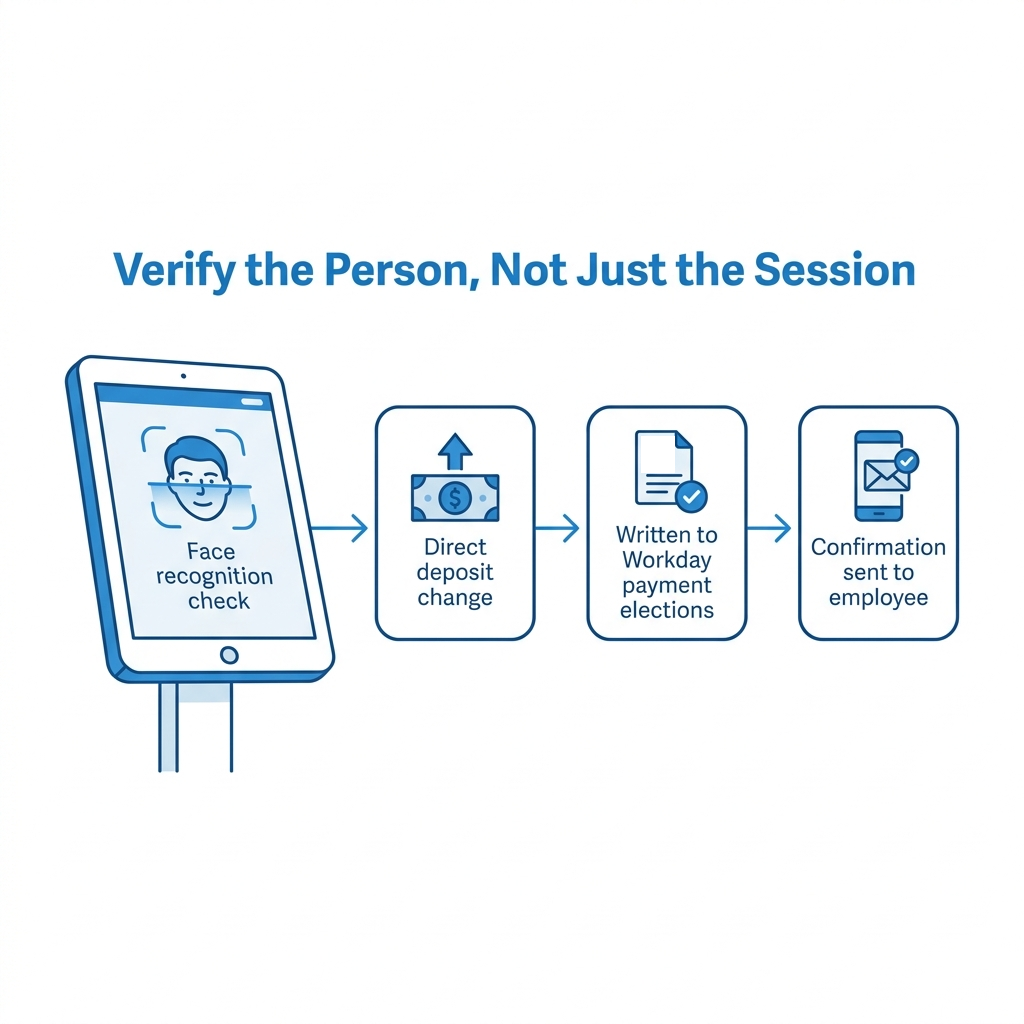
CloudApper hrPad for Workday is a tablet self-service kiosk that can require facial recognition, or badge plus PIN, before an employee updates direct deposit. The verified change writes to Workday’s payment elections, and a confirmation goes out on a channel the employee actually sees. A phished session cannot pass a face check on the plant floor. The same kiosk already handles paystub access for hourly workers, so employees know where to go.
Frequently Asked Questions
Q: What is payroll diversion fraud in Workday?
Payroll diversion is when an attacker uses stolen Workday credentials to change an employee’s payment elections so the next paycheck goes to an attacker-controlled bank account.
Q: Can MFA stop Workday direct deposit fraud?
Standard MFA helps, but adversary-in-the-middle phishing can relay codes in real time. Phishing-resistant MFA such as FIDO2 keys or passkeys blocks that technique.
Q: How do I detect unauthorized payment election changes in Workday?
Monitor Workday audit logs for bank account additions and payment election changes. Flag repeated changes by one user and changes right before payroll close.
Q: Should payroll hold deposits to a new bank account?
Yes. A one-cycle hold or prenote on newly added accounts gives payroll time to confirm the change with the employee before money moves.
Q: How do you verify direct deposit changes for frontline workers?
Require in-person identity verification, such as facial recognition at a kiosk, before the change reaches Workday, then confirm it on a channel the employee uses.
If direct deposit changes at your organization are still protected only by a password and a code, talk to the CloudApper team about adding identity verification alongside Workday before the next payroll run.

What is CloudApper AI Platform?
CloudApper AI is an advanced platform that enables organizations to integrate AI into their existing enterprise systems effortlessly, without the need for technical expertise, costly development, or upgrading the underlying infrastructure. By transforming legacy systems into AI-capable solutions, CloudApper allows companies to harness the power of Generative AI quickly and efficiently. This approach has been successfully implemented with leading systems like UKG, Workday, Oracle, Paradox, Amazon AWS Bedrock and can be applied across various industries, helping businesses enhance productivity, automate processes, and gain deeper insights without the usual complexities. With CloudApper AI, you can start experiencing the transformative benefits of AI today. Learn More
- Useful Links:
- Agentic AI
- No-Code/Low-Code
- Custom Software
- HCM Personalization
- iPaaS
- FedRAMP

Brochure
CloudApper AI TimeClock
For accurate & touchless time capture experience.
Download Brochure
CloudApper AI Solutions for Workday



- Works with








- and more.
Similar Posts

Workday W-4 Updates for Hourly Workers: Exempt Renewals, Overtime Deductions,…

Workday Access for Former Employees: How to Deliver W-2s and…