EIB is the right tool for a one-time load and the wrong one for anything recurring. This guide covers what Workday's Enterprise Interface Builder handles natively, why partial failures, business process side effects, and missing change detection break mass loads, and when to move the work to CloudApper iPaaS.

TL;DR
Workday's Enterprise Interface Builder is the right tool for a one-time, single-object load of clean data, and the wrong one for anything recurring. An EIB calls exactly one web service operation, has no transaction boundary or rollback, and cannot detect what changed since the last run, so multi-object changes need sequenced loads and a mid-load failure leaves the tenant partly updated. Mass loads also launch real business processes, which means thousands of notifications, approvals, and downstream integration events that teams rarely size for. Check Mass Operation Management first, test against a refreshed masked sandbox, map the business process consequences, and build the reconciliation report before the load. Once a load repeats, it is an integration: CloudApper iPaaS adds change detection, per-row quarantine and re-drive, coordinated multi-object sequencing, and an audit trail, without a custom build for every source system.
Table of Contents
- What Workday Does Natively with EIB
- Where the Friction Shows Up
- What to Do Within Workday First
- Where Native Tools Run Out
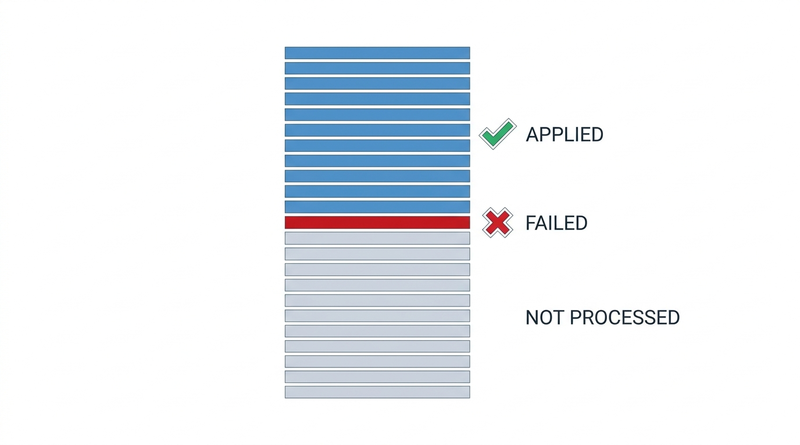
The Workday EIB is a capable tool that often ends up as recurring infrastructure, a job it was not designed for. When row 2,847 of a 4,100-row compensation load fails, earlier rows are already in the tenant, later ones are not, and rerunning the file reapplies everything with no undo.
Most tenants have a load like that in their history and one on a recurring schedule nobody has reviewed in a year. Choosing between an EIB and a real integration comes down to admitting a load is recurring, and CloudApper is relevant at the point where a one-time load quietly became infrastructure.
What Workday Does Natively with EIB
EIB is Workday’s delivered tool for simple data movement in and out of the tenant, and for what it covers it is efficient and requires no code.
An inbound EIB has three parts: a data source, a transformation, and a transport. In its most common form the data source is a spreadsheet you attach, the transformation is a template Workday generates from a specific web service operation, and the transport is that web service. You download the template for the operation you need, populate it, launch the EIB, and Workday processes each row as a web service call. Outbound EIBs work the other direction, taking a custom report as the source and delivering the output to SFTP, email, or a Workday attachment.

The parts people underrate: EIBs can be scheduled, and they can retrieve their input file from an SFTP endpoint rather than a manual attachment, so an EIB is not inherently a manual process. Each run produces an integration event with the input file, the results, and per-row messages retained against it, which is a real audit artifact. Workday also publishes row-count and file-size guidance for EIB loads and expects large volumes to be split into batches.
For mass changes that are truly one-time, single-object, and already clean, this is the right tool and building anything heavier is waste. Workday also delivers Mass Operation Management for several common change types, which handles some scenarios without an EIB and is worth checking first.
Where the Friction Shows Up
The defining constraint is that an EIB calls exactly one web service operation. A change that touches a worker’s position, compensation, and organization assignment is three EIBs, sequenced, each with its own failure surface. Nothing coordinates them. If the second one fails after the first succeeded, the tenant holds a half-applied change and the recovery is manual.
Partial failure is the second constraint, and it is the one that ruins evenings. EIB processes rows independently, so a load can end with most rows applied and a minority rejected. There is no transaction boundary and no rollback. Rerunning the same file reapplies successful rows, which for effective-dated business objects can mean duplicate events rather than a harmless no-op. Correct recovery means extracting the failed subset, fixing it, and loading only that, which requires someone to reconcile the results file by hand at the exact moment they are least equipped to.
Third: business process side effects at scale. An EIB is not writing to a table, it is launching business processes. Four thousand job changes are four thousand business process instances, each capable of routing approvals, notifying managers, triggering sub-processes, and firing downstream integrations. Teams discover this when managers receive hundreds of notifications overnight, or when a benefits or payroll integration meets a volume it was never sized for and fails quietly. That failure mode is the subject of monitoring and recovering from Workday integrations that fail silently, and the carrier-feed version of it appears in why benefits enrollments do not reach the carrier.
Fourth is effective dating. A mass load with dates set a pay period earlier than intended produces retroactive compensation and absence recalculations across thousands of workers. The load itself reports success. The consequences arrive during the next payroll run.
Fifth, and the most consequential over time: EIB has no concept of what changed since last time. Every run is a full file. When the load becomes recurring, someone builds delta logic in a spreadsheet, and that spreadsheet becomes the integration. It lives on a laptop, it is understood by one analyst, it is emailed with worker data in it, and it has no monitoring. The organization now depends on an undocumented process with a single point of failure and a data-security exposure nobody has assessed.
Then there is the audit question. When an auditor asks who changed four thousand records and under what authority, the answer is an attachment on an integration event and a person’s recollection. Compare that with the evidence expectations described in preparing for a Workday audit.
What to Do Within Workday First
Check Mass Operation Management and the delivered mass actions before building anything. A meaningful share of EIB projects exist because nobody checked whether Workday already had a supported path.
Test in a sandbox that resembles production, using a recently refreshed tenant rather than one that has drifted for six months. Sandbox data handling matters here, and the approach in masking PII in Workday sandbox and non-production tenants applies directly, since these files contain worker data.
Batch within Workday’s published guidance rather than at the edge of it, and sequence dependent loads explicitly with a validation step between them instead of launching them together.
Map the business process consequences before you run anything. Identify which process the operation launches, what it notifies, what it routes for approval, and which integrations subscribe to it. Decide deliberately whether to adjust notification behavior for the load window, and warn the teams whose integrations will see the volume.
Validate effective dates against pay period, absence accrual, and benefit event boundaries, not just against the calendar.
Build the reconciliation report before the load, not after. A report that compares the intended file against tenant state afterward turns a hopeful load into a verified one.
Keep the input file and results attached to the integration event, and record who authorized the change. This is the cheapest audit evidence available and it costs nothing at the time.
Where Native Tools Run Out
The line is recurrence. EIB is a good one-time tool and a poor recurring one, and most organizations cross that line without noticing.
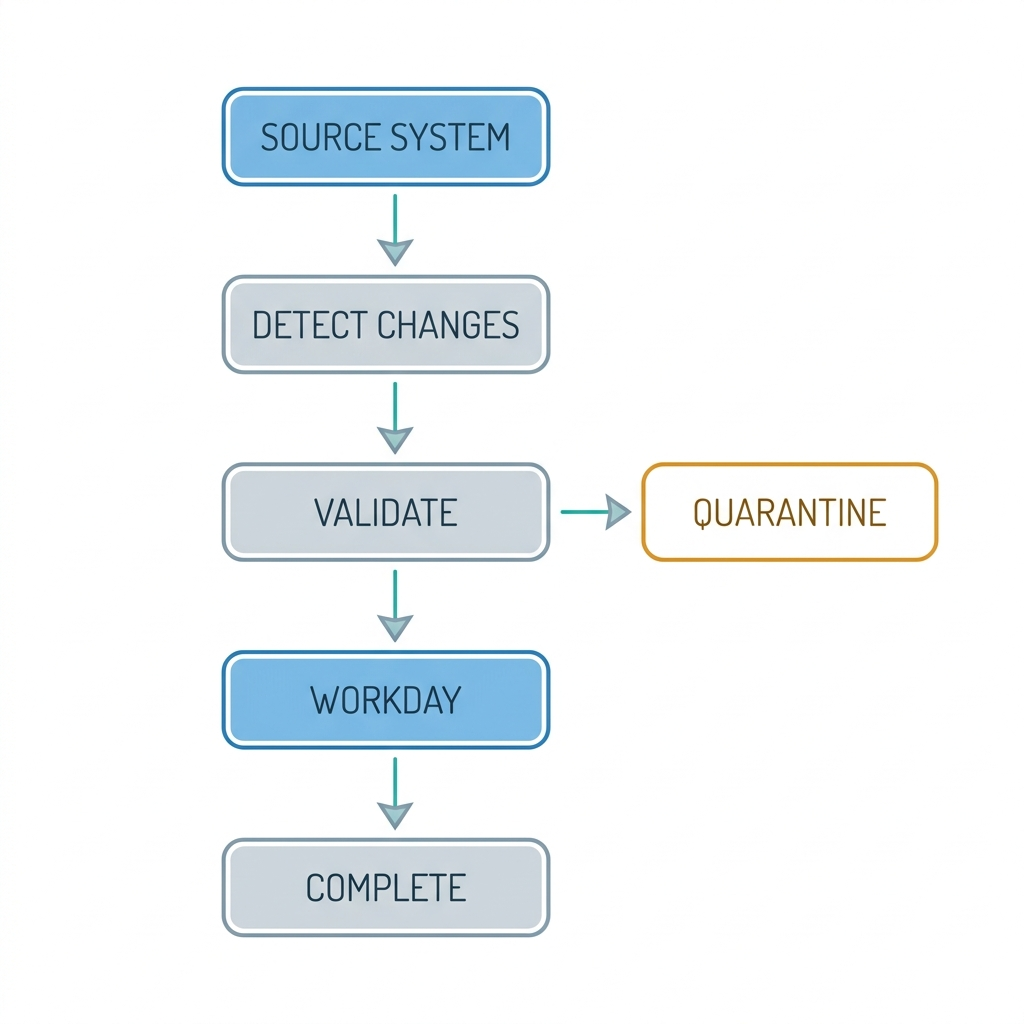
Once a load repeats, you need things EIB does not have: change detection against the previous state, matching and enrichment against Workday records before writing, retry semantics for transient failures, quarantine and re-drive for rows that legitimately fail, and monitoring that alerts someone other than the person who happened to run it. Workday Studio and Core Connectors cover part of this and are the right answer when the volume and permanence justify a build, a calculation similar to the one in deciding when to build inside the tenant and when to extend outside it. What they do not solve is the long tail: the dozen source systems each sending a few hundred rows a month, none of which individually justifies a Studio project, and all of which currently arrive as spreadsheets. That is where CloudApper fits.
How CloudApper iPaaS Replaces the Recurring EIB
CloudApper iPaaS is built for the loads that outgrew EIB but do not warrant a custom integration project each.
It handles delta detection, so the recurring full-file spreadsheet stops being necessary. CloudApper iPaaS compares the source system’s current state against what Workday holds and acts only on genuine differences, which eliminates both the manual Excel comparison and the duplicate-event risk of reloading rows that already applied.
It handles failure properly. Rows that fail validation are quarantined with the reason attached rather than aborting or silently vanishing, and they can be corrected and re-driven individually without touching the rows that succeeded. Transient failures retry on their own. Nobody reconciles a results file at midnight.
It coordinates multi-object changes. A change spanning position, compensation, and organization assignment runs as one sequenced operation with defined behavior when a step fails, instead of three EIBs and an analyst holding the sequence in their head.
It removes the spreadsheet from the process. Source systems connect directly, worker data stops travelling by email and laptop, and every record carries a per-row audit trail showing what changed, when, from which source, and whether it succeeded. The same platform covers the adjacent flows in syncing Workday with Salesforce and ServiceNow and the payroll path in connecting Workday to a third-party payroll system.
None of this argues against EIB. For a genuine one-time load of clean data into a single object, EIB remains the fastest correct answer, and CloudApper is not a substitute for it. The argument is that the second time you run the same load, you are operating an integration, and it should be built like one.
Frequently Asked Questions
Q: What is an EIB in Workday?
EIB stands for Enterprise Interface Builder, Workday’s delivered tool for simple inbound and outbound data movement without custom code. An inbound EIB combines a data source, usually a spreadsheet, with a template generated from a single web service operation and processes each row as a call to that operation. Outbound EIBs use a custom report as the source and deliver the output to SFTP, email, or an attachment.
Q: What are the limitations of a Workday EIB?
An EIB calls exactly one web service operation, so multi-object changes require several sequenced EIBs with no coordination between them. There is no conditional logic, no transaction boundary, and no rollback, so a load can end partly applied. Workday publishes row-count and file-size guidance that requires large volumes to be batched, and EIB has no way to detect what changed since the previous run.
Q: When should you use an EIB instead of a Core Connector or Studio integration?
Use an EIB when the load is one-time or rare, touches a single business object, uses data that is already clean and authoritative, and needs no transformation or matching logic. Move to a Core Connector, Studio, or an integration platform when the load recurs, spans multiple objects, requires change detection or error handling, or when the source system must stay continuously in sync.
Q: Can a Workday EIB run on a schedule?
Yes. EIBs can be scheduled and can retrieve their input file from an SFTP endpoint rather than a manual attachment, so the run itself can be automated. What scheduling does not provide is change detection, retry logic, per-row error recovery, or monitoring that alerts anyone when the file is missing or the load fails, which is why a scheduled EIB is usually a sign the load has outgrown the tool.
Q: What happens if a Workday EIB fails partway through a load?
Rows are processed independently, so the successful rows remain applied and the failed rows do not. There is no rollback. Recovery means reading the results file, extracting only the failed rows, correcting them, and loading that subset, because rerunning the original file reapplies rows that already succeeded and can create duplicate effective-dated events.
Q: How do you avoid triggering thousands of notifications during a mass Workday load?
Identify which business process the web service operation launches and review its notification and approval routing before running the load. Decide deliberately how notification behavior should work during the load window, sequence the load outside peak business hours, and tell the owners of any downstream integrations that subscribe to those events so they can watch for volume-related failures.
If a load that started as a one-time EIB has quietly become a monthly routine in your organization, the question is no longer which spreadsheet template to use but who owns the integration and what happens when it fails. CloudApper works alongside Workday to turn those recurring loads into monitored, recoverable processes. Contact the CloudApper team to review which of your current loads have crossed that line.

What is CloudApper AI Platform?
CloudApper AI is an advanced platform that enables organizations to integrate AI into their existing enterprise systems effortlessly, without the need for technical expertise, costly development, or upgrading the underlying infrastructure. By transforming legacy systems into AI-capable solutions, CloudApper allows companies to harness the power of Generative AI quickly and efficiently. This approach has been successfully implemented with leading systems like UKG, Workday, Oracle, Paradox, Amazon AWS Bedrock and can be applied across various industries, helping businesses enhance productivity, automate processes, and gain deeper insights without the usual complexities. With CloudApper AI, you can start experiencing the transformative benefits of AI today. Learn More
- Useful Links:
- Agentic AI
- No-Code/Low-Code
- Custom Software
- HCM Personalization
- iPaaS
- FedRAMP

Brochure
CloudApper AI TimeClock
For accurate & touchless time capture experience.
Download Brochure
CloudApper AI Solutions for Workday



- Works with








- and more.
Similar Posts

Workday Biometric Time Clock Compliance: Consent, Retention, and Deletion Rules…

Workday Kiosk Security: Protecting Pay Slips and PII on Shared…