Workday can report a benefits carrier integration as completed while the carrier never loads the member. This guide covers what Cloud Connect for Benefits handles natively, why partial rejects and incomplete benefit events cause silent coverage gaps, and how CloudApper iPaaS closes the return path with automated reconciliation.

TL;DR
Workday reports a benefits carrier integration as successful when the file reaches the carrier's SFTP endpoint, not when the carrier loads the member, so partial rejects, incomplete benefit events, and shifted as-of-entry-moments produce coverage gaps that no alert catches. Cloud Connect for Benefits and Core Connector: Benefits handle file generation and delivery well, but the return path, acknowledgments, discrepancy reports, and member-level rejects, has no home in the tenant. Fix what you can natively first: alert on zero-record files, audit incomplete benefit events weekly, tighten dependent data validation, and govern who can re-run a changes-only integration. Where native tools run out, CloudApper iPaaS ingests carrier rejects, matches them back to Workday worker records, and runs scheduled census reconciliation that doubles as audit evidence.
Table of Contents
- What Workday Does Natively for Benefits Carrier Feeds
- Where the Friction Shows Up
- What to Do Within Workday First
- Where Native Tools Run Out
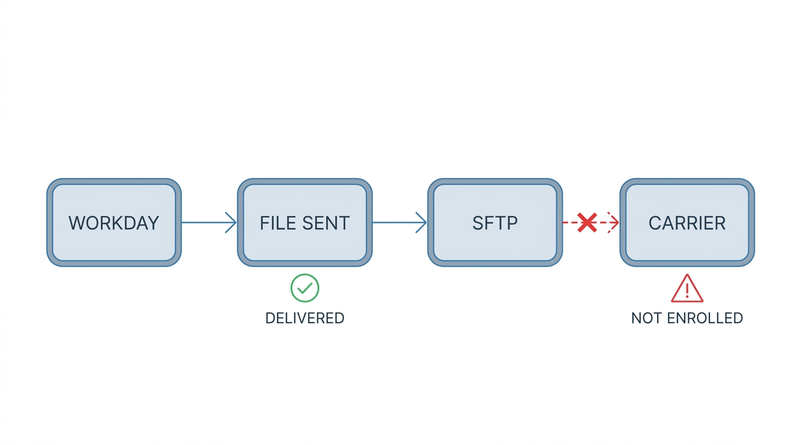
Nothing fails when Workday benefits carrier file errors happen, which is what makes them expensive. The integration event reads Completed and the election sits in the tenant, yet the record never reaches the carrier’s eligibility system, so a clean run status should be treated as proof that Workday finished its part, not proof the carrier loaded the member.
The first signal is often an employee told at the pharmacy that the plan has no record of them. No alert fired and the audit trail looks clean, because the record dropped out past the tenant’s edge. CloudApper operates as an extension layer alongside Workday for this kind of blind spot.
What Workday Does Natively for Benefits Carrier Feeds
Workday’s benefits integration capability is stronger than most admins give it credit for. For carriers in Workday’s connector catalog, Cloud Connect for Benefits provides a pre-built, Workday-maintained connection that produces an ANSI X12 834 file or the carrier’s proprietary format, on the cadence you configure, delivered over SFTP. Workday builds the mapping and keeps it current when the carrier changes its specification, so you configure eligibility and launch parameters rather than writing transformation logic.
For carriers outside that catalog, Core Connector: Benefits templates give you a delivered skeleton with configurable field mapping, and Document Transformation applies XSLT to reshape the output into whatever the carrier expects. Between the two, most organizations can stand up a working feed without a Workday Studio build.

The mechanism underneath is well designed. Workday drives changes-only files from the transaction log rather than diffing snapshots. Each run records a successful “as of entry moment,” and the next run picks up every benefit-relevant change entered after that point, so the carrier receives exactly the deltas since the last file with no duplicates and no gaps. Full-file replacements run on a separate schedule, which is how most organizations handle open enrollment.
Workday also gives you real monitoring primitives: the Integration Events report shows every run with its status, record counts, and output document, and integration notifications can alert a group on error.
Where the Friction Shows Up
The core problem is a definition mismatch. Workday reports success when it delivers the file to the SFTP endpoint. The carrier reports success when it loads a member record into its eligibility system. Those are two different events, separated by a system you do not control, and Workday has no visibility into the second.
Partial rejects are where this hurts most. A carrier will accept the interchange at the envelope level, return a clean 999 or 997 acknowledgment, then reject individual member records during downstream processing. Those rejects land in a discrepancy report in an SFTP folder or an inbox, in a format and on a schedule the carrier chose. If nobody owns that report, those members do not have coverage, and nothing in Workday indicates a problem.
The second recurring failure is incomplete benefit events. An employee submits elections, but the event does not complete because evidence of insurability is pending, dependent verification documents were never uploaded, or a step is sitting in a manager’s inbox. Workday behaves correctly here: the elections are not yet current, so they do not belong on the file. From the benefits team’s perspective the enrollment looks done, because the employee finished their part. These stall quietly and surface weeks later, the same pattern described in Workday benefits life event processing delays and dependent verification gaps.
Third, and most damaging when it happens: the entry moment window. Changes-only integrations depend on the last successful run. If a run is cancelled, restarted with an overridden parameter, or re-launched manually to get a file out, the window can shift and a set of changes never appears on any file. The integration event history looks normal afterward, and no delivered report says “these transactions were never transmitted.”
Record-level data quality accounts for most of the rest. Carriers reject on missing dependent Social Security numbers, implausible dates of birth, unaccepted relationship codes, over-length address lines, and coverage begin dates that violate their effective-dating rules. Workday transmits all of these, because they are valid in Workday. This compounds with scale: an organization running medical, dental, vision, life, disability, HSA, FSA, COBRA, and voluntary vendors has a dozen or more feeds, each with its own cadence, format, and reject report, and no single screen showing the health of all of them.
What to Do Within Workday First
Configure integration notifications properly, and not only on failure. Set an alert for zero-record or unusually small changes-only files, because a file with three records when you normally send eighty is a stronger signal than an outright error. Assign these to a monitored group, not an individual.
Build a recurring audit of incomplete benefit events. Workday’s benefit event reporting filters on events in progress past a threshold, and running it weekly catches EOI and dependent-verification stalls before the coverage date passes.
Tighten validation at the source. Condition rules and required-field configuration on dependent records keep missing SSNs and dates of birth out of the tenant, which is cheaper than chasing them after a reject. For large hourly populations the harder version is that the employee never logs into Workday to add dependent detail at all, the access gap covered in why employees don’t complete Workday open enrollment.
Document your launch parameters and control who can re-run a changes-only integration. If a file must be regenerated, use a deliberate date range rather than a manual restart.
Try Document Transformation before commissioning a custom build. Most “the carrier needs a different format” requests are XSLT problems, not architecture problems.
And schedule a real reconciliation. Pull a Workday benefit elections report, request a monthly eligibility census from each carrier, and compare. It is tedious, but it is the only native way to know the two systems agree. The discipline behind it is the same one described in monitoring and recovering from Workday integrations that fail silently.
Where Native Tools Run Out
Everything above is worth doing, and it still leaves three gaps Workday is not designed to close.
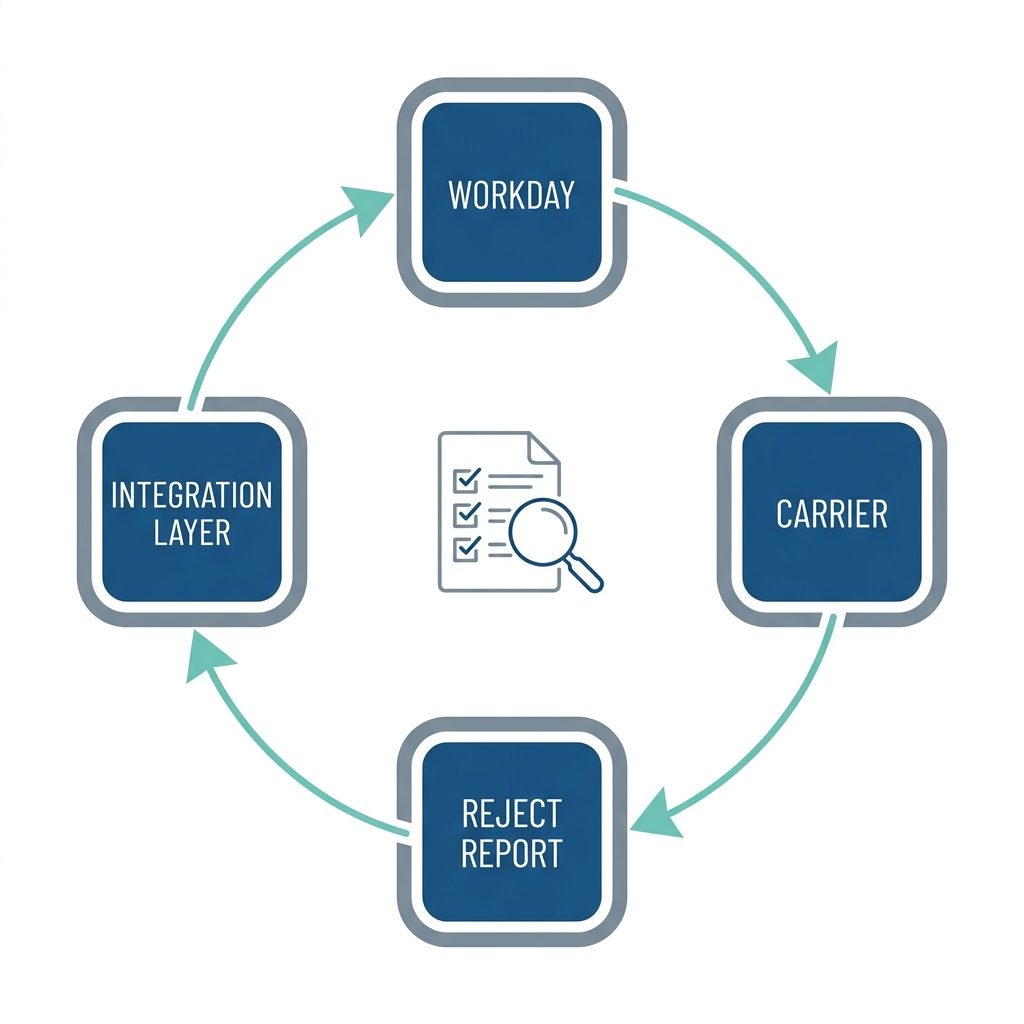
The first is the return path. Workday sends files. It does not ingest carrier acknowledgments, parse reject reports, or match a rejected member back to a Workday worker record. That work is manual by default, and it is the specific work that determines whether an employee actually has coverage. CloudApper is relevant here not as a replacement for the Workday connector but as the layer that closes the loop the connector was never meant to close.
The second is the long tail of carriers. Regional health plans, union trust funds, TPAs, and voluntary benefit vendors are rarely in Workday’s catalog, so each becomes a custom-built, individually maintained integration and every specification change becomes a project. This is the build-versus-extend calculation covered in when to build inside the Workday tenant and when to extend outside it.
The third is reconciliation as an ongoing control rather than an annual scramble. Manual census comparison does not survive contact with a benefits team’s calendar, and auditors want evidence that eligibility data was verified between systems, not just that a file was sent. That expectation shows up in preparing for a Workday audit.
How CloudApper iPaaS Closes the Loop
CloudApper iPaaS sits alongside Workday and handles the half of the carrier relationship Workday does not model: what comes back.
It monitors carrier SFTP endpoints and inboxes for acknowledgments and discrepancy reports, parses them regardless of format, and matches each rejected record back to the Workday worker it came from. Instead of an analyst eyeballing a fixed-width text file, the benefits team receives a worked exception list: employee, plan, carrier, reject reason, and the record that needs correcting. A reject becomes a task with an owner rather than something you discover at a pharmacy counter.
It runs scheduled census reconciliation, pulling current elections from Workday and the eligibility file from each carrier, comparing them member by member, and reporting the deltas: enrolled in Workday but absent at the carrier, active at the carrier but terminated in Workday, tier and dependent mismatches. That output doubles as audit evidence, because it is a dated, repeatable control rather than a one-time spreadsheet.
It also connects the carriers Workday’s catalog does not cover. Regional plans, TPAs, union trust funds, and voluntary vendors connect through CloudApper iPaaS without a separate build per vendor, and specification changes are handled in the integration layer rather than the tenant. The same platform handles adjacent flows such as syncing Workday with Salesforce and ServiceNow and the sequence in what happens to Workday access when an employee is terminated.
Where the underlying issue is that frontline employees never see their benefits status at all, CloudApper hrPad gives them a kiosk view of current elections and dependents without a Workday login, surfacing discrepancies before the coverage date.
None of this replaces the Workday connector, which remains the system of record for what gets sent. CloudApper iPaaS is the control layer around it that tells you whether what was sent was accepted.
Frequently Asked Questions
Q: Why does a Workday benefits integration show “Completed” when the carrier has no record of the employee?
Workday marks an integration complete when it generates and delivers the file to the carrier’s SFTP endpoint, with no visibility into what the carrier does afterward. Carriers routinely accept a file at the envelope level, then reject individual member records during downstream loading and report those rejects in a separate discrepancy file Workday never reads.
Q: What is an EDI 834 file in Workday?
EDI 834 is the ANSI X12 Benefit Enrollment and Maintenance transaction, the standard format for sending enrollment data to insurance carriers. Workday generates 834 files through Cloud Connect for Benefits or a Core Connector: Benefits integration, carrying subscriber and dependent demographics, plan elections, coverage tiers, and effective dates.
Q: What is the difference between a full file and a changes-only benefits file?
A changes-only file contains only benefit changes entered since the last successful run, driven by Workday’s transaction log. A full file contains every currently eligible member regardless of whether anything changed. Most organizations run changes-only weekly and a full-file replacement at open enrollment to resynchronize both systems.
Q: Why did some benefit elections never appear on any carrier file?
The two most common causes are an incomplete benefit event and a shifted as-of-entry-moment. If an event is still in progress, pending evidence of insurability, dependent verification, or an approval, the elections are not current and correctly do not transmit. Separately, if a changes-only integration is cancelled or manually re-launched, the change window can move past transactions never sent on any file.
Q: How do I reconcile Workday benefits data against a carrier’s eligibility system?
Request a monthly eligibility census from each carrier, run a current benefit elections report from Workday, and compare member by member on plan, tier, effective date, and dependents. Natively this is a manual spreadsheet exercise; CloudApper iPaaS automates the pull, comparison, and exception reporting on a schedule and produces a dated record for audit.
Q: Can Workday connect to a carrier that is not in its connector catalog?
Yes, through a Core Connector: Benefits template with Document Transformation, or a custom Workday Studio integration. Both are individually built and maintained, which is why organizations with many regional plans, TPAs, or voluntary vendors move that long tail to an integration platform such as CloudApper iPaaS rather than maintaining each in the tenant.
If carrier feeds are a recurring source of coverage gaps in your organization, the fix is usually not a better connector but a control layer around the one you already have. CloudApper works alongside Workday to close the return path, automate reconciliation, and connect the carriers your catalog does not cover. Contact the CloudApper team to talk through how your current feeds are monitored and where the gaps are.

What is CloudApper AI Platform?
CloudApper AI is an advanced platform that enables organizations to integrate AI into their existing enterprise systems effortlessly, without the need for technical expertise, costly development, or upgrading the underlying infrastructure. By transforming legacy systems into AI-capable solutions, CloudApper allows companies to harness the power of Generative AI quickly and efficiently. This approach has been successfully implemented with leading systems like UKG, Workday, Oracle, Paradox, Amazon AWS Bedrock and can be applied across various industries, helping businesses enhance productivity, automate processes, and gain deeper insights without the usual complexities. With CloudApper AI, you can start experiencing the transformative benefits of AI today. Learn More
- Useful Links:
- Agentic AI
- No-Code/Low-Code
- Custom Software
- HCM Personalization
- iPaaS
- FedRAMP

Brochure
CloudApper AI TimeClock
For accurate & touchless time capture experience.
Download Brochure
CloudApper AI Solutions for Workday



- Works with








- and more.
Similar Posts

Workday Biometric Time Clock Compliance: Consent, Retention, and Deletion Rules…

Workday Kiosk Security: Protecting Pay Slips and PII on Shared…