The GAO found critical federal systems running 23 to 60 years, and only three of eleven with a documented modernization plan. The lesson is not that replacement is hard — it is that wrapping the system you have is the approach that actually ships.

Table of Contents
- How Do I Modernize Business Apps Without Starting From Scratch?
- Legacy Systems Do Not Survive Because Nobody Noticed Them
- Wrap or Replace: An Honest Comparison
- Five Ways to Modernize Without a Rebuild
How Do I Modernize Business Apps Without Starting From Scratch?
Wrap the legacy system instead of replacing it. Leave the system of record where it is, and build the interfaces, workflows and automation your users actually need in a layer on top of it. You modernize the experience and the process in weeks, while the underlying data and integrations stay untouched.
Legacy Systems Do Not Survive Because Nobody Noticed Them
They survive because replacing them is a project nobody can get approved.

The best public evidence for this is federal. In July 2025 the US Government Accountability Office reviewed 69 legacy federal IT systems and singled out the 11 most critical (GAO-25-107795). Those 11 ranged from 23 to 60 years old. The oldest, at the Department of Defense, had been running for six decades. Two Treasury systems, 59 and 51 years old, were still running COBOL and Assembly. Eight of the 11 were on outdated programming languages and four had hardware or software the manufacturer no longer supports.
Here is the finding that should sound familiar to anyone in a commercial IT organization: of those 11 critical systems, only three had a fully documented modernization plan.
Not three that had finished modernizing — three that had written down how they would. The other eight knew the system was decades past its design life and still could not produce a plan. That is not incompetence. It is what happens when the only option on the table is a rebuild.
The same report notes the federal government spends over $100 billion a year on IT, roughly 80% of it on operations and maintenance of what already exists. That ratio is the actual problem. When four out of five dollars are committed to keeping the current thing alive, the modernization budget is whatever is left — and it is never enough for a replacement.
So the practical question is not “how do we replace this?” It is “what can we change without touching it?”
Wrap or Replace: An Honest Comparison
| Rip and replace | Wrap and extend | |
|---|---|---|
| Time to first working change | Quarters to years | Days to weeks |
| Risk profile | All at cutover | Incremental, reversible |
| Data migration required | Yes — usually the hardest part | No |
| Integrations rebuilt | All of them | None |
| Who has to be involved | IT, vendor, systems integrator | The team that owns the process |
| What happens if requirements change mid-way | Change order, re-scope, delay | Adjust the layer |
| Right when | The core system is genuinely end-of-life or unsupported | The system holds the data fine but the work around it is broken |
| Wrong when | The pain is the interface and the process, not the database | The platform is unsupported and a security liability |
Both columns are legitimate. The mistake is treating replacement as the default and wrapping as a compromise. For most enterprise systems the data model is fine — what has aged badly is the interface, the manual steps between screens, and the reports nobody can change without a ticket.
Five Ways to Modernize Without a Rebuild
1. Wrap, don’t replace
Keep the legacy system as the system of record and build the layer users touch on top of it. The database, the integrations and the compliance posture stay exactly as they are.
Start with: the single screen your team complains about most. Skip this if: the platform is unsupported and carrying live security exposure — that is a genuine replacement case.
2. Put a usable interface over the workflow that already works
Most legacy pain is interface pain. The logic is sound; getting to it takes eleven clicks and tribal knowledge. A modern front end over an unchanged back end removes the training burden and the transcription errors without a migration.
Start with: whatever process people currently do in a spreadsheet before entering it into the real system. That spreadsheet is a specification.
3. Automate the bottleneck, not the whole process
End-to-end automation programs stall because they need everyone to agree at once. Single-step automation does not. Find the handoff where work waits — an approval, a rekeying step, a status chase — and remove just that.
Start with: the step where work sits longest, not the step that is most annoying. They are rarely the same. For a worked example of single-step automation compounding, see retail business automation with AI.
4. Let the people who own the process build for it
Gartner’s November 2025 forecast puts the low-code development technologies market at $58.2 billion by 2029, growing at a 14.1% CAGR, and names citizen development and agentic AI as primary drivers. The reason is structural: the person who understands the process is not usually the person with development capacity, and that gap is where requirements die.
Start with: one process owner and one real problem. CloudApper’s no-code platform lets teams build the tools they need without joining the IT queue.
5. Modernize in increments you can fund from operating budget
A rebuild needs capital approval. A wrapped workflow usually does not. This matters more than it sounds: an increment you can fund this quarter ships, and a transformation program you have to get approved next fiscal year frequently does not.
Start with: a change small enough that no one needs to build a business case for it.
A Realistic First 30 Days
- Days 1–5. Inventory the workarounds, not the systems. Every spreadsheet, shared inbox and side database is a documented requirement someone already wrote for you.
- Days 6–10. Pick the one with the highest volume and the lowest political complexity. Resist the most broken thing; you want a result, not a fight.
- Days 11–20. Build the wrapper for that one process. The legacy system does not change.
- Days 21–30. Measure two numbers — time through the process, and errors caught downstream. Those two are what fund the next increment.
Deciding between this and a full rebuild is a real architectural question, and worth reading on properly: no-code versus traditional development for modernizing legacy systems and build or buy for business application needs.
Where CloudApper Fits
Your ERP, HCM or CRM holds the data. It records what happened. It was never built to handle what needs to happen next — the approvals, the interfaces, the exception handling, the process your organization actually runs.
CloudApper is the layer that does that work, on top of whatever system you already have, without code and without a migration. Not a replacement for the system of record, and not another point tool. The no-code platform for enterprise software development exists so that custom software gets built without development risk, and so the team that owns a process can change it in weeks rather than waiting for a roadmap.
Modernize one process first. Keep the system you already run.
Frequently Asked Questions
How do I modernize business apps without starting from scratch?
Wrap the legacy system rather than replacing it. Leave it as the system of record and build the interfaces, workflows and automation users need in a layer on top. The data model, integrations and compliance posture stay untouched, which removes the two things that make replacement projects fail: data migration and rebuilding every integration.
Is it safe to leave a legacy system in place?
It depends on support status, not age. A system running a current supported platform can sit behind a modern layer indefinitely. One running unsupported hardware or software is a security liability and needs genuine replacement. The GAO found four of eleven critical federal systems had components the manufacturer no longer supports, which is the line that separates the two cases.
Why do legacy modernization projects fail so often?
Because replacement is the only option most organizations consider, and it requires capital approval, data migration and rebuilding every integration simultaneously. The GAO reviewed eleven critical federal legacy systems in 2025 and found only three had a fully documented modernization plan, despite the systems being between 23 and 60 years old. The plan is the bottleneck, not the technology.
What should I modernize first?
The process with the highest volume and the lowest political complexity, not the one that generates the most complaints. Look for the workarounds: any spreadsheet, shared inbox or side database that exists alongside the official system is a requirement someone has already documented for you.
Can no-code really handle enterprise requirements?
For the process layer, yes. Gartner’s November 2025 forecast puts the low-code development technologies market at $58.2 billion by 2029 at a 14.1% CAGR, driven partly by citizen development. The distinction that matters is scope: no-code is well suited to the interfaces, workflows and automation around a system of record, not to replacing the system of record itself.
How much does maintaining a legacy system actually cost?
More than the visible line item, because maintenance crowds out everything else. The GAO reports the federal government spends over $100 billion a year on IT with roughly 80% going to operations and maintenance of existing systems. When four of five dollars are committed to keeping the current estate running, there is no budget left for replacement, which is precisely why incremental modernization funded from operating budget tends to be the only approach that ships.
CloudApper is the process layer that closes the gaps enterprise software can’t — across HR, ERP, CRM, and beyond, on any platform, in weeks not quarters. Because the organizations that move fastest aren’t the ones with the biggest budgets or the best vendors. They’re the ones that stopped waiting for permission to close the gap.
What is CloudApper AI Platform?
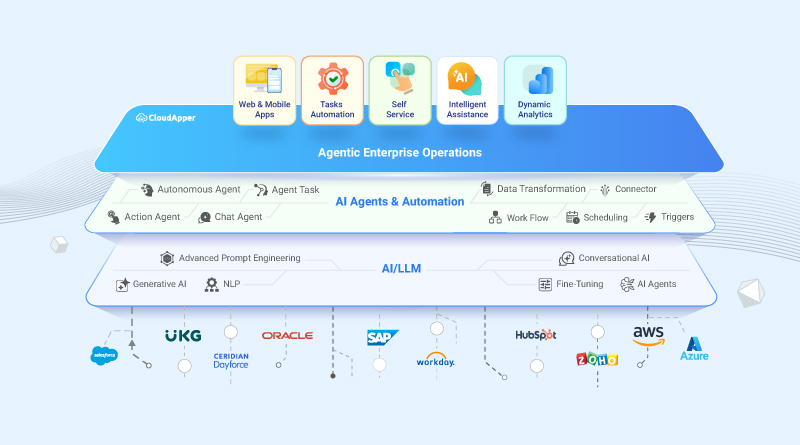
CloudApper AI is an advanced platform that enables organizations to integrate AI into their existing enterprise systems effortlessly, without the need for technical expertise, costly development, or upgrading the underlying infrastructure. By transforming legacy systems into AI-capable solutions, CloudApper allows companies to harness the power of Generative AI quickly and efficiently. This approach has been successfully implemented with leading systems like UKG, Workday, Oracle, Paradox, Amazon AWS Bedrock and can be applied across various industries, helping businesses enhance productivity, automate processes, and gain deeper insights without the usual complexities. With CloudApper AI, you can start experiencing the transformative benefits of AI today. Learn More
- Useful Links:
- Agentic AI
- No-Code/Low-Code
- Custom Software
- HCM Personalization
- iPaaS
- FedRAMP

Brochure
CloudApper hrPad
Empower Frontline Employees with an AI-Powered Tablet/iPad Solution
Download Brochure
CloudApper AI Solutions

- Works with








- and more.
Similar Posts

What Makes a No Code Platform Best for Workforce Management?
No Code vs Traditional Tools for Workforce Management