A modest internal business app costs roughly $260,000 in year one once you price developers at published BLS wages. The three routes to building one, what each actually costs, and how to tell which your app needs.

Table of Contents
- What a Business Mobile App Actually Costs
- Why Hiring Your Way Out Is Harder Than the Budget Suggests
- Native vs. Progressive Web App vs. No-Code
- How to Build a Business Mobile App Without a Development Team
You have three realistic routes: hire or contract developers to build natively, build a progressive web app, or configure one on a no-code platform. The right route depends on whether the app needs device hardware, how fast you need it, and whether you can afford to maintain two codebases indefinitely.
What a Business Mobile App Actually Costs
Most cost guides quote a range so wide it tells you nothing. Here is the arithmetic instead, built from published wage data, so you can run it with your own numbers.

The US Bureau of Labor Statistics puts the median annual wage for software developers at $133,080 as of May 2024. Fully loaded — benefits, taxes, equipment, overhead — a reasonable planning figure is around 1.3× salary, or roughly $14,400 per developer per month.
Now size a modest internal business app: a data-capture app for field staff, with a login, offline capability, a backend and both iOS and Android builds.
| Item | Assumption | Cost |
|---|---|---|
| iOS + Android + backend build | 3 developers × 4 months | ~$173,000 |
| Design and QA | ~30% of build effort | ~$52,000 |
| Year-one maintenance | ~20% of build, ongoing | ~$35,000/yr |
| First-year total | ~$260,000 |
That is for one app. Not a portfolio, not a platform — one app, doing one job, that will need reworking every time Apple and Google ship an OS release.
The maintenance line is the one businesses consistently underestimate. A native app is not a project that finishes. Two mobile operating systems update annually, both stores enforce SDK requirements, and an app nobody has touched in eighteen months eventually stops being installable. The build is the deposit; maintenance is the mortgage.
Why Hiring Your Way Out Is Harder Than the Budget Suggests
Assume you approve the budget. You still have to find the people.
BLS projects software developer employment to grow 16% between 2024 and 2034 — much faster than the average occupation — against about 129,200 openings a year across developers, QA analysts and testers. You are hiring into sustained competition, and you are competing with organizations for whom software is the product rather than a support function.
This is the real content of the “lack of skilled developers” problem. It is not that mobile developers do not exist. It is that a company whose core business is logistics, healthcare or manufacturing is bidding for the same scarce people as companies who will always pay more and offer more interesting work. Even when you win, you have added a permanent dependency: that app now needs an owner for as long as it exists. It is the same structural trap as relying on your IT department for every change.
Native vs. Progressive Web App vs. No-Code
| Native (iOS + Android) | Progressive web app | No-code platform | |
|---|---|---|---|
| Typical time to first release | 4–9 months | 2–4 months | Days to weeks |
| Codebases to maintain | Two, plus backend | One | None |
| App store presence | Yes | No | Usually yes |
| Full device hardware access | Yes | Partial | Common features covered |
| Works offline | Yes | Limited | Yes, if supported |
| Who changes it later | Developers | Developers | The team that owns the process |
| Cost of a small change | A sprint and a store review | A sprint | An afternoon |
| Best for | Consumer apps where the app is the product | Broad reach, light functionality | Internal business apps and process tools |
The distinction that matters is not technical, it is about what the app is for. If the app is your product and its performance is your competitive edge, build it natively and staff it properly. If the app exists so that eighty field technicians can submit inspection data without paper, native development is an expensive way to solve a process problem.
Most business mobile apps are the second kind. They are asked for because a process is broken, not because the company wants to be in the app business.
How to Build a Business Mobile App Without a Development Team
- Write down the process, not the app. Who does what, in what order, with what data. If you cannot describe it in a paragraph, no platform will save you.
- Find the existing workaround. A paper form, a spreadsheet, a WhatsApp group. That artifact is your specification, already validated by the people who use it.
- Decide what has to work offline. This is the single biggest driver of complexity for field applications, and the question most likely to be skipped.
- Connect to your systems rather than duplicating them. The app should read and write to your existing ERP, CRM or HCM, not become a second place where truth lives.
- Ship to one team first. Ten users for two weeks will teach you more than three months of requirements gathering.
- Confirm who owns changes. If the answer is a vendor queue, you have rebuilt the dependency you were trying to escape.
Where CloudApper Fits
Your ERP, CRM or HCM holds the data. It records what happened. It was never built to put a working app in the hands of a technician standing in a plant with no signal — and that gap is why mobile app requests end up as six-figure projects that take three quarters.
CloudApper is the platform layer that closes it. Business apps get configured rather than coded, connect to the systems you already run, and stay changeable by the team that owns the process. That applies as much to a computer-aided facility management platform or a customer relationship management system as it does to a mobile data-capture tool — the same layer, shaped to the process instead of to a vendor’s assumptions.
The point is not that no-code is always right. It is that most internal business apps never needed to be software projects at all.
Describe one process. See it working as a mobile app.
Frequently Asked Questions
How do you create a mobile app for your business?
There are three realistic routes: build natively with developers for iOS and Android, build a progressive web app, or configure the app on a no-code platform. Choose based on whether the app needs full device hardware access, how quickly you need it live, and whether you can sustain the cost of maintaining two codebases indefinitely.
How much does it cost to build a business mobile app?
Using the BLS median software developer wage of $133,080 as of May 2024 and a fully loaded cost of roughly 1.3 times salary, three developers over four months comes to about $173,000 for the build alone. Adding design, QA and first-year maintenance brings a modest internal app to roughly $260,000 in year one.
How long does it take to build a business mobile app?
Native development for both platforms typically runs four to nine months to first release. A progressive web app is usually two to four months because there is one codebase. Configuring an app on a no-code platform is measured in days to weeks, because there is no build and release cycle to run.
Do I need separate apps for iOS and Android?
With native development, yes, which is why maintenance costs compound: two codebases, two annual OS release cycles, and two sets of store requirements. Progressive web apps and no-code platforms avoid this by producing one artifact that runs on both, at the cost of some device-level capability.
Why is hiring mobile developers so difficult?
BLS projects software developer employment to grow 16% between 2024 and 2034, much faster than average, against roughly 129,200 annual openings across developers, QA analysts and testers. A company whose core business is not software is competing for those people with companies whose product is software, and can rarely win on pay or on the interest of the work.
Can a no-code app connect to our existing business systems?
That is the main reason to use one for an internal app. The app should read from and write to the ERP, CRM or HCM that already holds your data rather than becoming a second system of record, which is what creates reconciliation problems later.
CloudApper is the process layer that closes the gaps enterprise software can’t — across HR, ERP, CRM, and beyond, on any platform, in weeks not quarters. Because the organizations that move fastest aren’t the ones with the biggest budgets or the best vendors. They’re the ones that stopped waiting for permission to close the gap.
What is CloudApper AI Platform?
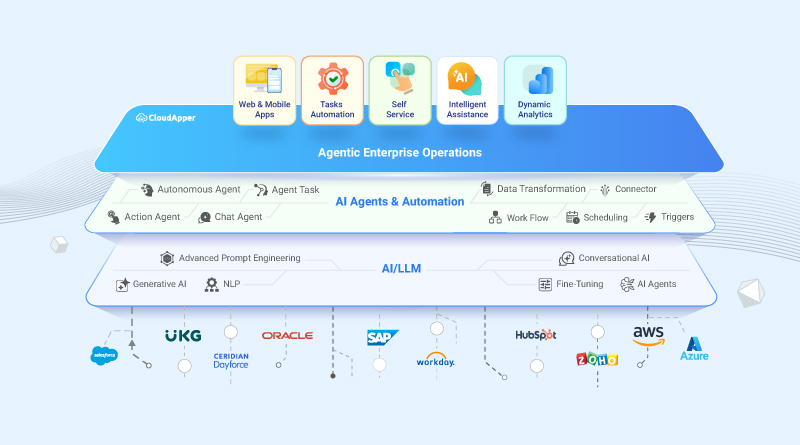
CloudApper AI is an advanced platform that enables organizations to integrate AI into their existing enterprise systems effortlessly, without the need for technical expertise, costly development, or upgrading the underlying infrastructure. By transforming legacy systems into AI-capable solutions, CloudApper allows companies to harness the power of Generative AI quickly and efficiently. This approach has been successfully implemented with leading systems like UKG, Workday, Oracle, Paradox, Amazon AWS Bedrock and can be applied across various industries, helping businesses enhance productivity, automate processes, and gain deeper insights without the usual complexities. With CloudApper AI, you can start experiencing the transformative benefits of AI today. Learn More
- Useful Links:
- Agentic AI
- No-Code/Low-Code
- Custom Software
- HCM Personalization
- iPaaS
- FedRAMP

Brochure
CloudApper hrPad
Empower Frontline Employees with an AI-Powered Tablet/iPad Solution
Download Brochure
CloudApper AI Solutions

- Works with








- and more.
Similar Posts

What Makes a No Code Platform Best for Workforce Management?
No Code vs Traditional Tools for Workforce Management