Use these video screening questions to hear from hourly applicants before you book a single interview. Get a 1 to 5 scorecard, a free interactive assistant, and three ready questions for warehouse, production, food service, school, driver and retail roles, each with what to listen for and a red flag.
Table of Contents
- Where does video screening fit in hourly hiring?
- How many video screening questions should you ask?
- The video screening scorecard (copy this)
- How do you rate recorded answers on a 1 to 5 scale?
- Video screening questions by role
- How do you score recorded answers fairly?
- How do you invite candidates so they finish?
- Video screening questions FAQ
- Put your video screening questions to work
Video screening questions give you a short recorded answer from each shortlisted applicant before you book a single interview. They matter more now because the resume has stopped being proof. AI writing tools make most applications read the same, so the first interview often turns into a fact-checking call.
This guide gives you a scorecard you can copy, a free interactive scorer, and three ready questions for six hourly roles. Each question comes with what to listen for and one red flag, so every reviewer scores the same way.
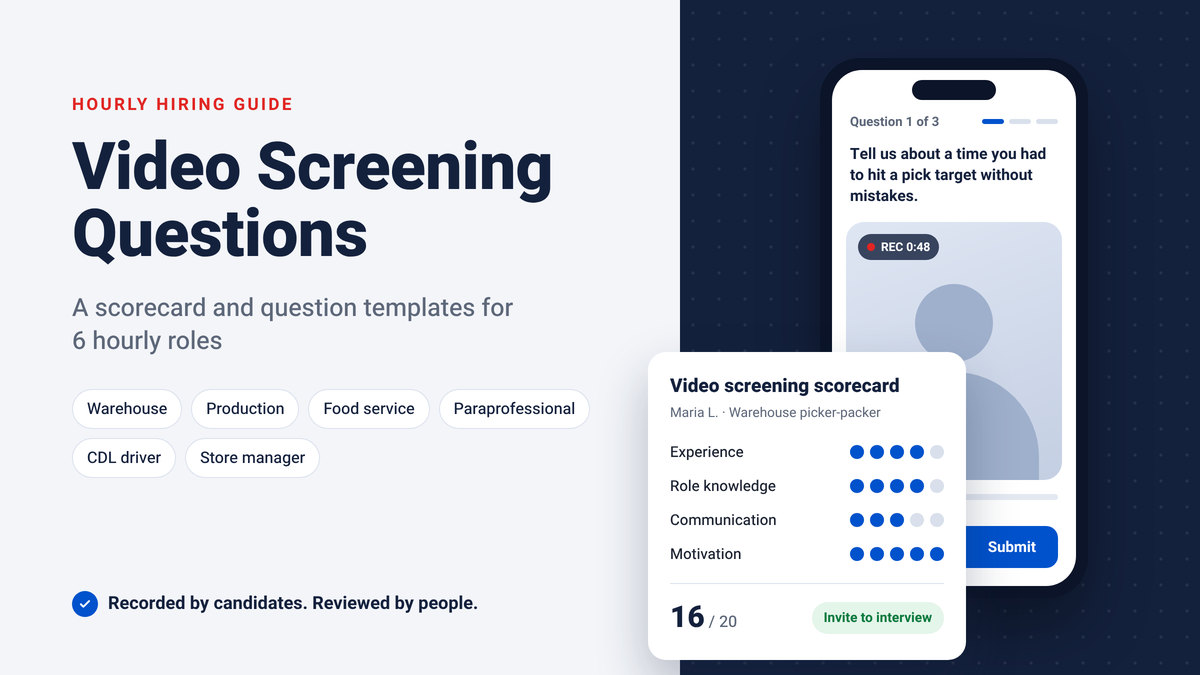
Three questions, four criteria, one decision: interview or not.
Where does video screening fit in hourly hiring?
Video screening sits between the application and the first interview. Instead of the quick phone screen that recruiters squeeze between other calls, candidates record their answers on their own time. It also only goes to applicants who already meet the basics.
Here is the flow most hourly teams use:

- Apply. The candidate applies in your ATS as usual.
- Check the must-haves. A short form confirms shift availability, any required license, and job-related physical needs (with or without reasonable accommodation).
- Record. Shortlisted applicants get a link by text and email, then answer on their phone.
- Review. A recruiter or hiring manager watches every answer and fills in the scorecard.
- Interview. Only candidates who score well move on.
The rule that keeps this fair is simple: recorded by candidates, reviewed by people. So software can send links, transcribe answers and sort the queue. However, a person watches the video and makes the call.
For a wider view of this model, also see our guide to asynchronous video hiring. If you are still deciding what to check before the video step, our AI pre-screening guide for recruiters covers knock-out questions in more depth.
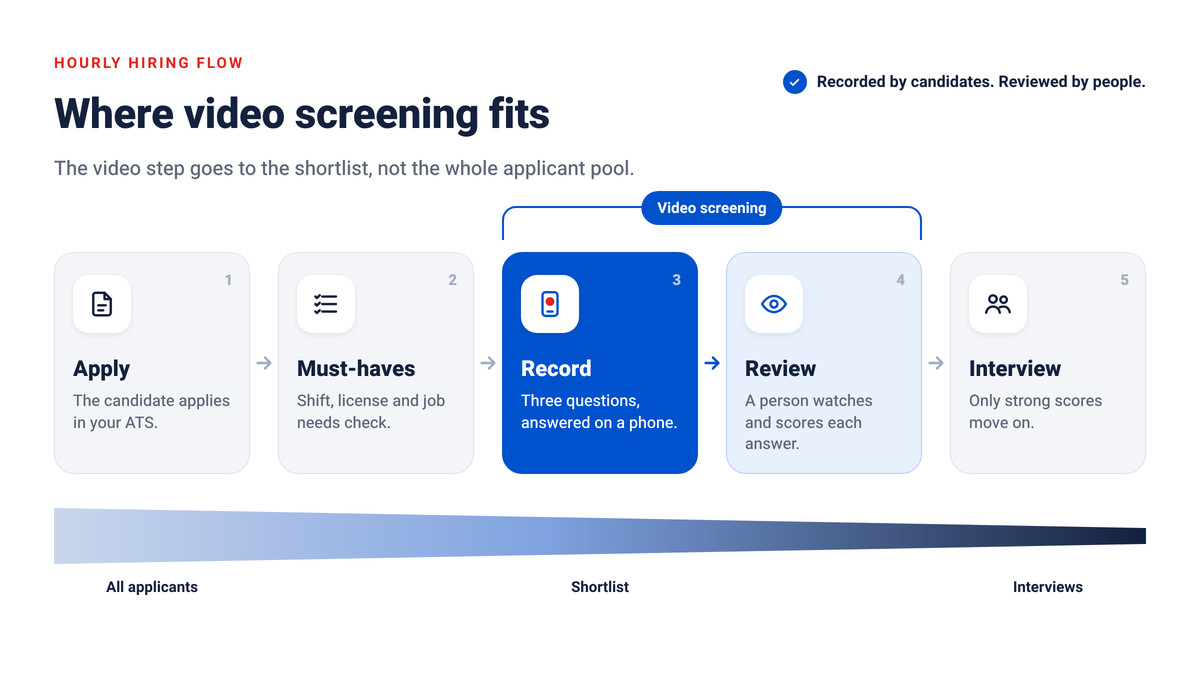
The video step goes to the shortlist, not the whole applicant pool.
How many video screening questions should you ask?
Three video screening questions are enough for most hourly roles. So keep the total recording time under five minutes. Longer sets lose candidates, and they also give reviewers more to watch without adding much signal.
First, give each of your video screening questions one job. For example, one question tests a core skill, one tests safety or reliability, and one tests how the person handles a real situation. Then each answer maps cleanly to the scorecard.
Good questions share four traits:
- One topic each. Two questions in one sentence get half an answer.
- A real example. For instance, “Tell us about a time” beats “Are you a team player?”
- Plain words. Write the way your shift leads talk.
- Tied to the job. If the answer would not change your decision, then cut the question.
Also, let candidates read each question before the camera starts. A moment to think produces clearer answers and fewer nervous restarts. Finally, never ask about age, family plans, health, religion or anything else unrelated to the work.
The video screening scorecard (copy this)
Rate each candidate on four criteria from 1 to 5, then record a clear yes or no for the interview. Use the same scorecard for everyone who answers the same video screening questions.
| Criterion | What you are looking for | 1: Not shown | 3: Solid | 5: Exceptional |
|---|---|---|---|---|
| Experience | Has done this work, or close to it | No related experience mentioned | One real example of similar work | Several examples with results |
| Role knowledge | Knows how the job is done well and safely | Cannot describe the core tasks | Describes the tasks and the main rules | Explains the why, not just the steps |
| Communication | Clear, organized, answers the question asked | Hard to follow or off topic | Clear answer with some rambling | Clear, specific and concise |
| Motivation | Wants this job, at these hours, in this place | No reason given | A believable reason | A specific reason tied to your workplace |
Add two fields under the table: Interview: Yes or No, and Evidence, a short quote from the video for each score.
To read the total, add the four scores for a number out of 20:
- 16 to 20: invite to interview.
- 12 to 15: ask a second reviewer to watch.
- Below 12: likely a no, but a person still records the decision.
Treat these bands as a starting point, then adjust them after your first 20 candidates.
Try the free assistant. Pick a role to get three video screening questions, then score a candidate in four taps. You get a total, a recommendation and a summary for your ATS notes.
Video screening assistant
Scores stay on your screen
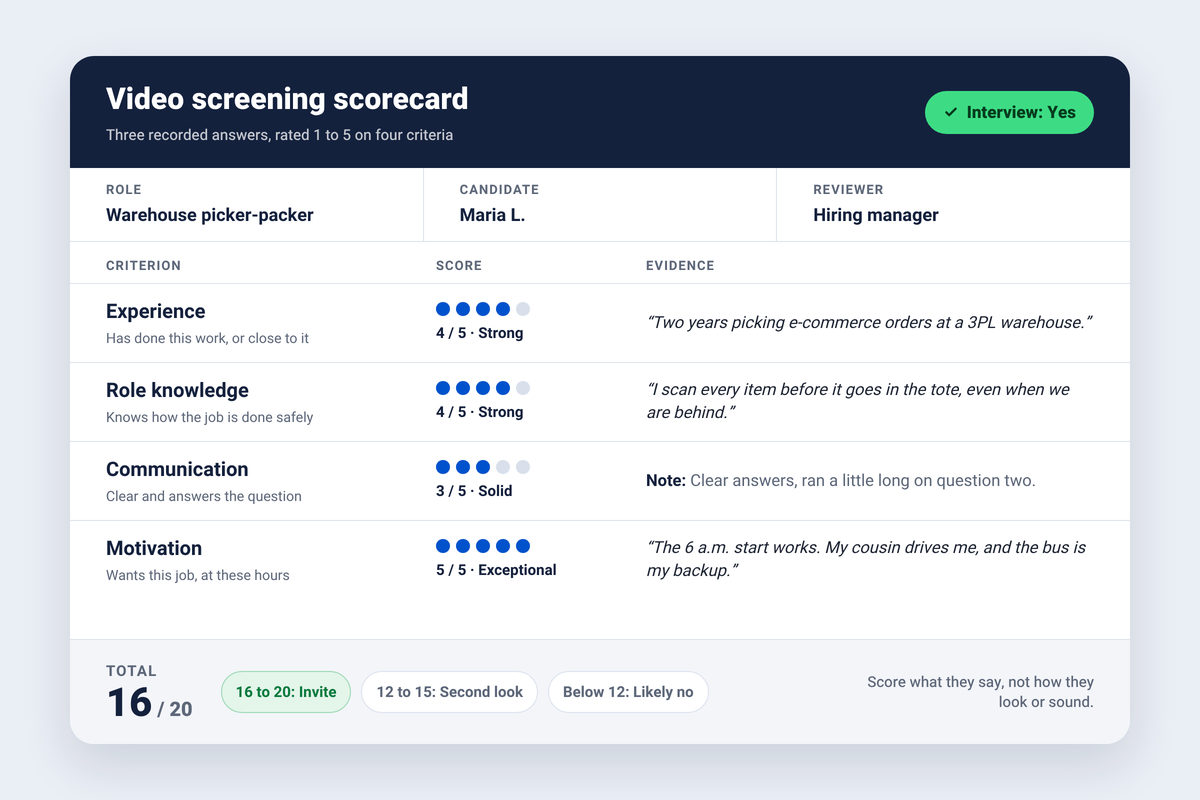
A filled-in scorecard. Every score has a quote behind it.
How do you rate recorded answers on a 1 to 5 scale?
Match what the candidate actually said to a defined level, then write down the evidence. Because each level is defined, one reviewer’s “3” can’t mean another reviewer’s “5”. Use the same five levels for all three video screening questions.
| Score | Label | What it sounds like |
|---|---|---|
| 1 | Not shown | No answer, off topic, or no relevant detail |
| 2 | Weak | General claims such as “I’m a hard worker,” with no example |
| 3 | Solid | Answers the question with one real example |
| 4 | Strong | A clear example with an outcome, such as a number or a result |
| 5 | Exceptional | A strong example, plus how they would apply it in your workplace |
In fact, this structure is not just tidy. In a large 2022 review of hiring research, structured interviews had the highest average validity of any selection method, at .42, ahead of job knowledge tests and work samples (SIOP summary of Sackett and colleagues).
The US Office of Personnel Management also gives similar advice for scales: use one range for every competency, typically 3 to 7 levels, and rate each question on its own (OPM structured interview guide). So score one criterion at a time, across all three answers, before you move to the next.
Video screening questions by role
Each role below lists what matters most, three video screening questions, and what good and poor answers sound like. Every section also links to a full set of 10 interview questions for that role, so you can reuse them later in the process.
Video screening questions for warehouse picker-packers
What matters most: pace with accuracy, safety, and showing up. Ask these video screening questions once the must-have form confirms the shift works for them.
- “Tell us about a time you had to hit a pick or pack target. How did you keep up without making mistakes?” Listen for a method, such as scanning every item or double-checking labels, because accuracy counts as much as pace. Red flag: they only talk about speed.
- “What does working safely around forklifts and pallet jacks look like to you?” Listen for a specific habit, for example staying in marked walkways. Red flag: “I just stay out of the way.”
- “Our shifts start at 6 a.m. and include some weekends. How would you make sure you’re here on time every shift?” Listen for a transport plan and a backup. Red flag: no plan at all.
Then, for seven more, see our warehouse picker-packer interview questions.
Video screening questions for production line workers
What matters most: quality, safety, and focus on repetitive work. So these video screening questions focus on what people do when the line has a problem.
- “Tell us about a time you spotted a defect or a problem on the line. What did you do?” Listen for stopping, flagging a lead, and following the process. Red flag: they kept going to hit the count instead.
- “How do you stay focused when you do the same task for a full shift?” Listen for real habits, for example self-checks or short goals. Red flag: they admit they drift and have no fix.
- “Describe a safety rule you followed even when it slowed you down.” Listen for a concrete example, like protective gear or lockout steps. Red flag: safety sounds optional when things get busy.
Next, use our production line worker interview questions for the in-person round.
Video screening questions for food service workers
What matters most: food safety, calm during rushes, and care for the people you serve.
- “Walk us through how you keep food safe during a busy service.” Listen for handwashing, temperatures, gloves, labels or allergens. Red flag: they cannot name one practice.
- “Tell us about a rush when things fell behind. What did you do?” Listen for prioritizing, asking for help and staying calm, because rushes happen every day. Red flag: they blame coworkers.
- “Many of our customers are students. How would you handle a student who is upset about their meal?” Listen for patience, and also for knowing when to bring in a supervisor. Red flag: a dismissive tone.
School districts can also find more in our cafeteria worker interview questions.
Video screening questions for paraprofessionals
What matters most: patience with students, following the teacher’s lead, and privacy. These video screening questions show how a person responds to children, not just what they know.
- “Tell us about a time you helped a child who was struggling or upset. What did you do?” Listen for calm, step-by-step support. Red flag: punishment comes up first, but support never does.
- “A teacher asks you to support a student in a way you would do differently. How do you handle it?” Listen for following the plan first, then raising concerns privately. Red flag: they would ignore the direction.
- “What does keeping student information private mean to you?” Listen for sharing only with staff who need to know. Red flag: a casual attitude about talking outside school.
Then go deeper with our paraprofessional interview questions.
Video screening questions for CDL truck drivers
What matters most: safety, hours-of-service rules, and reliability. Check the license class and driving record in the must-have form first, not on video. Then keep these video screening questions on safety habits.
- “Walk us through your pre-trip inspection. What would make you refuse a load?” Listen for a full, ordered routine covering brakes, tires, lights and coupling. Red flag: they skip steps when running late.
- “Tell us about a time you were close to running out of hours. How did you handle it?” Listen for planning stops and also calling dispatch early. Red flag: any hint of bending the logs.
- “Describe the worst weather you have driven in. What did you do differently?” Listen for slowing down, more following distance, or pulling over. Red flag: they brag about pushing through.
Next, see our CDL truck driver interview questions.
Video screening questions for retail store managers
What matters most: leading a team, scheduling, and protecting the store.
- “Tell us about a time you had to fill a shift gap at short notice. What did you do?” Listen for a system and fairness to the team. Red flag: they always cover it themselves instead.
- “How have you helped a struggling team member improve?” Listen for coaching, clear expectations and then follow-up. Red flag: they jump straight to letting people go.
- “What steps have you taken to reduce shrink or theft?” Listen for specific controls and staff training. Red flag: no example at all.
Finally, for the full set, read our store manager interview questions.
How do you score recorded answers fairly?
Score what the candidate says, never how they look, where they live, how they sound, or how good their camera is. Then make sure every reviewer scores your video screening questions the same way.
- Same questions, same order. Every candidate for the role answers the same set.
- Watch to the end. Strong answers often start slowly, so wait before you judge.
- Score alone first. Discuss only after everyone has submitted, so the loudest voice does not set the score.
- Hide names and photos if you can. Blind review also keeps attention on the answer until the decision is recorded.
- Write the evidence. A short quote next to each score also makes decisions easy to explain.
- Keep records. The EEOC requires employers to keep personnel records for at least one year, and longer if a charge is filed (EEOC recordkeeping rules). The simplest home is your ATS, and you can push scores into Greenhouse scorecards or your own system.
Finally, let software help without letting it decide. For example, transcripts and short summaries save time. However, candidates notice when no person is involved. In a 2026 Greenhouse survey of 2,950 job seekers, 38% of US candidates said they had left a hiring process because it included an interview run by AI. The top reason, at 33%, was a pre-recorded video scored by AI with no human present (Greenhouse candidate report).
How do you invite candidates so they finish?
Tell candidates exactly what to expect: why you are asking, how long it takes, who watches, and when it is due. That matters because a clear invite answers the doubts that make people drop out.
The same Greenhouse survey found that 38% of US candidates want confirmation that a person reviews the results. Also, 27% of those who left a process said the company failed to explain how AI would be used. So say it plainly in the invite, before anyone sees your video screening questions.
Here is a short invite you can adapt:
Hi [Name], thanks for applying for [Role]. Before we schedule interviews, we’d like to hear from you. Tap the link to answer three short questions on your phone. It takes about five minutes, and a member of our hiring team watches every answer. Please finish by [Date].
Then follow four habits:
- Send by text and email. Hourly candidates check texts first.
- Make it mobile. The link should open on a phone with no app to install.
- Give 48 to 72 hours. Shift workers need a window that fits around their current job, so 24 hours is too short.
- Disclose and ask consent. This matters most if any AI analyzes the videos. Illinois requires notice, an explanation and consent before that happens, and deletion within 30 days on request (Illinois Artificial Intelligence Video Interview Act).
Video screening questions FAQ
What are good video screening questions?
Good video screening questions ask for one real example, connect directly to the job, and take under two minutes to answer. For instance, “Tell us about a time you had to hit a pick target without mistakes” works better than “Are you detail oriented?”
How many video screening questions should you ask?
Ask three questions for most hourly roles and keep the total under five minutes. Three questions give you enough to score experience, role knowledge, communication and motivation without losing candidates.
How do you score a video screening?
First, rate four criteria from 1 to 5: experience, role knowledge, communication and motivation. Then write a short quote as evidence for each score, add them up out of 20, and record a clear yes or no for the interview.
Do candidates need to consent to recorded screening?
You should always tell candidates how you use their video and ask for consent. For Illinois roles, the law requires notice, an explanation and consent when AI analyzes the video. Rules vary by location, so review your process with your legal team.
How long should you keep screening videos and scorecards?
Keep scorecards and related hiring records for at least one year under EEOC rules, and longer if someone files a charge. For videos, also set a retention limit with your legal team and delete them on request where the law requires it.
Put your video screening questions to work
The resume can no longer tell you who is behind it. But three good questions and a fair scorecard can, in about the time it takes to read a cover letter.
Candidate Video Pre-Screening sends your video screening questions by text and email, lets candidates record on their phone, and puts every recording, transcript and score in the ATS you already use, including UKG, Workday, Dayforce, iCIMS, Greenhouse and Lever. Recorded by candidates. Reviewed by people.
It runs on CloudApper, the platform that closes the gaps your systems were never built to handle. As a result, recruiters spend their interview time on the candidates worth meeting, and good applicants hear back faster.

What is CloudApper AI Platform?
CloudApper AI is an advanced platform that enables organizations to integrate AI into their existing enterprise systems effortlessly, without the need for technical expertise, costly development, or upgrading the underlying infrastructure. By transforming legacy systems into AI-capable solutions, CloudApper allows companies to harness the power of Generative AI quickly and efficiently. This approach has been successfully implemented with leading systems like UKG, Workday, Oracle, Paradox, Amazon AWS Bedrock and can be applied across various industries, helping businesses enhance productivity, automate processes, and gain deeper insights without the usual complexities. With CloudApper AI, you can start experiencing the transformative benefits of AI today. Learn More
- Useful Links:
- Agentic AI
- No-Code/Low-Code
- Custom Software
- HCM Personalization
- iPaaS
- FedRAMP
CloudApper AI Solutions for HR

- Works with








- and more.
Similar Posts

Panel Interview Scheduling at Enterprise Scale: How to Book the…
Call Center Interview Questions to Ask on Video Before the…