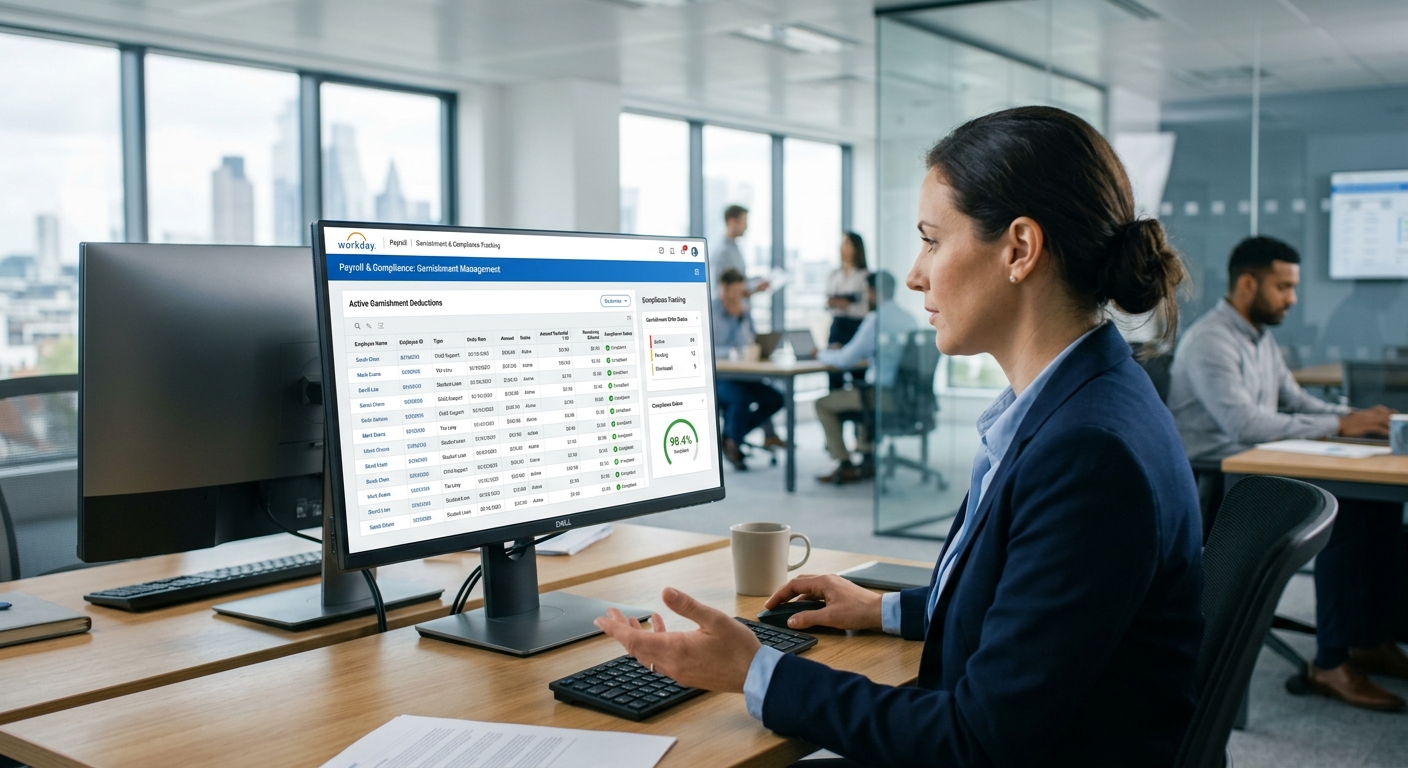
Workday Recruiting is built for knowledge-worker hiring — and that governance model is the reason your hourly requisitions are closing late. Here is where to fix it inside Workday first, and where CloudApper AI Recruiter extends the pipeline for frontline and seasonal volume.

TL;DR
If your hourly requisitions are closing in 72+ hours, the bottleneck is almost never a recruiting capacity problem — it is a governance mismatch. Workday Recruiting is built and configured for knowledge-worker hiring: multi-step approval chains, a browser-based candidate portal requiring account creation, and no native conversational screening layer for high-volume apply windows. The fix starts inside Workday — separate business process definitions for non-exempt roles, evergreen requisitions for recurring positions, and conditional routing that distinguishes headcount-plan hires from incremental adds. Where native configuration ends, CloudApper AI Recruiter extends Workday with a text-to-apply and conversational screening layer that hands qualified candidates back to native Workday objects — no parallel ATS, no duplicate data, Workday stays the system of record.
Table of Contents
- What Workday Recruiting Handles Natively
- Where the Hourly Pipeline Breaks
- What to Configure in Workday First
- Where Native Configuration Runs Out
The overtime report for the distribution center shows what no Workday dashboard does: eleven positions that took more than 72 hours to fill last quarter cost operations $34,000 in coverage spend and triggered two SLA penalties with a retail client. The requisitions were active in Workday the entire time. Recruiters were working them. The process ran exactly as designed — and that’s the problem. CloudApper AI Recruiter extends Workday Recruiting with a conversational screening layer that returns qualified candidates to native Workday objects without creating a parallel system — but the root cause of that overtime spend is governance, not a missing feature.
What Workday Recruiting Handles Natively
Workday Recruiting is a capable applicant tracking system. Evergreen requisitions let teams keep recurring hourly roles continuously open without re-posting every cycle. Candidate tracking, offer management, and background check integrations connect the ATS to the rest of the hire-to-onboard workflow. Recruiting dashboards give TA leaders visibility into pipeline velocity, source of hire, and requisition status by location or business unit. For exempt, professional, and technical roles where hiring decisions involve multiple rounds and a defined approval chain, the native workflow is appropriate and complete. Most enterprise Workday Recruiting configurations were designed precisely for this profile of hire.
Where the Hourly Pipeline Breaks
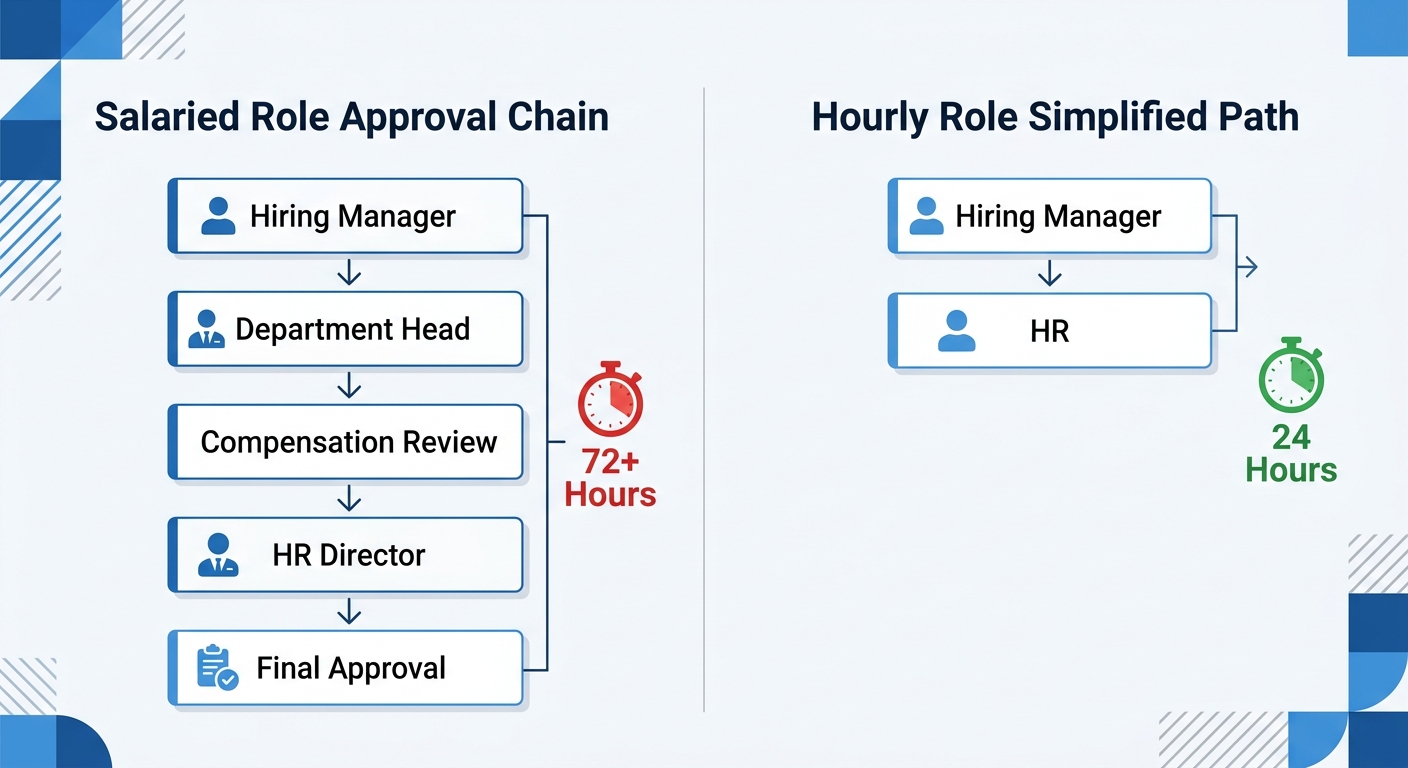
Hourly and seasonal requisitions are routed through the same business process approval chains built for salaried hiring. A warehouse associate requisition that should move from open to offer in 48 hours sits in the same approval queue as a director-level hire that legitimately requires two rounds of sign-off and a compensation review. The approval chain doesn’t distinguish between them. The candidate experience doesn’t either: a deskless applicant applying for a forklift operator position on a phone faces the same Workday candidate portal that requires account creation, multiple form screens, and a desktop-optimized layout. Application completion rates for hourly roles through the standard Workday portal run significantly lower than the same role advertised via text-to-apply or QR code. The third break is screening: native Workday Recruiting does not provide an automated, real-time conversational screening layer for the volume of applicants that hourly hiring generates. A seasonal retail hiring event that produces 400 applicants in a week requires a screening cadence that a two-person recruiting team cannot run manually through Workday Inbox. And because background check vendor integrations and offer letter generation are downstream of requisition approval, the hours lost early in the funnel compound at every subsequent step.
What to Configure in Workday First
Before building outside Workday, fix the governance layer first. Create a separate business process definition for non-exempt hourly requisitions with a shortened approval chain — typically one step, from hiring manager to HR, with no compensation review loop for roles with a fixed pay grade. This single change removes the primary bottleneck for most hourly requisitions. Configure evergreen requisitions for roles with continuous turnover — warehouse associates, clinical support staff, food service workers — so that the requisition is never expired and recruiters can move candidates directly to screen rather than waiting for re-approval. For approval routing in multi-location environments, set conditional routing rules that distinguish between headcount-plan positions (minimal approval) and incremental headcount (full chain). These configuration changes reduce time-to-offer without touching the candidate-facing side of Workday Recruiting.
Where Native Configuration Runs Out
The application experience and screening volume problem cannot be resolved through Workday configuration. The Workday candidate portal is a browser-based form flow. It is not a text message. An applicant who sees a “Now Hiring” sign in a warehouse lobby, scans a QR code, and expects to apply in three minutes is not going to create a Workday account and complete six screens on a phone with variable signal. The drop-off rate at the account-creation step alone makes the Workday portal a poor fit for the first-touch apply experience that hourly hiring requires. This is the same access gap that appears across every frontline touchpoint — the same reason Workday notifications don’t reach frontline workers and why onboarding tasks stall for hourly new hires. The interface was designed for a worker who is already inside the system. The hourly applicant has never been inside the system, and the application experience is the first ask.
CloudApper AI Recruiter
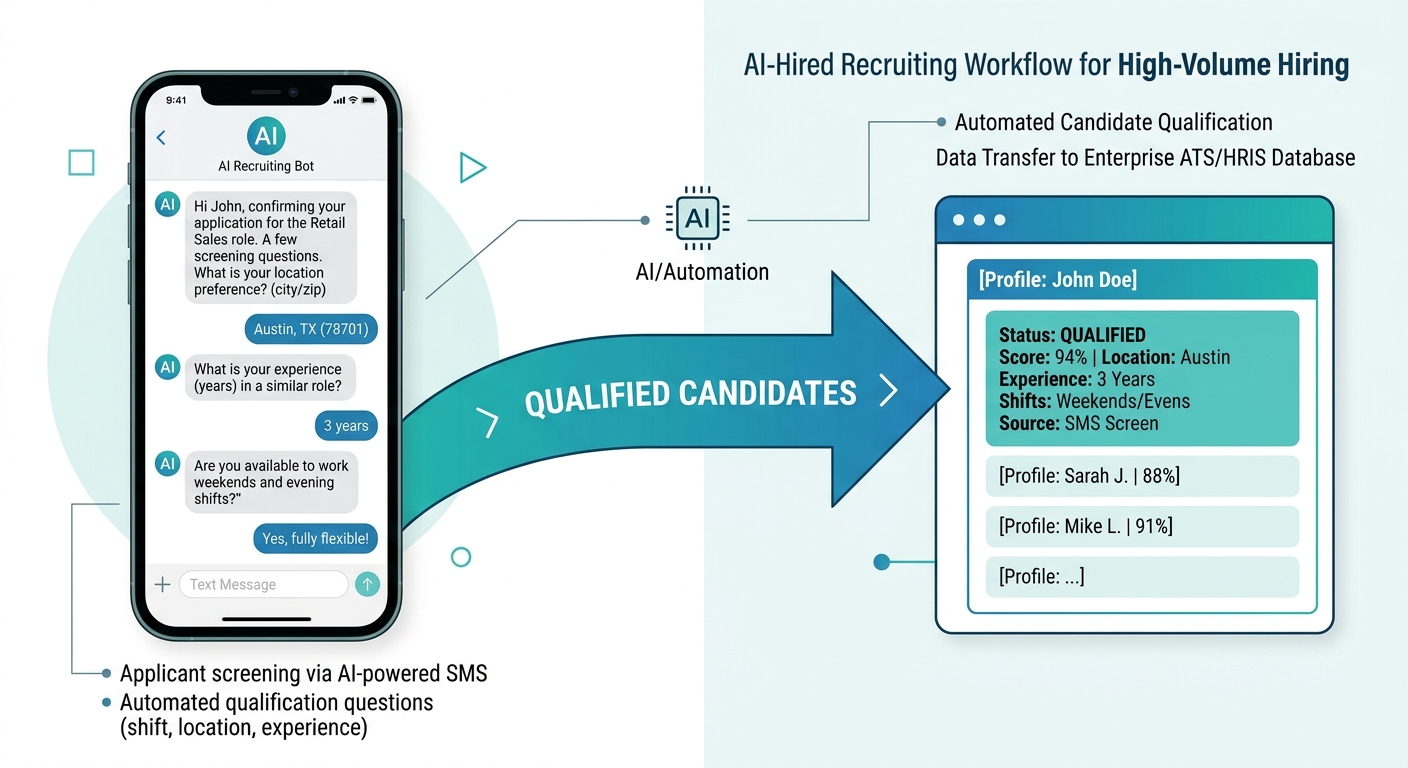
CloudApper AI Recruiter adds a text-based, conversational apply layer in front of Workday Recruiting without replacing it. A candidate texts a short code or scans a QR code at a hiring event, at a store location, or from a social post. CloudApper conducts an automated screening conversation — availability, location, role requirements, shift preference — and hands qualified candidates directly back to the Workday requisition as applicant records. No parallel ATS. No duplicate candidate data. Workday remains the system of record; the conversational layer handles the first-touch apply and initial screen at the volume that hourly hiring generates. For the operations manager who inherits the candidate after handoff — the shift supervisor, the charge nurse, the plant floor lead — the practical difference is that the candidates who reach the Workday offer stage have already confirmed their availability for the specific shift, location, and pay rate. The no-show rate drops because the screen happened before the Workday record was created, not after. The support load that typically follows a new hire’s first Workday login also decreases because the candidate was captured and communicated with outside the portal before they ever needed to log in.
Frequently Asked Questions
Q: Can Workday Recruiting support high-volume hourly and seasonal hiring?
Workday Recruiting supports high-volume hiring through evergreen requisitions, candidate tracking, and workflow automation. For organizations hiring large numbers of frontline or seasonal workers, the main gaps are the candidate portal experience on mobile devices and the absence of a native conversational screening layer for managing high apply volumes. These are typically addressed through an extension rather than Workday configuration.

Q: What is an evergreen requisition in Workday Recruiting?
An evergreen requisition is a continuously open requisition used for roles with recurring hiring needs — warehouse associates, seasonal retail staff, clinical support. Rather than re-posting the same role every time a position opens, an evergreen requisition stays active and new openings are filled from the same candidate pool. This reduces re-approval cycles and keeps the role visible to applicants without manual maintenance by a recruiter.
Q: How do you reduce approval chain delays for hourly requisitions in Workday?
Create a separate business process definition for non-exempt hourly roles with a shortened approval path — typically one or two steps instead of the multi-level chain used for exempt hiring. Use conditional routing to distinguish between headcount-plan positions, which require minimal approval, and incremental headcount, which follows the full chain. This change removes the primary cause of requisition delay for hourly roles without affecting the approval governance for salaried or professional hiring.
Q: Why do hourly applicants drop off during the Workday application process?
The Workday candidate portal requires account creation before an application can be submitted. For deskless or mobile applicants applying through a phone — at a job fair, from a QR code, or via social media — the account creation and multi-step form flow creates significant drop-off before the application is complete. The portal was designed for a candidate who has time to complete an application on a desktop device; it does not match the apply behavior of most hourly candidates.
Q: What is text-to-apply for Workday Recruiting?
Text-to-apply is an application method where candidates initiate a job application by sending a text message to a short code or scanning a QR code, rather than navigating to a web portal. For Workday Recruiting, text-to-apply is typically implemented through an extension that conducts a conversational screening interaction via SMS and then creates the candidate record and application in the native Workday tenant. Workday does not provide a native text-to-apply capability.
Q: How does Workday Recruiting handle high apply volumes for seasonal hiring?
Workday Recruiting manages apply volume through candidate pipeline dashboards and recruiter task queues, but it does not automate the initial screening conversation at scale. When a seasonal hiring event generates hundreds of applicants in a short window, recruiters must manually progress candidates through the screen stage or configure knockout questions in the application itself. Automated conversational screening — contacting applicants by text, confirming availability, and advancing qualified candidates — requires an extension outside native Workday.
Q: Does extending Workday Recruiting with an AI layer create a separate system of record?
Not when the extension is built to write back to Workday’s native objects. A properly integrated AI recruiting layer creates the candidate record, application, and screening notes in Workday Recruiting directly — not in a parallel database. The extension handles the conversational interaction; Workday owns the data. This is the distinction that matters for organizations concerned about data governance and the integrity of their Workday investment.
If your hourly requisitions are sitting in the same approval queue as director-level hires, or your apply completion rate for frontline roles is below 40%, the configuration fix is achievable — and the extension is already built for Workday. The CloudApper team can map both problems for your specific tenant. Reach out at cloudapper.ai/contact-us.

What is CloudApper AI Platform?
CloudApper AI is an advanced platform that enables organizations to integrate AI into their existing enterprise systems effortlessly, without the need for technical expertise, costly development, or upgrading the underlying infrastructure. By transforming legacy systems into AI-capable solutions, CloudApper allows companies to harness the power of Generative AI quickly and efficiently. This approach has been successfully implemented with leading systems like UKG, Workday, Oracle, Paradox, Amazon AWS Bedrock and can be applied across various industries, helping businesses enhance productivity, automate processes, and gain deeper insights without the usual complexities. With CloudApper AI, you can start experiencing the transformative benefits of AI today. Learn More
- Useful Links:
- Agentic AI
- No-Code/Low-Code
- Custom Software
- HCM Personalization
- iPaaS
- FedRAMP

Brochure
CloudApper AI TimeClock
For accurate & touchless time capture experience.
Download Brochure
CloudApper AI Solutions for Workday



- Works with








- and more.
Similar Posts

Workday Compensation Review: Why Merit Worksheets Go Blank and Merit…
Workday Security Roles After a Supervisory Org Change: What the…