Implementing an AI Time Clock boosts productivity and reduces errors. To maximize its benefits, use facial recognition, automate alerts, and integrate with payroll. Regular updates and training enhance efficiency, compliance, and employee satisfaction. Discover more strategies here.
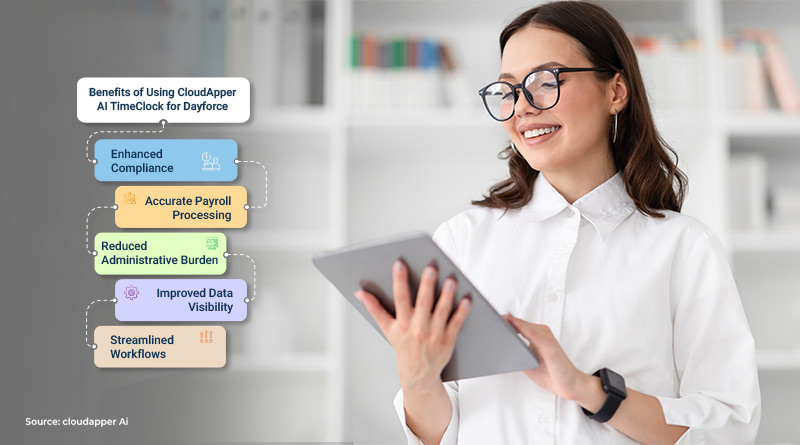
Implementing an AI Time Clock can dramatically enhance productivity, reduce payroll errors, and streamline compliance. However, unlocking its full potential requires more than just installation—you need to leverage the features effectively. After deploying CloudApper’s AI Time Clock across multiple locations, I’ve gathered several essential hacks and practical tips to maximize the benefits of this advanced tool. Let’s explore these strategies in detail:
1. Speed Up Attendance with Facial Recognition
Facial recognition is one of the fastest ways to verify employee attendance. To maximize efficiency, ensure employees complete their biometric enrollment correctly. Regularly verify and update biometric data to keep the recognition process swift and error-free. This tip alone reduces waiting times during peak shifts, improving overall productivity.

2. Automate Overtime Alerts to Reduce Payroll Costs
One of the most powerful yet underutilized features of an AI Time Clock is automatic overtime alerts. Setting threshold alerts helps managers identify when employees approach overtime hours. By proactively managing these alerts, you can significantly reduce unexpected payroll expenses, enhancing your operational cost control.
3. Embed Attestation Questions at Clock-Out for Compliance
To effortlessly maintain compliance, integrate attestation questions into your clock-out process. Employees can confirm breaks, meal periods, or workplace safety conditions right at punch-out. This feature helps your organization stay compliant with labor laws and greatly simplifies record-keeping for audits.
4. Optimize Scheduling Using Real-Time Analytics
Don’t overlook the real-time analytics provided by your AI Time Clock. Regularly reviewing this data offers valuable insights into attendance patterns, productivity trends, and potential staffing shortages. Managers can leverage these insights to make informed decisions, improving shift management and overall efficiency.
5. Integrate Seamlessly with Your Payroll System
Directly linking your AI Time Clock to your payroll software is crucial. Seamless integration reduces the chance of manual data-entry errors and significantly cuts down payroll processing time. Automated payroll integration means fewer administrative tasks, allowing your HR team to focus on strategic responsibilities rather than paperwork.
6. Maintain Accurate Employee Profiles Regularly
Keep employee profiles up-to-date, including their biometric data and QR codes. Regularly reviewing employee data prevents clock-in issues, improves verification accuracy, and ensures smooth operations. A quarterly check-in on employee data accuracy typically does the trick.
7. Empower Employees with Self-Service Features
A great AI Time Clock provides robust employee self-service features. Allowing employees to view attendance records, submit leave requests, and even address simple scheduling adjustments reduces HR’s workload. When employees can self-manage basic HR functions, overall satisfaction and efficiency improve significantly.
8. Provide Ongoing Training and Support
Frequent short refresher sessions ensure employees remain proficient with the AI Time Clock. Brief, periodic training boosts employee confidence and reduces the likelihood of operational hiccups. Offer quick guides or short training videos so employees can independently resolve common questions, minimizing downtime.
9. Use Clock-In Surveys for Employee Engagement
Adding brief surveys or quick polls at clock-in or clock-out points helps gather immediate feedback on employee morale, work environment issues, and operational suggestions. This simple addition transforms your AI Time Clock into a powerful employee engagement and feedback tool, giving management valuable insights for improvement.
10. Ensure Effortless Compliance Monitoring
Utilize automatic compliance monitoring features like break tracking and mandatory rest period management. Your AI Time Clock can effortlessly maintain accurate records, eliminating the need for manual oversight. Automating compliance reduces the risk of expensive regulatory penalties and makes your organization audit-ready at all times.
11. Leverage Multi-Modal Authentication
Although facial recognition is fast and reliable, sometimes environmental factors can cause minor issues. Provide a secondary verification method like QR codes or PIN codes as backup options. This redundancy ensures that verification issues never disrupt workflow or productivity.
12. Implement Mobile Access for Remote Employees
If your organization includes remote or off-site employees, ensure they have secure, mobile access to the AI Time Clock. Providing remote clock-in/out capabilities helps maintain accurate attendance records across geographically dispersed teams, making payroll and compliance simpler and more efficient.
Final Thoughts
These hacks and tips showcase practical, easily implementable strategies to maximize your AI Time Clock’s capabilities. By leveraging CloudApper’s AI Time Clock effectively, your organization can achieve greater efficiency, cost savings, and improved employee satisfaction.
Discover even more ways to enhance workforce management with CloudApper’s AI Time Clock solution.

What is CloudApper AI Platform?
CloudApper AI is an advanced platform that enables organizations to integrate AI into their existing enterprise systems effortlessly, without the need for technical expertise, costly development, or upgrading the underlying infrastructure. By transforming legacy systems into AI-capable solutions, CloudApper allows companies to harness the power of Generative AI quickly and efficiently. This approach has been successfully implemented with leading systems like UKG, Workday, Oracle, Paradox, Amazon AWS Bedrock and can be applied across various industries, helping businesses enhance productivity, automate processes, and gain deeper insights without the usual complexities. With CloudApper AI, you can start experiencing the transformative benefits of AI today. Learn More
- Useful Links:
- Agentic AI
- No-Code/Low-Code
- Custom Software
- HCM Personalization
- iPaaS
- FedRAMP
Brochure
CloudApper AI TimeClock
For accurate & touchless time capture experience.
Download Brochure
CloudApper AI Solutions for HR



- Works with








- and more.
Similar Posts

No Cell Phones on the Production Floor: How Hourly Workers…

In-Vehicle Time Clocks for Crews Who Rotate Trucks: Clocking In…