Frontline managers lose hours each pay period reviewing timesheets where almost everything is already correct. Exception-based Dayforce timesheet approval automation flips the model — surfacing only the records that need a human decision. Here's how the approach works, and how CloudApper hrPad extends it to the frontline.

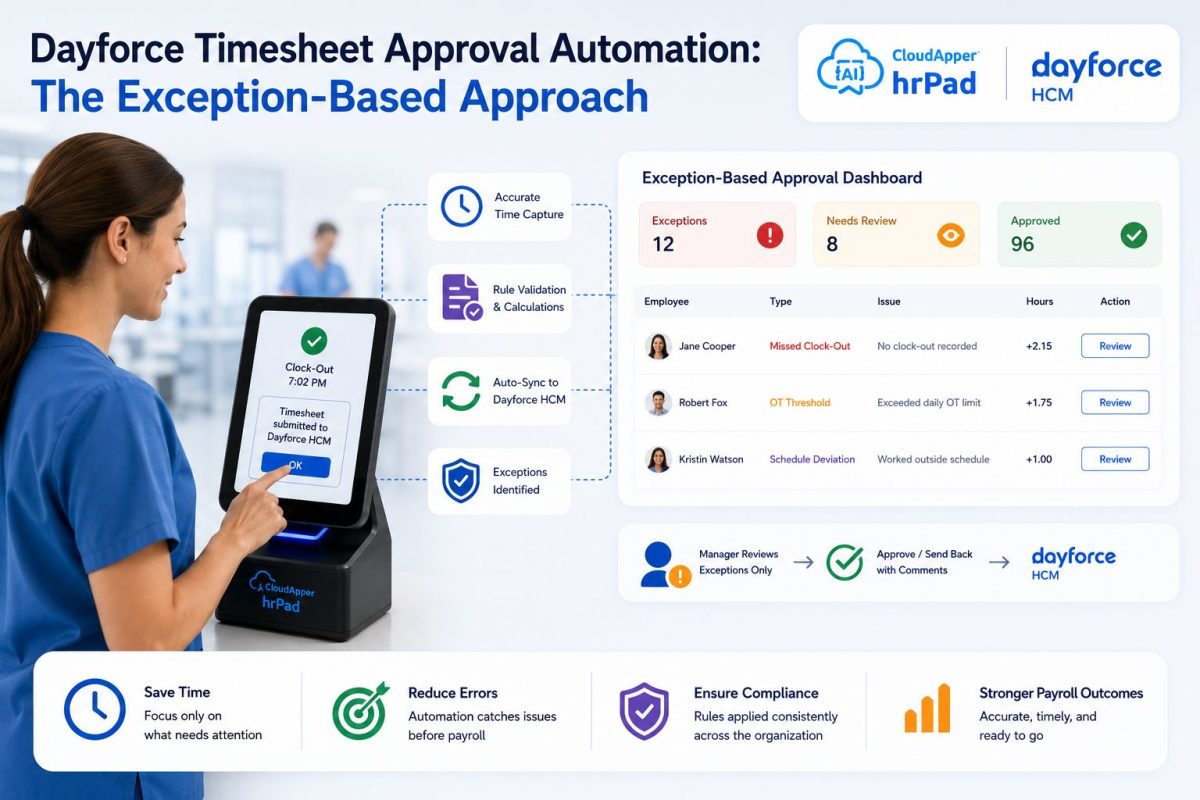
Table of Contents
- The real cost isn’t the approval. It’s the attention it takes.
- What is Dayforce timesheet approval automation?
- Why organizations are modernizing the approval workflow
- The specific workflow: exception-based manager approvals
- How Dayforce supports timesheet approvals today
- How CloudApper hrPad extends exception-based approvals to the frontline
- How to move toward exception-based approvals: a practical path
- The business outcomes operations leaders care about
- Best practices
- Example scenario
- Frequently asked questions
- Conclusion
The real cost isn’t the approval. It’s the attention it takes.
For most operations leaders, the pay-period close is death by a thousand notifications. A store manager with forty frontline employees isn’t reviewing forty problems — they’re reviewing forty timesheets to find the three that actually need a decision. The punches that rounded cleanly, the shifts that matched the schedule, the breaks that were taken on time: all of it demands the same click, the same glance, the same cognitive load as the genuine anomalies buried inside it.

That’s the quiet tax on frontline operations. Not the exceptions themselves, but the sheer volume of normal a manager has to wade through to reach them. Multiply that across every location, every supervisor, and every pay period, and modernizing how approvals actually reach a manager stops being a nice-to-have. It becomes the difference between managers who spend their day running the floor and managers who spend it reconciling a screen.
What became possible when organizations rethink this isn’t faster clicking. It’s manager attention redirected to the work only a human can do — and a pay-close process that stays clean because the right records got looked at, at the right moment.
What is Dayforce timesheet approval automation?
Dayforce timesheet approval automation is the practice of reducing manual manager review by surfacing only the timesheet records that need a decision — exceptions, changes, and anomalies — instead of requiring managers to approve every routine punch. An exception-based approach filters out normal behavior so approvals become a short, focused review rather than a line-by-line audit of every employee.
Why organizations are modernizing the approval workflow
Digital transformation in workforce management has largely been about capturing time more accurately. The next frontier is about deciding on that time more intelligently. As frontline teams scale, the volume of records flowing toward managers grows faster than the number of records that genuinely require judgment. Left unmanaged, that imbalance shows up everywhere that matters: delayed pay-period closes, approval fatigue, rubber-stamped timesheets, and the compliance risk that comes with both.
Operations leaders care about this for practical reasons. Every hour a supervisor spends inside an approval queue is an hour not spent on coverage, coaching, or service. And when approval becomes a formality performed under time pressure, the exceptions that should have been caught slip through — which is exactly the outcome the review was meant to prevent. Modernizing the workflow is really about protecting two things at once: the manager’s time and the integrity of the data that feeds payroll.
The specific workflow: exception-based manager approvals
Once the broader context is clear, the specific workflow comes into focus. An exception-based approval model treats routine, in-policy activity as pre-cleared and reserves the manager’s active attention for records that deviate from the norm — a missed punch, an unscheduled shift, an edited entry, a break that ran long, or time that falls outside expected patterns.
Instead of presenting a manager with a full roster to authorize, an exception-based dashboard presents a short, prioritized list of what changed or what looks unusual. The manager reviews the anomalies, makes decisions where decisions are warranted, and the clean records flow through without demanding a click each. The approval becomes proportional to the actual risk in the data — not the headcount on the timesheet.
How Dayforce supports timesheet approvals today
Dayforce provides a capable, well-structured foundation for time approval, and many organizations run their entire close process on it. Understanding those native capabilities is the starting point for any enhancement.
Within Dayforce, managers authorize worked shifts on the timesheet to record their agreement that the times are accurate, and pay is then approved through the Pay Approve Checklist. Period Review is designed to identify timesheet records that contain exceptions — records that should be resolved before they’re authorized — using a set of reports that can be enabled by role. The Unauthorized Records Report returns employees with pay details, such as worked or unscheduled shifts, that a manager hasn’t yet authorized.
Dayforce also keeps managers informed through notifications. The Manager Authorization notification alerts managers when there are unauthorized time and attendance records to address in a pay period that’s about to close, and the Manager Reauthorization notification informs a manager when an employee changes an already-authorized timesheet, with details of the change and the opportunity to authorize it. Access authorizations can even prevent pay periods containing unauthorized records from being approved, depending on the pay group’s configuration.
In other words, Dayforce already surfaces exceptions and drives authorization through a structured checklist. Many teams look to extend this foundation further — bringing the same exception-first logic all the way to the frontline device where the punch happens, and shaping the manager’s daily review experience around it.
How CloudApper hrPad extends exception-based approvals to the frontline
CloudApper hrPad adds an operational layer on top of a Dayforce instance, designed for the shop floor, the store, and the field — places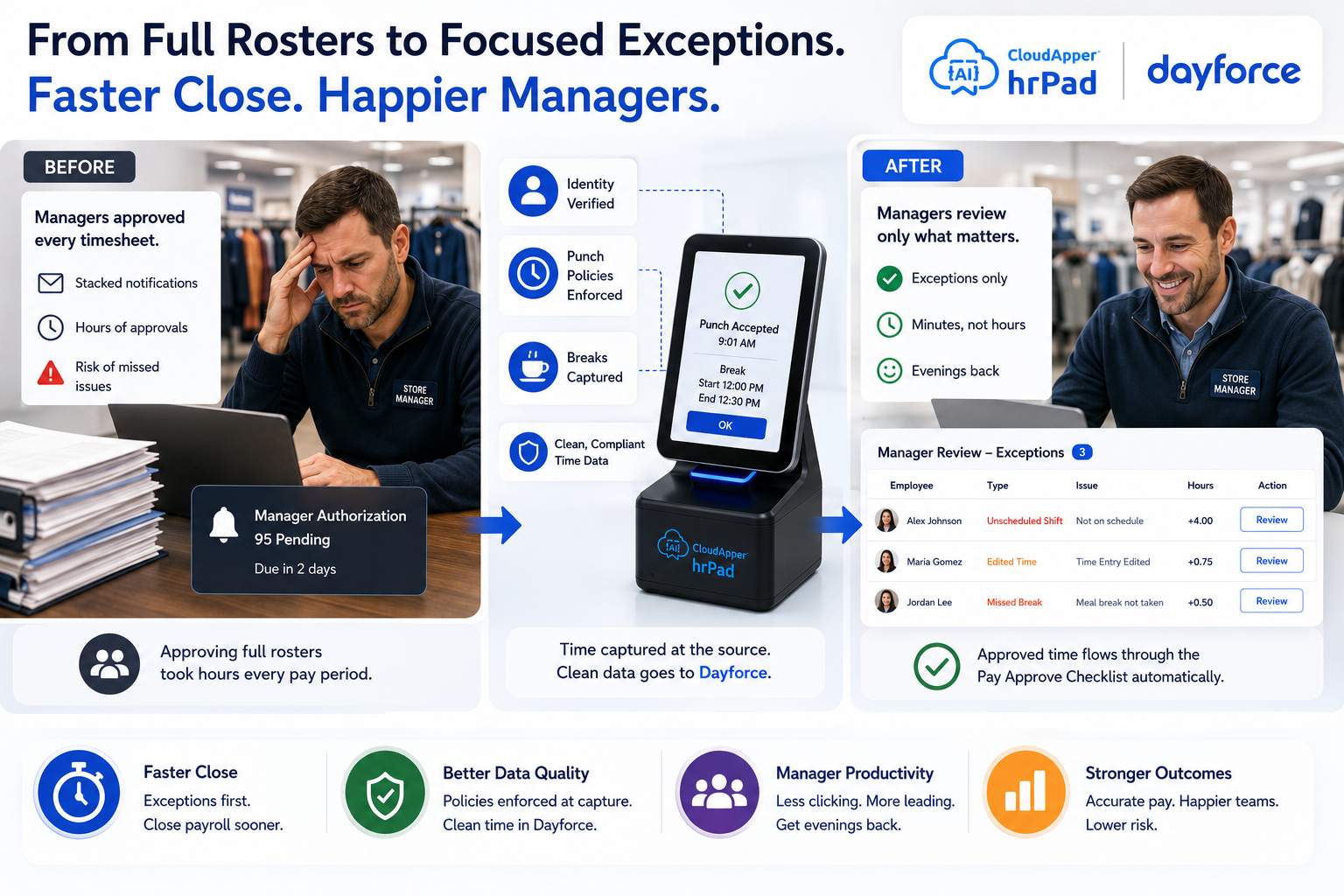 where employees don’t sit at a desk and managers don’t live inside the HCM. It turns any iOS, Android, or Windows device into a secure Dayforce employee self-service kiosk and time clock, and it introduces AI agents that handle the daily friction in time, attendance, and scheduling. Applied to approvals, that layer does several things:
- Cleans the data upstream, before it becomes an exception. hrPad Employee self service kiosk enforces punch policies, rounding, grace periods, and break rules at the point of punch, and can trigger meal-break and rest-period attestations at clock-out. Verified, in-policy time arrives in Dayforce already aligned to the pay group — which means fewer records ever reach the manager’s queue as exceptions in the first place.
- Verifies identity at the source. Facial recognition with geofencing confirms the right person punched at the right place, reducing the ambiguous records that managers otherwise have to investigate manually.
- Frames the manager’s review around anomalies. By capturing attestations, transfers, and policy acknowledgments at the moment they happen, hrPad gives managers cleaner context on what actually needs a decision — so the review that remains in Dayforce is shorter and more focused.
- Keeps everything in sync. The Dayforce Sync Layer keeps punches, authorizations, time-away requests, and employee data consistent between hrPad and Dayforce HCM in real time, so managers and payroll are always working from the same record.
The effect is additive, not disruptive. Pay rules stay governed the way the organization already runs them, and hrPad works alongside the existing Dayforce configuration rather than replacing any of it.
How to move toward exception-based approvals: a practical path
- Define what “normal” looks like. Document the punch policies, rounding rules, grace periods, and break requirements that represent in-policy behavior for each pay group. This is the baseline that determines what counts as an exception.
- Enable the exception reports you rely on. In Dayforce, turn on the relevant Period Review reports by role so managers see exceptions and unauthorized records clearly during the review window.
- Move enforcement upstream. Configure hrPad to apply rounding, break rules, and attestations at the point of punch so clean time is validated before it ever reaches Period Review.
- Verify identity at capture. Use facial recognition and geofenced punches to eliminate the ambiguous, hard-to-authorize records that slow managers down.
- Focus the manager on anomalies. Route managers to a prioritized view of what changed and what looks unusual, rather than a full roster to rubber-stamp.
- Reconcile continuously. Rely on real-time sync so authorizations and edits stay consistent between hrPad and Dayforce, keeping the Pay Approve Checklist accurate as the period closes.
The business outcomes operations leaders care about
Organizations that adopt an exception-based approach tend to see improvement across the measures that matter to frontline operations:
- Reclaimed manager time, because supervisors review anomalies instead of auditing every routine punch.
- A cleaner, faster pay-period close, because verified time arrives upstream and fewer exceptions pile up at the deadline.
- Better compliance posture, because attestations and identity verification are captured at the source and the records that need human judgment actually get it.
- Higher frontline adoption, because employees interact with time and self-service through a device that meets them where they work.
- More consistent operations across locations, because the same policies and the same exception logic apply everywhere.
These outcomes compound. The manager who isn’t buried in an approval queue is a manager present on the floor. The payroll team that isn’t chasing last-minute exceptions closes on time. And the employee whose punch was captured cleanly gets paid correctly, without a correction cycle.
Best practices
- Keep exception definitions tight enough to catch real anomalies but loose enough to avoid flagging ordinary variation — over-flagging recreates the noise you’re trying to remove.
- Standardize policies across pay groups where possible, so managers who cover multiple areas aren’t reasoning about different rules.
- Capture attestations at the moment of the event, not retroactively, to preserve their compliance value.
- Review your exception volume periodically; a rising trend usually points to a policy or configuration that needs tuning, not a manager who needs to click faster.
Example scenario
Consider a regional retailer running Dayforce across dozens of stores. Before, each store manager authorized full rosters every pay period, and the Manager Authorization notifications stacked up as the close approached. By enforcing punch and break policies through hrPad at the kiosk and verifying identity at capture, most time now arrives in Dayforce already clean. Managers open their review to a short list of genuine exceptions — an unscheduled shift here, an edited entry there — resolve them, and the rest flows through the Pay Approve Checklist without a click each. The close gets faster, and managers get their evenings back.
Frequently asked questions
What is exception-based time approval in Dayforce?
Exception-based time approval is an approach where managers actively review only the timesheet records that deviate from normal, in-policy behavior — missed punches, unscheduled shifts, edited entries, or long breaks — instead of authorizing every routine punch. Dayforce supports this through Period Review, exception reports, and the Unauthorized Records Report, and organizations can extend it further with tools like CloudApper hrPad.
Does Dayforce already flag timesheet exceptions?
Yes. Dayforce’s Period Review uses reports to identify records that contain exceptions before they’re authorized, and the Unauthorized Records Report lists employees with unauthorized pay details. Manager Authorization and Reauthorization notifications alert managers to records needing attention. An exception-based enhancement builds on this by reducing how many records become exceptions in the first place.
How does CloudApper hrPad reduce manager approval workload?
hrPad enforces punch policies, rounding, and break rules at the point of punch and verifies identity with facial recognition and geofencing, so clean, in-policy time flows into Dayforce upstream. That means fewer records reach the manager as exceptions, and the review that remains is shorter and focused on genuine anomalies.
Does hrPad replace Dayforce?
No. hrPad works alongside Dayforce as an additional operational layer. It extends Dayforce workforce management to frontline devices and keeps data synchronized with the HCM in real time. Pay rules, authorizations, and the pay-close process remain governed within the organization’s existing Dayforce configuration.
Will exception-based approvals affect payroll compliance?
Handled well, they strengthen it. Capturing attestations and verifying identity at the point of punch preserves the compliance value of the record, and focusing managers on genuine anomalies makes it more likely those records get real scrutiny rather than a rushed rubber stamp under deadline pressure.
Who benefits most from exception-based Dayforce approvals?
Organizations with large frontline or hourly workforces — retail, manufacturing, healthcare, hospitality, and field operations — where managers oversee many employees and pay-period volume is high. These are the environments where filtering routine activity out of the approval queue returns the most time.
How do I get started?
Begin by documenting what in-policy behavior looks like for each pay group, enable the relevant Period Review exception reports in Dayforce, and move policy enforcement upstream to the point of punch. From there, focus managers on a prioritized view of anomalies rather than full rosters.
Conclusion
Time approval has always been framed as a task to complete. Reframed as an attention problem, it points somewhere more valuable: workforce operations where managers spend their judgment on what actually needs it, and where the systems around them handle the routine quietly and correctly. That’s the promise of exception-based approval — not fewer clicks for their own sake, but frontline leaders freed to lead, payroll teams that close on time, and employees who get paid right the first time.
Dayforce provides a strong foundation for this, and CloudApper hrPad extends it to the frontline — digitizing how time is captured, verified, and surfaced for decision so the exceptions rise to the top and the noise falls away. Organizations that make this shift aren’t just approving timesheets faster. They’re changing what their frontline operation is capable of.
Curious how exception-based approvals could work in your Dayforce environment? See how CloudApper hrPad extends Dayforce to the frontline.
What is CloudApper AI Platform?
CloudApper AI is an advanced platform that enables organizations to integrate AI into their existing enterprise systems effortlessly, without the need for technical expertise, costly development, or upgrading the underlying infrastructure. By transforming legacy systems into AI-capable solutions, CloudApper allows companies to harness the power of Generative AI quickly and efficiently. This approach has been successfully implemented with leading systems like UKG, Workday, Oracle, Paradox, Amazon AWS Bedrock and can be applied across various industries, helping businesses enhance productivity, automate processes, and gain deeper insights without the usual complexities. With CloudApper AI, you can start experiencing the transformative benefits of AI today. Learn More
- Useful Links:
- Agentic AI
- No-Code/Low-Code
- Custom Software
- HCM Personalization
- iPaaS
- FedRAMP

Brochure
CloudApper hrPad
Empower Frontline Employees with an AI-Powered Tablet/iPad Solution
Download Brochure
CloudApper AI Solutions for HR



- Works with








- and more.
Similar Posts
Dayforce Time Clock Rounding: A Payroll Guide to Pay Accuracy
How to Ensure Accurate Work and Break Hour Confirmation in…