Workday calculates retro pay and off-cycle corrections correctly, but the friction shows up when that correction has to reach a third-party payroll system or multiple downstream tools on time. Here is where the native gap sits and how coordinated integration closes it.

TL;DR
Workday's retro pay framework and off-cycle payment tools calculate corrections accurately and maintain a clean audit trail, but the process assumes the correction only needs to live inside Workday. Organizations running a third-party payroll system, or syncing pay data to finance and benefits platforms, hit a real gap when that correction has to reach multiple external systems on a tight timeline, since batch-based integrations and separate point-to-point connections were not built for real-time, multi-system coordination. The usual fallback is manual reconciliation, which works at low volume but becomes the actual bottleneck in the payroll close process as correction volume increases. CloudApper iPaaS closes this by pushing an approved retro pay or off-cycle event to every connected system in one coordinated workflow, with the field mapping and timing each destination requires already configured, so the correction lands consistently everywhere at once. Workday remains the system of record for the calculation and approval; iPaaS handles getting that number where it needs to go on the timeline the correction actually requires.
Table of Contents
- What Workday Does Natively
- Where the Friction Shows Up
- What to Do Within Workday First
- Where Native Tools Run Out
The calculation is rarely the weak point in retro pay and off-cycle correction in Workday. Workday can compute a retroactive raise correctly the first time; the risk sits in the handoff that follows.

When a raise lands after its pay period has processed, payroll has to calculate, approve, and pay the difference without waiting for the next regular cycle, then get the corrected amount to a third-party payroll system and every downstream tool that depends on it. If that lags, another department finds the mismatch first. CloudApper iPaaS works in that handoff, carrying the corrected amount to payroll and the downstream systems that depend on it.
What Workday Does Natively
Workday’s retro pay framework is built to handle exactly this kind of timing problem. When a compensation change, timecard correction, or bonus award is entered with an effective date in the past, Workday’s Retroactive Changes functionality identifies which pay periods are affected and calculates the difference between what was paid and what should have been paid. This runs through the same business process framework governing regular payroll, so approval routing, cost center allocation, and tax treatment follow the same rules a standard pay event would.
For off-cycle needs — an employee who needs a payment outside the regular schedule entirely, such as a final paycheck for a terminated worker or an urgent correction that can’t wait for the next run — Workday supports off-cycle payment processing with its own approval workflow, separate from the main payroll calendar. On-Demand Payment, where enabled, lets payroll process an individual off-cycle payment without triggering a full payroll run for the entire population.
Workday also maintains the audit trail for these events by default. Every retroactive change and off-cycle payment is tied to the business process that initiated it, which gives payroll and finance a record of what was corrected, who approved it, and why — useful during a Workday audit or an internal review.
Where the Friction Shows Up
The calculation itself is rarely where things go wrong. The friction shows up in three specific places, and none of them are unique to union environments — retro pay under a ratified collective bargaining agreement has its own added complexity, but even a standard, non-union organization runs into these same three problems.
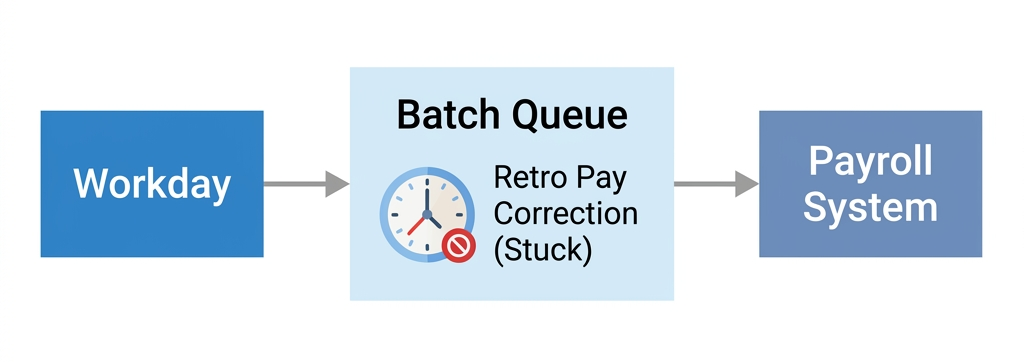
The correction doesn’t reach a third-party payroll system on the same timeline it hits Workday. Plenty of organizations run Workday for HCM but process payroll through ADP, Paychex, Ceridian, or a regional provider. A retro pay adjustment calculated correctly in Workday still has to travel to that external system, and if the integration between the two runs on a batch schedule rather than real time, the correction sits in a queue while the payroll deadline gets closer.
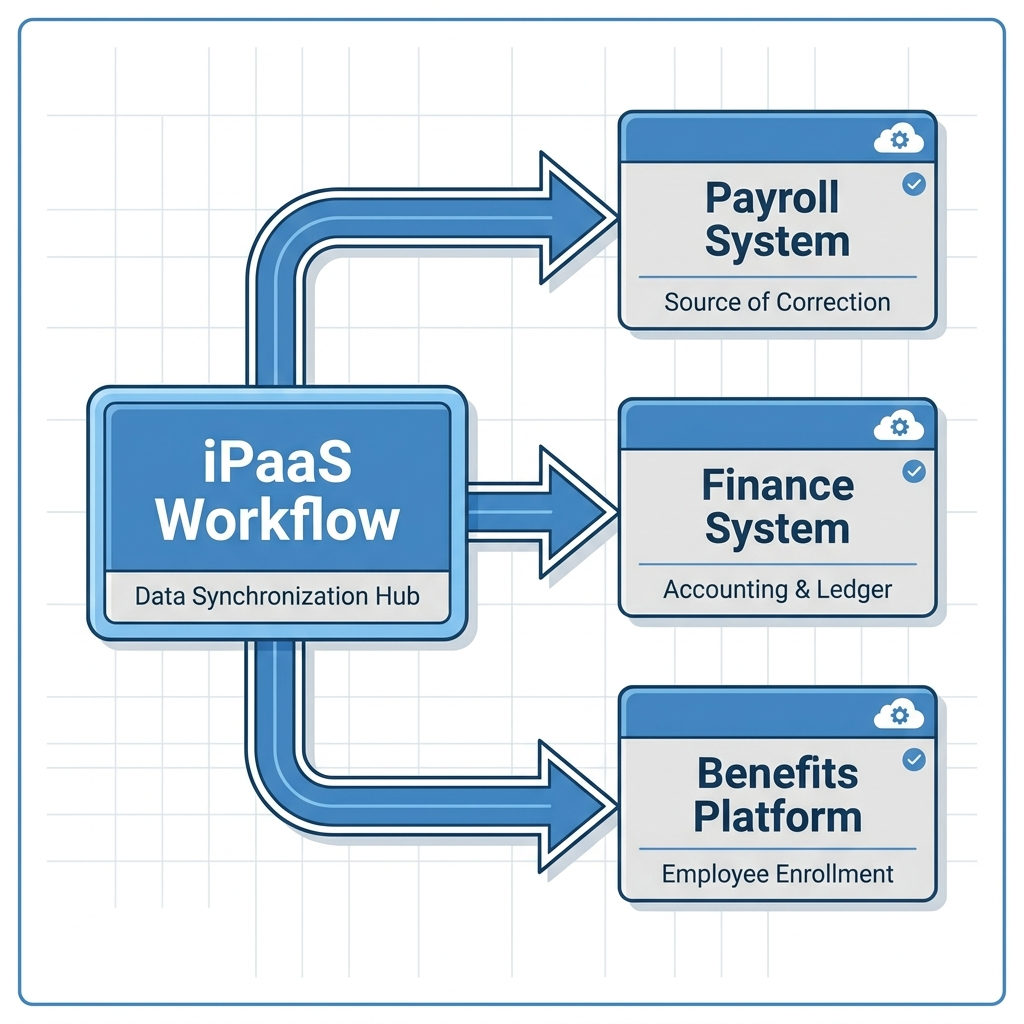
Multiple downstream systems don’t get the correction at the same time. An off-cycle payment or retro adjustment often needs to reach more than just payroll. Finance systems tracking labor cost need the update. A benefits platform calculating contributions off of gross pay needs it. If these connections are built as separate point-to-point integrations rather than one coordinated flow, one system updates before another, and someone downstream is working from a number that’s already stale.
Manual reconciliation becomes the fallback when timing doesn’t line up. When a correction can’t move through the intended integration path fast enough, the default fallback is a person manually re-entering the adjustment into the third-party system, then manually confirming later that both systems agree. This works until volume increases, at which point manual reconciliation becomes the actual bottleneck in the payroll close process, not the calculation.
What to Do Within Workday First
Before treating any of this as an integration problem, a few things are worth checking inside the tenant itself. Confirm the retroactive change business process is configured to trigger the correct downstream integration automatically rather than requiring a manual EIB load — a surprising number of tenants still route corrections through a manual bulk load step that was set up during initial implementation and never revisited.
Review how Workday’s connection to the external payroll system is currently built. EIB exports on a scheduled batch, Workday Studio integrations, and Workday’s Cloud Connect pre-built templates all have different latency characteristics, and a retro pay correction that’s time-sensitive needs a path that doesn’t wait for an overnight batch window. If timecard corrections are part of what’s driving the retro pay event in the first place, it’s also worth confirming how timesheets lock once payroll processing begins, since a correction entered after that lock behaves differently than one entered before it.
For organizations with union-negotiated retro pay spanning multiple contract periods, the complexity compounds further, and that scenario deserves its own dedicated review beyond what’s covered here.
Where Native Tools Run Out
Workday was not built to function as an orchestration layer across multiple external systems on a real-time basis. Its integration tools — EIB, Cloud Connect templates, Workday Studio — are strong at moving data out of Workday, but coordinating that data landing correctly and simultaneously across a third-party payroll system, a finance tool, and a benefits platform, each with different field mappings and different timing requirements, is a multi-system orchestration problem Workday’s native tools weren’t designed to solve on their own.
This becomes a real limit specifically for organizations running Workday alongside one or more external payroll or finance systems where retro pay and off-cycle corrections need to move fast and land consistently everywhere at once. An organization running Workday Payroll as its sole system of record, with no external payroll dependency, generally doesn’t hit this wall in the same way.
Closing the Gap with CloudApper iPaaS
CloudApper iPaaS sits between Workday and the external systems that need retro pay and off-cycle correction data, coordinating the handoff instead of leaving it to a batch schedule or a manual re-entry step. When a retroactive change or off-cycle payment is approved in Workday, iPaaS can push that event to the third-party payroll system, the finance platform, and any other connected tool in the same workflow, with the field mapping and timing rules each destination system requires already configured.
This is the same underlying approach CloudApper uses to coordinate Workday events across Salesforce, ServiceNow, and similar enterprise tools — one workflow builder handling multiple downstream destinations rather than a separate point-to-point integration for each pair of systems. For payroll specifically, that means a retro pay correction doesn’t sit in a nightly batch queue while a payroll deadline closes in, and it doesn’t require someone manually re-keying the adjustment into a second system to make sure both sides agree.
Workday remains the system that calculates the retro pay amount and holds the authoritative record of what was approved. iPaaS handles getting that number where it needs to go, on the timeline the correction actually requires, without adding a manual reconciliation step to the payroll team’s workload.
Frequently Asked Questions
Q: Does Workday calculate retro pay automatically?
A: Yes. Workday’s Retroactive Changes functionality identifies which pay periods are affected by a backdated compensation change, timecard correction, or bonus, and calculates the difference between what was paid and what should have been paid, following the same business process rules as regular payroll.
Q: What’s the difference between retro pay and an off-cycle payment in Workday?
A: Retro pay corrects a discrepancy from a past pay period, usually processed alongside or ahead of the next regular payroll run. An off-cycle payment is a payment made entirely outside the regular payroll calendar, such as a final paycheck or an urgent correction that can’t wait for the next cycle.
Q: Why does a retro pay correction take longer to reach our third-party payroll system than it does to calculate in Workday?
A: This usually comes down to the integration method between Workday and the external system. A batch-based export running on a nightly or weekly schedule introduces a delay that a real-time or near-real-time integration wouldn’t.
Q: Can Workday send retro pay corrections to multiple downstream systems at once?
A: Workday’s native integration tools can be configured to send data to multiple destinations, but each connection is typically built and maintained separately. Coordinating simultaneous, consistently mapped delivery across several systems at once generally requires an orchestration layer rather than several independent point-to-point integrations.
Q: Does CloudApper iPaaS replace Workday’s payroll calculation?
A: No. Workday remains the system that calculates the retro pay amount and holds the record of what was approved. iPaaS handles moving that data to third-party payroll, finance, or other connected systems on the timeline the correction requires.
Q: Is retro pay more complicated for union employees?
A: Yes, particularly when a collective bargaining agreement is ratified with a retroactive effective date spanning multiple contract periods and pay components. That scenario involves additional considerations beyond standard retro pay handling.
If retro pay and off-cycle corrections are routinely turning into a manual reconciliation exercise between Workday and your other payroll or finance systems, it’s worth mapping out where the handoff is actually breaking down. Contact CloudApper to talk through what that would look like for your Workday tenant.

What is CloudApper AI Platform?
CloudApper AI is an advanced platform that enables organizations to integrate AI into their existing enterprise systems effortlessly, without the need for technical expertise, costly development, or upgrading the underlying infrastructure. By transforming legacy systems into AI-capable solutions, CloudApper allows companies to harness the power of Generative AI quickly and efficiently. This approach has been successfully implemented with leading systems like UKG, Workday, Oracle, Paradox, Amazon AWS Bedrock and can be applied across various industries, helping businesses enhance productivity, automate processes, and gain deeper insights without the usual complexities. With CloudApper AI, you can start experiencing the transformative benefits of AI today. Learn More
- Useful Links:
- Agentic AI
- No-Code/Low-Code
- Custom Software
- HCM Personalization
- iPaaS
- FedRAMP

Brochure
CloudApper AI TimeClock
For accurate & touchless time capture experience.
Download Brochure
CloudApper AI Solutions for Workday



- Works with








- and more.
Similar Posts

Workday Display Language for Frontline Workers: What Gets Translated and…

Workday Payroll Without Workday Time Tracking: How to Get Hourly…