Workday doesn't calculate reporting time pay automatically. This guide walks payroll managers through the California and Massachusetts show-up pay formulas, explains why cancelled or cut-short shifts create payroll risk, and shows how accurate time-clock data closes the gap before payroll close.


TL;DR
- Workday does not natively calculate reporting time pay — you have to compare scheduled hours against worked hours yourself.
- California requires half the scheduled shift, with a minimum of 2 hours and a maximum of 4, paid at the regular rate.
- Massachusetts requires 3 hours at minimum wage when an employee scheduled for 3+ hours is sent home early.
- A second reporting on the same workday triggers its own 2-hour minimum under California's rule.
- Accurate clock-in and clock-out data is the foundation of every reporting time pay calculation — pair CloudApper AI TimeClock with Workday to capture it.
Table of Contents
- Where Workday’s Time Tracking Stops
- What Triggers Reporting Time Pay (and Where It Applies)
- The Workday Reporting Time Pay Calculation, Step by Step
- Why the Calculation Breaks Down Without Clean Time Data
Workday’s time tracking engine is built to pay for hours actually worked, not to compare a scheduled shift against what an employee was actually given and calculate the gap. Closing that gap is exactly what reporting time pay laws (also called show-up pay) require in California, Massachusetts, and several other states. This guide walks through the Workday reporting time pay calculation payroll managers and HR operations teams need, and shows where CloudApper AI’s TimeClock closes the data gap.
Where Workday’s Time Tracking Stops
Workday Time Tracking, and the comparable modules inside UKG, Oracle, and Dayforce, are all built to pay for hours actually worked. None of the major HCM platforms ship with a native reporting time pay engine, because the obligation doesn’t come from federal law. The Fair Labor Standards Act is silent on it, so it was never built into the base time-and-absence framework any of these systems ship with. Reporting time pay exists only at the state and local level, which means your Workday tenant will not flag it, calculate it, or pay it unless someone builds that logic in.
What Triggers Reporting Time Pay (and Where It Applies)
Reporting time pay, sometimes called show-up pay, applies when a non-exempt employee reports for a scheduled shift as required and is then sent home early or given no work at all. At least eight U.S. jurisdictions require some version of it, including California, Massachusetts, New York, New Hampshire, New Jersey, Connecticut, Rhode Island, and Washington, D.C. Each has its own formula, and several overlap with predictive scheduling rules, so it’s worth checking your obligations against both if your organization already tracks predictive scheduling compliance in Workday.
The Workday Reporting Time Pay Calculation, Step by Step
How to calculate California reporting time pay:

- Start with the scheduled shift length.
- If the employee worked less than half of it, take half the scheduled hours.
- Apply the limits: no less than 2 hours and no more than 4.
- Pay that many hours at the regular rate, counting any hours already worked.
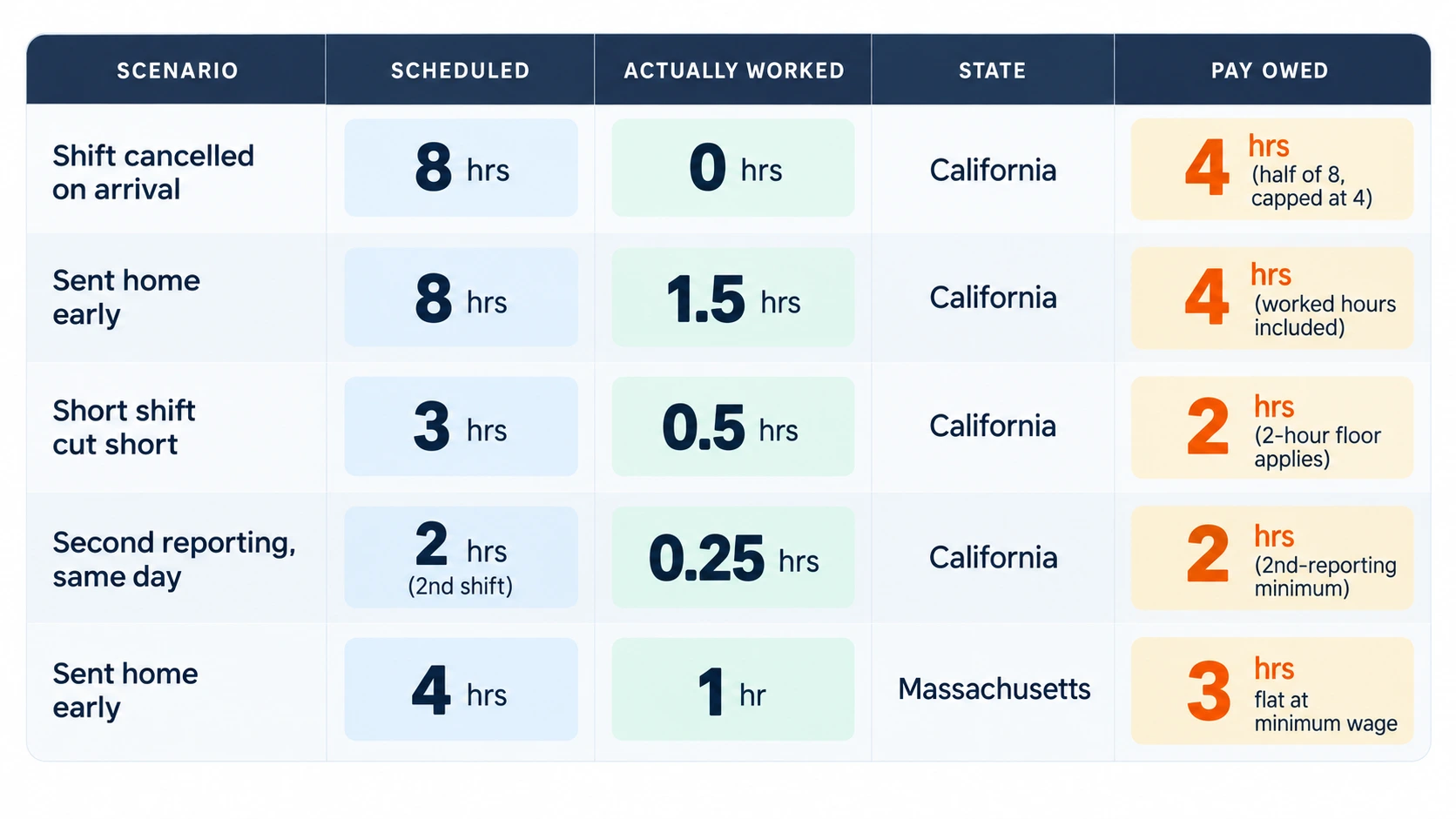
California’s rule is the one most Workday customers run into first. Under the state’s Industrial Welfare Commission wage orders, an employee who reports and works less than half their scheduled shift is owed half that shift’s length, with a floor of two hours and a ceiling of four, paid at their regular rate. A second reporting on the same workday triggers its own two-hour minimum, which matters for split-shift operations running shift differential and premium pay configurations in Workday. Massachusetts works differently: an employee scheduled for three hours or more who is sent home early is owed three hours of pay at minimum wage, with exceptions for utility failures and acts of God.
Worked Examples
Why the Calculation Breaks Down Without Clean Time Data
This is where Workday’s native tools stop being enough. Time Tracking compares clocked hours against a schedule for overtime and absence purposes, but it isn’t set up to ask whether an employee was given at least half their scheduled shift and generate a payable difference. If your team is reconciling that comparison manually against a spreadsheet, missing punches after an otherwise successful integration run erase the exact data the calculation depends on before payroll ever sees it, and any exception-based time approval workflow you’ve already built has nothing to catch.
Building the Check Into Your Workday Process
The fix isn’t a bigger Workday configuration project. It’s cleaner data going into Workday in the first place. CloudApper AI TimeClock captures geofenced clock events tied to the employee’s actual scheduled shift, so a shortfall between scheduled and worked hours is visible the moment it happens, not discovered during payroll close. If you already run multi-jurisdiction compliance attestations at clock-out, the same event stream can carry the scheduled-versus-worked comparison needed for reporting time pay. And when a shortfall is caught after the fact, the correction runs through the same retro pay and off-cycle correction workflow you’d use for any other missed payroll adjustment, instead of a manual off-system fix.

None of this replaces legal review of your specific state and local obligations. What it does is give payroll and HR operations a reliable, timestamped record of what was scheduled and what was actually worked, so the reporting time pay calculation is a lookup instead of a reconstruction project every time a shift gets cut short.
If cancelled or cut-short shifts are already turning into payroll corrections in your Workday tenant, request a demo to see how CloudApper AI TimeClock closes that gap.
Frequently Asked Questions
Does Workday automatically calculate reporting time pay?
No. Workday tracks scheduled and worked hours for overtime and absence purposes, but it does not compare the two to trigger a state-required reporting time pay minimum. That comparison has to be built as a separate process or fed in from accurate time-clock data before payroll close.
Which states require reporting time pay?
At least eight U.S. jurisdictions require some form of reporting time or show-up pay, including California, Massachusetts, New York, New Hampshire, New Jersey, Connecticut, Rhode Island, and Washington, D.C. The federal Fair Labor Standards Act does not require it.
How do you calculate reporting time pay for a cut-short shift in California?
Pay half the scheduled shift length, with a floor of two hours and a ceiling of four hours, at the employee’s regular rate of pay, inclusive of any hours actually worked during that shift.
Is reporting time pay owed if a shift is cancelled due to weather or a utility failure?
Several states, including California and Massachusetts, carve out exceptions for civil emergencies, utility failures, or acts of nature that make work impossible. Confirm the specific wage order or regulation applies before treating a cancellation as exempt.
Does reporting time pay count toward overtime calculations?
Reporting time pay is generally treated as pay for time not worked, so it typically does not add to the hours used to calculate weekly overtime. Treatment can vary by state, so confirm this against your specific jurisdiction’s rule.
How can Workday admins avoid reporting time pay violations?
By comparing scheduled shift length to actual clocked hours at the point of clock-out rather than at payroll close, using accurate time-clock data to flag shortfalls early enough for HR to correct pay before the pay period locks.

What is CloudApper AI Platform?
CloudApper AI is an advanced platform that enables organizations to integrate AI into their existing enterprise systems effortlessly, without the need for technical expertise, costly development, or upgrading the underlying infrastructure. By transforming legacy systems into AI-capable solutions, CloudApper allows companies to harness the power of Generative AI quickly and efficiently. This approach has been successfully implemented with leading systems like UKG, Workday, Oracle, Paradox, Amazon AWS Bedrock and can be applied across various industries, helping businesses enhance productivity, automate processes, and gain deeper insights without the usual complexities. With CloudApper AI, you can start experiencing the transformative benefits of AI today. Learn More
- Useful Links:
- Agentic AI
- No-Code/Low-Code
- Custom Software
- HCM Personalization
- iPaaS
- FedRAMP

Brochure
CloudApper AI TimeClock
For accurate & touchless time capture experience.
Download Brochure
CloudApper AI Solutions for HR



- Works with








- and more.
Similar Posts

In-Vehicle Time Clocks for Crews Who Rotate Trucks: Clocking In…

New Hire Orientation Pay: Recording Orientation Hours in Training Rooms…