To add a module to your HR system, you have five options: wait for the vendor roadmap, buy a point solution, configure deeper, build with the vendor's own extensibility tool, or add a process layer on top that reads and writes through the API. The last one is usually fastest and cheapest.
Table of Contents
- What does it mean to add a module to your HR system?
- Why the gap exists
- Five ways to add a module to your HR system
- The one rule that keeps it clean
- Adding capabilities inside the screens people already use
- How to decide which HCM option fits
- Where to start
- Frequently asked questions
There is a sentence every HR leader has heard when they ask to add a module to their HR system. “That’s not supported.”
It arrives after a reasonable request. A plant manager wants field crews to submit compliance photos from a phone. A payroll director needs a different overtime rule for one union group. A benefits lead wants two systems to stop disagreeing about who works where.

None of that is exotic. None of it is in the system either.
So three bad options appear. Wait for the roadmap, buy another system, or let somebody keep it in a spreadsheet. There is a fourth path and a fifth, and this article covers all five honestly.
What does it mean to add a module to your HR system?
Almost nobody means a literal product module from the vendor’s price list. They mean one of four things.
A new app. Something that does not exist today, like a mobile form for field crews.
A custom rule. Logic the standard configuration cannot express, like union seniority driving overtime approval.
A connection. Two systems that need to agree, continuously, without anyone retyping.
A new field or button. Something small, inside a screen your team already opens daily.
All four are capability gaps. None requires replacing the system of record. That distinction decides the cost. If the gap is a recruiting function specifically, the mechanics differ a little, and our guide to Oracle Recruiting Cloud implementation essentials covers that case.
Why the gap exists
This is not a criticism of your vendor.
An HR system is built to be the system of record. It stores the employee, the job, the pay rule, the balance, and the history. It has to be correct, auditable, and identical for every customer running it.
That design goal makes general-purpose process work hard. Your union agreement is not the same as anyone else’s. A vendor serving thousands of customers cannot ship every variation and keep the core stable.
So the gap is structural. The only question is what you do about it.
Five ways to add a module to your HR system
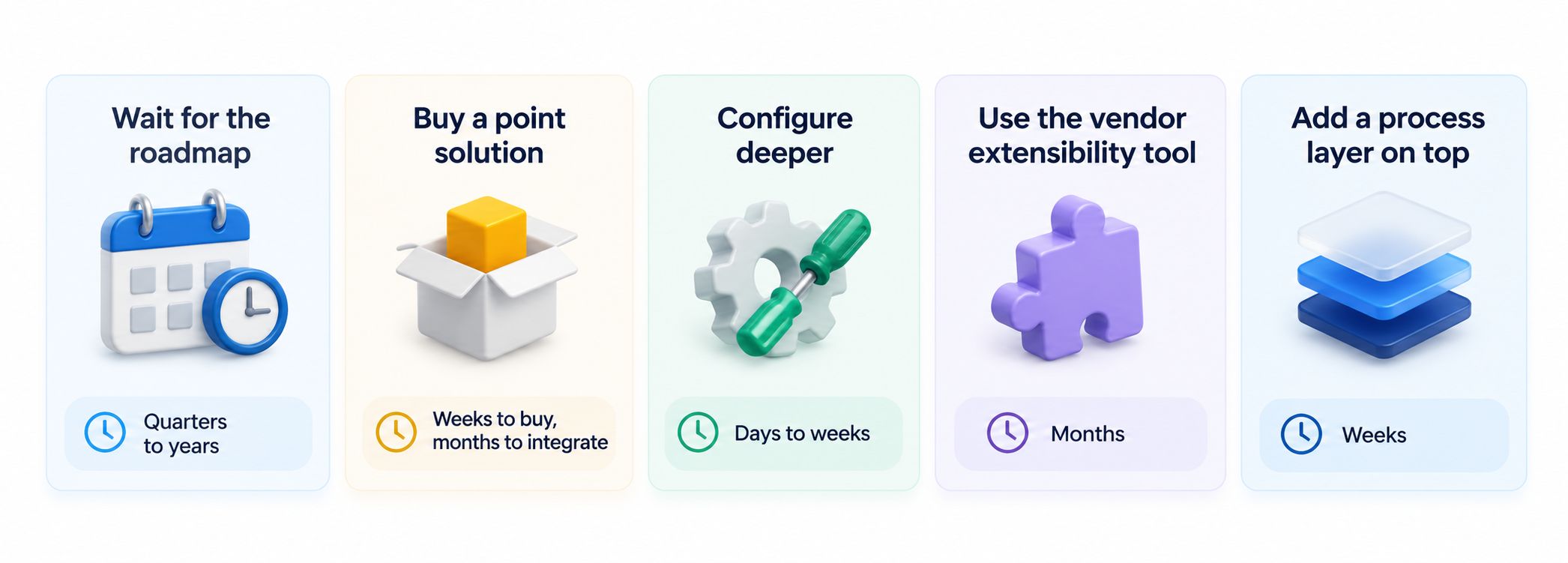
| Option | Time | Cost | Who does it | You keep control? |
|---|---|---|---|---|
| Wait for the roadmap | Quarters to years | Free | The vendor | No |
| Buy a point solution | Weeks to buy, months to integrate | New licence plus integration | A second vendor | Partly |
| Configure deeper | Days to weeks | Internal time | Your admin | Within limits |
| Vendor extensibility tool | Months | Developer time | Developers or a partner | Inside that vendor |
| Process layer on top | Weeks | Lowest | Your own team, no code | Yes |
Wait for the roadmap. Sometimes right. If the capability is common and genuinely slated for next release, waiting costs nothing. Usually it is not right, because roadmaps slip and the spreadsheet workaround becomes permanent. Ask for a committed release in writing before you plan around it.
Buy a point solution. This feels fast because buying is fast. The cost arrives later as a second login, a second contract, a second place employee data lives, and an integration somebody maintains. Buy one when the capability is a whole discipline. Do not buy one to add a form.
Configure deeper. Most teams have not exhausted what their system already allows. Custom fields, extra workflow steps, limit lists, and reporting cover more than people assume. Start here, because it is free and keeps everything in one place. The limit is simple: you can only configure what the vendor chose to expose.
Use the vendor’s extensibility tool. Several vendors offer a way to build on their platform, and these are powerful. But you need developers, timelines run in months, and what you build usually lives inside that vendor’s tenant. We cover that trade-off in when to build inside the Workday tenant and when to extend outside it.
Add a process layer on top. This is the option most buyers have not been shown. You leave the HR system as the record. Then a layer above it holds the work the system was never built to hold: forms, approvals, mobile screens, custom rules, and connections. The layer talks to the system through its API, so data flows both ways and nothing gets retyped. Because nothing is migrated, you can try it and remove it. For the connection side specifically, see integrating AI with your existing HRIS and how to connect AI with platforms like UKG, Workday, or SAP SuccessFactors.
The one rule that keeps it clean
Whichever route you pick, one rule separates a working setup from a mess.
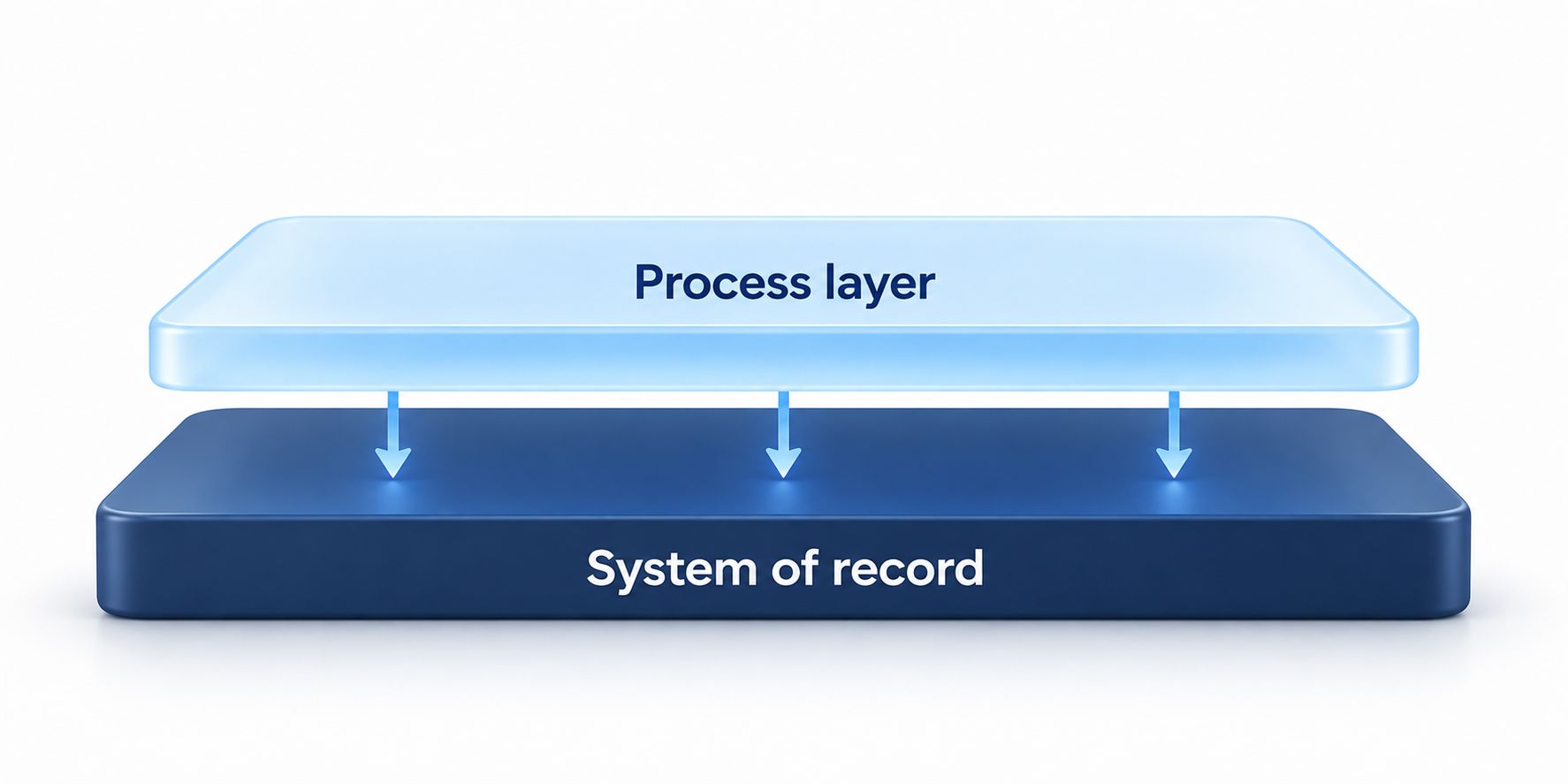
One system stays authoritative. Pick it, write it down, and never split history across two places hoping nobody asks. For almost every company that is the HR system, because payroll, compliance, and reporting already point there.
Then three things follow. Log every write in both directions, because auditors want the chain and not just the result. Inherit the permission model you already maintain rather than building a second one, since two models always drift. And run both sides in parallel before you commit, so differences surface before anyone signs off.
Skip those and you have not added a module to your HR system. You have added a second system nobody reconciles.
Adding capabilities inside the screens people already use
This is the quietest capability and often the most useful.
Most gap-closing adds a new place to go. A new app, a new tab, a new login. Adoption suffers, because people must remember a second destination.
The alternative puts the capability inside the screen people already open. A browser extension loads alongside the HR system, and the new fields, buttons, and panels appear on the existing page. The record still lives in the HR system. The extra information sits in the layer. To the user there is one screen.
That matters more than any feature list. Nobody needs training on a new system, because from their side there is no new system. For frontline staff who never log in at all, the shared-device equivalent is covered in employee kiosk software that works with any HR or payroll system.
How to decide which HCM option fits
Three questions, in order.
Is the data fine and the process broken? If the system holds the right information and the problem is the work around it, you do not need a new system. Configure deeper or add a layer.
How fast do you need it? Weeks points to the process layer. Months points to the vendor tool. Quarters points to the roadmap, if you can wait.
Who maintains it afterwards? If the answer is your HR operations team, they need something they can change without filing a ticket.
One more question worth asking before you commit: what happens if you change systems later? Configuration and vendor-tenant builds stay behind. A process layer connected through APIs is portable, because you repoint the connection rather than rebuild the capability. That matters, because the capabilities built around an old system are usually the part nobody budgeted to rebuild. We wrote about the pattern in how enterprises recreate the vendor lock-in problem.
Finally, a cost nobody quotes. McKinsey found that 10% to 20% of budget earmarked for new products gets pulled back into fixing old technology problems. Every custom build becomes something to maintain. So pick the lightest option that actually works, not the most impressive one.
Where to start
Start with the list, not the software.
Spend a week writing down every process your HR team runs outside the system. Every spreadsheet. Every email approval. Every report rebuilt by hand. Every time somebody retypes data from one screen to another.
That list is your real backlog, and it is shorter than anyone expects. Rank it by wasted hours and by risk, then fix the top three and measure what changed.
CloudApper is the process layer that closes the gaps enterprise software cannot, across HR, ERP, CRM, and beyond, on any platform, in weeks not quarters. To see what that looks like on your own system, our AI for HR systems page walks through it.
Frequently asked questions
What does it mean to add a module to your HR system?
It usually means closing a capability gap rather than buying a vendor module. In practice it is one of four things: a new app, a custom rule the standard configuration cannot express, a connection between systems, or a new field inside an existing screen.
Can you add a module to your HR system without replacing it?
Yes, and for most gaps that is better. The HR system stays as the record while a process layer above it holds the forms, rules, and workflows. The two talk through the API, so nothing is migrated and nothing is switched off.
How long does it take to add a module to your HR system?
Configuring deeper takes days to weeks. A process layer takes weeks. A vendor extensibility tool takes months. Waiting for the roadmap takes quarters, if it arrives.
Is it better to buy a point solution or extend the system?
Buy a point solution when the capability is a whole discipline on its own. Extend when the gap is a process, a rule, or a field. Buying a separate system to add a form creates a second login, a second contract, and an integration to maintain.
What is the main risk of extending your HR system?
Losing the single source of truth. Keep one system authoritative, log every write in both directions, inherit the existing permission model, and run both in parallel before you commit.
Will what we build survive an HR system change?
It depends where you built it. Configuration and vendor-tenant builds stay behind. Work built in a process layer that connects through APIs is portable, because you repoint the connection instead of rebuilding.
How do new fields appear inside our existing HR system screens?
A browser extension loads alongside the HR system and renders the extra fields, buttons, and panels on the page your team already uses. The record stays in the HR system and the extra data sits in the layer, so to the user it is one screen.

What is CloudApper AI Platform?
CloudApper AI is an advanced platform that enables organizations to integrate AI into their existing enterprise systems effortlessly, without the need for technical expertise, costly development, or upgrading the underlying infrastructure. By transforming legacy systems into AI-capable solutions, CloudApper allows companies to harness the power of Generative AI quickly and efficiently. This approach has been successfully implemented with leading systems like UKG, Workday, Oracle, Paradox, Amazon AWS Bedrock and can be applied across various industries, helping businesses enhance productivity, automate processes, and gain deeper insights without the usual complexities. With CloudApper AI, you can start experiencing the transformative benefits of AI today. Learn More
- Useful Links:
- Agentic AI
- No-Code/Low-Code
- Custom Software
- HCM Personalization
- iPaaS
- FedRAMP

CloudApper AI Solutions for HR



- Works with








- and more.
Similar Posts

Why Complex Workforce Environments Need More Than a Standard HCM…

Auto-Clear Timesheets Using API Workflows: Save HR Hours