Workday open shift bidding is simple to enable but shaped by decisions on schedule tags, approvals, edit locks, manager criteria, union rules and unfilled shifts. This guide assigns each of six decisions to its owner and notes where policy ranking still happens by hand.


TL;DR
Enabling Workday open shift bidding takes one setting, but six decisions decide whether it works: schedule tags, approval routing, shift finalization, what managers see, union and hour rules, and unfilled shifts. Workday documents that managers cannot edit a shift once bidding starts and that no bidding window duration is described, so confirm timing in your tenant. Ranking bids by policy is a practitioner pattern many staffing offices finish by hand. CloudApper Bidding ranks bids by your policy and sends accepted assignments back to the connected HR system.
Table of Contents
- What the Checkbox Switches On
- The Workday Admin Owns Two Decisions
- The Scheduler Owns Two Decisions
- Labor Relations and Payroll Own Two Decisions
- Where Staffing Offices Keep a Spreadsheet Anyway
- Policy-Ranked Bidding Alongside Workday
- Frequently Asked Questions
Workday open shift bidding takes one checkbox to enable, and one posted shift to regret: Workday documents that managers can’t edit a shift once bidding has started. The decisions behind it belong to different people. CloudApper works alongside Workday Scheduling for teams whose bid-ranking rules outgrow the native screens.
What the Checkbox Switches On
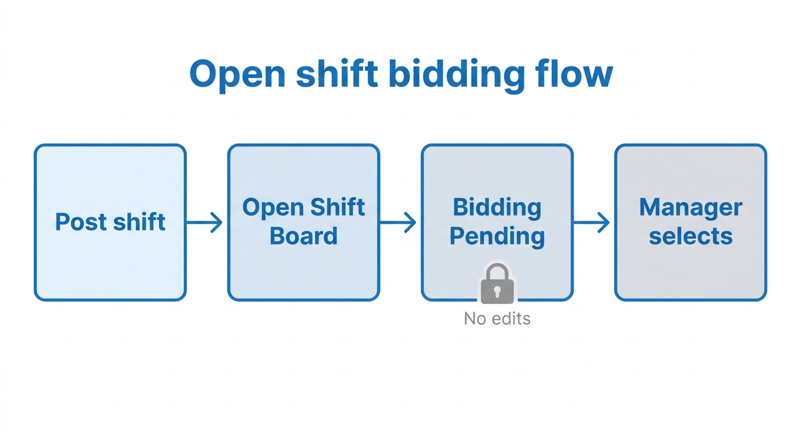
Enable Shift Bidding sits on the Worker Experience tab of Edit Scheduling Settings. Bidding runs through the Cover Shift Bidding Event business process, where workers use Bid to Cover Shift and managers use Select Worker to Cover Shift. Workers see the option on Open or Bidding Pending shifts, only if eligible.
The Workday Admin Owns Two Decisions
1. Which shifts carry which schedule tags. The Open Shift Board shows a shift only to workers assigned its schedule tags, within their nearest high-level scheduling organization. Stale tags decide who sees what, and notices can still miss people, as covered in why Workday notifications miss frontline employees.

2. Who approves posting and covering. Workday lets administrators require approval to post a shift, to cover one, or both. The documentation states no default, so confirm in your tenant. Business process approval routing is where stuck requests start.
The Scheduler Owns Two Decisions
3. When a shift is final. Edits stop once bidding starts, so correct time, location and tags first.
4. What the manager sees when choosing. The My Tasks notification includes worker seniority, and Maintain Step Related Worklets can attach a custom report with performance rating, years employed or skills. The documentation does not describe a bidding window duration, so confirm in your tenant and set a written cutoff in the meantime.
Labor Relations and Payroll Own Two Decisions
5. How union rules and hour caps apply. Workday shows the reviewing manager a validation when a bid would break a configured rule, such as a maximum weekly hours threshold. Documentation describes nothing beyond those, so rules like union work rules and seniority date versus continuous service date need a written procedure.
6. What happens to a shift nobody takes. Workday documents that when a posted shift isn’t covered, the original worker stays responsible for it. Decide how unfilled shifts escalate and check the overtime they create under workweek overtime rules.
Where Staffing Offices Keep a Spreadsheet Anyway
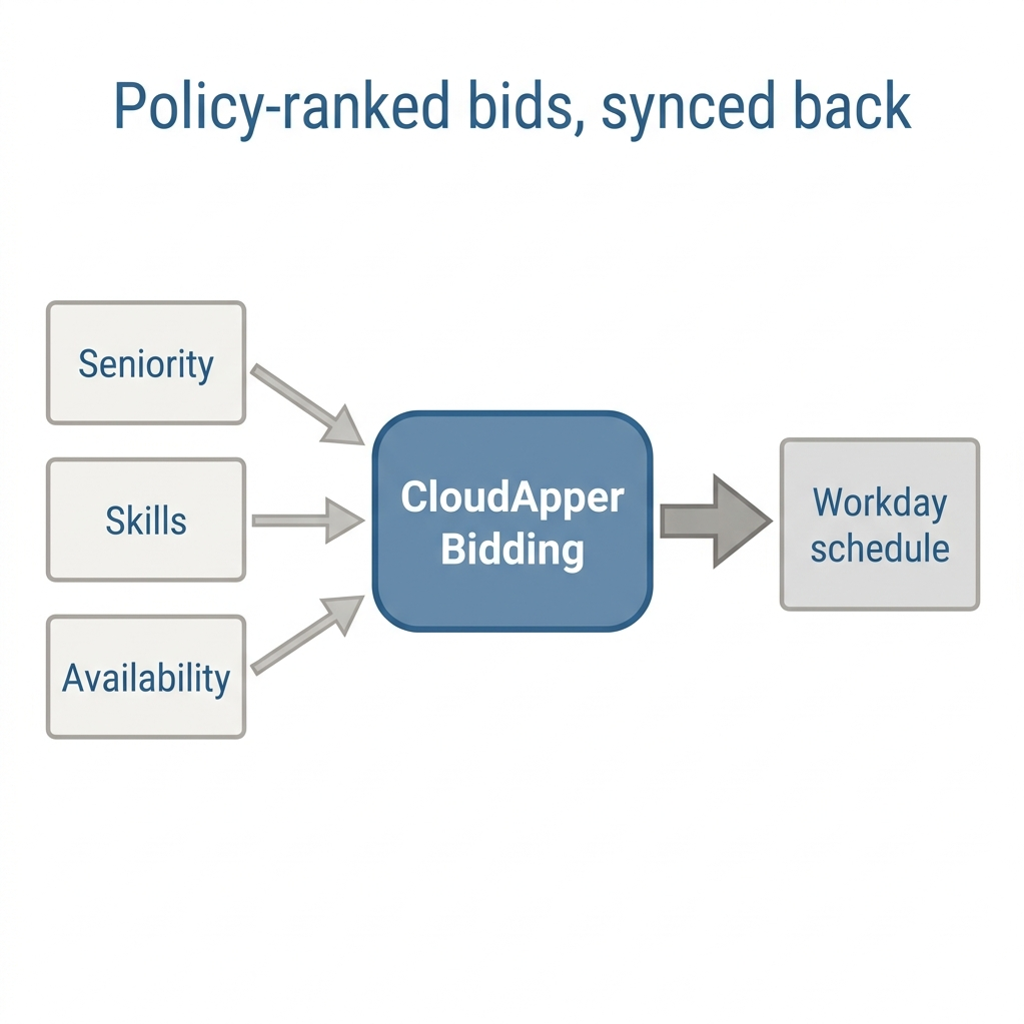
Native bidding hands the manager a list with seniority. Ranking bids by policy across seniority, skills and availability is a practitioner pattern most 24/7 sites finish by hand, in a shadow sheet or an email chain. That matches the pain on the CloudApper Bidding page: replacing spreadsheets and email chains with HR-system-integrated bidding workflows.
Policy-Ranked Bidding Alongside Workday
CloudApper Bidding scores and ranks bids using your own policy, and sends accepted assignments back to the connected HR system. Workday keeps the schedule and approvals. Confirm the Workday sync method with CloudApper before scoping. Pair it with Workday time off limits.
Frequently Asked Questions
Q: How does open shift bidding work in Workday?
Eligible workers see open shifts on the Open Shift Board and submit a Bid to Cover Shift. The manager reviews the bids in My Tasks and selects the worker through the Cover Shift Bidding Event.
Q: How do I enable shift bidding in Workday?
Create the Cover Shift Bidding Event business process definition, add Bid to Cover Shift and Select Worker to Cover Shift, then select Enable Shift Bidding in Edit Scheduling Settings.
Q: Why can’t a manager edit a shift in Workday after bidding starts?
Workday documents that managers can’t edit shifts once bidding has started. Finalize details before posting.
Q: Who can see an open shift on the Workday Open Shift Board?
Workers assigned the schedule tags on the shift, within the same nearest high-level scheduling organization, can see it.
Q: Does Workday show a manager if a bid breaks hour limits?
Yes. Workday shows the reviewing manager a validation, such as exceeding a maximum weekly hours threshold, when a cover request breaks a configured rule.
If your staffing office still ranks shift bids by hand, talk with CloudApper about policy-based bidding that runs alongside Workday.

What is CloudApper AI Platform?
CloudApper AI is an advanced platform that enables organizations to integrate AI into their existing enterprise systems effortlessly, without the need for technical expertise, costly development, or upgrading the underlying infrastructure. By transforming legacy systems into AI-capable solutions, CloudApper allows companies to harness the power of Generative AI quickly and efficiently. This approach has been successfully implemented with leading systems like UKG, Workday, Oracle, Paradox, Amazon AWS Bedrock and can be applied across various industries, helping businesses enhance productivity, automate processes, and gain deeper insights without the usual complexities. With CloudApper AI, you can start experiencing the transformative benefits of AI today. Learn More
- Useful Links:
- Agentic AI
- No-Code/Low-Code
- Custom Software
- HCM Personalization
- iPaaS
- FedRAMP
Brochure
CloudApper AI TimeClock
For accurate & touchless time capture experience.
Download Brochure
CloudApper AI Solutions for Workday



- Works with








- and more.
Similar Posts

Workday Scheduled Reports: 7 Pay Period Spreadsheets to Stop Rebuilding

Workday Mass Enter Time: 5 Crew Methods and Their Limits