Someone covers for a coworker who is running late. Five minutes here, ten minutes there. Buddy punching bleeds thousands from your payroll every year, and most of it follows the same eight patterns.

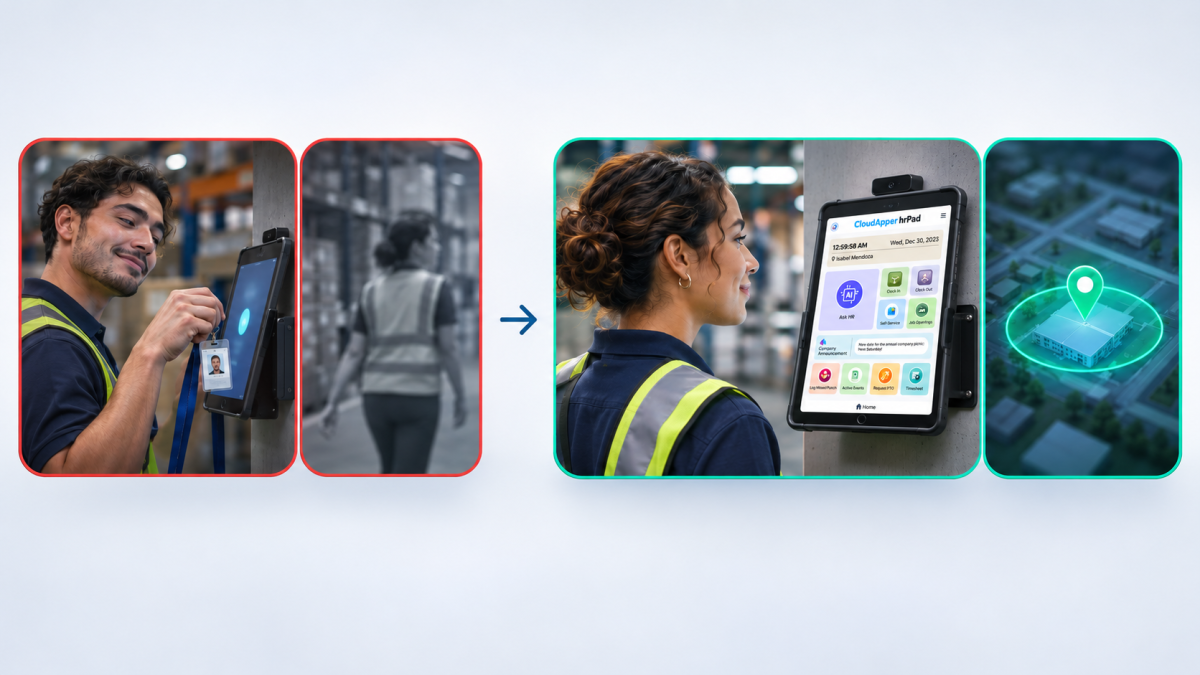
Table of Contents
Buddy punching is when one employee clocks in or out for another. It is the most predictable form of time theft in hourly workplaces, and it almost always starts the same way: someone covers for a coworker running five minutes late.

Five minutes sounds harmless. But spread that across dozens of employees over a few months, and the numbers get ugly. The American Payroll Association estimates buddy punching costs employers 2% to 5% of gross payroll. On $1 million in hourly wages, that is $20,000 to $50,000 gone every year.
The tactics are predictable, though, and a CloudApper AI-powered tablet-based time clock like hrPad can shut down each one. Eight methods show up again and again.
1. Sharing PIN codes
One employee texts their PIN to a coworker who punches in before they arrive.
Fix: Replace PINs with facial recognition. A face scan cannot be shared or forwarded. Facial recognition time clocks verify identity in seconds.
2. Swapping badge cards
An employee hands their badge to a coworker who taps it at the terminal.
Fix: Add photo capture at every punch. The system snaps a photo alongside the badge tap. Any mismatch between the cardholder and the face on screen lands in the audit log.
3. Clocking in from a coworker’s phone
Mobile apps make it simple for someone to punch in from a coworker’s device.
Fix: Lock mobile punches to geofencing plus device ID. Geofencing confirms the punch happens within the job site. Device binding ties it to the employee’s own registered phone.
Every common buddy punching method has a specific countermeasure that eliminates it.
4. Covering for late arrivals
A coworker clocks in at 7:00 AM. The actual employee walks in at 7:20. Twenty minutes of paid time, unearned.
Fix: Set real time manager alerts. When a punch happens but the employee has not been visually confirmed on site, a supervisor notification catches the gap before it hits payroll.
5. Extending a shift for someone who left early
An employee leaves at 4:30 but a coworker clocks them out at 5:00. That is half an hour of phantom time, repeated daily.
Fix: Enforce automatic shift end rules. Configure the system to flag or reject clock outs outside the scheduled window. If the punch does not come from the assigned employee’s biometric, it gets blocked.
6. GPS spoofing on remote punches
Tech savvy employees use spoofing apps to fake their GPS location and clock in from home.
Fix: Layer IP restriction on top of geofencing. Geofencing alone can be fooled. Adding IP verification or Wi-Fi checks creates a second location signal spoofing apps cannot replicate.
7. Using a shared workstation login
In warehouses and manufacturing floors, shared computers make it easy for one person to clock in multiple coworkers at once.
Fix: Require biometric authentication at the kiosk. Each punch requires a unique face scan or fingerprint. Even on a shared device, the system confirms exactly who is standing there.
8. Early punch in by the first person to arrive
The first employee on site clocks in the whole crew before anyone else shows up.
Fix: Randomize identity verification prompts. The system occasionally asks for a secondary check like a selfie or a security question. Unpredictable prompts make batch punching impractical.
What buddy punching actually costs
Here is a simple formula:
Number of employees x average daily time stolen x hourly rate x working days per year = annual loss
The Real Cost of Buddy Punching
Annual Loss Formula
Employees × Daily Time Stolen × Hourly Rate × Working Days = Annual Loss
2-5%
of gross payroll lost to buddy punching (APA)
$259M
recovered by DOL Wage & Hour Division (FY2025)
$78K
annual loss example (100 employees, 10 min/day, $18/hr)
Even 10 minutes of buddy punching per employee per day adds up to tens of thousands in annual payroll waste.
For a 100 person operation where buddy punching adds just 10 minutes per employee per day at $18/hour, that is roughly $78,000 a year. The DOL’s Wage and Hour Division recovered over $259 million in back wages in its most recent fiscal year. Inaccurate time records cut both ways, and the FLSA’s recordkeeping requirements put the accuracy burden on the employer.
The common thread
Every method on this list works because traditional time clocks verify credentials, not people. PINs, badges, and passwords can all be handed off. A face cannot.
That is what makes facial recognition combined with geofencing and AI-based monitoring effective. The system confirms who is punching and where, and honest employees still clock in and out in seconds.
Frequently asked questions
Is buddy punching illegal?
Buddy punching itself is not a standalone crime, but it qualifies as time theft and payroll fraud. Employers can terminate employees for it, and in some cases, it can lead to civil or criminal liability depending on the amount and intent.
Can biometric time clocks fully prevent buddy punching?
Biometric systems like facial recognition make buddy punching extremely difficult because biological traits cannot be shared or duplicated the way PINs and badges can. No system is 100% foolproof, but biometrics eliminate the most common methods.
Do I need employee consent for biometric time tracking?
Yes, in many states. Illinois (BIPA), Texas, Washington, and several others have biometric privacy laws that require written notice and consent before collecting biometric data. Check your state’s requirements before deploying facial recognition or fingerprint-based time clocks.
Stop paying for hours nobody worked
CloudApper hrPad uses facial recognition, geofencing, and smart scheduling rules to shut down buddy punching before it hits your payroll. See how it works.

What is CloudApper AI Platform?
CloudApper AI is an advanced platform that enables organizations to integrate AI into their existing enterprise systems effortlessly, without the need for technical expertise, costly development, or upgrading the underlying infrastructure. By transforming legacy systems into AI-capable solutions, CloudApper allows companies to harness the power of Generative AI quickly and efficiently. This approach has been successfully implemented with leading systems like UKG, Workday, Oracle, Paradox, Amazon AWS Bedrock and can be applied across various industries, helping businesses enhance productivity, automate processes, and gain deeper insights without the usual complexities. With CloudApper AI, you can start experiencing the transformative benefits of AI today. Learn More
- Useful Links:
- Agentic AI
- No-Code/Low-Code
- Custom Software
- HCM Personalization
- iPaaS
- FedRAMP

Brochure
CloudApper hrPad
Empower Frontline Employees with an AI-Powered Tablet/iPad Solution
Download Brochure
CloudApper AI Solutions for HR


- Works with








- and more.
Similar Posts

How to use different verification methods for different employees on…

Fair Workweek Violations Are Getting Expensive: What Employers Need to…