Tip distribution in restaurants carries IRS daily recordkeeping requirements that most manual spreadsheet processes can't reliably satisfy. UKG, Workday, and Dayforce process payroll — but not tip capture or pool calculation. CloudApper automates the missing workflow and syncs clean, compliant tip data directly to your HCM.
Table of Contents
- TL;DR
- Tip Distribution in Restaurants Is More Complicated Than It Looks
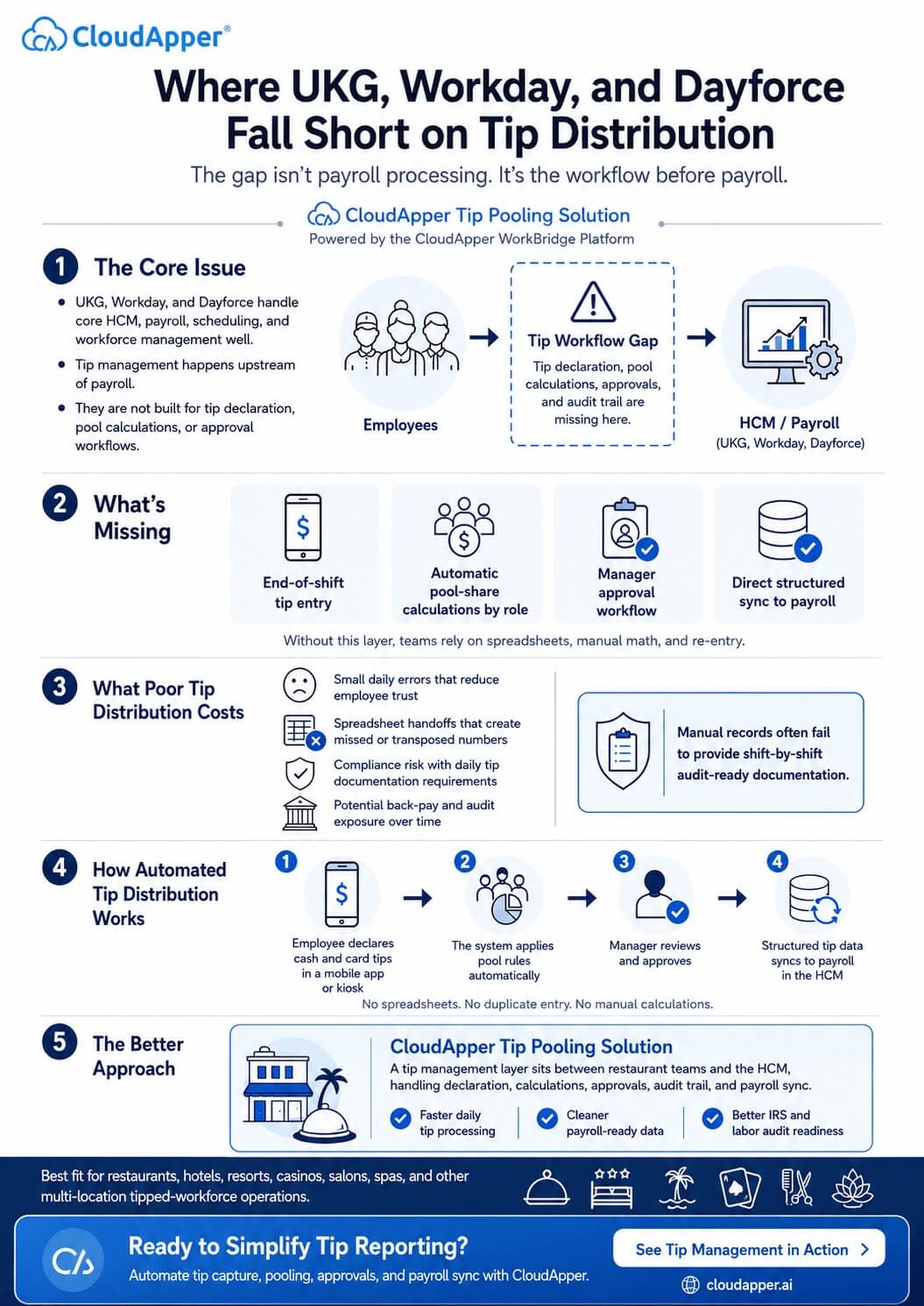
- Where UKG, Workday, and Dayforce Actually Fall Short
- What Poor Tip Distribution in Restaurants Actually Costs You
- How Automated Tip Distribution Works in a Restaurant Environment
- IRS Compliance and Restaurant Tip Distribution: Not Just a Year-End Problem
- Who’s Actually Dealing With Restaurant Tip Distribution Problems
- Adding the Missing Layer to Your HCM
- FAQ
- Fix Restaurant Tip Distribution in Your HCM — Without Starting Over
Most restaurant operators running UKG, Workday, or Dayforce have solved a lot of hard HR problems. Scheduling across locations, compliance tracking, benefits administration — the systems handle it. Then someone asks how tip distribution gets into payroll, and the answer is usually some version of: “Maria does it in a spreadsheet and enters it manually before Wednesday’s run.”

That’s not a knock on Maria. It’s a sign that tip distribution in restaurants has been quietly treated as an admin task when it’s actually a compliance workflow — one with IRS daily recordkeeping requirements, Department of Labor exposure, and real back-pay liability if the numbers are consistently off.
The HCM didn’t fail here. It just was never designed to handle this part.
TL;DR
Tip distribution in restaurants is a daily compliance workflow — not just an admin task — with IRS daily recordkeeping requirements and real back-pay liability when the numbers are off. UKG, Workday, and Dayforce process payroll well but have no native way to capture tip declarations or calculate pool shares. CloudApper’s Tip Management Solution automates the full workflow from employee declaration to HCM payroll sync, without replacing your existing platform.
Tip Distribution in Restaurants Is More Complicated Than It Looks
Take a mid-size restaurant group. 150 employees, four locations. On any given shift you’re looking at cash tips declared by servers at close, credit card tips pulled from the POS, auto-gratuity on large parties (the IRS treats that one differently, which trips people up), tip pool contributions from tipped staff, and pool shares split out across servers, bussers, bartenders, hosts, sometimes kitchen workers.
Five data types. Per shift. Per location. Seven days a week.
A group running two shifts daily with 80 tipped employees generates around 160 tip declarations a day. At even two minutes of manual entry per employee, that’s more than five hours of administrative work before a single number reaches payroll. And that’s assuming no errors, no disputes, no one who forgot to declare.
The IRS wants daily records — not weekly summaries, not year-end reconstructions. If you’re relying on manual entry, you’re not really keeping daily records. You’re keeping approximations. Auditors know the difference.
Effortlessly Manage Employee Tips & Gratuities for HCM Compliance CloudApper Tip Management Solution
Where UKG, Workday, and Dayforce Actually Fall Short
None of this is a knock on these platforms. UKG Pro, Workday HCM, and Ceridian Dayforce do what they’re built to do — scheduling, workforce management, benefits, core payroll processing — and they do it well. That’s exactly why so many large hospitality and restaurant operators run on them.
The problem is that tip management sits upstream of payroll. It’s a data capture and calculation problem, not a processing one. And that’s the part none of these systems were built to solve.
UKG users know this firsthand. UKG Pro and UKG Ready accept tip data through earning codes — M001, M002, however your org has it configured. But there’s no native mechanism for a server to declare end-of-shift tips, no engine to calculate pool shares by role, no approval workflow for managers. Someone has to gather the numbers, do the math by hand, and type it all in.
Workday has the same gap. Tip data can land in Workday as compensation supplements or expense line items, but only after a human has already done the intake and the math. Workday processes what you give it. It doesn’t help you collect it.
Dayforce customers often bridge the gap with spreadsheets — tip totals go in, pool math gets done there, then someone imports the results into payroll. Every handoff between POS and HCM is a place where numbers get transposed, lost, or just forgotten at the end of a long shift.
What’s missing isn’t inside any of these systems. It’s the workflow that should exist before the HCM ever sees the data.
What Poor Tip Distribution in Restaurants Actually Costs You
The individual errors are usually small. A server shorted $12 on a pool share isn’t going to HR on day one. But tipped workers notice when the math doesn’t add up consistently, and in states with strict tip pooling laws — California being the obvious one — a pattern of distribution errors can turn into a Department of Labor complaint faster than most managers expect.
The compliance side is harder to see until it isn’t. Form 4070 requires documentation of what each employee declared, what the employer allocated, and how pool distributions were calculated — and it has to reflect daily activity, not a retroactive summary. If your records are reconstructed from payroll imports or weekly spreadsheet exports, they probably won’t hold up to close scrutiny.
Back-pay liability from tip calculation errors can go back years. That outcome shows up regularly in hospitality audits. It’s not rare.
How Automated Tip Distribution Works in a Restaurant Environment
You don’t need to replace your HCM to fix this. The better approach is adding a layer between your restaurant employees and your existing payroll system that handles declaration, pool math, manager approval, and sync — without anyone hand-entering a number.
In practice it works like this: at shift end, the server or dealer enters their cash and credit card tips through a mobile app or a manager kiosk. Takes under a minute. The system applies whatever pool rules your org uses — 70% to servers, 20% to bussers, 10% to hosts, or however you’ve configured it — and calculates each person’s share automatically.
A manager reviews the totals, adjusts if anything looks off, and approves. The audit trail builds itself in the background. Once approved, the tip data pushes to your HCM as structured payroll entries, mapped to UKG earning codes, Workday compensation supplements, or Dayforce wage types — whichever applies. No spreadsheet in the middle. No re-entry.
The payroll team gets clean, IRS-compliant data. They don’t touch the tip records at all.
IRS Compliance and Restaurant Tip Distribution: Not Just a Year-End Problem
The audit exposure here is specific. The IRS doesn’t want a total — they want a record showing what each individual employee declared per shift, what the employer allocated, and the logic behind every pool distribution. Most manual processes can’t produce that on demand. They can produce something that looks close. That’s not the same thing.
A properly automated tip management system keeps those records per employee, per shift, automatically. If an auditor asks for 90 days of documentation, you pull it in a few minutes rather than spending a week reconstructing it from memory and export files.
Multi-location operators have an extra layer to deal with. State tip pooling laws vary significantly — California’s rules look quite different from federal standards, and several other states have their own requirements. A system that can’t accommodate location-specific distribution rules pushes that complexity back onto managers, which typically means more manual workarounds, not fewer.
Who’s Actually Dealing With Restaurant Tip Distribution Problems
Restaurant groups with 50 or more tipped employees on UKG, Workday, or Dayforce run into this the hardest — the daily declaration volume alone makes manual management a real staffing burden. Hotel and resort operators managing pooled gratuities across housekeeping, F&B, and concierge have the same problem at a different scale. Casino and gaming venues dealing with high-volume dealer tip pools. Salon and spa chains tracking stylist gratuities. Food delivery companies splitting driver tips.
The industry varies. The structural issue doesn’t: tip data lives somewhere outside the HCM, and a person has to move it in.
Adding the Missing Layer to Your HCM
Switching platforms isn’t the answer — the gap isn’t inside the HCM, so a new HCM won’t close it. What actually works is plugging in a tip management layer that connects to the system you already run.
CloudApper’s Tip Management Solution does that. Built on the CloudApper AI platform, it connects directly with UKG, Workday, Dayforce, Oracle HCM, SAP SuccessFactors, and other major platforms. Tips get declared through mobile or kiosk, pool calculations run automatically against your rules, managers approve, and structured data syncs to payroll. Teams that have moved off manual processes report getting daily tip entry down to minutes instead of hours — and being able to answer audit requests without a week of reconstruction work.
FAQ
Q1: What does tip distribution in a restaurant involve?
Tip distribution in a restaurant covers the full process of collecting tip declarations from tipped employees, calculating pool shares based on your org’s rules, getting manager approval, and routing the resulting amounts into payroll as taxable earnings. It typically involves cash tips, credit card tips, auto-gratuity, and tip pool splits across multiple roles — all of which have to be accurately recorded daily per IRS requirements.
Q2: How is tip distribution handled in UKG Pro or UKG Ready?
UKG Pro and UKG Ready can process tip amounts through earning codes once that data is entered. What they don’t do natively is capture employee tip declarations at shift end, calculate pool distributions by role, or provide a manager approval workflow. Operators using UKG typically handle those upstream steps manually — in spreadsheets or through separate tools — before entering data into UKG.
Q3: Does Workday HCM support restaurant tip pooling?
Workday can receive tip data as compensation supplements or expense line items, but it has no native tip declaration interface or pool calculation engine. An employee has no way to declare their tips directly in Workday, and the pool math still happens outside the system. That gap means manual data entry remains part of the workflow for most Workday users in hospitality.
Q4: What are the legal requirements for tip distribution in restaurants?
Under the Fair Labor Standards Act, tip pools must comply with federal rules on which employees can participate — particularly whether the employer takes a tip credit. State laws add additional layers: California prohibits managers and supervisors from tip pools entirely, and other states have their own requirements on distribution timing and documentation. The IRS requires daily records of employee-declared tips and employer allocations, documented per employee per shift.
Q5: What happens if restaurant tip distribution records are inaccurate?
Inaccurate tip distribution records can result in back-pay liability if employees were underpaid, Department of Labor penalties for FLSA violations, and IRS penalties for improper tip income reporting. Back-pay claims from tip distribution errors can cover several years. These outcomes are relatively common in hospitality audits, particularly in multi-location groups where manual processes are inconsistent across sites.
Q6: How can restaurants automate tip distribution without replacing their HCM?
The most practical approach is adding a tip management layer that sits between your restaurant floor and your HCM — capturing declarations, calculating pool shares, routing manager approvals, and syncing to payroll automatically. Solutions like CloudApper’s Tip Management Solution connect directly to UKG, Workday, Dayforce, and other major platforms via payroll API, so the HCM receives clean, structured data without any manual re-entry.
Fix Restaurant Tip Distribution in Your HCM — Without Starting Over
If your team is still keying tip data in by hand — or you’re genuinely not sure your current records would survive IRS scrutiny — it’s worth 30 minutes to see what a different approach looks like in your specific environment.
Reach out to CloudApper to schedule a demo and walk through how the Tip Management Solution maps to your UKG, Workday, or Dayforce setup. No pitch deck. Just a look at the actual workflow.
CloudApper’s Tip Management Solution works with UKG Pro, UKG Ready, Workday HCM, Ceridian Dayforce, Oracle HCM, SAP SuccessFactors, and other major HCM platforms. See the full solution overview.

What is CloudApper AI Platform?
CloudApper AI is an advanced platform that enables organizations to integrate AI into their existing enterprise systems effortlessly, without the need for technical expertise, costly development, or upgrading the underlying infrastructure. By transforming legacy systems into AI-capable solutions, CloudApper allows companies to harness the power of Generative AI quickly and efficiently. This approach has been successfully implemented with leading systems like UKG, Workday, Oracle, Paradox, Amazon AWS Bedrock and can be applied across various industries, helping businesses enhance productivity, automate processes, and gain deeper insights without the usual complexities. With CloudApper AI, you can start experiencing the transformative benefits of AI today. Learn More
- Useful Links:
- Agentic AI
- No-Code/Low-Code
- Custom Software
- HCM Personalization
- iPaaS
- FedRAMP

Brochure
CloudApper hrPad
Empower Frontline Employees with an AI-Powered Tablet/iPad Solution
Download Brochure
CloudApper AI Solutions for HR



- Works with








- and more.
Similar Posts
Free Restaurant Tip Calculator — And Why Your Team Shouldn’t…
Why Restaurant Tip Pooling and Payroll Integration Is Broken for…