Real-time reporting and in-house data management are crucial for payroll accuracy. External data uploads can cause discrepancies. CloudApper offers a solution with centralized data, instant syncing, and compliance tracking to streamline payroll and enhance accuracy.

Payroll accuracy across mid-sized employers averages 80.15%. That figure comes from EY’s survey of 508 companies in the 250 to 10,000 employee range, and it means roughly one payroll run in five contains an error someone has to find, explain, and fix (EY, 2022).
Most teams respond by tightening the payroll process itself: more review steps, more approvals, a longer close. That rarely works, because the errors did not originate in payroll. They arrived there.

By the time a payroll administrator opens a pay period, that data has already travelled a long way: an employee worked a shift, a supervisor wrote it on a paper sheet, someone keyed it into a spreadsheet, a scheduling tool exported it, and four locations uploaded it on four different days. Payroll inherits every gap in that chain and answers for all of them.
Real-time payroll reporting inverts the sequence. Instead of collecting data after the fact and reconciling it under deadline, the workforce data lands in your system of record the moment it happens, owned in-house, visible to everyone who needs it, before the pay period closes.
What Is Real-Time Payroll Reporting?
Real-time payroll reporting captures time, attendance, and pay-affecting employee data at the moment it occurs and syncs it directly into your HCM or payroll system, rather than collecting it in spreadsheets or third-party exports and uploading it later. Managers and payroll teams see current, complete data throughout the pay period, so discrepancies surface while there is still time to resolve them.
The phrase “in-house data management” matters alongside it. When payroll data lives inside systems you control, you can audit it, correct it at the source, and prove what happened. When it arrives through external uploads, you inherit whatever the upload contained and have no record of what changed on the way.
Why Payroll Errors Start Before Payroll Runs
The EY data is specific about where the money goes, and the ranking is instructive. Per 1,000 employees, per year:
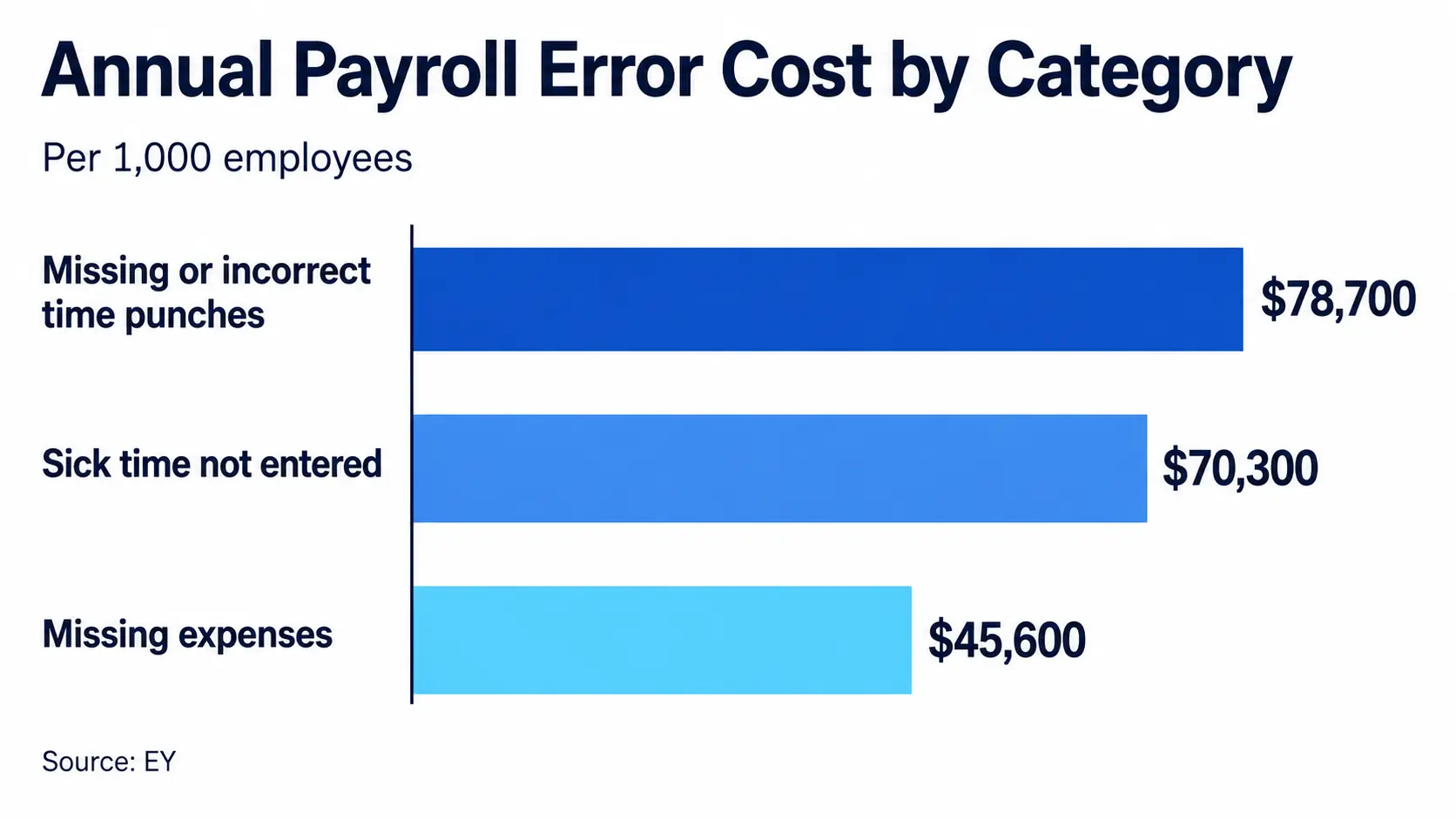
The most expensive category in payroll is not a payroll calculation problem. It is a data capture problem. Punches that nobody recorded, or that someone recorded wrong, and then rebuilt from memory days later.
The rest of the survey fills in the picture. Each individual error costs an average of $291 to resolve, $281 of it in direct costs. Correcting missing time punches alone consumes 26 minutes per employee per year. Payroll teams field an average of 30 employee questions per pay period. And the consequences extend past administration: 14% of surveyed companies faced payroll-related litigation, averaging $3,200 in direct costs, while 12% incurred regulatory fines averaging $5,200.
None of those costs appear on a payroll software invoice. They surface as overtime for the HR team, as goodwill spent on employees who were paid wrong, and occasionally as legal exposure.
Why Multi-Location Payroll Breaks First
A single-site employer can absorb a manual process, because one person usually knows where every number came from. Multi-location employers cannot, and the failure points are predictable.
Every site captures data slightly differently. One location’s supervisor rounds to the nearest quarter hour, another records exact times, a third submits at the end of the week from memory.
Upload timing varies. Payroll cannot begin reconciliation until the last location reports, so the close compresses into whatever time the slowest site leaves behind.
Shift differentials and local rules multiply. Night premiums, weekend rates, state-specific break and overtime rules, and union provisions all need to attach to the punch at the moment it happens. Applied retroactively during reconciliation, they become guesswork.
Nobody can see the whole picture mid-period. A regional manager cannot spot that one site is trending toward unplanned overtime, because that data will not exist in a usable form until after the pay period ends.
There is no audit trail across the chain. When an employee disputes a paycheck, reconstructing what happened means emailing a supervisor and hoping they remember.
Each of these compounds with every additional location. This is why the same manual process that felt merely annoying at three sites becomes untenable at thirty.
How Real-Time Reporting and In-House Data Capture Actually Work
Capture at the point of action. Employees record their own time, PTO requests, and shift changes where the work happens, on a device at the site, with identity verified at the moment of the punch. Nothing depends on a supervisor’s later recollection.
Validate before it enters the record. Rules apply at capture: geofence boundaries, scheduled shift windows, break requirements, and premium eligibility. An exception raises a flag while the employee still stands at the device, which is the only moment anyone can resolve it cheaply.
Sync directly to the system of record. Validated data flows into your HCM or payroll platform continuously rather than as a batch upload, so the pay period is always current.
Give managers live visibility. Supervisors and payroll see the same current data mid-period. Overtime trends, missing punches, and unapproved exceptions become visible while there is still time to act on them.
Keep the audit trail in-house. Every capture, edit, approval, and exception is time-stamped and attributable. When a dispute or an audit arrives, the answer is a report.
Let payroll close on schedule. With data validated on arrival, the close becomes a review rather than a reconstruction.
What to Look For When Evaluating Real-Time Payroll Reporting
Does it write into the system you already run? A reporting layer that requires a separate database recreates the external-upload problem under a new name. It should sync into your existing HCM or payroll platform, whichever one you use.
Does it validate at capture or only report afterward? Dashboards that visualize bad data faster are not an improvement. The value comes from rules applied at the moment of capture.
Can employees use it without training? Frontline workers will not adopt a system that requires a login they do not have and a manual they will not read. If adoption fails, you are back to paper.
Does it enforce your policies, including the local ones? State overtime rules, break requirements, union provisions, and site-specific differentials need to be configurable by you, not hard-coded by a vendor.
Is there a complete audit trail? If you cannot show who recorded what and when, you cannot defend a pay dispute or satisfy an auditor.
How long does deployment take across all sites? A rollout measured in quarters means you carry the current cost for another year.
How CloudApper hrPad Captures Payroll Data at the Source
CloudApper hrPad turns standard iOS, Android, or Windows tablets into employee self-service kiosks at each of your locations, and writes the resulting data straight into the system of record you already use, including UKG, Workday, Dayforce, Oracle, SAP SuccessFactors, Infor, isolved, Sage, Paylocity, Paycom, Paychex, and Paycor.
Employees check in with touchless Face ID, which verifies identity at the moment of the punch and removes buddy punching as a category of error. Geofencing confirms location. Custom policy enforcement applies your state, federal, and union rules at capture rather than during reconciliation. Beyond time capture, employees handle PTO requests, accrual balances, shift bids and swaps, schedule checks, and forms themselves, with a 24/7 AI assistant answering policy questions, which is what removes most of those 30 questions per pay period from your HR team’s queue.
Organizations using hrPad report missed punches falling from 25 to 30% weekly to under 5%. Set against EY’s $78,700 per 1,000 employees for punch errors, that is the largest single line item in payroll error cost, addressed at its origin. Deployment runs in hours across multiple sites on tablets you may already own, at up to 75% less hardware cost than dedicated kiosk terminals.
The Payroll Metrics Worth Tracking
Five numbers tell you whether your payroll data pipeline is working, and each should move within two pay cycles of fixing capture:
Payroll accuracy rate. The EY benchmark is 80.15%. Anything below that is below average for your size band.
Corrections per pay period. Count them by category, not in aggregate, so you can see whether punches, PTO, or premiums are the source.
Time to close. If the close depends on the slowest location reporting, this metric measures your data pipeline more than your payroll team.
Missed punch rate. The most expensive error category, and the easiest to measure.
Employee payroll questions per period. EY’s benchmark is 30. A number well above that usually means employees cannot see their own data.
Track missed punch rate first. It predicts most of the others.
Payroll Accuracy Is Decided Before Payroll Runs
The instinct when paychecks are wrong is to add scrutiny to payroll. The data argues for the opposite: strengthen the moment of capture, and payroll becomes a review instead of an investigation.
That shift also changes who carries the burden. Right now, the cost of a broken data chain falls on the HR generalist reconstructing punches, the supervisor answering questions about a paycheck they did not calculate, and the employee who was paid wrong and has to ask twice. Capturing data correctly the first time gives those hours back to all three.
CloudApper is the process layer that closes the gaps enterprise software cannot. Your HCM holds the payroll record. It was never built to stand at a job site and capture the moment work actually happened. The organizations that close that gap stop paying $78,700 per thousand employees for the privilege of guessing, and they do it in weeks, not quarters.
Frequently Asked Questions
What is real-time payroll reporting? Real-time payroll reporting captures time, attendance, and pay-affecting data at the moment it occurs and syncs it directly into your HCM or payroll system, instead of collecting it in spreadsheets and uploading it later. Payroll teams and managers see current data throughout the pay period, so discrepancies surface while there is still time to fix them.
Why do payroll errors happen even with good payroll software? Most payroll errors enter before payroll processing begins. EY found that missing or incorrect time punches cost $78,700 annually per 1,000 employees, making data capture, not calculation, the largest error category. Payroll software processes whatever data it receives, so accuracy depends on how the data arrived.
What does a single payroll error cost? EY’s 2022 survey puts the average at $291 per error, with $281 of that in direct costs. Correcting missing time punches alone consumes 26 minutes per employee per year. Beyond administration, 14% of surveyed companies faced payroll litigation averaging $3,200 and 12% paid regulatory fines averaging $5,200.
How does in-house data management improve payroll accuracy? Owning the data in your own systems lets you audit it, correct it at the source, and prove what happened. External uploads hand you whatever the file contained, with no record of what changed along the way. In-house capture also keeps a time-stamped audit trail for pay disputes and compliance reviews.
Why is payroll harder across multiple locations? Each site captures data differently, uploads on its own schedule, and applies local shift differentials and state rules inconsistently. Payroll cannot start reconciling until the last location reports, and nobody sees the full picture mid-period. Every additional site multiplies these gaps.
Does real-time payroll reporting work with our existing HCM? Yes. Workflow-level tools operate as a capture and reporting layer on top of your current system rather than replacing it. CloudApper hrPad, for example, syncs into UKG, Workday, Dayforce, Oracle, SAP SuccessFactors, and most major payroll platforms.
What payroll accuracy rate should we aim for? EY’s benchmark across companies with 250 to 10,000 employees is 80.15% accuracy, which means the average employer gets roughly one payroll run in five wrong somewhere. Treat that as the floor rather than the goal, and track corrections by category so you know which capture point to fix.
How long does it take to deploy real-time payroll data capture? Tablet-based capture deploys across multiple sites in hours using standard iOS, Android, or Windows devices, because it does not require dedicated hardware or a change to your payroll platform. Full rollout timing depends on how many locations and policy rules you configure.

What is CloudApper AI Platform?
CloudApper AI is an advanced platform that enables organizations to integrate AI into their existing enterprise systems effortlessly, without the need for technical expertise, costly development, or upgrading the underlying infrastructure. By transforming legacy systems into AI-capable solutions, CloudApper allows companies to harness the power of Generative AI quickly and efficiently. This approach has been successfully implemented with leading systems like UKG, Workday, Oracle, Paradox, Amazon AWS Bedrock and can be applied across various industries, helping businesses enhance productivity, automate processes, and gain deeper insights without the usual complexities. With CloudApper AI, you can start experiencing the transformative benefits of AI today. Learn More
- Useful Links:
- Agentic AI
- No-Code/Low-Code
- Custom Software
- HCM Personalization
- iPaaS
- FedRAMP

Brochure
CloudApper hrPad
Empower Frontline Employees with an AI-Powered Tablet/iPad Solution
Download Brochure
CloudApper AI Solutions for HR



- Works with








- and more.
Similar Posts

Payroll Questions From Employees: Six Causes and Fixes

Stop Piece-Rate Pay Disputes on Payday: Let Workers Confirm Daily…