Workday handles pay groups, compensation steps, and condition-based routing for union workforces — but collective bargaining agreements often require enforcement logic that goes beyond native configuration. This guide covers what Workday does well, where it runs out, and how to enforce CBA rules without modifying the core system.

TL;DR
Workday supports foundational union configuration — pay groups, compensation steps, benefit eligibility, and condition-based business process routing — but falls short when collective bargaining agreements require contract-specific overtime pyramiding, seniority-based workflow enforcement, multi-tier shift differential logic, or grievance tracking linked to individual transactions. This guide explains what can be configured natively, where native tools run out, and how CloudApper WorkBridge enforces CBA rules on top of Workday without modifying the core system or opening a Workday Extend project.
Table of Contents
- What Workday Does Natively for Union Employees
- Where Union Configuration Gets Complicated
- What to Configure in Workday First
- Where Workday’s Native Configuration Runs Out
- How CloudApper AI for HCM Extensibility & Personalization Handles What Workday Can’t
- Frequently Asked Questions
- Getting CBA Configuration Right Before It Becomes a Grievance
A collective bargaining agreement is where Workday configuration meets its hardest test. Workday tracks union membership and supports dues deductions natively, but union work rules in Workday get difficult at the contract details: overtime pyramiding, seniority-based scheduling, shift differentials and dues that vary by classification. The distance between what a CBA requires and what any HCM configures out of the box is wider than most admins expect.
Organizations that extend Workday with CloudApper’s HCM extensibility and personalization layer enforce CBA logic alongside the core tenant without opening a Workday Extend project.
What Workday Does Natively for Union Employees
Workday does handle a meaningful portion of union workforce management without customization. Pay groups can be segmented by bargaining unit, which lets you apply different payroll processing cycles, pay frequencies, or pay run rules to union and non-union populations independently. Compensation grades and grade profiles support the step-based pay structures common in most union contracts, where employees advance through defined pay steps based on tenure or performance milestones negotiated at the table.
Eligibility rules on benefit plans can key off union membership fields, meaning you can restrict or expose certain benefit options to union-represented employees without manually managing enrollment eligibility. Pay components in Workday Time Tracking can capture shift differentials — a second-shift premium or a weekend premium, for example — as long as the logic is relatively simple: a flat rate or a fixed percentage applied to qualifying hours.

Business process condition rules can be configured to route certain transactions through additional steps when a worker is in a union-represented supervisory organization. A job change for a union employee can trigger a review step that a non-union change skips entirely. For a walkthrough of how these approval routing conditions work, this guide on Workday business process approvals covers the condition rule setup in detail.
Finally, Workday’s custom object framework and calculated fields give admins some flexibility to store union-specific data points — bargaining unit code, grievance count, contract expiration date — directly on the worker record, without needing a separate system of record for basic labor relations data.
Where Union Configuration Gets Complicated
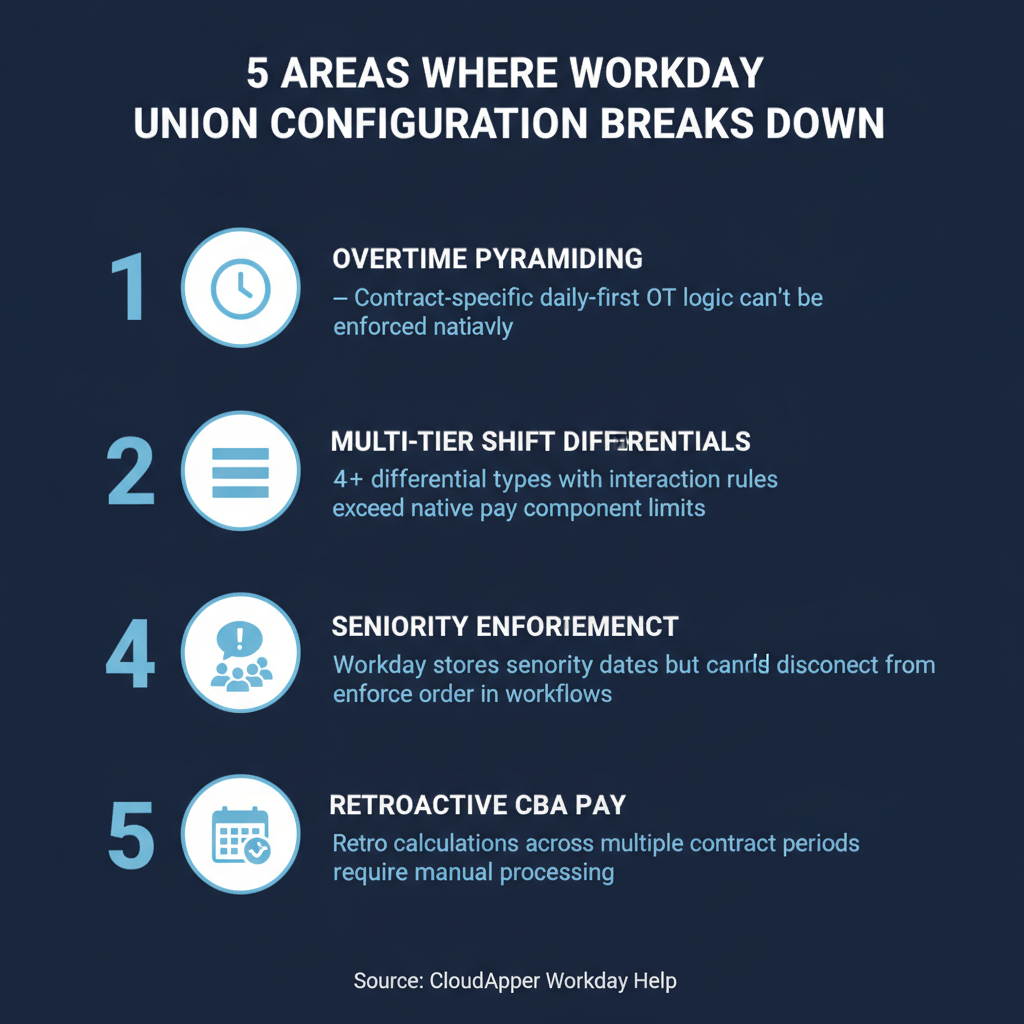
The friction starts when a CBA introduces logic that cannot be expressed cleanly in Workday’s native rule framework.
Overtime pyramiding. Many manufacturing and healthcare CBAs require that daily overtime be calculated first, and that those premium hours not be counted again toward weekly overtime. Workday’s time calculation framework handles FLSA overtime well, but contract-specific pyramiding logic — where the order of calculation is explicitly negotiated — often cannot be enforced natively without workarounds that create audit risk. As you review multi-state payroll tax compliance in Workday, keep in mind that unionized workers in multiple states often have CBA overtime rules that stack on top of state law requirements, compounding the configuration challenge.
Multi-tier shift differentials. A single CBA may define four or five separate shift types, each with its own premium, with additional premiums for holiday shifts, weekend shifts, or call-back situations — and rules about how premiums interact (e.g., a call-back premium is paid instead of, not in addition to, a weekend premium). Workday can handle two or three clean differential types before the pay component configuration becomes fragile and hard to audit.
Seniority-based rules. Seniority governs a lot more than promotion in a union environment. Shift bidding, vacation scheduling priority, layoff sequencing, and recall rights often all flow from a seniority calculation that Workday does not maintain natively. Organizations typically track seniority in a custom field, but enforcing seniority-based workflows — automatically surfacing a senior employee’s preference before a junior one, for example — requires logic that native business processes cannot execute without manual intervention.
Grievance and arbitration tracking. Workday has no native grievance module. HR teams managing active grievances typically track them in a spreadsheet or a bolt-on system. This creates a data gap that surfaces acutely during audits, particularly when an auditor wants to correlate a grievance with the specific transaction or business process decision that triggered it. For organizations already thinking through their Workday audit preparation strategy, the absence of native grievance data is a common finding.
Retroactive pay from contract renegotiations. When a CBA is ratified with a retroactive effective date — common in negotiations that run past the contract expiration — calculating and loading the retro pay correctly for dozens of pay components across multiple periods is largely a manual exercise. Workday has a retro pay framework, but applying it accurately to union-specific pay components requires careful setup and testing that most implementation teams underestimate.
Union dues and COPE deductions. Dues structures vary by classification, earnings tier, and local. Employees may owe initiation fees in their first months. COPE (political action fund) contributions are voluntary and must be tracked separately. Workday can handle deduction setup, but maintaining accurate deduction amounts as dues schedules change — especially after a ratification — requires a disciplined EIB and integration process. Organizations connecting Workday to a third-party payroll system should review how payroll system connections work before assuming union deduction data flows correctly downstream.
What to Configure in Workday First
Before looking at extension options, there is a baseline configuration that every organization with a union workforce should have in place in Workday.
Segment your supervisory organization structure so that union-represented workers sit in clearly defined organizations separate from non-union populations. This is the anchor for every condition rule, every eligibility rule, and every reporting filter you will build later. If union and non-union workers are mixed in the same supervisory orgs, untangling them after the fact is painful.
Build your bargaining unit as a custom organization type or as a coded field on the worker record. This lets you filter reports, segment benefit eligibility, and drive business process routing off a reliable data point rather than trying to infer union status from job profile or location — both of which can produce false positives.
Configure pay components for each differential type defined in the contract, even if you are not ready to automate the calculation. Having the correct pay component structure in place means your time and payroll data is reportable by differential type from the start, which matters when the union requests an accounting of premium pay at the end of a quarter.
Map the CBA’s approval requirements to Workday business process steps. For each transaction type covered in the contract — job change, demotion, involuntary transfer, schedule change — document which party must approve and in what sequence. Then configure condition rules so that transactions involving union workers route to those approvers. For organizations managing workers across multiple sites under different local agreements, the guide on multi-location Workday configurations covers how to structure routing without creating maintenance overhead.
Finally, establish the custom fields you need to store CBA-specific data: bargaining unit code, contract expiration date, seniority date (which may differ from hire date), and grievance count. These fields are low-effort to add and high-value when an HR ops leader needs to answer a labor relations question quickly. For a step-by-step walkthrough of adding custom fields without modifying the core system, this article covers the process in detail.
Where Workday’s Native Configuration Runs Out
The native configuration above handles the structural work. The problems that require extension are the ones involving conditional logic that changes based on worker-specific variables — seniority, classification tier, local agreement, concurrent premium eligibility — in combinations that Workday’s condition rule framework cannot evaluate at runtime.
When overtime pyramiding logic is contract-specific and not statutory, Workday cannot enforce it. When shift bidding must respect seniority order, Workday has no mechanism to present and enforce that order automatically. When a grievance step must appear in a business process before a manager can finalize a schedule change, native business processes cannot surface that step conditionally based on whether an open grievance exists for that worker.
These are not Workday deficiencies — they are the natural boundary of a configurable HCM platform. The question is how to enforce the rules that sit outside that boundary without either building a full Workday Extend project or maintaining a parallel spreadsheet process that creates audit risk.
How CloudApper AI for HCM Extensibility & Personalization Handles What Workday Can’t
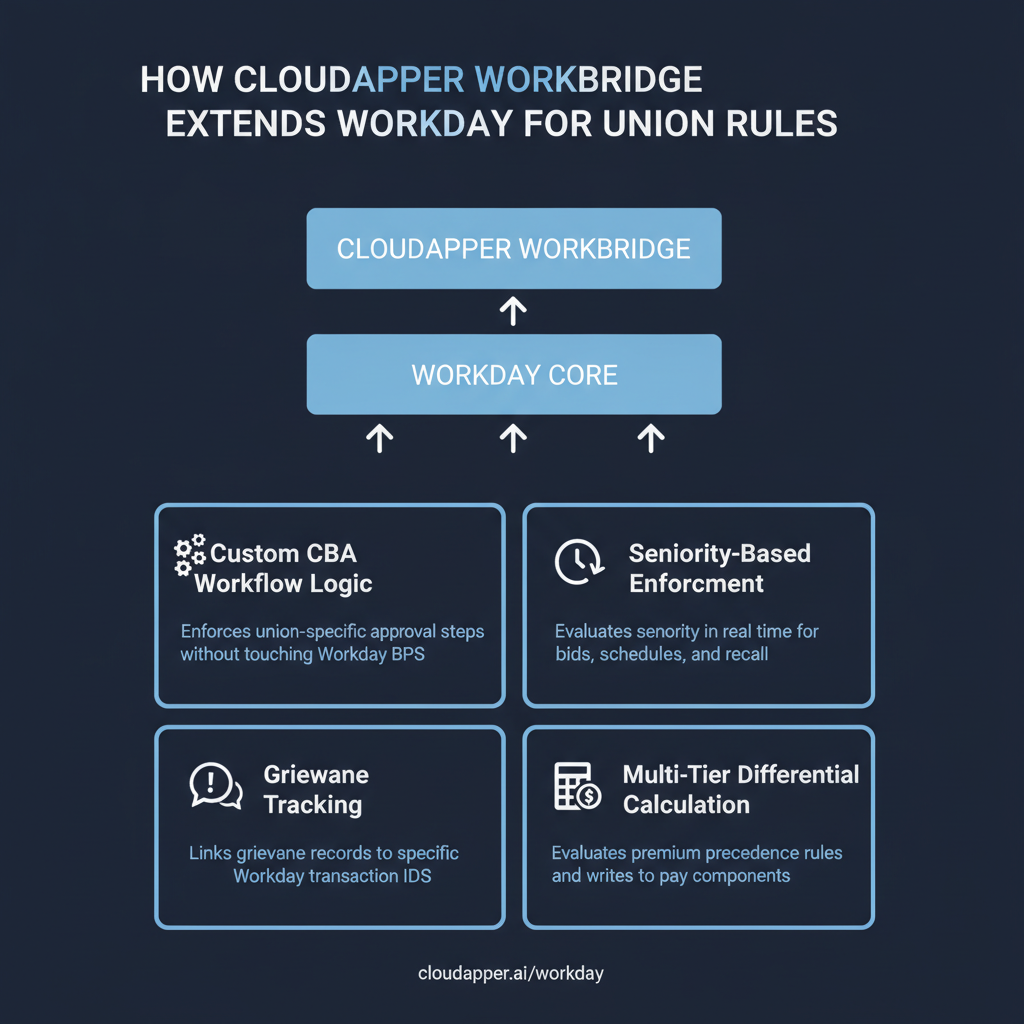
CloudApper AI sits on top of Workday as an extension and personalization layer — it reads from and writes to Workday without modifying the core system, and without requiring a Workday Extend project. For unionized organizations, CloudApper AI addresses the configuration gaps through several capabilities that are not available natively.
Custom workflow logic on union transactions. CloudApper AI can enforce CBA-specific approval sequences on top of Workday’s standard business processes. A schedule change for a union employee can trigger a CloudApper AI workflow that checks for open grievances, validates that the proposed schedule respects seniority order, and routes to the union steward for acknowledgment — all before the transaction completes in Workday. None of this requires touching the Workday business process definition itself.
Seniority enforcement. CloudApper AI can maintain seniority data and evaluate it in real time when a shift bid, vacation preference window, or recall event is triggered. The logic runs in CloudApper AI, and the outcome is written back to Workday — keeping the system of record clean while enforcing the contract requirement.
Grievance tracking linked to Workday transactions. CloudApper AI can create a grievance record that is tied to the specific Workday transaction ID that triggered it. This means when a grievance is filed over a specific scheduling decision, the supporting data — the transaction, the approver, the timestamp, the worker’s seniority at the time — is retrievable from CloudApper AI without reconstructing it from audit logs. This is the same principle that applies to Workday audit readiness: the data needs to be structured and linked before an audit, not assembled after the request arrives.
Multi-tier differential calculation. CloudApper AI can evaluate multiple premium eligibility conditions simultaneously and calculate the correct premium based on the contract’s precedence rules. The result feeds into Workday’s pay components as a calculated value rather than requiring a manual entry or a complex calculated field that breaks when the contract changes.
No-code configuration for contract changes. When a CBA is renegotiated, the rules change. CloudApper AI’s no-code environment means that updating the logic for a new shift differential structure or a revised grievance workflow does not require a development project or a Workday release cycle. HR ops or a Workday admin with CloudApper AI access can update the rule and test it without involving IT.
Frequently Asked Questions
Q: Can Workday store which bargaining unit an employee belongs to?
Yes. Bargaining unit can be tracked as a custom organization, a custom object, or a coded field on the worker record. The method you choose affects how you report on it and how you drive eligibility and routing logic. Most organizations use a custom organization type for bargaining unit because it integrates cleanly with Workday’s existing security and supervisory org framework.
Q: How do you handle shift differentials in Workday for union employees?
Workday supports shift differentials through pay components in Time Tracking. You configure a pay component for each differential type (second shift, third shift, weekend, call-back) and define the earning rules — flat rate or percentage — that trigger the component. For simple two- or three-tier structures, native configuration works. For contracts with five or more differential types and interaction rules between them, an extension layer like HCM Extensibility and Personalization is typically needed to manage the calculation logic reliably.
Q: Does Workday have a grievance tracking module?
No. Workday does not have a native grievance management module. Most organizations track grievances in a spreadsheet or a separate HRMS. The risk is that grievance records become disconnected from the Workday transactions that triggered them, creating documentation gaps that surface during audits or arbitration. CloudApper AI can serve as a grievance tracking layer that links records directly to Workday transaction IDs.
Q: Can Workday business processes enforce union-specific approval steps?
Yes, within limits. Condition rules in Workday business processes can route transactions through additional steps when a worker is in a union-represented org. Where native processes fall short is in conditional logic that depends on runtime data — checking whether an open grievance exists, or whether seniority order has been respected — because condition rules evaluate static fields, not live transactional state.
Q: How should retroactive pay from a CBA ratification be handled in Workday?
Workday has a retro pay framework, but applying it accurately to union pay components requires careful configuration of the retro pay eligibility rules and thorough testing. Most teams load retro pay through an EIB or a manual pay input after calculating the amounts in a spreadsheet. If the retro period spans multiple contract periods with different rates, the calculation complexity increases significantly and typically requires a dedicated project with payroll involved from the start.
Q: Can Workday enforce seniority-based rules automatically?
Not natively. Workday can store seniority dates and display them on the worker profile, but it cannot enforce seniority order in workflows — for example, presenting shift bid options in seniority sequence or preventing a junior employee from being assigned a shift before a senior employee has had the opportunity to claim it. That enforcement requires custom logic outside the native business process framework.
Q: What is the best way to track union dues deductions in Workday?
Set up a recurring deduction per bargaining unit with the correct dues amount, frequency, and arrears rules. Separate COPE contributions should be tracked as a distinct voluntary deduction with appropriate employee consent documentation. When dues schedules change, update the deduction plan — do not edit active deductions on individual records manually, as that approach creates inconsistency at scale and breaks downstream payroll reporting.
Getting CBA Configuration Right Before It Becomes a Grievance
Union workforce management in Workday is not impossible. The native platform handles the structural work — pay groups, compensation steps, differential pay components, condition-based routing — well enough for organizations with relatively straightforward CBAs. Where it consistently falls short is in enforcing the conditional, worker-specific logic that complex labor agreements require. If you are managing a workforce where the contract governs seniority bidding, multi-tier differentials, or grievance workflow requirements, the gap between what Workday does natively and what your contract requires is worth addressing before the first arbitration — not after. CloudApper AI for HCM Extensibility & Personalization is built specifically for that gap: enforcing CBA logic on top of Workday without modifying the core system or waiting for a Workday Extend project to complete.
If you are working through a CBA ratification or a contract renegotiation and want to understand what a CloudApper AI configuration would look like for your specific agreement, contact the CloudApper team at cloudapper.ai/contact-us.

What is CloudApper AI Platform?
CloudApper AI is an advanced platform that enables organizations to integrate AI into their existing enterprise systems effortlessly, without the need for technical expertise, costly development, or upgrading the underlying infrastructure. By transforming legacy systems into AI-capable solutions, CloudApper allows companies to harness the power of Generative AI quickly and efficiently. This approach has been successfully implemented with leading systems like UKG, Workday, Oracle, Paradox, Amazon AWS Bedrock and can be applied across various industries, helping businesses enhance productivity, automate processes, and gain deeper insights without the usual complexities. With CloudApper AI, you can start experiencing the transformative benefits of AI today. Learn More
- Useful Links:
- Agentic AI
- No-Code/Low-Code
- Custom Software
- HCM Personalization
- iPaaS
- FedRAMP

Brochure
CloudApper AI TimeClock
For accurate & touchless time capture experience.
Download Brochure
CloudApper AI Solutions for Workday



- Works with








- and more.
Similar Posts

Workday Display Language for Frontline Workers: What Gets Translated and…

Workday Payroll Without Workday Time Tracking: How to Get Hourly…