Choosing between Workday position management and job management is one of the most consequential configuration decisions an organization makes. This guide explains both models, where each breaks down, and how to evaluate which fits your workforce structure and Finance requirements.

TL;DR
Choosing between Workday position management and job management is a foundational configuration decision that affects how Finance controls headcount, how HR manages hiring, and how reliably workforce data can be reported. Position management enforces system-level headcount gates by requiring a pre-approved position before any hire can proceed — ideal for stable, structured workforces where Finance needs real-time visibility into open and filled seats. Job management removes the position layer entirely, offering faster hiring with lower administrative overhead, making it the right default for high-turnover hourly populations in manufacturing, retail, or logistics. Most mid-to-large enterprises run a hybrid of both models, and switching from one to the other after go-live is a near-reimplementation in cost and effort. Where native Workday configuration leaves gaps — complex approval chains, position restriction governance, org-specific headcount rules — CloudApper AI for HCM Extensibility & Personalization adds a configurable logic layer that enforces the business rules Workday alone cannot.
Table of Contents
- What Workday Does Natively: Two Models, Two Philosophies
- Where the Friction Shows Up
- How to Evaluate the Right Model for Your Organization
- Where Native Configuration Runs Out
You are three months into your Workday implementation when someone from Finance asks a simple question: “Can we see every open headcount slot against budget in real time?” The honest answer is: it depends entirely on which staffing model you chose at the start of the project. If your team selected job management for its speed and simplicity, that report does not exist the way Finance expects it to. If you are reconsidering that decision now, you are not alone. The choice between Workday’s two primary staffing models — position management and job management — is one of the most consequential configuration decisions an organization makes, and it is rarely explained in terms that help HR ops leaders and system admins understand what they are actually committing to. Organizations running complex workforce structures, union rules, or org-specific approval requirements often find, like those using CloudApper AI, that native Workday configuration is only the starting point for getting headcount workflows to behave the way the business needs them to.
What Workday Does Natively: Two Models, Two Philosophies
Workday’s staffing model is set at the supervisory organization level and governs how workers are hired, tracked, and managed across the system. There are two primary options: position management and job management. A third option, headcount management, exists but is rarely used at enterprise scale.
Position management requires a position to exist before a hire can be made. Each position is a defined container — it carries attributes like job profile, location, time type, scheduled weekly hours, and any restrictions that limit what kind of worker can fill it. Positions are tracked as open, filled, or frozen. Finance can count them, budget against them, and see in real time what is unfilled. Headcount reporting in position management reflects the org chart as designed, not just as staffed.

Job management removes the position layer entirely. Workers are hired directly into a supervisory organization using a job profile. There is no pre-defined container, no seat that needs to exist before a requisition can be opened. Hiring speed increases significantly, and the administrative overhead of creating and maintaining positions disappears. The tradeoff is that headcount control becomes a reporting exercise rather than a system-enforced gate.
Workday supports using both models in the same tenant — different supervisory organizations can run on different models. This hybrid approach is more common than most implementations acknowledge, and it is worth understanding before assuming the decision is all-or-nothing.
Where the Friction Shows Up
The model you choose produces very different operational problems once you are live.
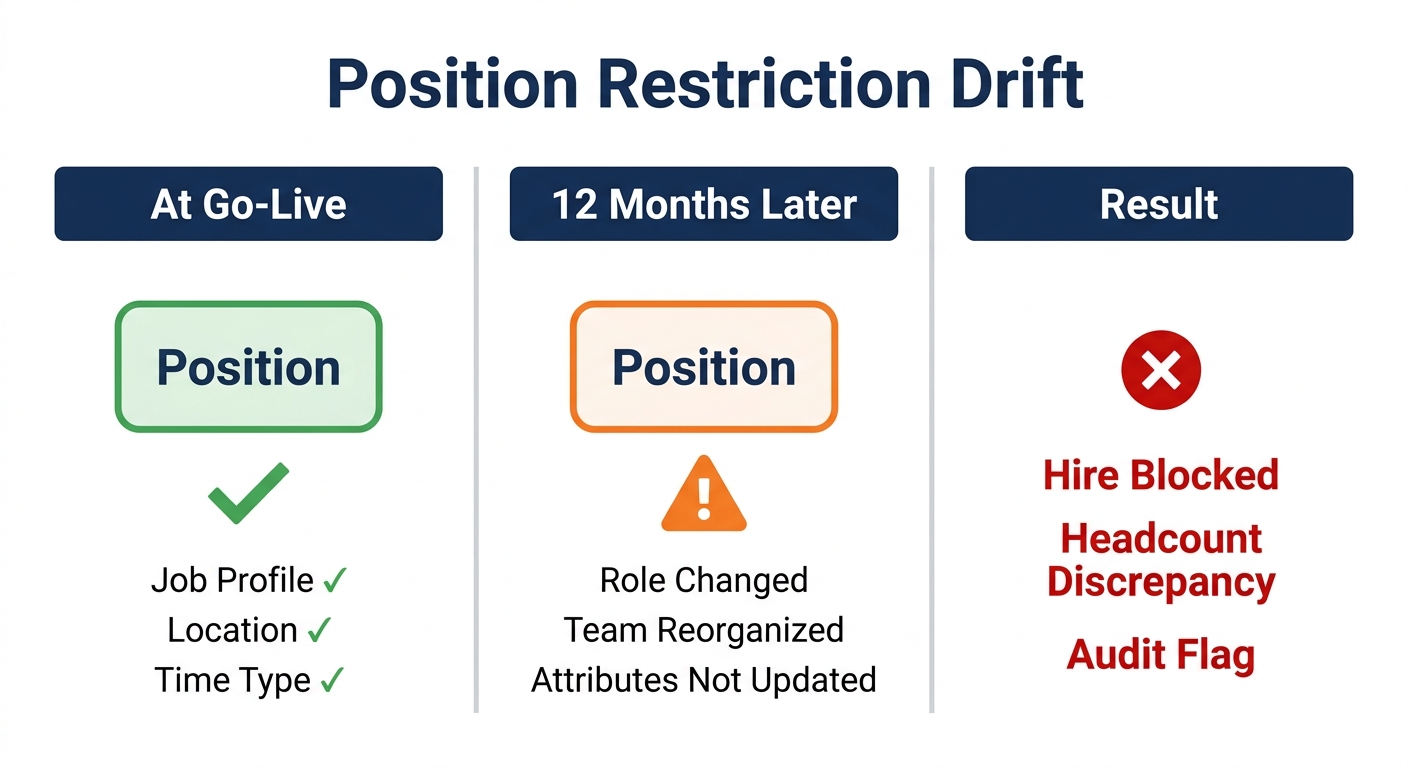
Under position management, the most persistent problem is position restriction drift. Restrictions — the attributes that define who can be hired into a given position — are set at configuration and then tend to age poorly. When a role evolves, when a team reorganizes, or when a position is transferred between supervisory orgs, those attributes often do not get updated. Over time, you accumulate positions whose restrictions no longer reflect the business rules Finance and HR agreed to. The symptoms are familiar: hiring is blocked for no apparent reason, headcount reports show discrepancies that no one can explain, or positions show as open in Workday while the org chart shows them as filled. This drift problem is documented consistently across large Workday environments — it is not a configuration error you make once and correct, but an ongoing governance requirement that most teams are not staffed to manage continuously.
Under job management, the problem is the opposite. Because there is no position gate, hiring decisions are controlled by process and people rather than by the system. If a manager creates a requisition outside an approved headcount plan, Workday has no built-in mechanism to stop it. The requisition routes through the approval workflow you have configured, but the system itself does not validate whether a position was approved in the annual plan. Finance ends up reconciling actuals against plan in a spreadsheet rather than in Workday, which defeats a significant part of the system’s value.
There is also a switching cost that organizations consistently underestimate. Converting from job management to position management mid-lifecycle requires creating individual positions for every current worker, reconfiguring security, rewriting business process definitions, and retraining managers and HR staff. According to practitioners who have been through it, the technical migration takes weeks; the process redesign and trust rebuilding take a year or more. This is not a decision to revisit lightly after go-live.
A third friction point affects hybrid environments: maintaining consistency across supervisory orgs running different models is operationally difficult. Reporting that crosses org boundaries can produce misleading headcount numbers when position-managed and job-managed orgs are aggregated without careful configuration. Auditors reviewing workforce data often flag these inconsistencies when they cannot reconcile headcount reports against payroll actuals.
How to Evaluate the Right Model for Your Organization
The decision comes down to two variables: how much headcount control the organization actually needs, and what workforce profile you are managing.
Position management is the right choice when Finance requires system-enforced headcount gates — when no hire should be able to proceed without a pre-approved, budgeted position. It is also the right model when the workforce is stable, roles are well-defined, and the operational overhead of maintaining positions is acceptable. Healthcare, higher education, and government organizations typically run position management because their funding models and regulatory requirements demand that level of control. Organizations subject to union contracts often find that position management aligns more naturally with the position-specific language in collective bargaining agreements, where a worker’s rights and pay may be attached to a defined position rather than a job profile.
Job management is the right choice when the workforce includes a significant volume of high-turnover, pooled, or contingent roles — manufacturing floor workers, retail associates, warehouse staff, seasonal hires. Creating and maintaining individual positions for every seat in a 5,000-person warehouse operation is an administrative burden that produces very little headcount visibility in practice, because the positions turn over faster than they can be kept current. For those worker populations, job management reduces friction in recruiting and onboarding without meaningfully sacrificing control, because the supervisory org-level headcount limits still exist as a guardrail.
Many mid-to-large enterprises run a hybrid: position management for salaried, professional, and leadership roles where headcount control matters; job management for high-volume hourly populations where speed matters. This requires deliberate org structure design from the start and consistent governance across teams to prevent reporting inconsistencies.
Before making the final call, work through four questions with Finance, HR, and your Workday implementation partner. First: does Finance need Workday to enforce headcount limits, or is a report sufficient? Second: what percentage of your workforce turns over annually in high-volume roles? Third: do you have the administrative capacity to create and maintain positions as the org evolves? Fourth: are there compliance, union, or audit requirements that dictate position-level tracking?
These questions should produce a clear answer in most cases. Where they do not — where the organization has both a stable salaried workforce and a large hourly population — the hybrid model is probably the right default, and the implementation should be designed with that in mind from the beginning. Organizations conducting a Workday ROI review often find that the staffing model decision is a root cause when headcount data is unreliable or when Finance is working off of spreadsheets instead of Workday reports.
Where Native Configuration Runs Out
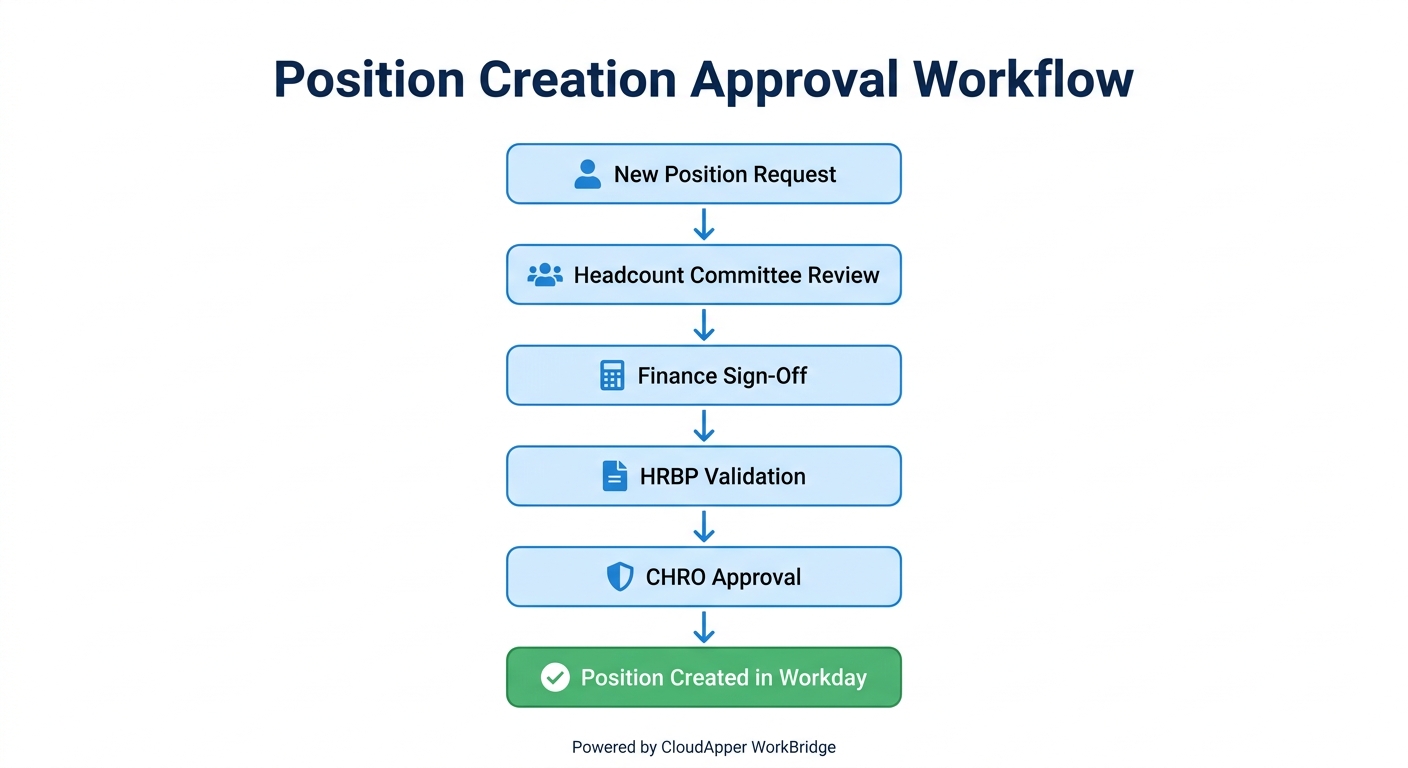
Even with the right model in place, there are workflow scenarios that native Workday configuration handles poorly. Position management enforces the existence of a position, but it does not enforce the business logic that should govern when a position can be created. If your approval process for creating a new position involves a multi-step sign-off — headcount committee, Finance, HRBP, CHRO — that sequence needs to be configured in Workday’s business process framework. The default position creation process is relatively flat, and organizations with complex approval chains routinely find it is not surfacing the right approvers or enforcing the right conditions.
Similarly, organizations with org-specific rules — different headcount thresholds by business unit, different approval chains for backfills versus new headcount, or position restrictions that need to reflect multi-state pay rules — find that Workday’s native configuration gives them the structure but not the specificity. When position attributes intersect with multi-state compensation rules, the number of variables involved can exceed what the standard position restriction framework handles cleanly.
Position restriction drift — the governance problem described earlier — is not solved by native Workday tooling. The system does not automatically flag when a position’s restrictions no longer match its actual usage pattern. Keeping restriction data current requires a manual audit process run on a defined schedule, typically quarterly, against a documented standard. Most HR ops teams do not have a structured process for this, and the gap compounds over time.
The delegation and proxy access issues that appear in complex approval chains often trace back to position management configuration — specifically, approval routing that was designed for a smaller organization and was not updated as the business scaled. When a position creation request needs sign-off from a role that has been delegated five levels up, and that delegation chain is not current, the request stalls silently.
How CloudApper CloudApper AI Addresses These Gaps
CloudApper AI is built for organizations that need more from Workday’s staffing framework than native configuration delivers. It adds a configurable logic layer on top of Workday HCM that allows HR ops teams to define and enforce org-specific rules — without custom development and without waiting for a Workday update cycle.
For organizations running position management, CloudApper AI addresses the three operational gaps that surface most consistently. First, it allows teams to configure multi-step position creation workflows that reflect actual business rules: headcount committee approval, Finance sign-off, HRBP validation, each sequenced and routed correctly based on org unit, position type, or employee classification. These workflows exist on top of Workday’s native business process framework, extending it without replacing it.
Second, CloudApper AI supports custom field logic at the position level. Organizations with org-specific requirements — positions that need to track additional metadata not available in standard Workday fields, or positions that should surface different approval chains based on their attributes — can configure those rules in CloudApper AI without a Workday Studio integration or a custom report.
Third, for organizations struggling with position restriction drift, CloudApper AI provides a governance workflow that surfaces positions whose restriction data has not been reviewed within a defined period, routes them to the appropriate owner for validation, and logs the review in a format that can be produced for internal audit. This is the kind of maintenance scaffolding that native Workday does not provide and that most HR ops teams need to run position management reliably at scale.
For organizations on job management that need to add headcount gates without converting to full position management, CloudApper AI can implement a pre-requisition approval step that validates headcount against an approved plan before a requisition is opened — providing Finance the control they need without requiring the organization to absorb the cost and disruption of a staffing model migration.
If your organization is finding that your staffing model is producing data your business can no longer rely on, or that your headcount workflows do not enforce what they are supposed to enforce, contact CloudApper at cloudapper.ai/contact-us to see how CloudApper AI addresses these gaps in your specific configuration.
Frequently Asked Questions
Q: Can you switch from job management to position management in Workday after go-live?
Yes, but it is a significant undertaking. Converting requires creating individual positions for every current worker, reconfiguring security policies, rewriting business process definitions, and retraining managers and HR staff. Practitioners who have completed this migration describe the technical work as taking weeks and the organizational change management as taking a year or more. It is not impossible, but it should be treated as a near-reimplementation, not a configuration change.
Q: What is the difference between position management and headcount management in Workday?
Position management tracks individual, named positions — each position has defined attributes and can only be filled by one worker at a time. Headcount management tracks a slot count at the supervisory org level without defining individual positions. Headcount management offers some of job management’s simplicity while adding a numerical headcount limit. It is rarely used at enterprise scale because it lacks the position-level visibility Finance teams typically require.
Q: Can a Workday tenant run both position management and job management at the same time?
Yes. Workday sets the staffing model at the supervisory organization level, so different parts of the org can run on different models within the same tenant. A common approach is position management for salaried and leadership roles, job management for high-volume hourly populations. Managing a hybrid environment requires careful report design to avoid misleading headcount aggregations across org boundaries.
Q: What causes position restriction drift in Workday and how do you fix it?
Position restriction drift happens when a position’s configuration attributes — job profile, time type, location, hiring restrictions — are set at implementation and then not updated as the organization evolves. The fix requires a periodic restriction audit: documenting the expected state of restrictions for each position type, running standard Workday headcount and position reports, and reconciling mismatches. Most HR ops teams do not have a structured process for this, which is why restrictions drift. A quarterly review cycle with a defined owner is the minimum governance requirement.
Q: Does Workday position management require a position to be approved before a requisition is opened?
Yes. Under position management, a requisition can only be created against an existing, open position. If the position does not exist or is frozen, the requisition cannot proceed. This is the system-level headcount gate Finance teams typically want. However, the process for creating and approving a new position — including how many approval steps it requires and who those approvers are — is configured in Workday’s business process framework and may need customization to reflect actual organizational rules.
Q: Is job management a valid long-term model for large enterprises, or should organizations eventually migrate to position management?
Job management is a valid long-term model for organizations with large hourly, contingent, or high-turnover worker populations where the overhead of maintaining individual positions exceeds the control benefit. Many large enterprises run job management successfully for portions of their workforce. The decision should be driven by workforce profile and Finance’s actual headcount control requirements, not by a general assumption that position management is more mature. The cost of migrating incorrectly is high enough that the right model at go-live is always preferable to a post-go-live conversion.
Q: How do union work rules interact with the staffing model decision in Workday?
Union contracts often attach rights, pay, and seniority to specific positions rather than job profiles, which makes position management a more natural fit for unionized workforces. Under job management, there is no position-level container to attach contract-specific rules to. Organizations with mixed populations — unionized production workers and non-union salaried staff — frequently run position management for covered positions and job management for non-covered roles.
If your organization is working through a staffing model decision, dealing with position restriction drift, or trying to add headcount controls that native Workday does not enforce, CloudApper can help. Contact the team at cloudapper.ai/contact-us to discuss your configuration and what CloudApper AI can do for your specific environment.

What is CloudApper AI Platform?
CloudApper AI is an advanced platform that enables organizations to integrate AI into their existing enterprise systems effortlessly, without the need for technical expertise, costly development, or upgrading the underlying infrastructure. By transforming legacy systems into AI-capable solutions, CloudApper allows companies to harness the power of Generative AI quickly and efficiently. This approach has been successfully implemented with leading systems like UKG, Workday, Oracle, Paradox, Amazon AWS Bedrock and can be applied across various industries, helping businesses enhance productivity, automate processes, and gain deeper insights without the usual complexities. With CloudApper AI, you can start experiencing the transformative benefits of AI today. Learn More
- Useful Links:
- Agentic AI
- No-Code/Low-Code
- Custom Software
- HCM Personalization
- iPaaS
- FedRAMP

Brochure
CloudApper AI TimeClock
For accurate & touchless time capture experience.
Download Brochure
CloudApper AI Solutions for Workday



- Works with








- and more.
Similar Posts

Workday W-4 Updates for Hourly Workers: Exempt Renewals, Overtime Deductions,…

Workday Access for Former Employees: How to Deliver W-2s and…