Workday Recruiting can order a background check, store the vendor status, and gate the hire, but it does not chase stalled candidates, coordinate multiple screening vendors, schedule recurring re-screens, or hold the consent and adjudication evidence an auditor asks for. Here is what to configure natively and where the gaps remain.

TL;DR
Workday Recruiting has a real Background Check business process: it can order a check from a stage, a standalone event, or the Hire process, map vendor packages and statuses, and connect through certified partner integrations, Core Connectors, or the Get_Background_Check and Put_Background_Check web services. What it does not do is track how long a candidate has been stuck, chase a stalled consent form, coordinate more than one screening vendor on a single requisition, or schedule recurring re-screens against an existing worker population. It also stores the status without storing the FCRA disclosure, the authorization, or the adjudication rationale, which turns every audit evidence request into a two-system reconciliation. Configure packages one-to-one, mirror vendor statuses exactly, hard-gate the step before Hire, and build a days-in-stage report before considering anything external. Where those gaps remain structural, CloudApper iPaaS orchestrates the vendor connections, SLA escalation, and recurring re-screens while Workday stays the system of record.
Table of Contents
- What Workday Does Natively
- Where the Friction Shows Up
- What to Do Within Workday First
- Where Native Tools Run Out
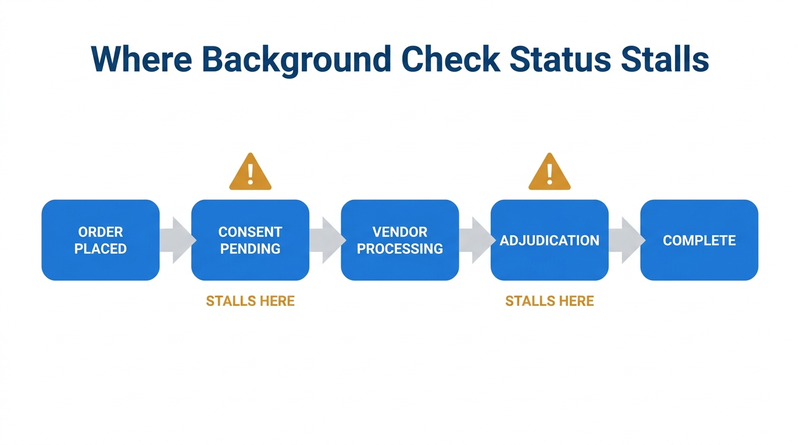
Workday stores the last status your screening vendor sent. It does not store when that status arrived, or how long it has been sitting there. A candidate whose consent email went to spam and a candidate waiting on a backlogged county court look identical in the tenant. Both read In Progress.
That is the whole problem, and it is why background check coordination ends up living in a spreadsheet, a recruiter’s memory, or a standing Thursday meeting. Nothing in Workday is broken here. The object models the outcome of a check accurately. It was just never built to tell you that nothing has happened for six days.
Workday Recruiting handles more of this than most of the people complaining about it realize, and a fair share of the pain is configuration nobody got around to doing. What remains after that work is narrower and more specific than the usual complaint, and it is where an extension layer like CloudApper earns its place alongside the tenant rather than inside it.
What Workday Does Natively
Workday’s Background Check business process is real functionality, and it is more capable than the recruiters using it usually realize.
You can trigger it three ways: as a stage within Recruiting on a job requisition, as a standalone event against a candidate or worker, or as a step inside the Hire business process. Most organizations use the Recruiting stage trigger, which means moving a candidate into the Background Check stage fires the outbound integration.

Inside the tenant you configure background check packages, named bundles that map to the packages your vendor sells: county criminal seven-year, motor vehicle record, employment verification, education verification, and so on. You also configure statuses through the Maintain Background Check Statuses task, where custom vendor status values get mapped onto Workday’s delivered set. That mapping is what lets a vendor status like “Client Review Required” or “Meets Company Standards” resolve into something Workday’s business process can act on.
For the connection itself, Workday gives you three paths. Certified partner integrations exist for the major screening providers, including Accurate Background, HireRight, Sterling, and First Advantage, each of which maintains a Workday-certified connector. Core Connectors handle outbound and inbound flows for vendors without a certified build. And the Recruiting web services expose Get_Background_Check and Put_Background_Check for organizations building through Studio.
Results land on the Candidate Profile and carry forward to the Worker Profile when the candidate is hired. Integration events are visible in Process Monitor filtered to type Integration. Business process security policies control who can order a check, who can view results, and who can adjudicate.
That is a legitimate foundation. If your vendor has a certified integration, your hiring volume is moderate, and your screening packages are consistent across locations, native Workday plus the partner connector will carry you.
Where the Friction Shows Up
The friction is not in the happy path. It shows up in six specific places.
Status is a snapshot, not a clock. Workday stores the last status the vendor sent. It does not track how long the candidate has been sitting at that status, and it has no native escalation when a check stalls. A candidate who never opened the consent email looks identical in Workday to a candidate whose county court is running a two-week backlog. Both show “In Progress.” Neither triggers anything.
Consent and disclosure live in the vendor portal. The Fair Credit Reporting Act requires a standalone written disclosure and separate authorization before a consumer report is procured (15 U.S.C. § 1681b(b)(2)). That document is almost always collected in the vendor’s candidate portal, not in Workday. When an auditor asks for the signed authorization for a specific hire, Workday holds the status and the vendor holds the evidence. Anyone who has worked through a Workday audit evidence request recognizes the shape of that problem.
Adjudication happens outside Workday, and so does the reasoning. Workday receives a final disposition. It does not receive the individualized assessment the EEOC’s 2012 enforcement guidance on criminal history expects, the pre-adverse action notice, the waiting period, or the adverse action letter. Those artifacts sit in the vendor system or in an email thread.
Package selection by jurisdiction is a human decision. Fair-chance and ban-the-box requirements vary by state and municipality, and permissible scope varies with them. Workday can hold twenty packages. Choosing the right one for a warehouse hire in Philadelphia versus one in Dallas depends on the recruiter knowing the difference, unless someone has built condition rules to force it. Organizations running multi-entity or multi-location Workday configurations hit this constantly.
Drug screening does not fit the model cleanly. Workday’s background check object was not designed to represent a collection appointment, a Medical Review Officer review, or a DOT-regulated testing flow. For CDL drivers, the FMCSA Drug and Alcohol Clearinghouse requires a full pre-employment query and annual limited queries, a separate system with its own consent requirements that Workday does not touch. State cannabis statutes add another layer: California’s AB 2188, effective January 1, 2024, restricts adverse action based on non-psychoactive cannabis metabolites, and Washington’s SB 5123 took effect the same day.
Re-screening has no native recurring trigger. The Background Check business process is built around a hiring event. Healthcare organizations checking the HHS-OIG List of Excluded Individuals and Entities, which the OIG’s 2013 Special Advisory Bulletin on the Effect of Exclusion recommends screening monthly, get no help from it. Neither do fleet operators running annual MVR pulls. The same structural gap shows up in recurring compliance training tracking: Workday records completion, but recurring obligations against an existing population need something driving the cycle.
What to Do Within Workday First
Several of these are configuration problems, and configuration should be exhausted before anything else.
Use the certified partner integration if your vendor publishes one. A maintained connector survives Workday’s bi-annual releases better than a Studio build your team owns.
Map packages one-to-one with what the vendor sells. Consolidating four vendor packages into one Workday package saves setup time and costs you the ability to report on what was actually run.
Mirror vendor statuses exactly in Maintain Background Check Statuses. Collapsing “Client Review Required” and “In Progress” into a single value destroys the only signal you have that something needs human attention.
Build condition rules on the business process so package selection follows location and job profile rather than recruiter memory. The mechanics are the same ones covered in Workday business process approval configuration, and the security policy has to permit the adjudicating role to act on the step or it will sit unrouted.
Hard-gate the step. Make Background Check a required predecessor to Hire so no requisition can advance past it, the same pattern that works for I-9 completion in the onboarding business process.
Build a custom report on the Background Check object showing status plus days elapsed in stage, and schedule it to the talent operations team daily. This is the single highest-value thing most organizations have not done. It converts an invisible stall into a morning list.
Schedule an integration exception report against Process Monitor so failed outbound orders surface without anyone opening the tenant.
Where Native Tools Run Out
After all of that, four gaps remain, and they are structural rather than configuration mistakes.
Workday has no SLA engine for this process. You can report on elapsed days; you cannot make the system chase the candidate, re-notify the vendor, or escalate to a recruiter at a defined threshold.
Workday assumes one screening vendor per flow. Organizations that use one provider for criminal history, a second for occupational health and drug screening, and a third for license verification in clinical roles end up with parallel processes that nobody reconciles.
Workday has no recurring re-screen scheduler tied to a worker population.
And Workday holds the status without holding the evidence. The consent form, the report, the adjudication rationale, and the adverse action correspondence are distributed across systems that were never designed to produce a single audit packet. This is the point where extending Workday becomes the practical answer, and it is the specific gap CloudApper was built to close, not by replacing the Background Check business process, but by orchestrating around it.
Closing the Gap with CloudApper iPaaS and AI Recruiter
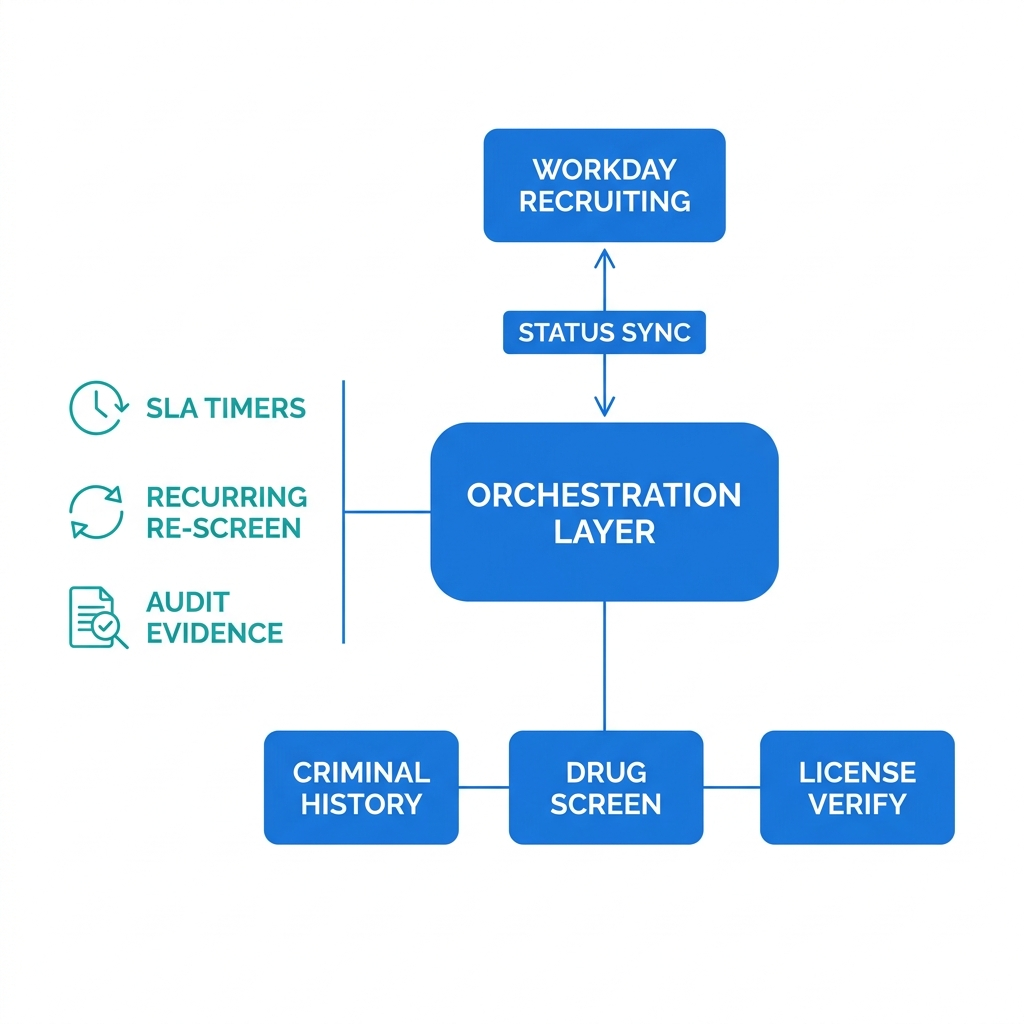
CloudApper iPaaS handles the integration and orchestration layer. It connects Workday to screening vendors that have no certified connector, using REST or SFTP against the vendor’s API and writing results back through Put_Background_Check so Workday remains the system of record for status. Because the orchestration lives in iPaaS rather than in a Studio build inside the tenant, the logic can be changed without a sandbox-to-production deployment cycle, the same reasoning that applies when you sync Workday with other enterprise systems.
Four capabilities matter specifically here. CloudApper iPaaS can run SLA timers and escalation, re-notifying a candidate who has not completed consent after forty-eight hours and alerting the recruiter at day five. It can orchestrate multiple vendors on a single requisition, holding the candidate at the stage until criminal, MVR, and occupational health all return, then posting one consolidated status to Workday. It can schedule recurring re-screens against a Workday-defined population, such as monthly OIG exclusion checks for clinical staff or annual MVR pulls for drivers, and write exceptions back as a worker-level flag. And it can consolidate the evidence, storing the disclosure, the authorization, the report reference, and the adjudication decision against a single record so an audit request produces one packet rather than three system exports.
CloudApper AI Recruiter addresses the candidate side, which is where high-volume hourly hiring actually loses time. Candidates receive and complete consent and document submission over SMS rather than an email portal login, which matters when the applicant is a warehouse or clinical support hire who checks email rarely. Status updates go out automatically. Recruiters see stalled candidates without opening Workday. For seasonal and high-volume hourly programs, this is usually where days come out of time-to-fill.
Neither product replaces Workday Recruiting. Workday remains the requisition system, the business process engine, and the system of record for the hire. CloudApper handles the coordination the native process leaves to people.
Frequently Asked Questions
Q: Does Workday have a built-in background check integration?
Workday includes a native Background Check business process and supports certified partner integrations with major screening vendors, Core Connectors for outbound and inbound flows, and the Get_Background_Check and Put_Background_Check web services for custom builds. Workday does not perform screening itself; it orders, receives, and stores the status from an external consumer reporting agency.
Q: How do I check background check status in Workday Recruiting?
Search for the candidate using the cand: prefix and open the Candidate Profile, where the background check package and current status appear. Admins can also build a custom report on the Background Check object to show status and elapsed days across all in-flight candidates, which is more useful than checking records individually.
Q: Why is my Workday background check stuck in the Background Check stage?
The three most common causes are a failed outbound integration that never placed the order, a candidate who has not completed the vendor’s consent and disclosure step, and a returned report sitting in an adjudication queue that nobody has actioned. Check Process Monitor filtered to Integration type first to confirm the order was transmitted.
Q: Can Workday handle drug screening as part of the background check process?
Workday can record a drug screen as a component of a background check package and store the resulting status, but it does not manage collection site scheduling, Medical Review Officer review, or DOT-regulated testing under the FMCSA Drug and Alcohol Clearinghouse. Those workflows run in the vendor or occupational health system.
Q: How do I run recurring background re-screens on existing employees in Workday?
Workday’s Background Check business process can be triggered as a standalone event against an existing worker, but there is no native scheduler that runs it on a recurring basis for a defined population. Organizations with monthly OIG exclusion checks or annual MVR requirements typically drive the cycle from an external orchestration layer that reads the population from Workday and initiates each event.
Q: Where is the FCRA consent form stored if the candidate signs it in the vendor portal?
It stays in the vendor system unless something moves it. Workday stores the background check status and package, not the signed disclosure and authorization, which means audit evidence requests usually require pulling documentation from two systems and matching it by candidate.
Q: Do background check results carry over to the Worker Profile after hire?
Yes. Results captured against the Candidate Profile during Recruiting flow to the Worker Profile when the candidate is hired, subject to the security policy governing who can view them.
If your background check process depends on a recruiter noticing that a candidate has gone quiet, it is worth mapping where the stalls actually happen before your next high-volume hiring cycle. The CloudApper team can walk through your Workday Recruiting configuration and screening vendor setup and show what the orchestration layer would cover. Start that conversation at https://www.cloudapper.ai/contact-us.

What is CloudApper AI Platform?
CloudApper AI is an advanced platform that enables organizations to integrate AI into their existing enterprise systems effortlessly, without the need for technical expertise, costly development, or upgrading the underlying infrastructure. By transforming legacy systems into AI-capable solutions, CloudApper allows companies to harness the power of Generative AI quickly and efficiently. This approach has been successfully implemented with leading systems like UKG, Workday, Oracle, Paradox, Amazon AWS Bedrock and can be applied across various industries, helping businesses enhance productivity, automate processes, and gain deeper insights without the usual complexities. With CloudApper AI, you can start experiencing the transformative benefits of AI today. Learn More
- Useful Links:
- Agentic AI
- No-Code/Low-Code
- Custom Software
- HCM Personalization
- iPaaS
- FedRAMP

Brochure
CloudApper AI TimeClock
For accurate & touchless time capture experience.
Download Brochure
CloudApper AI Solutions for Workday



- Works with








- and more.
Similar Posts

Workday W-4 Updates for Hourly Workers: Exempt Renewals, Overtime Deductions,…

Workday Access for Former Employees: How to Deliver W-2s and…