Hourly workers' W-4 withholding goes stale because exempt claims expire every February 15 and frontline workers rarely log in to Workday. This guide covers the IRS rules, the 2026 Form W-4 changes for overtime and tips, native Workday withholding elections, and how CloudApper hrPad gets the form completed on the floor.

TL;DR
Exempt W-4 claims expire each year, and employees who miss the February 15 renewal must be moved to single withholding with no adjustments. The 2026 Form W-4 adds an exempt checkbox and deductions for qualified tips and overtime, which matter most to hourly workers. Workday's withholding elections, effective dating, and reporting handle the mechanics, but every renewal still depends on the worker logging in. CloudApper hrPad puts a guided W-4 on a kiosk at the time clock and writes the election back to Workday.
Table of Contents
- Why Hourly Withholding Goes Stale
- What Workday Handles Natively
- What to Set Up Before February
- Where Native Self-Service Runs Out
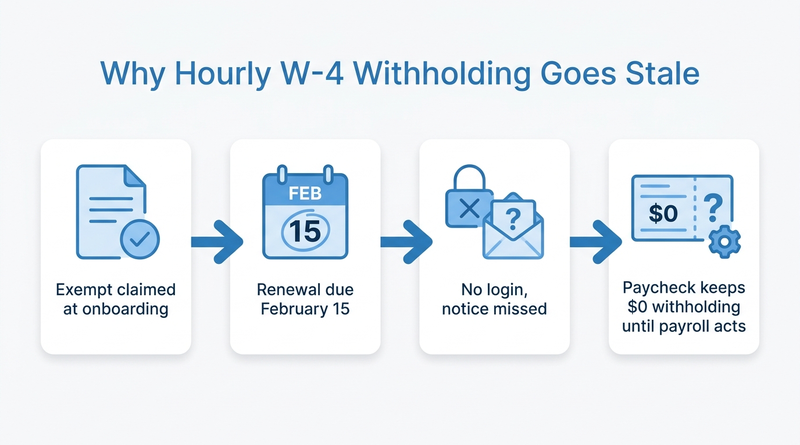
Federal income tax: $0.00. That line has appeared on a warehouse associate’s pay slip every week since he claimed exempt on a paper W-4 during onboarding two years ago. Nobody asked him to renew it. In April he owes the IRS, and he calls payroll.

Stale withholding is usually an access problem, and that is where CloudApper adds a layer alongside Workday once payroll has used the native controls.
Why Hourly Withholding Goes Stale
IRS Publication 15 says an exempt claim lasts one year. Employees must give a new Form W-4 by February 15 to keep it, and if they don’t, the employer withholds as single with no adjustments. The 2026 form adds two more reasons to update. A dedicated exempt checkbox replaces the handwritten “Exempt,” and the Step 4(b) deductions worksheet now covers qualified tips and qualified overtime premium, per CBIZ’s review of the form. Those are hourly-worker deductions, and hourly workers rarely open Workday.
What Workday Handles Natively
Workday Payroll gives employees a self-service withholding elections task for federal and state forms, and payroll partners can enter elections for them. Elections carry effective dates, so changes land on the right pay period. Reporting on withholding elections lets you list every worker currently claiming exempt. For new hires, the withholding step usually sits inside the onboarding flow, which is why stalled onboarding tasks for frontline new hires often show up later as withholding problems.
What to Set Up Before February
- Run an exempt-status report in early January and send each worker a renewal notice with the February 15 deadline.
- Schedule an effective-dated change that moves non-renewed exempt workers to the default on the first pay date after the deadline.
- Add a short note on the 2026 overtime and tips deductions to pay slip messages, since hourly workers check pay slips more often than anything else in Workday.
- Check state forms separately. Workers who move or work across state lines need the setup covered in multi-state payroll tax compliance in Workday.
Where Native Self-Service Runs Out
Every step above ends with “the employee updates the election in Workday.” A worker who clocks in with a badge, has no corporate email and is locked out from his last Workday password reset will miss the renewal notice and the deadline. Payroll then keys paper W-4s or reverts the election and fields complaints. This is where CloudApper puts the form in front of the worker on the floor instead of waiting for a login that won’t happen.
How CloudApper hrPad Gets the W-4 Completed
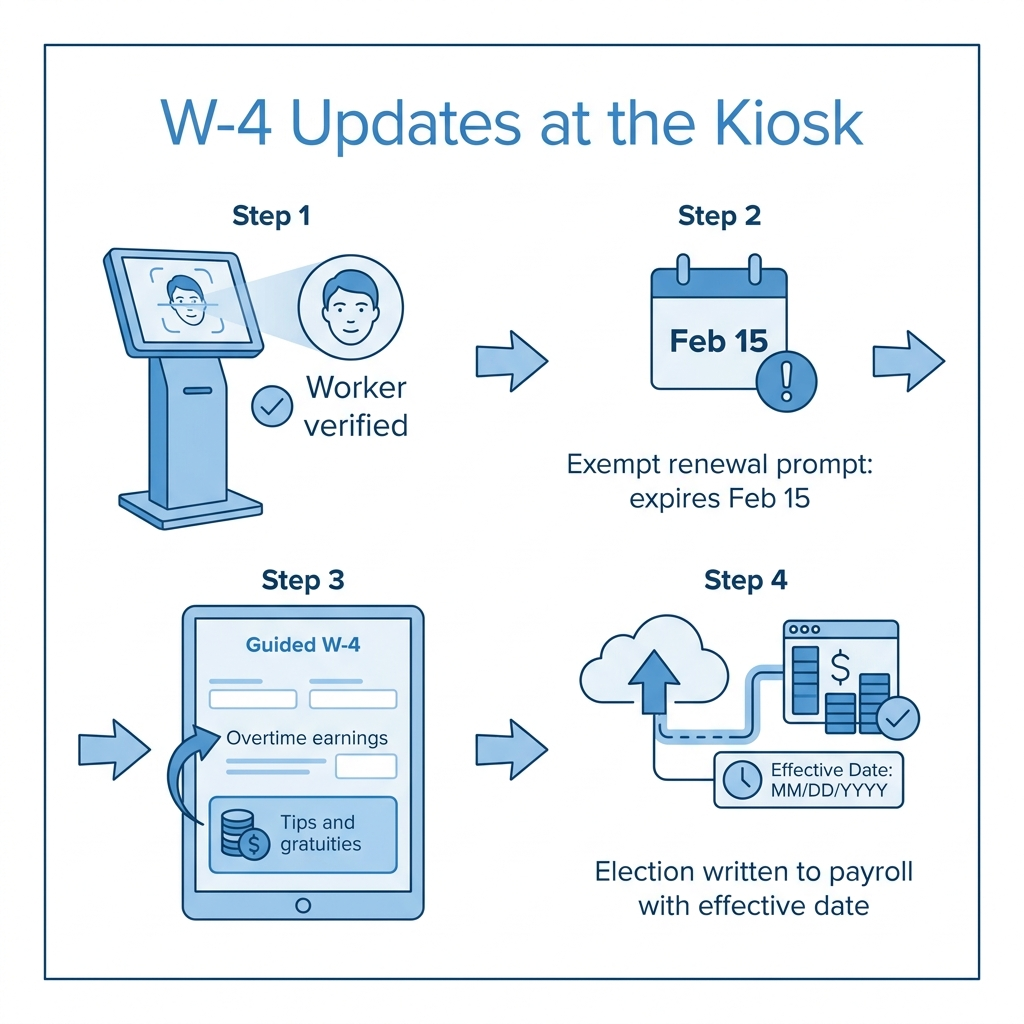
CloudApper hrPad for Workday is a tablet kiosk at the time clock or break room. A worker signs in with a face scan or badge, sees a prompt that their exempt status expires February 15, and completes the W-4 in a guided flow that explains the overtime and tips lines in plain language. The election writes back to Workday with the correct effective date, and payroll tracks completion by location. That also cuts the corrections that pile up during year-end W-2 reconciliation.
Frequently Asked Questions
Q: How do I change my W-4 in Workday?
Open the Pay area in Workday and select the withholding elections task, then update your federal or state form. If you can’t sign in, payroll can enter it for you.
Q: When does a W-4 exempt status expire?
An exempt claim lasts one year. Employees must submit a new Form W-4 by February 15 to keep it.
Q: What happens if an employee doesn’t renew exempt status?
Per IRS Publication 15, the employer must withhold as if the employee is single with no adjustments, starting after the February 15 deadline.
Q: What changed on the 2026 Form W-4?
The 2026 form adds a checkbox for claiming exemption, and its deductions worksheet now covers qualified tips, qualified overtime, and qualified vehicle loan interest.
Q: How can hourly workers without Workday logins update their W-4?
Employers can offer a shared kiosk where workers verify their identity and complete the form, with the election written back to Workday.
If your exempt-status report runs longer every January, talk to the CloudApper team about putting W-4 updates where your hourly workers already are, alongside Workday.

What is CloudApper AI Platform?
CloudApper AI is an advanced platform that enables organizations to integrate AI into their existing enterprise systems effortlessly, without the need for technical expertise, costly development, or upgrading the underlying infrastructure. By transforming legacy systems into AI-capable solutions, CloudApper allows companies to harness the power of Generative AI quickly and efficiently. This approach has been successfully implemented with leading systems like UKG, Workday, Oracle, Paradox, Amazon AWS Bedrock and can be applied across various industries, helping businesses enhance productivity, automate processes, and gain deeper insights without the usual complexities. With CloudApper AI, you can start experiencing the transformative benefits of AI today. Learn More
- Useful Links:
- Agentic AI
- No-Code/Low-Code
- Custom Software
- HCM Personalization
- iPaaS
- FedRAMP

Brochure
CloudApper AI TimeClock
For accurate & touchless time capture experience.
Download Brochure
CloudApper AI Solutions for Workday



- Works with








- and more.
Similar Posts

Workday Access for Former Employees: How to Deliver W-2s and…

Workday Direct Deposit Fraud: How to Stop Payroll Diversion Before…