Clocks fall back on November 1, and overnight workers log a repeated hour that must reach payroll. This guide explains how Workday Time Tracking handles time zones and punches, what payroll should check before close, and where CloudApper AI TimeClock closes the remaining gap for frontline teams today.

TL;DR
Clocks fall back on Sunday, November 1, 2026, and overnight hourly workers are credited with an extra hour worked under the Department of Labor's guidance. The risk is not the pay rule but whether the repeated 1:30 a.m. punch reaches Workday as a distinct hour. Workday uses the worker, location, then tenant time zone and defaults to Pacific Time, so missing configuration shifts punches. Review overnight blocks, differential, meal, and overtime results before payroll closes. CloudApper AI TimeClock for Workday captures punches on tablets and syncs them to Workday, with configurable validation for the repeated hour.
Table of Contents
- What Workday Time Tracking Does Natively
- Where the Friction Shows Up
- What to Do Within Workday First
- Where Native Tools Run Out
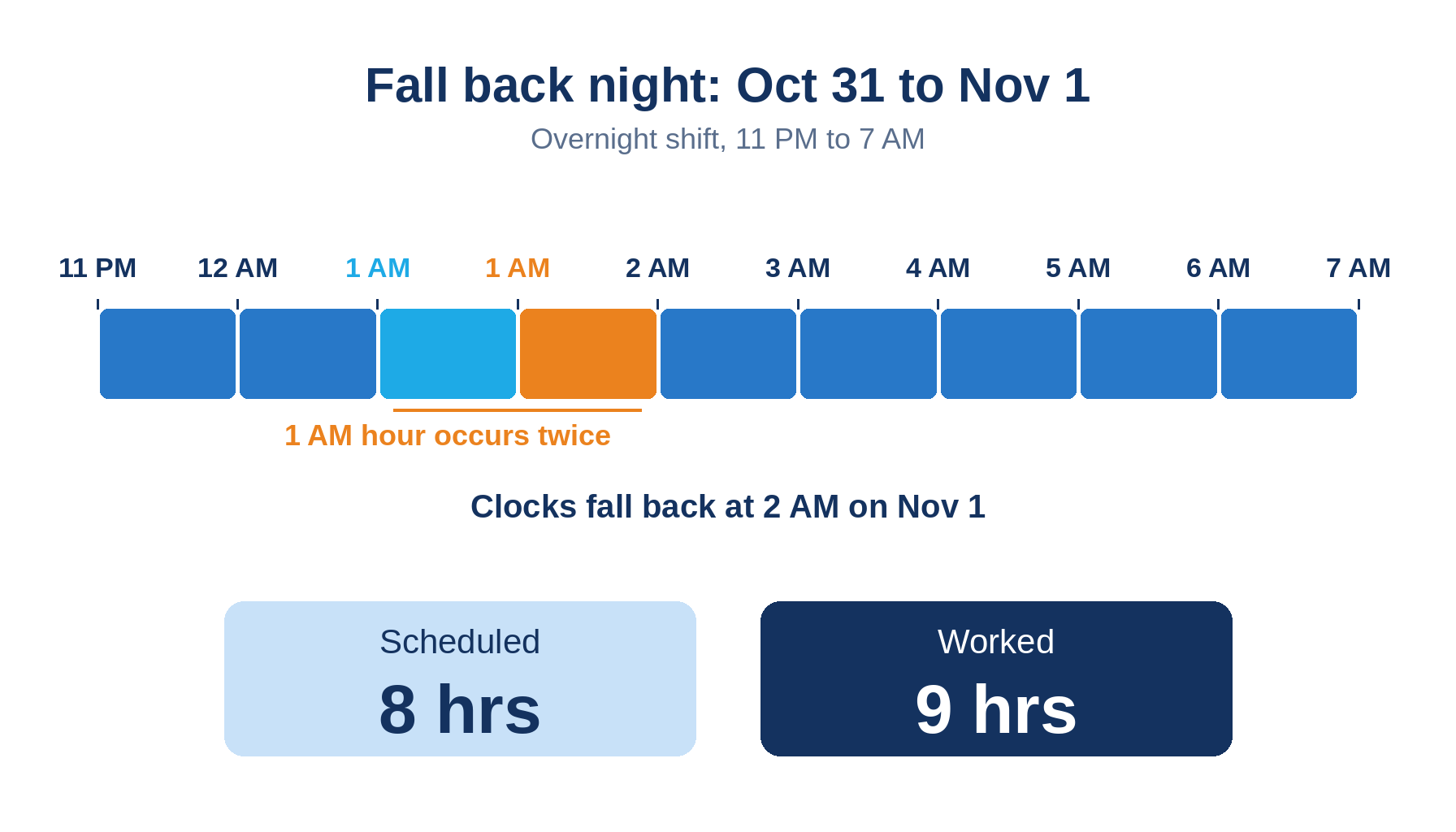
The Workday daylight saving time payroll question is not whether to pay the repeated hour. The Department of Labor already answered that: an employee on the overnight shift when clocks fall back is credited with nine hours worked against an eight-hour schedule. The open question is whether the second 1:30 a.m. reaches Workday as a distinct hour before payroll closes. Clocks fall back Sunday, November 1, 2026, and CloudApper AI TimeClock for Workday extends Workday Time Tracking where frontline punches are captured.
What Workday Time Tracking Does Natively
Workday records each time entry against a time zone. Per Workday’s FAQ: Time Entry documentation, it uses the worker’s time zone first, then the location’s, then the tenant’s, and defaults to Pacific Time if none is configured. Calculations run on recorded time, so the repeated hour must be in the record to be paid.
Where the Friction Shows Up
- A shift keyed as 11:00 p.m. to 7:00 a.m. totals eight hours by the wall clock, so the ninth hour never reaches payroll.
- With no worker, location, or tenant time zone configured, Workday applies Pacific Time, which shifts overnight punches at Eastern and Central sites.
- Device timestamps without an offset make the two 1:30 a.m. punches indistinguishable.
HR Morning notes the repeated hour counts toward weekly overtime for covered nonexempt employees, and in daily overtime states such as California and Alaska the ninth hour may count as daily overtime. A shift differential window defined by clock time can pay eight hours of differential on a nine-hour shift, and a meal break premium check tied to elapsed hours may behave differently.
What to Do Within Workday First
Before payroll closes for the week containing November 1:
- Confirm worker, location, and tenant time zones are populated.
- Compare elapsed and scheduled hours for October 31 to November 1 overnight blocks.
- Test differential, meal, and overtime results on a sample of those workers.
- Check union work rules that define night pay windows.
- Correct before close, because later changes become retro pay corrections.
Where Native Tools Run Out
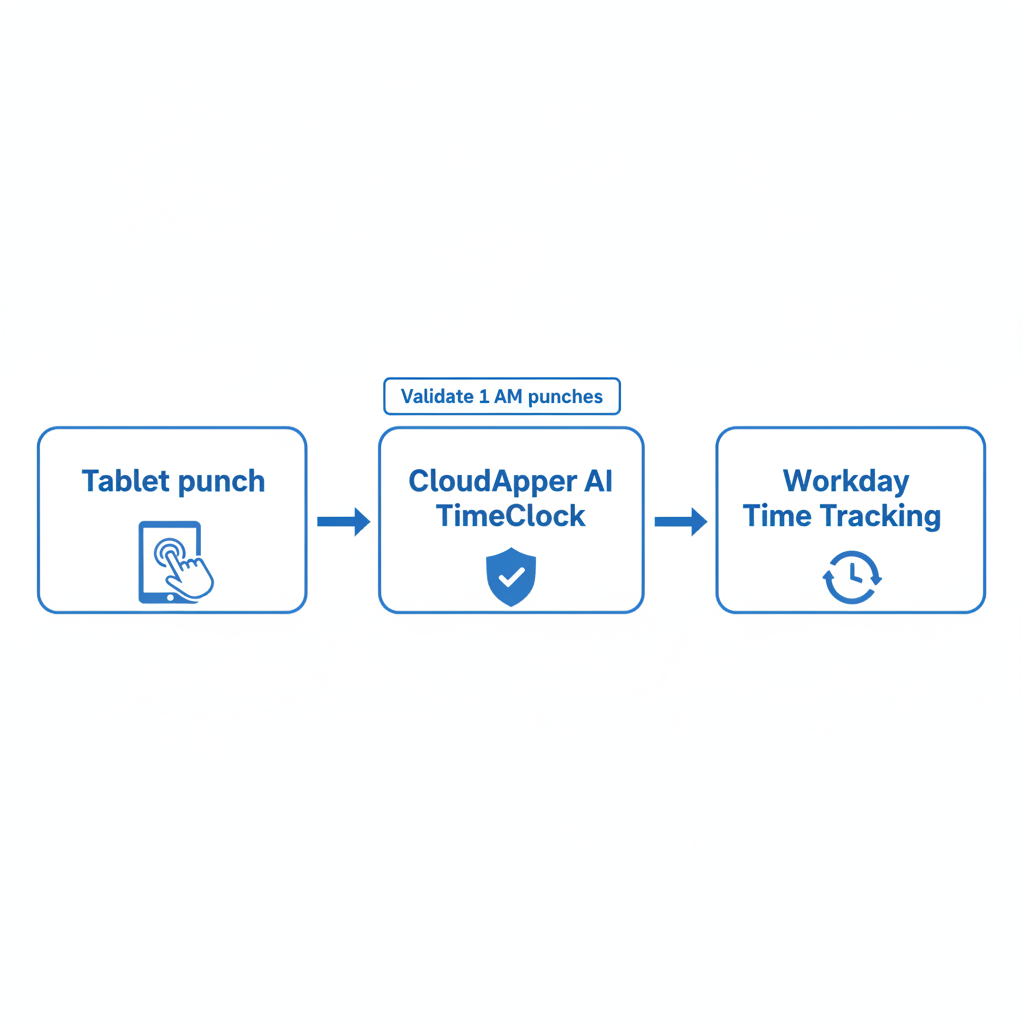
Workday can only calculate what reaches it. When a clock sends local time without an offset, the ambiguity exists before Workday sees the punch, and no calculation rule can reconstruct it. The result resembles punches that go missing after a successful integration run: a supervisor keys the missing hour on Monday morning. That is the gap CloudApper AI TimeClock is built to close at the point of capture.
How CloudApper AI TimeClock Closes the Gap
CloudApper AI TimeClock runs on any iOS or Android tablet and syncs automatically with Workday Time Tracking and Payroll. Workers punch by face recognition, QR code, barcode, or NFC, and can capture time offline. Because validation and attestation are configurable, a site can set a rule for punches in the 1:00 to 2:00 a.m. window and ask workers to confirm hours before the record posts. CloudApper AI TimeClock works alongside Workday, and Workday still calculates overtime, differentials, and pay.
Frequently Asked Questions
Q: Does Workday pay the extra hour when clocks fall back?

Yes, when the hour is worked and recorded. The Department of Labor credits an overnight worker with nine hours, not eight. Workday pays it only if the repeated hour is in the time block.
Q: Does the extra daylight saving hour count toward overtime?
For covered nonexempt employees it counts as hours worked in the workweek, so it can push the week past 40 hours. In daily overtime states such as California, the ninth hour may also qualify.
Q: What time zone does Workday use for time entries?
Workday uses the worker’s time zone first, then the location’s, then the tenant’s. If none is configured, it uses Pacific Time.
Q: How do you fix a missed fall back hour after payroll closes?
Correct the time block and process the change as a retro or off-cycle adjustment.
Q: What should payroll check for overnight shifts on November 1?
Confirm time zones, compare elapsed and scheduled hours, and test differential, meal, and overtime results.
If your overnight sites run Workday Time Tracking and you want fall back hours captured correctly, talk to the CloudApper team about how AI TimeClock fits your setup.

What is CloudApper AI Platform?
CloudApper AI is an advanced platform that enables organizations to integrate AI into their existing enterprise systems effortlessly, without the need for technical expertise, costly development, or upgrading the underlying infrastructure. By transforming legacy systems into AI-capable solutions, CloudApper allows companies to harness the power of Generative AI quickly and efficiently. This approach has been successfully implemented with leading systems like UKG, Workday, Oracle, Paradox, Amazon AWS Bedrock and can be applied across various industries, helping businesses enhance productivity, automate processes, and gain deeper insights without the usual complexities. With CloudApper AI, you can start experiencing the transformative benefits of AI today. Learn More
- Useful Links:
- Agentic AI
- No-Code/Low-Code
- Custom Software
- HCM Personalization
- iPaaS
- FedRAMP

Brochure
CloudApper AI TimeClock
For accurate & touchless time capture experience.
Download Brochure
CloudApper AI Solutions for Workday



- Works with








- and more.
Similar Posts
Workday Display Language for Frontline Workers: What Gets Translated and…
Workday Payroll Without Workday Time Tracking: How to Get Hourly…