Frontline employers can't always prove an employee received a disciplinary write-up, since most acknowledgment tools sit inside a self-service portal employees rarely open. See how CloudApper AI TimeClock captures that acknowledgment at the tablet employees already use to clock in, then syncs it straight into Workday, UKG, Oracle, or Dayforce.


TL;DR
- A paper write-up with no proof of receipt is hard to defend if it's ever challenged in an unemployment hearing or an EEOC investigation.
- An AI time clock can be configured to require every frontline employee to view and digitally acknowledge a write-up before completing a punch.
- Each acknowledgment logs a timestamp and an identity match tied to a verified person, building a record that doesn't depend on a signed paper surviving in the right folder.
- Most HCMs already include a document acknowledgment feature built for exactly this purpose, but it lives inside a self-service portal, and it only works if the employee opens it.
- CloudApper AI TimeClock moves that same acknowledgment to the device employees already touch every shift, and syncs it back into any major HCM systems already in place.
Table of Contents
- Why a Signed Write-Up Isn’t Always Proof
- Why This Gap Hits Frontline Teams Hardest
- Turning the Clock-In Into Write-Up Acknowledgment
- Keeping It a Service Tool, Not a Surveillance Tool
HR Managers and Operations Managers running hourly, multi-site teams still deal with disciplinary forms signed in a back office, sent home in a paycheck envelope, or read aloud during a rushed shift change. When an unemployment hearing or an employment dispute comes down to whether an employee actually saw a write-up, that process is hard to defend. Most frontline employers already run established workforce systems with a document acknowledgment feature built for exactly this purpose, and it works well for the employees who use it. The trouble comes down to reach: it only proves that one specific employee saw and understood something at one specific moment if that employee logs in to find it.

CloudApper AI’s Employee Time Clock Software closes that gap by turning the clock-in and clock-out process employees already use every shift into proof of employee write-up acknowledgment: the tablet verifies who’s standing there through a PIN, QR code, or face match, then logs a timestamped confirmation that the employee reviewed the write-up, tying the acknowledgment to a verified person at a verified moment, right alongside the data already flowing into UKG, Oracle, or Workday.
Why a Signed Write-Up Isn’t Always Proof
Most disciplinary processes treat a signed write-up as proof by default, even when that signed copy ends up as a scanned PDF nobody can find months later, or a paper original sitting in a folder somewhere. That default doesn’t hold up well under scrutiny. A signature on a photocopy is hard to verify with certainty, and supervisors change roles or leave the company, so the documentation often outlives the person who could speak to how or when it was actually delivered. Retaliation topped the EEOC’s charge list for the seventeenth year in a row in fiscal 2024, according to the agency’s own enforcement data. Those charges often come down in part to whether the employer can show consistent, documented treatment. A write-up with no verifiable proof of receipt doesn’t answer that. It invites the question.

Why This Gap Hits Frontline Teams Hardest
Frontline employees make this harder to manage than it looks. Most don’t have a company email to check in the first place, and many rarely log into a self-service portal at all, since it usually doesn’t reach them where they work. The acknowledgment tools built into most HCMs assume that login happens; they weren’t designed to solve for a workforce that skips the portal entirely, and that’s not a flaw in the tool so much as a mismatch with how this specific group works. A write-up handed out on a warehouse floor or in a restaurant back office depends entirely on whichever supervisor is on shift that day, and turnover means that supervisor might not be the one who trained on the process. Multiply that across a dozen locations and a rotating shift schedule, and having a policy on paper stops being the same thing as being able to prove it was followed.
Turning the Clock-In Into Write-Up Acknowledgment
CloudApper AI TimeClock turns a standard iPad or Android tablet into the punch station employees already use every shift. It identifies whoever’s standing in front of it through a PIN, an NFC tag, a QR code, or Face ID check-in, so every action taken at that screen is tied to a specific, verified person, not just a name someone typed in. It already handles the basics employees rely on daily: clocking in and out, viewing schedules, requesting PTO, submitting tips, and checking accrual balances, all while syncing that data back into the HCM a company already runs.
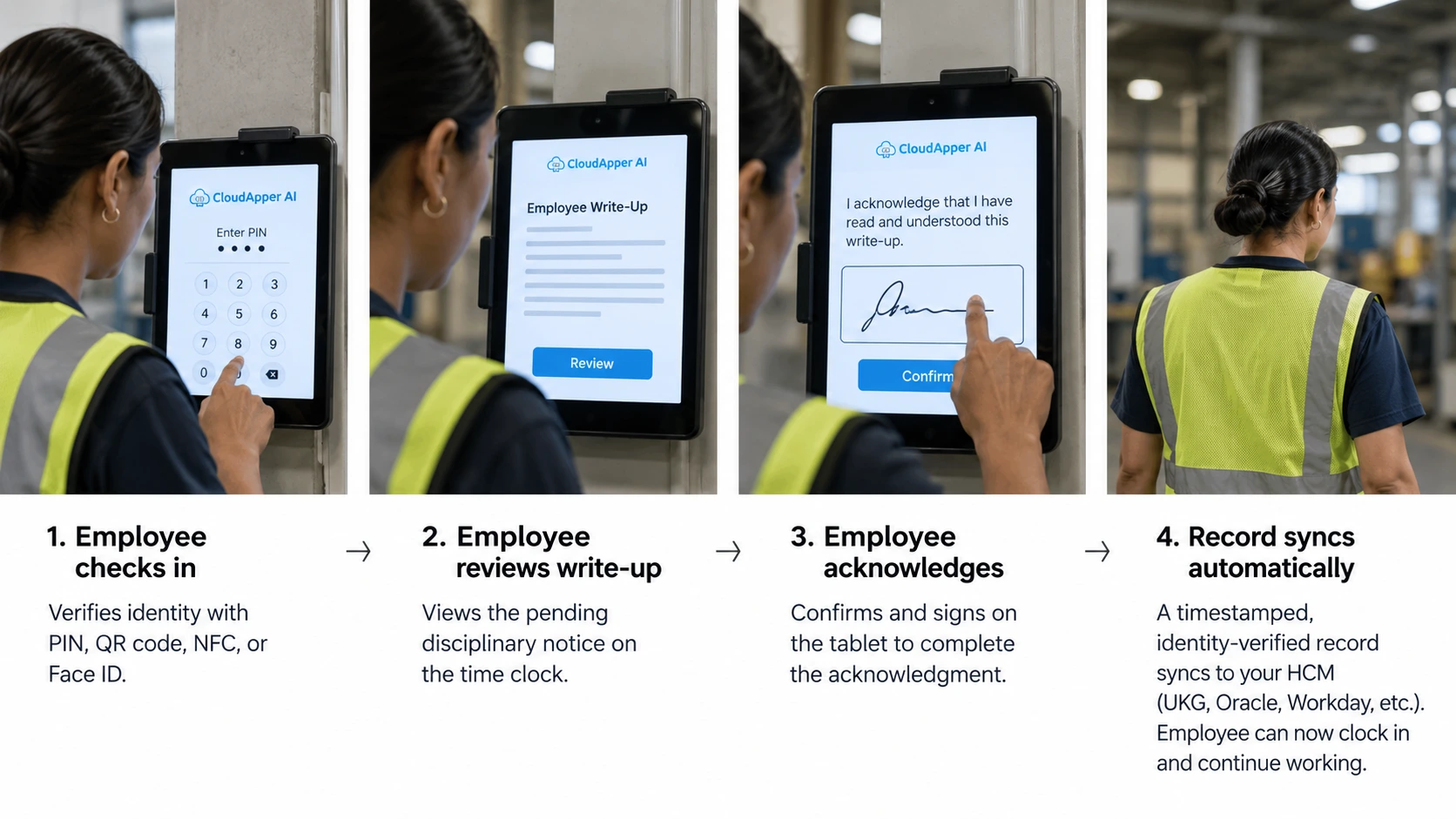
That combination, a device every employee touches without fail and a screen that already knows who they are, is what makes it a natural place to require acknowledgment instead of hoping for it. The acknowledgment itself isn’t a new idea; most HCMs already have a way to request one. What changes is where it happens: instead of waiting inside a portal for someone to open it, CloudApper AI TimeClock can be configured to show a pending write-up at the punch, with the punch time recorded first, so the employee reviews it, confirms their identity, and signs off without losing paid time. The acknowledgment carries a timestamp and an identity match, then syncs back into the HCM as part of the employee’s record, the same way it already triggers notifications for time clock corrections.
Keeping It a Service Tool, Not a Surveillance Tool
The same tablet that handles PTO, shift swaps, and paycheck questions needs to stay a service tool, so employers should be upfront that the identity check confirms who received a notice, not scores anyone’s behavior. CloudApper AI TimeClock runs on that same tablet and syncs punches and attestations directly with whatever HCM a company already runs, whether that’s UKG, Oracle, Workday, or Dayforce. The write-up still comes from a supervisor through the normal process. The kiosk’s only job is proving it reached the right person at the right time, which is what keeps this feeling like part of the job instead of a trap, especially for high-turnover, temp-heavy operations that can’t rely on one supervisor remembering the steps.
If you’d like to see how employee write-up acknowledgment could work at your time clocks, contact us to learn more.
FAQ
Does an electronic acknowledgment hold up the same as a signed paper write-up?
It creates a timestamped, identity-verified record showing an employee was presented with a write-up and responded to it, which is a stronger form of documentation than a signature that can be disputed, lost, or never collected in the first place. Whether it carries the exact same legal weight as a signature depends on your jurisdiction and specific policies, so it’s worth confirming with employment counsel how this fits into your documentation practices.
Can the disciplinary write-up itself be delivered through the time clock, or only the acknowledgment?
The tablet can be configured to display the write-up for the employee to review before confirming they’ve seen it, so the acknowledgment and the review happen at the same point. Many employers still handle the underlying supervisor conversation and paperwork the way they always have, and use the tablet specifically for the confirmation step.
Does the acknowledgment record sync back to Workday, UKG, Oracle, or Dayforce automatically?
Yes. CloudApper AI TimeClock’s integrations push the acknowledgment, including the timestamp and identity verification, into the employee’s record in Workday, UKG, Oracle, or Dayforce without a manual export.
What if a location has unreliable internet access when a write-up needs to be acknowledged?
CloudApper AI TimeClock is offline-first, so the acknowledgment is captured locally on the tablet and syncs to the HCM as soon as connectivity returns, with no gap in the record.
Doesn’t our HCM already have a document acknowledgment feature?
Yes, and it’s a genuinely useful part of those platforms. The difference here isn’t the acknowledgment step, it’s where that step happens. A portal-based acknowledgment only creates a record if the employee opens the portal, which is exactly the part that’s hardest to guarantee with a frontline, deskless workforce. CloudApper AI TimeClock doesn’t replace that feature or compete with it. It extends the same idea to the one screen employees are already standing in front of every shift, so the acknowledgment gets captured whether or not anyone remembers to log in separately.
How do you prove an employee received a write-up?
You need a record that ties the write-up to a verified person and a specific time. A signed paper copy can be lost or disputed. A write-up acknowledgment captured at the time clock, where the employee confirms their identity and signs off on the tablet, creates a timestamped record that syncs into the employee’s file in Workday, UKG, Oracle, or Dayforce.

What is CloudApper AI Platform?
CloudApper AI is an advanced platform that enables organizations to integrate AI into their existing enterprise systems effortlessly, without the need for technical expertise, costly development, or upgrading the underlying infrastructure. By transforming legacy systems into AI-capable solutions, CloudApper allows companies to harness the power of Generative AI quickly and efficiently. This approach has been successfully implemented with leading systems like UKG, Workday, Oracle, Paradox, Amazon AWS Bedrock and can be applied across various industries, helping businesses enhance productivity, automate processes, and gain deeper insights without the usual complexities. With CloudApper AI, you can start experiencing the transformative benefits of AI today. Learn More
- Useful Links:
- Agentic AI
- No-Code/Low-Code
- Custom Software
- HCM Personalization
- iPaaS
- FedRAMP

Brochure
CloudApper AI TimeClock
For accurate & touchless time capture experience.
Download Brochure
CloudApper AI Solutions for HR



- Works with








- and more.
Similar Posts
Hazard Pay Time Tracking: Proving Who Worked in the Hazardous…
Time Clock for Agency Workers: How to Capture Temp Hours…