Opening a new site? This time clock implementation checklist walks operations and HRIS teams through building the location in your HR system, setting up an iPad or Android time clock, enrolling new hires, and checking the first payroll.


TL;DR
- Build the new location in your HR system before setting up the clock.
- Use an iPad or Android tablet as the clock to keep the launch cost effective.
- Enroll and test every new hire before opening day.
- Review the first pay period's punches before payroll closes.
Table of Contents
- Why a New Location Needs Its Own Time Clock Plan
- The Time Clock Implementation Checklist for a New Location
- How CloudApper AI TimeClock Handles the Whole Launch
- Conclusion
Your HR system already applies your pay rules and runs payroll for every existing location. A new site adds one task to that list: setting up a time clock that sends every punch to the right location and cost center from day one. To get that setup right before opening, you need a time clock implementation checklist. Without one, managers fall back on paper timesheets and payroll spends the first pay period fixing entries. CloudApper AI TimeClock simplifies the launch by turning an iPad or Android tablet into a time clock that connects to the HR system you already use. It is compatible with all major HR systems, such as Workday, UKG, Oracle, and Dayforce.
Why a New Location Needs Its Own Time Clock Plan
A company-wide rollout gets a project team and months of planning. A single new site usually falls to an operations manager and an HRIS admin working toward a fixed opening date. The trouble spots are predictable: punches on the wrong cost center, new hires who can’t clock in, and corrections that pile up before payroll. Those gaps carry real cost. The U.S. Department of Labor recovered more than $259 million in back wages for nearly 177,000 workers in fiscal year 2025.

The Time Clock Implementation Checklist for a New Location
The steps are the same whichever HR system you use. Work through them in order, starting a few weeks before opening day.
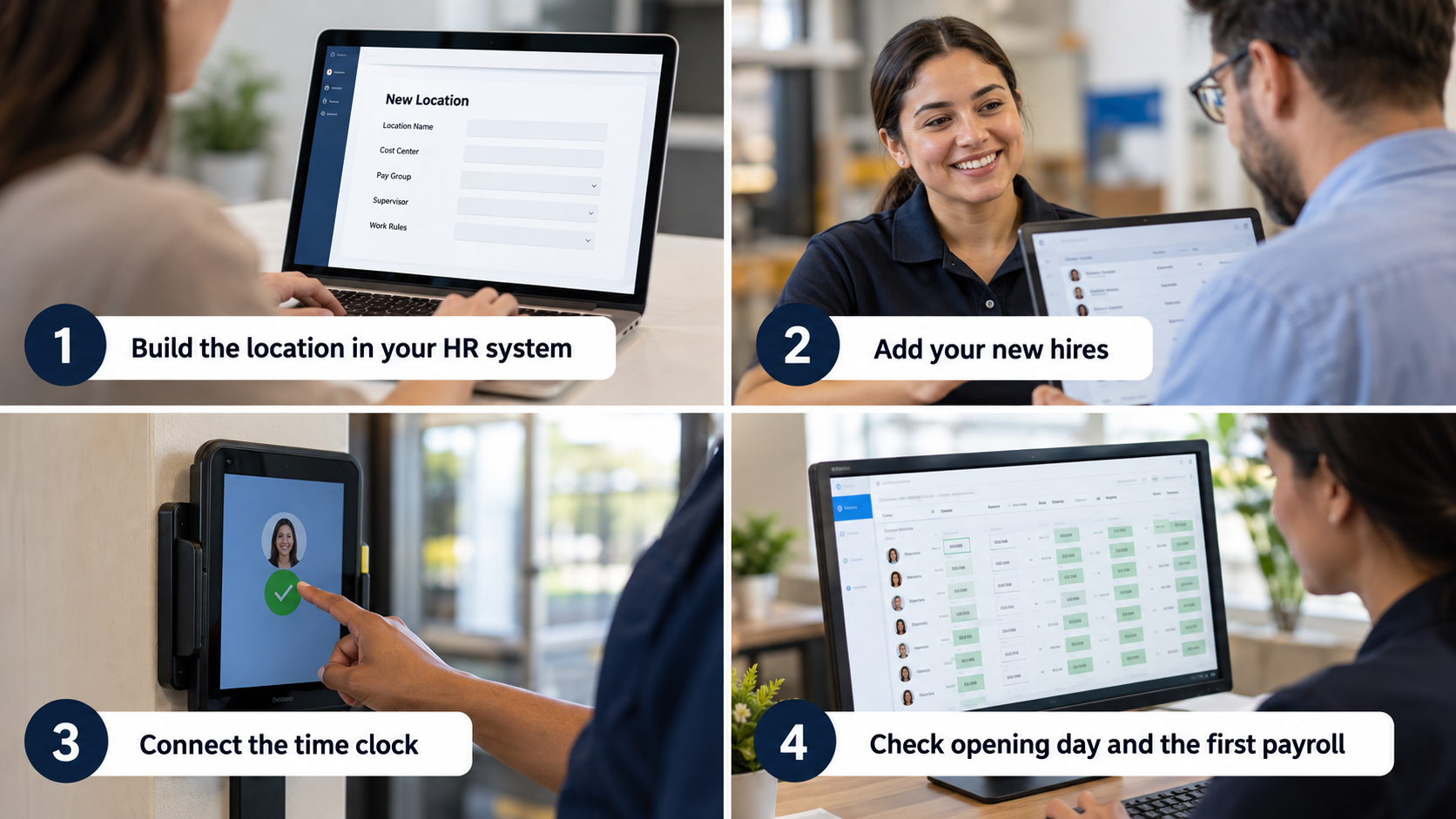
Step 1: Build the location in your HR system
Create the new location with its cost center or labor level values, pay group, supervisor, and any local work rules. The clock can only send punches to a location that already exists, so this step comes first.
Step 2: Add your new hires
Make sure every new employee is in the HR system with the correct location and job. Give the site’s managers approval access before the first shift so they can review timecards from day one.
Note (UKG): In UKG Pro Workforce Management, each employee’s primary job sits in the business structure and decides where punches roll up. If a new hire’s primary job still points to another site, their punches will roll up there instead.
Step 3: Connect the time clock
Assign the clock to the new location, set up each employee’s clock-in method, and have everyone run a test punch. Any problem then shows up before opening day instead of during the first shift.
Note (Oracle): Oracle Time and Labor processes punches from third-party time collection devices through a time device processing profile, and it also offers a web clock. Oracle does not provide its own physical clock, so the device for a new site comes from outside Oracle.
Step 4: Check opening day and the first payroll
On opening day, keep missed-punch alerts on so gaps get fixed the same day. Before the first payroll closes, compare punches with the schedule and correct any cost center errors at the source.
Note (Dayforce): Dayforce calculates pay continuously as time data comes in, so errors can surface before the pay run. It can only calculate what it receives, though, so punches still need to arrive tagged to the right location.
The time clock itself can be a device you already have. A standard iPad or Android tablet can serve as the clock and connect to whichever HR system you run, which keeps a new location cost effective. Draw a geofence around the building, turn on offline mode so punches still save without a connection, and mount the tablet where shifts start, using the facility layout guide to choose the spot. CloudApper AI TimeClock is built for exactly this, turning an iPad or Android tablet into a time clock that connects with all of these HR systems.
How CloudApper AI TimeClock Handles the Whole Launch
CloudApper AI TimeClock runs on standard iPads and Android tablets, so a new location can start with a device you may already own, which keeps the launch cost effective.
The app connects with your HR system and works from the employee and location data already stored there. Punches sync with the location and cost center attached, so payroll treats them like any other site. Geofencing, offline sync, and missed-punch alerts are built in, since a new site needs more than geofencing alone. The next location simply gets another tablet.
Conclusion
A new site brings a fixed opening date, a new crew, and the first payroll that has to be right. The time clock implementation checklist covers each stage: building the location, preparing the tablet, enrolling staff, testing punches on opening day, and reviewing the first pay period. CloudApper AI TimeClock connects an iPad or Android tablet to the HR system you already run, whether that is Workday, UKG, Oracle, Dayforce, or another major platform, so every site launches the same way.
If you want to utilize CloudApper AI’s TimeClock solution for your new location, consider contacting us today.
FAQ
What should a time clock implementation checklist include for a new location?
It should cover setting up the location in your HR system, configuring the time clock device, enrolling and testing new hires, and reviewing punches before the first payroll.
Can we use iPads or Android tablets as time clocks at a new site?
Yes. CloudApper AI TimeClock turns standard iPads and Android tablets into time clocks, which keeps the setup for a new location cost effective.
Will the new location’s time clock work with our existing HR system?
Yes. CloudApper AI TimeClock connects with all major HR systems and sends punches with the location and cost center attached.
How long does it take to get a new location live on the time clock?
It mostly depends on how quickly the location is set up in your HR system. After that, the tablet can be configured, assigned, and tested with new hires before opening day.

What is CloudApper AI Platform?
CloudApper AI is an advanced platform that enables organizations to integrate AI into their existing enterprise systems effortlessly, without the need for technical expertise, costly development, or upgrading the underlying infrastructure. By transforming legacy systems into AI-capable solutions, CloudApper allows companies to harness the power of Generative AI quickly and efficiently. This approach has been successfully implemented with leading systems like UKG, Workday, Oracle, Paradox, Amazon AWS Bedrock and can be applied across various industries, helping businesses enhance productivity, automate processes, and gain deeper insights without the usual complexities. With CloudApper AI, you can start experiencing the transformative benefits of AI today. Learn More
- Useful Links:
- Agentic AI
- No-Code/Low-Code
- Custom Software
- HCM Personalization
- iPaaS
- FedRAMP

Brochure
CloudApper AI TimeClock
For accurate & touchless time capture experience.
Download Brochure
CloudApper AI Solutions for HR



- Works with








- and more.
Similar Posts
Bulk Punch In and Out at Shift Change: Clearing the…
Credential Expiration Tracking: Alert Supervisors and Block Clock-In for Lapsed…