Workday's security framework handles constrained role access natively — but org restructures silently break those constraints without triggering errors or audit flags. Here's where the access exposure actually forms, and what to do about it.

TL;DR
Workday's configurable security framework handles role-based access, constrained security groups, and least-privilege enforcement effectively in stable environments — but constrained group conditions are not automatically re-evaluated when supervisory org hierarchies change. After a restructure, managers may retain technically valid role assignments whose constraint conditions no longer match the current org chart, creating access exposure that standard Workday security reports do not flag. Tightening native security governance — targeted role assignment reports, post-restructure constraint audits, and EIB-loaded role validation — reduces the gap but does not eliminate the manual re-evaluation dependency. CloudApper AI for HCM Personalization and Extensibility automates constrained group re-evaluation after org changes, and CloudApper iPaaS extends deprovisioning events from the Workday tenant to Active Directory, benefits platforms, and other connected systems with a full audit trail at each handoff.
Table of Contents
- What Workday’s Security Role Framework Handles Natively
- Where the Access Breaks After a Restructure
- What to Review in Workday First
- Where Native Security Management Runs Out
The internal audit runs 90 days after the supervisory org restructure. The access report comes back clean — all role assignments show valid, all security group memberships look correct. Three weeks later, a manager in a newly formed business unit approves a compensation change for an employee who no longer reports to her. The constrained security group that should have limited her access to her original supervisory org still shows her name. Workday generated no error. The audit report flagged nothing. The access was wrong the entire time. Solutions like CloudApper AI for HCM Personalization and Extensibility are built for exactly this gap: automating the re-evaluation of role assignments and constrained group conditions when supervisory org boundaries change, rather than relying on a manual review cycle that runs months behind the org chart. But the exposure itself is structural, and understanding it requires starting with what Workday’s security framework actually does.
What Workday’s Security Role Framework Handles Natively
Workday’s configurable security model is one of the more sophisticated access control frameworks in enterprise HCM. Security groups — role-based, user-based, and intersection groups — define which workers can perform which tasks and view which data. Constrained security groups limit access within an organizational boundary: a manager’s role-based security group is constrained to their supervisory organization, which means their access to compensation data, time approvals, and absence records is scoped to the workers who report to them. Workday also supports unconstrained security groups for HR roles that need cross-organization access, intersection groups for access that requires membership in two groups simultaneously, and assignable roles for functional access that follows position changes automatically. The Maintain Assignable Roles task and the Activate Pending Security Policy Changes step give security administrators explicit control over what each change does before it takes effect. For organizations with stable org structures, this framework is sufficient to maintain least-privilege access throughout the employee lifecycle.
Where the Access Breaks After a Restructure
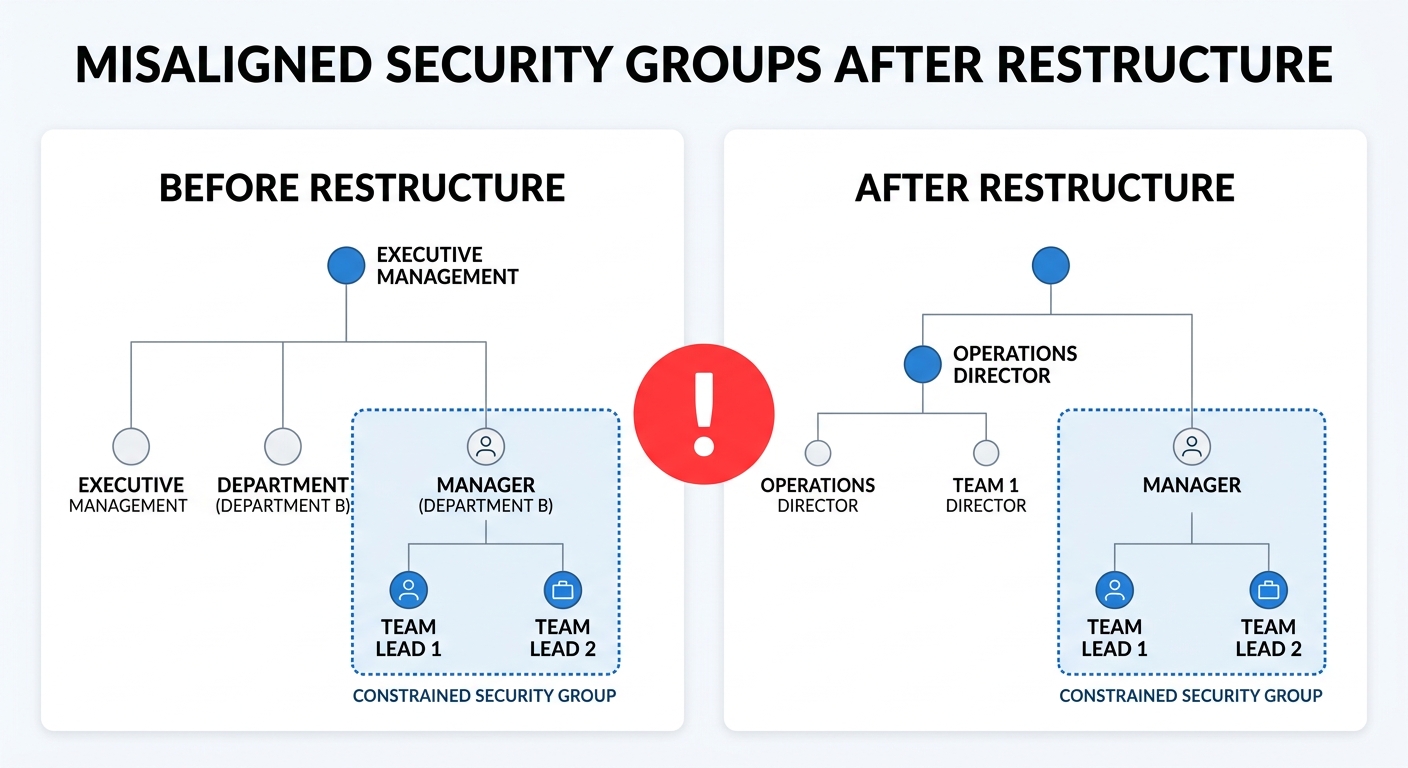
Constrained security groups enforce their boundaries based on the supervisory organization hierarchy at the time the group is evaluated. When a supervisory org restructure moves workers into new reporting lines, the group membership records for managers in affected orgs do not automatically re-evaluate against the new boundaries. A manager whose security group was constrained to Supervisory Org A now manages workers in a merged Supervisory Org B — but her role-based security group still reflects the original constraint condition, which may no longer correspond to her actual reporting scope. The role assignment itself remains valid in Workday. The audit report confirms she holds the Manager role. What the report does not surface is whether the constraint is now enforcing a boundary that matches the current org chart. For organizations running more than three or four supervisory org changes per year — common in acquisitions, business unit consolidations, and leadership transitions — this gap accumulates: multiple managers with technically valid role assignments whose access scope no longer matches their current organizational context. The proxy and delegation access layer compounds this when managers who have moved org positions still hold active delegation grants from their previous configuration.
What to Review in Workday First
Before looking outside Workday, run two targeted reports. The first: a role assignment report filtered by supervisory org, showing every manager-level role holder and the organizational boundary their constrained group enforces. Compare that boundary against the current supervisory org hierarchy to identify mismatches. The second: a security group audit report showing when each membership record was last evaluated and whether it predates the most recent org restructure effective date. Workday’s built-in Security Analysis report gives a starting point, but it shows current state — it does not flag assignments whose constraint conditions have drifted from the org chart. For terminated employees, confirm that the Hire business process is reversed correctly on the security side: terminated worker access in Workday is removed from the tenant, but role memberships in connected systems that were provisioned through Workday may still be active if the deprovisioning chain was not automated. High-volume role configurations — created through EIB mass loads during go-live or acquisition onboarding — are particularly likely to contain constraint conditions that were never validated against post-restructure org boundaries.
Where Native Security Management Runs Out
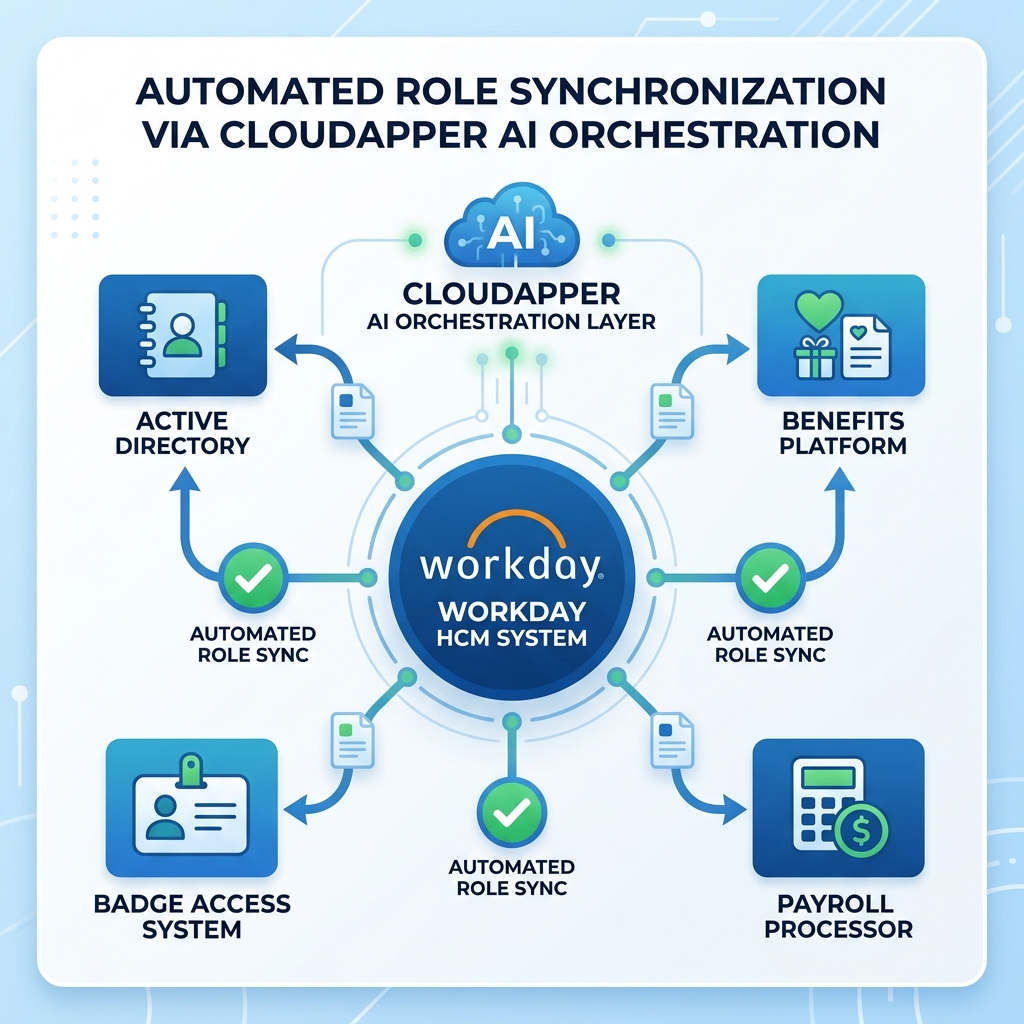
Workday’s security framework does not re-evaluate constrained group conditions automatically when the supervisory org hierarchy changes. Re-evaluation is a manual step — security administrators must identify which groups are affected by a restructure, update the constraint conditions, and activate the pending policy changes. In a complex org with hundreds of active constrained groups, this process is not a one-hour task; it is typically a multi-week project that lags the effective date of the restructure. The gap between effective date and security remediation is exactly when the access exposure exists. For organizations that integrate Workday with external systems — Active Directory, benefits platforms, badge access systems, or payroll processors — the deprovisioning problem extends beyond the Workday tenant. A role change in Workday does not automatically propagate access revocation to connected systems unless an integration was built to do so. Most organizations running Workday have some of these integrations but not all, which means role changes are fully enforced in Workday but partially enforced in the broader access environment.
CloudApper AI for HCM Personalization and Extensibility
CloudApper AI for HCM Personalization and Extensibility adds an automated role re-evaluation layer that runs alongside Workday’s security framework. When a supervisory org restructure completes, CloudApper triggers a review of all constrained security group conditions for affected managers, flags mismatches between current constraint boundaries and the new org chart, and generates a remediation queue for security administrators — before the gap has time to accumulate. For multi-system environments, CloudApper iPaaS automates the propagation of role changes from Workday to connected systems, ensuring that a role removal in the Workday tenant generates the corresponding deprovisioning event in Active Directory, the benefits carrier portal, the badge system, or whatever downstream access environment the organization runs. The audit trail is captured at each handoff, which is what internal audit and SOX/HIPAA compliance teams actually need: not a static snapshot of current access, but a timestamped record of when each change was made and where it propagated.
Frequently Asked Questions
Q: How do Workday security roles work?
Workday security roles control what tasks workers can perform and what data they can view. Role-based security groups assign access based on a worker’s position or role in the organization; constrained security groups limit that access to a specific organizational boundary, such as a supervisory organization. When a manager holds a constrained role-based security group, her access is scoped to the workers in her supervisory org rather than the entire tenant.

Q: What are constrained security groups in Workday?
Constrained security groups restrict access within an organizational boundary — typically a supervisory organization, company, or cost center. A manager’s constrained role-based security group gives her access to approve time, view compensation, and manage absence for the workers who report to her, and not for the broader workforce. When supervisory org boundaries change, constrained groups need to be re-evaluated to confirm the constraint still reflects the new org structure.
Q: Why do Workday security role assignments break after a supervisory org restructure?
When a supervisory org is restructured, the constrained security group conditions for managers in affected orgs are not automatically updated. The role assignment remains valid — it shows correctly in audit reports — but the constraint condition may now reference an organizational boundary that no longer matches the manager’s actual reporting scope. This produces an access gap that standard Workday security reports do not surface, because they verify that the role is assigned but not that the constraint is still correct.
Q: How do you audit Workday security role assignments?
Use Workday’s Security Analysis report to get a current view of role assignments by security group and organizational boundary. Supplement this with a role assignment report filtered by supervisory org to compare constraint conditions against the current org chart. For post-restructure audits, also check the effective dates on group memberships to identify assignments that predate the restructure and have not been re-evaluated since.
Q: Does Workday automatically remove access when an employee is terminated?
Workday removes the terminated worker’s access to the Workday tenant when termination is processed correctly. However, access in connected systems — Active Directory, benefits platforms, badge systems — is not revoked automatically unless an integration was built to propagate the deprovisioning event. Organizations without automated cross-system deprovisioning must manage downstream access removal manually, which creates a compliance gap between the Workday termination date and when access is actually removed from all connected environments.
Q: What is the difference between role-based and user-based security in Workday?
Role-based security groups grant access based on a worker’s organizational role or position — the access follows the role, not the individual. When a worker changes positions, she gains and loses access automatically as her role changes. User-based security groups grant access to specific named individuals regardless of their role or position — these are typically used for HR administrators, system administrators, or workers with responsibilities that span multiple supervisory orgs. User-based access does not change automatically with position changes, so it requires more active governance.
Q: How does Workday handle security across multiple companies or business units?
Workday supports multi-company security through company-level constraints on security groups, combined with supervisory org hierarchies that reflect each entity’s reporting structure. For organizations with shared-services models or frequent acquisitions, intersection security groups allow access to be granted only where a worker is a member of two groups simultaneously. Maintaining correct intersection group membership across org changes is one of the more complex ongoing security governance tasks in multi-entity Workday tenants.
If your Workday security role assignments look correct in reports but your internal audit or SOX review is still finding access anomalies after org changes, the constraint conditions on your security groups almost certainly haven’t caught up with the current org chart. The CloudApper team can map exactly where the gaps are and automate the re-evaluation process. Reach out at cloudapper.ai/contact-us.

What is CloudApper AI Platform?
CloudApper AI is an advanced platform that enables organizations to integrate AI into their existing enterprise systems effortlessly, without the need for technical expertise, costly development, or upgrading the underlying infrastructure. By transforming legacy systems into AI-capable solutions, CloudApper allows companies to harness the power of Generative AI quickly and efficiently. This approach has been successfully implemented with leading systems like UKG, Workday, Oracle, Paradox, Amazon AWS Bedrock and can be applied across various industries, helping businesses enhance productivity, automate processes, and gain deeper insights without the usual complexities. With CloudApper AI, you can start experiencing the transformative benefits of AI today. Learn More
- Useful Links:
- Agentic AI
- No-Code/Low-Code
- Custom Software
- HCM Personalization
- iPaaS
- FedRAMP

Brochure
CloudApper AI TimeClock
For accurate & touchless time capture experience.
Download Brochure
CloudApper AI Solutions for Workday



- Works with








- and more.
Similar Posts

Workday Recruiting for Hourly Workers: Why Salaried-Role Governance Is Stalling…

Workday Compensation Review: Why Merit Worksheets Go Blank and Merit…