Calculate tips, split bills, and distribute tip pools instantly — then learn why running that math manually every shift creates IRS exposure, payroll errors, and hours of daily admin burden. See how CloudApper automates restaurant tip management and syncs directly to your existing HCM or payroll system.
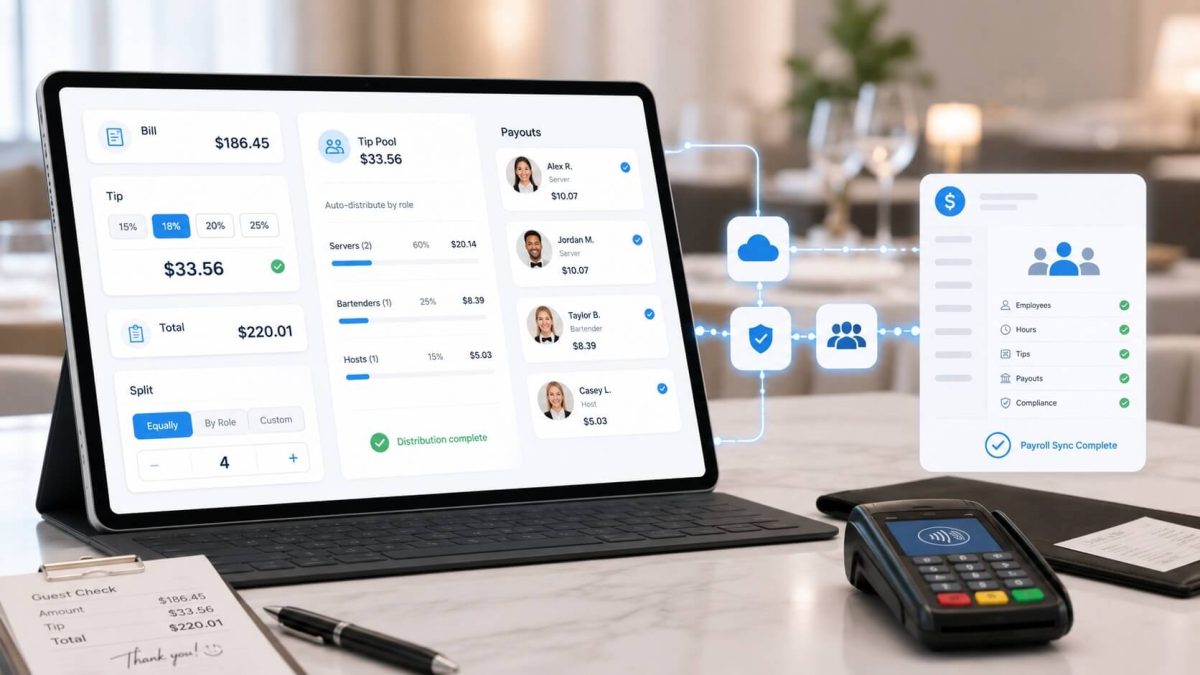
Table of Contents
- Free Restaurant Tip Calculator for Fast, Accurate Tip Splitting
- How to Use This Tip Calculator
- How to Calculate a Tip — The Basic Formula
- How Tip Pool Distribution Works
- The Real Problem With Manual Tip Calculation
- What Automation Actually Changes
- Works With the HCM or Payroll System You Already Use
- The Compliance Case for Getting This Right
- FAQ: Tip Calculation and Restaurant Tip Management
- Ready to Stop Running the Numbers Manually?
Free Restaurant Tip Calculator for Fast, Accurate Tip Splitting
This Free Restaurant Tip Calculator helps servers, managers, and restaurant staff quickly calculate tips, split bills, and estimate gratuity without doing manual math during busy shifts. Whether you need to divide tips evenly, calculate service charges, or manage pooled tips, this tool makes restaurant tip calculations faster and more accurate.
Using a digital Free Restaurant Tip Calculator also helps reduce payroll mistakes, improve transparency between employees, and simplify end-of-shift reporting. For restaurants handling high-volume transactions, automated tip tracking can save time and reduce disputes over tip distribution.
Free Tool
Restaurant Tip Calculator
Calculate standard tips, split bills, and distribute tip pools by role — instantly, with no manual math.
Standard Tip Calculator
$
Tip = Bill × Percentage. Grand total = Bill + Tip.
Split Bill Calculator
$
4
Split total bill + tip
Split tip only
Each person’s share is calculated from the total bill including tip, divided equally.
Tip Pool Distribution Calculator
$
Servers
65%
Bussers
20%
Hosts
10%
Bartenders
5%
⚠ Percentages must add up to 100% (currently100%)
This calculator shows role-level totals. For per-employee distribution, divide each role’s total by the number of employees in that role who worked the shift.
Auto-Gratuity Calculator
$
$
⚠ Auto-gratuity is a service charge, not a tip. The IRS requires it to be treated as employer revenue and run through payroll — not declared as employee tip income.
Tip Amount
$17.00
on a $85.00 bill at 20%
Bill subtotal$85.00
Tip (20%)$17.00
Grand total$102.00
Works with
UKG ProUKG ReadyWorkdayDayforceOracle HCMSAP SuccessFactorsPaychex+ more
TL;DR
A free, real-time tip calculator for restaurants — handling standard tips, bill splits, and tip pool distributions by role. Includes a full breakdown of how tip pool math works, what goes wrong with manual calculation (IRS exposure, rounding errors, policy drift, payroll re-entry), and how CloudApper’s Tip Management Solution automates the full workflow from employee declaration to payroll sync — integrating with UKG, Workday, Dayforce, Oracle, SAP, Paycom, Paychex, and other major HCM and payroll platforms.
Most people searching for a tip calculator have one of two things going on. Either they’re at a table figuring out what to leave, or they’re a manager somewhere in a back office trying to work out tip pool distributions before the next pay run.

The first group needs a quick number. The second group needs to stop doing this manually.
This article is for both. The calculator above handles the math. Everything below explains what that math costs restaurant operators when they run it by hand every single day — and what a better process actually looks like.
How to Use This Tip Calculator
The calculator handles four scenarios:
Standard tip — Enter a bill amount, pick a tip percentage, get the tip total and grand total. Useful for individual checks or verifying a POS-calculated tip.
Split bill — Add the number of diners and the calculator breaks down each person’s share of the bill and the tip.
Tip pool distribution — Enter total tips collected for a shift and set percentage splits by role (server, busser, host, bartender). The calculator shows how much each role receives from the pool. This is where it gets relevant for operators managing nightly distributions.
Custom percentage — Slide to any tip percentage, including auto-gratuity thresholds, to calculate exactly what a specific check should carry.
All calculations update in real time. No submit button, no page reload.
How to Calculate a Tip — The Basic Formula
For anyone who wants the math without a calculator:
Tip amount = Bill total × (Tip percentage ÷ 100)
So a 20% tip on a $85.00 check:
$85.00 × 0.20 = $17.00 tip → $102.00 total
To split evenly across a table of four:
$102.00 ÷ 4 = $25.50 per person
How Tip Pool Distribution Works
Tip pooling collects some or all of the tips from tipped employees and redistributes them across roles. The formula depends on how your organization has structured it, but the most common approaches are:
Role-based percentage split — The total tip pool is divided by fixed percentages assigned to each role. Example: a pool of $400 split as 65% servers / 20% bussers / 15% hosts gives $260 / $80 / $60 respectively. Each server, busser, and host then receives a share proportional to their hours worked or a flat equal share, depending on policy.
Hours-weighted distribution — Each employee’s share is calculated based on hours worked during the shift relative to total hours worked by all pool participants. More hours = larger share.
Point system — Some operators assign points per role (servers get 3 points, bussers 2, hosts 1) and divide the pool by total points across all employees on shift.
Each approach produces different numbers. Each needs to be calculated correctly, documented daily, and pushed to payroll accurately.
That last part — the daily documentation and payroll push — is what breaks down in most restaurant operations.
The Real Problem With Manual Tip Calculation
A single tip pool calculation for one shift isn’t hard. A server does the mental math in about 90 seconds.
The problem is that it’s not one shift. It’s every shift, every day, across every location, with different employees, different hours, different pool totals, and occasionally different rules depending on state law or staffing changes. At that volume and frequency, manual calculation isn’t just tedious — it’s where errors compound quietly until they’re expensive.
Here’s what actually goes wrong:
Rounding errors accumulate: A manual pool split at $0.01 off per employee per shift adds up across a full year’s payroll for a 60-person restaurant. Small discrepancies erode employee trust faster than large ones, because tipped workers notice patterns.
Documentation doesn’t happen: The IRS requires daily records of tip declarations and employer allocations per employee. In practice, manual processes produce weekly summaries at best, and reconstructed spreadsheets at worst. When an audit happens, “we had it in a spreadsheet somewhere” is not an adequate answer.
Policy drift goes undetected: When tip pool rules change — a new role added, a percentage adjusted, a state law update — manual processes don’t enforce the update consistently. One manager uses the old percentages for three weeks before anyone notices.
Payroll entry is a separate manual step: Even if the pool math is correct, someone still has to enter each employee’s tip amount into the payroll system by hand. That’s a second round of manual work, a second point of potential error, and a daily time sink that compounds at every location.
State law variation goes unmanaged: California prohibits managers from participating in tip pools. Other states have different rules on who can participate, how distributions must be timed, and what records must be kept. A single spreadsheet template running across multiple states is almost certainly non-compliant somewhere.
What Automation Actually Changes
When tip management is automated — from employee declaration through pool calculation to payroll sync — the process changes at every step.
Employees declare tips at shift end through a mobile app or manager kiosk. The system captures the declaration, timestamps it, and logs it against the employee record. That creates the IRS-required daily record automatically, without anyone transcribing it later.
Pool calculations run against your configured rules immediately. You set the percentages once. Every shift, every location applies them consistently. Adjustments for hours worked, role splits, or custom rules happen in the system, not in someone’s head.
A manager reviews the output and approves. One screen, one action, a full audit trail built automatically. If anything looks off — an employee who worked half a shift, a correction to a declared amount — the manager adjusts it before approval. The log captures what changed and why.
Approved tip data syncs directly to payroll. No export, no import, no re-entry. The payroll system receives structured data mapped to the correct earning codes or compensation elements for your platform.
The math still happens. It just doesn’t happen manually.
Works With the HCM or Payroll System You Already Use
One concern operators raise: they’ve invested in a payroll or HCM platform and don’t want to introduce something that creates a separate workflow or requires double data entry.
CloudApper’s Tip Management Solution integrates directly with the major HCM and payroll platforms in use across the hospitality industry — UKG Pro, UKG Ready, Workday HCM, Ceridian Dayforce, Oracle HCM, SAP SuccessFactors, Paycom, Paychex, and others. Tip data moves from CloudApper into your existing system as structured payroll entries, mapped to your platform’s earning codes, wage types, or compensation elements.
The setup doesn’t require replacing your HCM or running parallel payroll systems. It adds the tip management layer that your HCM doesn’t have natively, and feeds the output back into the system you already run.
Capano Management, a restaurant group running 19 locations on UKG Pro WFM (Dimensions), reduced tip calculation delays by 80% and eliminated payroll errors after implementing CloudApper’s Tip Management Solution. The tip workflow that previously consumed hours of daily manager time now runs with a single approval step.
The Compliance Case for Getting This Right
Tip income is federally taxable. The IRS treats tip underreporting as a serious issue — not just for employees but for employers who fail to maintain adequate records or withhold correctly.
Form 4070 (or employer-maintained equivalent records) must document what each employee declared, per day. Employer tip allocations under the FLSA must be calculated correctly based on which employees participate in the pool and which roles are eligible. State law requirements on top of federal rules vary significantly by location.
Back-pay liability from tip calculation errors can extend several years. DOL investigations triggered by employee complaints about tip pool distributions are a common source of multi-year back-pay assessments in the restaurant industry.
None of this is new information for experienced restaurant operators. But “we know we should do this better” and “we have a system that actually does it correctly” are two different positions to be in when a complaint lands.
FAQ: Tip Calculation and Restaurant Tip Management
What is the standard tip percentage in a restaurant?
The standard in the U.S. has shifted upward over the past decade. Fifteen percent was the longtime benchmark; 18–20% is now the more common baseline for table service, with 20–25% increasingly common in major metro areas. Counter service and quick service tipping is more varied — the suggested percentages on card readers typically run 18%, 20%, and 25%, but the expected norm is still forming.
How do you calculate a tip on a large party with auto-gratuity?
Auto-gratuity is a service charge added to the bill by the restaurant, not a voluntary tip from the guest. The IRS treats them differently: auto-gratuity is employer revenue subject to payroll tax, not employee tip income. Calculate it as a fixed percentage of the pre-tax bill total (typically 18% for parties of 6 or more, though policies vary). It does not get declared as a tip by the server — it runs through payroll as a service charge allocation.
How does a tip pool work legally?
Under the FLSA, tip pools may include employees who customarily and regularly receive tips. Since a 2018 amendment, employers who do not take a tip credit may include back-of-house employees in tip pools — but managers and supervisors may never participate regardless. State laws often impose stricter rules. California prohibits any employer participation in tip pools, limits pools to employees in the chain of service, and has additional timing requirements. Operators running across multiple states need location-specific pool configurations.
How do you split tips fairly among restaurant staff?
“Fair” depends on your policy and applicable law. The most defensible approaches are documented, consistently applied, and disclosed to employees in writing. Common methods include fixed role-based percentages (servers contribute X%, bussers receive Y%), hours-weighted distributions (each employee receives a share proportional to hours worked), and point systems that account for role seniority or shift type. Whatever the method, the calculation has to be done correctly and documented daily.
What happens if tip pool math is wrong?
Consistent errors in tip pool distributions can trigger employee complaints to the Department of Labor. Once a complaint is filed, DOL investigations typically cover two to three years of back-pay exposure. If the error pattern shows willful non-compliance, penalties extend further. Employers also face the risk of private lawsuits from affected employees under the FLSA, which allows for double damages (liquidated damages) plus attorney fees.
Can a restaurant manager keep tips?
No. Under the FLSA as amended, managers and supervisors may not receive tips from a tip pool — under any circumstances, regardless of whether the employer takes a tip credit. A manager who receives a portion of a tip pool, even if they occasionally do tipped work, creates FLSA exposure for the employer. State laws in some jurisdictions are even stricter.
What payroll systems does CloudApper Tip Management integrate with?
CloudApper’s Tip Management Solution integrates with UKG Pro, UKG Ready, Workday HCM, Ceridian Dayforce, Oracle HCM Cloud, SAP SuccessFactors, Paycom, Paychex, and other major HCM and payroll platforms. The integration pushes approved tip data as structured payroll entries — no spreadsheet exports, no manual re-entry. If your platform isn’t listed, CloudApper’s AI integration layer can typically accommodate it — reach out to confirm.
How long does it take to implement automated tip management?
Most implementations are live within two to four weeks. The primary setup steps are configuring your tip pool rules, establishing the HCM integration, and training managers on the approval interface. There’s no rip-and-replace of your existing payroll infrastructure — CloudApper adds the tip workflow on top of what you already run.
Ready to Stop Running the Numbers Manually?
The calculator at the top of this page handles the math for a single check or a single shift distribution. It gives you the right number, instantly.
The problem it can’t solve is the one that exists at scale — 160 tip declarations a day, pool distributions across 12 roles and 4 locations, daily records that have to hold up in an audit, and payroll entries that have to be correct before every pay run.
That’s the problem CloudApper’s Tip Management Solution is built for.
Contact CloudApper to see how it maps to your existing HCM or payroll system →
Or learn more about the solution here before scheduling a conversation.
CloudApper Tip Management integrates with UKG Pro, UKG Ready, Workday, Ceridian Dayforce, Oracle HCM, SAP SuccessFactors, Paycom, Paychex, and other major HCM and payroll platforms. See the full integration list.

What is CloudApper AI Platform?
CloudApper AI is an advanced platform that enables organizations to integrate AI into their existing enterprise systems effortlessly, without the need for technical expertise, costly development, or upgrading the underlying infrastructure. By transforming legacy systems into AI-capable solutions, CloudApper allows companies to harness the power of Generative AI quickly and efficiently. This approach has been successfully implemented with leading systems like UKG, Workday, Oracle, Paradox, Amazon AWS Bedrock and can be applied across various industries, helping businesses enhance productivity, automate processes, and gain deeper insights without the usual complexities. With CloudApper AI, you can start experiencing the transformative benefits of AI today. Learn More
- Useful Links:
- Agentic AI
- No-Code/Low-Code
- Custom Software
- HCM Personalization
- iPaaS
- FedRAMP

Brochure
CloudApper hrPad
Empower Frontline Employees with an AI-Powered Tablet/iPad Solution
Download Brochure
CloudApper AI Solutions for HR



- Works with








- and more.
Similar Posts
Why Restaurant Tip Pooling and Payroll Integration Is Broken for…
Tip Distribution in Restaurants: Why UKG, Workday, and Dayforce Users…