When an employee works two rates in one workweek, the FLSA requires overtime on the weighted average of those rates, not on the rate where the hours crossed forty. Workday can compute this, but only as a deliberate configuration, and the errors usually start before payroll ever sees the hours.

TL;DR
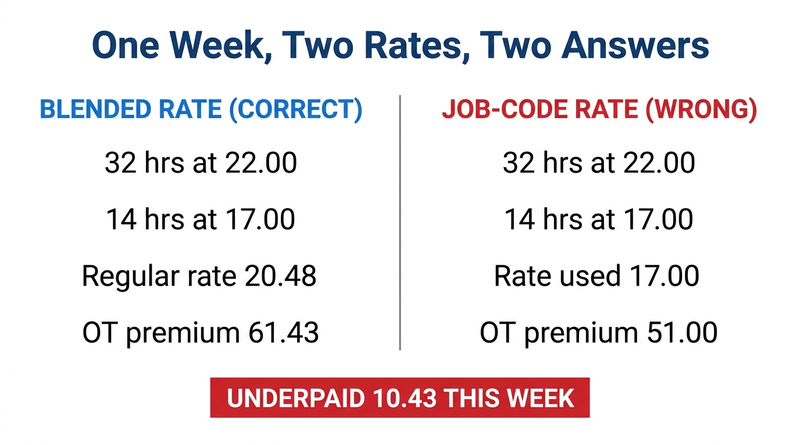
When an employee works at two or more rates in the same workweek, 29 CFR 778.115 requires the regular rate to be the weighted average of those rates: total straight-time earnings divided by total hours worked, with the overtime premium paid at half that rate because straight time has already been paid on every hour. Thirty-two hours at 22.00 plus fourteen at 17.00 gives a regular rate of 20.48 and a premium of 61.43 on six overtime hours, where paying the premium at the lower job-code rate underpays by 10.43 in a single week. Workday supports the calculation but does not perform it by default: time calculations must aggregate hours at the worker level across positions for the FLSA workweek, and differentials and nondiscretionary bonuses must be configured into the regular rate. The errors that matter usually start at capture, when a worker moves between job codes without a transfer, which no amount of payroll configuration can correct. CloudApper AI TimeClock fixes the attribution at the punch and CloudApper AI for HCM Extensibility & Personalization independently recomputes the regular rate to flag weeks where the paid premium does not match.
Table of Contents
- What the FLSA Actually Requires
- What Workday Does Natively
- Where the Friction Shows Up
- What to Do Within Workday First
- Where Native Tools Run Out
- Closing the Gap with CloudApper AI TimeClock and CloudApper AI for HCM Extensibility & Personalization
- Frequently Asked Questions
A CNA picks up fourteen hours in dietary at 17.00 an hour on top of thirty-two hours on the floor at 22.00. Forty-six hours, six of them overtime. If your tenant calculates that overtime premium at the dietary rate because that is where the hours crossed forty, the employee is short 10.43 for the week.
Ten dollars and change. Now multiply it by every employee who crosses a job code, by fifty-two weeks, by the two years the Department of Labor can reach back, three if the violation is found willful, and add liquidated damages equal to the back wages owed. The arithmetic error is trivial. The exposure is not.
This is one of the most common wage and hour findings in organizations running mixed job codes, and it is rarely a payroll team getting the math wrong. It is a configuration question nobody was assigned. Where the calculation depends on data Workday never received cleanly, an extension layer like CloudApper is what closes the gap.
What the FLSA Actually Requires
Start with the rule, because the Workday configuration only makes sense downstream of it.
When an employee works at two or more rates during a single workweek, 29 CFR 778.115 requires the regular rate to be the weighted average of those rates. You total the straight-time earnings for all hours worked, divide by the total hours worked, and that quotient is the regular rate for that week.

Run the numbers from the opening. Thirty-two hours at 22.00 is 704.00. Fourteen hours at 17.00 is 238.00. Total straight-time earnings are 942.00 across forty-six hours, which gives a regular rate of 20.4783. The overtime premium is half that rate applied to the six overtime hours, or 61.43, because straight time has already been paid on all forty-six hours. Total pay for the week is 1,003.43.
Two details trip people up. The premium is calculated at 0.5 rather than 1.5 precisely because the straight-time component is already in the first figure, and the resulting blended rate will not match any rate the employee is actually assigned. That second point generates help desk tickets, which is a real cost even when the math is correct.
The regular rate is also broader than base hourly pay. Shift differentials, nondiscretionary bonuses, and most premium payments belong in the numerator. Discretionary bonuses, gifts, and paid time off do not. Organizations running union work rules and collective bargaining agreements hit this constantly, since contract-specified differentials are exactly the kind of payment that has to be folded in.
There is a lawful alternative. Under section 7(g)(2) of the FLSA and 29 CFR 778.419, an employer may pay overtime at one and a half times the rate applicable to the type of work performed during the overtime hours, but only where there is an agreement or understanding with the employee reached before the work is performed. Retroactively deciding this is how you paid is not available. Most organizations that think they are using this method have no such agreement on file.
What Workday Does Natively
Workday supports all of this. The qualifier is that supporting it and doing it by default are different things.
An employee can hold more than one position through the Add Additional Job process, and each position carries its own job profile, supervisory organization, cost center, and compensation. That structure is correct and it is what makes accurate blended rate calculation possible at all. Whether positions or jobs are the right container for your organization is the question covered in position management versus job management.
Workday Time Tracking captures worked time against a position and applies time calculations to classify hours. Workday Payroll then resolves those hours into pay components at the applicable rates. The FLSA workweek is a configured, fixed, recurring period, which matters because the regular rate is a weekly computation and nothing else.
Workday Payroll can compute a weighted average regular rate across positions and pay the half-time premium against it. Multi-state operations get another layer here, since state rules can impose daily thresholds and their own regular rate mechanics on top of the federal baseline, which is territory covered in multi-state payroll tax compliance in Workday.
None of that is automatic. The aggregation of hours across positions into a single FLSA workweek, the inclusion of differentials and nondiscretionary bonuses in the numerator, and the half-time premium calculation are all configuration decisions someone has to make deliberately during implementation or afterward.
Where the Friction Shows Up
The most expensive failure is the one that happens before payroll runs. If the hours were not attributed to the correct position at the moment they were worked, every downstream calculation inherits the error and looks perfectly consistent while doing it. A nurse who floats to a different unit mid-shift and does not perform a job transfer at the clock has just recorded four hours against the wrong rate, and nothing in the system flags it.
Then there is per-position overtime, which is the classic implementation mistake. If time calculations evaluate the forty-hour threshold within each position rather than across the worker, an employee working twenty-eight hours in one and twenty-two in another shows no overtime at all. Fifty hours worked, ten hours of overtime owed, zero calculated. This is the version that produces the largest settlements because it is invisible in every report.
Differentials get left out of the numerator more often than they get included. A night differential is compensation for hours worked and belongs in the regular rate. Systems configured to treat it as a separate earning that sits outside the calculation understate the regular rate for every week the employee worked nights.
Nondiscretionary bonuses carry a retroactive obligation that surprises people. A quarterly attendance or production bonus must be allocated back across the workweeks it covers, and the overtime premium recalculated for each of those weeks. Handling that correctly means running retro pay and off-cycle corrections on a schedule, not as an exception.
Employees also cannot verify any of this. A blended rate appears on the payslip matching neither of the rates the employee knows they earn, and the natural conclusion is that payroll made a mistake. This is a version of the visibility problem in how employees see their hours in Workday, with the added difficulty that even a correct answer looks wrong.
And exempt status does not travel by person. It attaches to the work. An employee holding an exempt position and a nonexempt one is owed overtime on the nonexempt hours, and tenants configured to treat exempt status as a worker-level attribute get this wrong in the direction that costs money.
What to Do Within Workday First
Confirm that time calculations aggregate hours at the worker level across all positions for the FLSA workweek rather than evaluating each position independently. This is the single highest-value check on the list, and it is worth verifying against a live multi-position employee rather than trusting the design document.
Audit which earnings sit inside the regular rate. Walk the full list of pay components with payroll and legal, and confirm that differentials, nondiscretionary bonuses, and premium payments are included while genuinely discretionary items are not.
Build a report identifying every employee with more than one active position and hours in more than one during the same workweek. Most organizations have never counted this population and are surprised by the number.
Verify the workweek definition is a fixed, regularly recurring period and that it matches what is documented in your handbook. A mismatch between configured and published workweek is its own finding.
Test the exempt and nonexempt combination explicitly, since it is rare enough to be missed in testing and expensive enough to matter.
Document the calculation method and, if you intend to rely on the 7(g)(2) alternative, get the written agreements in place before the work is performed rather than after. Wage and hour questions come up directly in the exercise described in preparing for a Workday audit, and the calculation method is something you want to be able to show rather than describe.
Where Native Tools Run Out
Two gaps survive good configuration.
The first is data quality at capture. Workday computes a correct blended rate from the hours it receives. It has no way to know that a worker who floated to another unit never transferred job codes, so the calculation is right and the answer is wrong. Configuration cannot fix an input problem, and this is where most real-world blended rate errors actually originate. Manual timesheet correction after the fact, as described in submitting a timesheet in Workday, depends on someone noticing.
The second is that Workday will not tell you the calculation is wrong. There is no native control that compares what was paid against an independently computed regular rate and raises an exception. The feedback loop runs through an employee complaint or a DOL investigator, and both arrive long after the error started.
Closing the Gap with CloudApper AI TimeClock and CloudApper AI for HCM Extensibility & Personalization
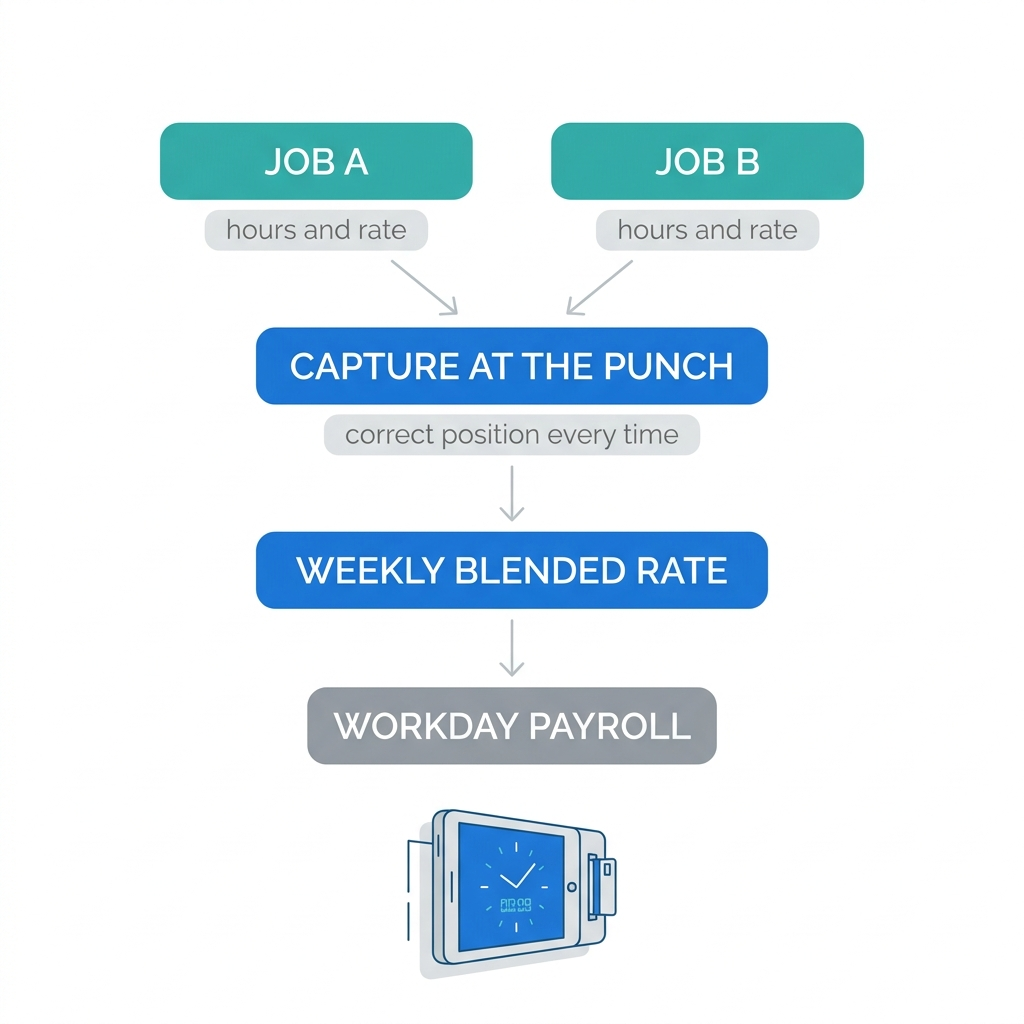
CloudApper AI TimeClock for Workday addresses the capture problem, which is the root cause rather than the symptom. Employees select the job or position they are moving into at the clock, on a tablet at the unit or on the floor, so a mid-shift transfer is recorded when it happens instead of being reconstructed later. The clock can require the transfer selection rather than defaulting to the primary position, which is what stops the silent misattribution. Hours flow to Workday already carrying the correct position, so the blended rate is computed from accurate inputs.
Because the same interface handles attestation, it can also capture the meal break and shift confirmations that carry their own state-law consequences for employees working across units.
CloudApper AI handles the verification layer. It can independently recompute the weighted average regular rate for multi-position employees each pay period and flag any week where the paid premium does not match, turning a finding that would surface in litigation into an exception report that lands before the pay run closes. Where union agreements or state rules impose calculation rules Workday’s delivered configuration does not model, CloudApper AI holds that logic as configuration rather than as a tenant development cycle, which matters because those rules change on a bargaining schedule rather than a release schedule.
Neither product replaces Workday Payroll. Workday remains the system of record for compensation, hours, and pay results. CloudApper covers the accuracy of what goes in and the verification of what comes out.
Frequently Asked Questions
Q: What is a blended overtime rate?
A blended overtime rate, also called weighted average overtime, is the regular rate used to calculate overtime when an employee works at two or more pay rates in the same workweek. It is the total straight-time earnings for the week divided by the total hours worked, and the FLSA requires overtime to be based on it rather than on any single rate the employee earns.
Q: How do you calculate blended overtime for an employee with two jobs?
Multiply the hours in each job by that job’s rate and add the results to get total straight-time earnings, including shift differentials and nondiscretionary bonuses. Divide that total by all hours worked in the week to get the regular rate, then multiply the regular rate by 0.5 and by the number of overtime hours to get the premium owed. The premium is half rather than time and a half because straight time has already been paid on every hour worked.
Q: Does Workday calculate blended overtime automatically?
Workday Payroll can calculate a weighted average regular rate across multiple positions, but it is a configuration rather than default behavior. Time calculations must aggregate hours at the worker level across positions for the FLSA workweek, and the earnings that belong in the regular rate must be configured into it, or the result will be wrong in a way that looks consistent.
Q: Why does the overtime rate on my payslip not match my hourly rate?
If you worked at more than one rate that week, the overtime premium is based on the weighted average of your rates rather than on any individual one, so the figure shown will fall between them and match neither. This is the calculation the FLSA requires when an employee works multiple jobs or rates for the same employer in a single workweek.
Q: Do shift differentials have to be included in the regular rate?
Yes. Shift differentials are compensation for hours worked and belong in the regular rate calculation, as do nondiscretionary bonuses and most premium payments. Discretionary bonuses, gifts, and paid time off are excluded, and excluding a differential that should have been included understates the regular rate for every affected week.
Q: Can you pay overtime at the rate of the job where the overtime occurred?
Only under section 7(g)(2) of the FLSA, which permits paying one and a half times the rate applicable to the work performed during the overtime hours where there is an agreement or understanding with the employee reached before the work is performed. Without that prior agreement, the weighted average method applies, and the agreement cannot be established retroactively.
Q: What happens if an employee holds both an exempt and a nonexempt position?
Exempt status attaches to the work performed rather than to the person, so hours worked in the nonexempt position are generally overtime eligible. Tenants configured to treat exempt status as a worker-level attribute typically fail to pay overtime that is owed, which is the direction of error that creates liability.
If you have employees working across job codes and cannot say with confidence how your tenant aggregates their hours for the FLSA workweek, that is worth confirming before the next pay run rather than after a complaint. The CloudApper team can review how hours are captured and how the regular rate is computed in your configuration. Start that conversation at https://www.cloudapper.ai/contact-us.

What is CloudApper AI Platform?
CloudApper AI is an advanced platform that enables organizations to integrate AI into their existing enterprise systems effortlessly, without the need for technical expertise, costly development, or upgrading the underlying infrastructure. By transforming legacy systems into AI-capable solutions, CloudApper allows companies to harness the power of Generative AI quickly and efficiently. This approach has been successfully implemented with leading systems like UKG, Workday, Oracle, Paradox, Amazon AWS Bedrock and can be applied across various industries, helping businesses enhance productivity, automate processes, and gain deeper insights without the usual complexities. With CloudApper AI, you can start experiencing the transformative benefits of AI today. Learn More
- Useful Links:
- Agentic AI
- No-Code/Low-Code
- Custom Software
- HCM Personalization
- iPaaS
- FedRAMP

Brochure
CloudApper AI TimeClock
For accurate & touchless time capture experience.
Download Brochure
CloudApper AI Solutions for Workday



- Works with








- and more.
Similar Posts

Workday W-4 Updates for Hourly Workers: Exempt Renewals, Overtime Deductions,…

Workday Access for Former Employees: How to Deliver W-2s and…