Crystal Reports and SSRS migration is the scope item that stalls legacy modernization projects after go-live. IT teams that skip the reporting inventory end up with a new system live and a legacy server that cannot be turned off. Here is what governed modernization looks like for the reporting layer.
TL;DR
Crystal Reports and SSRS reports are rarely scoped as dependencies in legacy modernization projects, which is why applications migrate on schedule while old servers remain live for months. These files contain embedded business logic, undocumented stored procedure calls, and formula calculations that often have no named owner. When a migrated report produces a different number than the one finance has used for years, the IT team is not equipped to resolve the resulting dispute. Governing the reporting layer — with a pre-cutover inventory, named ownership, and parallel output validation — prevents the decommission hold and closes legacy infrastructure on schedule.
Table of Contents
The new system is live. Acceptance testing passed. The go-live happened on schedule. Then someone checks the infrastructure report and notices the old application server is still running — not because anything failed, but because 40-odd Crystal Reports files are still querying the legacy database. Three departments print those reports every week. Nobody told them the system changed. The modernization project is technically complete, but the infrastructure it replaced cannot be turned off.

This scenario is not unusual. Crystal Reports and SSRS were not counted as deliverables in the original project scope. They were background operational assets — scheduled exports, finance printouts, compliance summaries — that predated the modernization initiative and were never mapped as dependencies. CloudApper encounters this consistently when organizations bring modernization projects for remediation: the reporting layer was scoped as an afterthought, or not scoped at all.
Reports Are Not Just Output Files
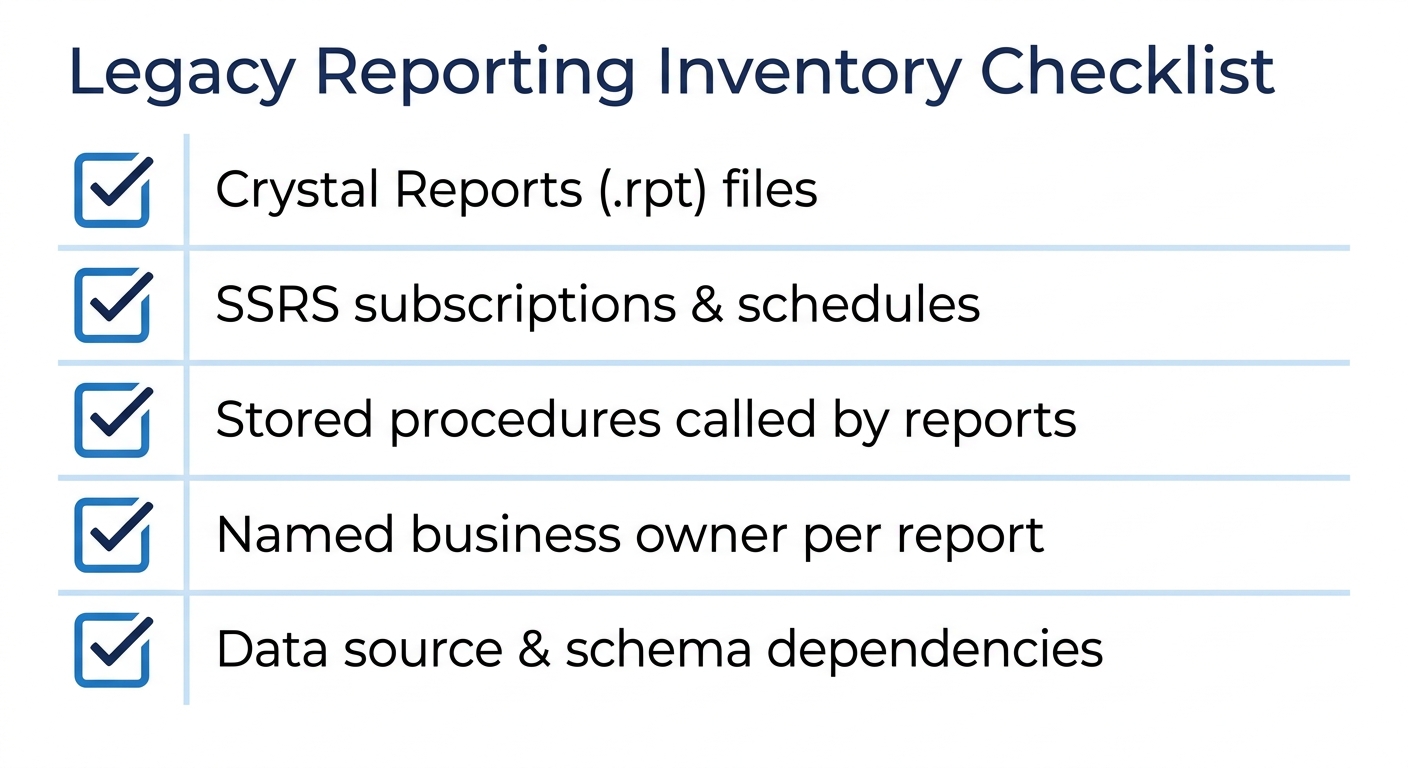
When an enterprise scopes a legacy modernization, the inventory covers databases, APIs, integrations, and business rules embedded in application code. What rarely gets counted in the same pass: Crystal Reports (.rpt) files, SSRS subscriptions, scheduled report jobs, and the stored procedures they call directly against the legacy schema.
These are not passive output files. A single .rpt file can contain a margin calculation that exists nowhere else in the documented system. An SSRS subscription may call a stored procedure that was never versioned, pulling from a schema that is about to be deprecated. Legacy database migrations that include a stored procedure review surface these dependencies — but only when the reporting inventory runs in the same pass as the application inventory, not after the cutover.
The Ownership Problem Nobody Budgets For
Report files are rarely counted in migration scope, and their owners are rarely identified. At project close, a modernization team hands off a new system with no clear owner for the Crystal Reports that finance, operations, and compliance have depended on for years. Hidden integration dependencies in legacy systems cause scope overruns in the same pattern: every report is an implicit integration that knows which database, which schema, and which version of the data to query. When the schema changes, the report breaks — not as a code error, but as an ownership gap nobody assigned.
Platforms like CloudApper treat the reporting surface as part of the application scope during modernization. The platform’s AI-driven requirements extraction surfaces embedded report logic as a scoping input before migration begins — not as a cleanup task afterward.
The Numbers Everyone Has Been Trusting
The political risk is here. Finance has been emailing a weekly margin summary generated by a Crystal Reports file since 2017. Compliance pulls a quarterly exception report from SSRS before every audit. Operations prints a daily labor summary from a scheduled export that feeds a supervisor’s wall chart.
The institutional knowledge problem in legacy modernization applies directly here: the person who built those reports is commonly no longer at the organization. The current owner is whoever runs the report — which means nobody owns the formula logic. When migration forces a rebuild, the migrated report will often produce a slightly different output. Rounding behavior, null handling, join order, parameter defaults — all of them can shift a number. The new output is not wrong. But it differs from what finance treated as truth for eight years. Legacy modernization projects that fail at the data governance layer often fail exactly here: undocumented logic, no validation baseline, and outputs that were authoritative by convention rather than by design.
The conversation about which number was correct is one most IT teams are not positioned to facilitate, and most modernization budgets did not include.
A Governed Approach Starts Before Go-Live
A reporting inventory conducted before scoping — not after cutover — is the baseline requirement. Every Crystal Reports and SSRS file gets catalogued with its data source, last modification date, schedule, and a named business owner. Reports that call undocumented stored procedures get flagged for logic review before migration scope is finalized.
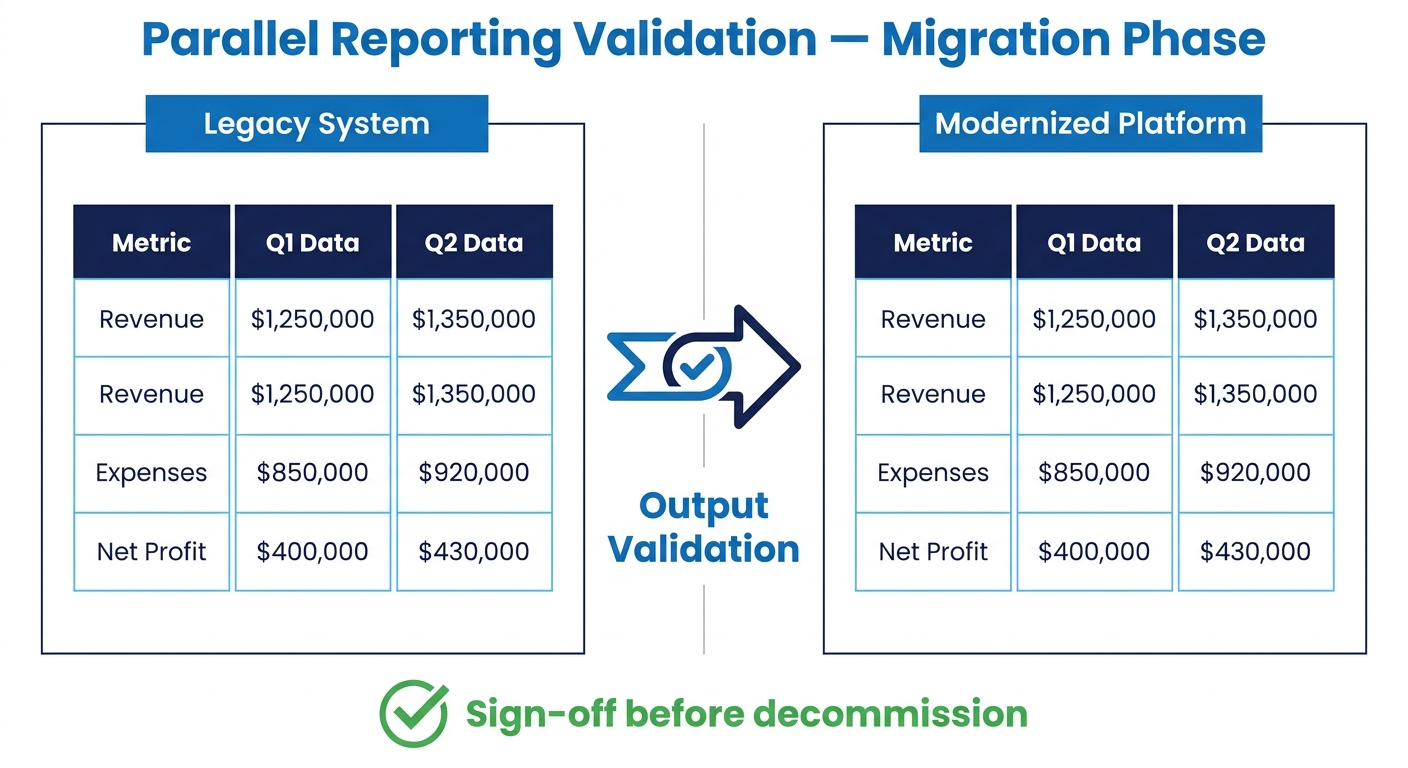
Running legacy and replacement systems in parallel during compliance transitions applies to the reporting layer as well — the safest migration path runs both report versions for at least one full reporting cycle, producing output comparisons before the legacy version is decommissioned. An enterprise application inventory conducted before modernization should treat report files as first-class application components, not operational background noise.
CloudApper’s iPaaS integration layer connects modernized applications to reporting data sources without requiring the legacy database to stay alive post-cutover — which is how organizations eliminate the decommission hold and close out legacy infrastructure on schedule.
If Crystal Reports or SSRS files haven’t been inventoried in your modernization scope, that is the gap to close before go-live. Contact CloudApper to see how a governed modernization approach treats the reporting layer as a scoping input, not a post-launch problem.

What is CloudApper AI Platform?
CloudApper AI is an advanced platform that enables organizations to integrate AI into their existing enterprise systems effortlessly, without the need for technical expertise, costly development, or upgrading the underlying infrastructure. By transforming legacy systems into AI-capable solutions, CloudApper allows companies to harness the power of Generative AI quickly and efficiently. This approach has been successfully implemented with leading systems like UKG, Workday, Oracle, Paradox, Amazon AWS Bedrock and can be applied across various industries, helping businesses enhance productivity, automate processes, and gain deeper insights without the usual complexities. With CloudApper AI, you can start experiencing the transformative benefits of AI today. Learn More
- Useful Links:
- Agentic AI
- No-Code/Low-Code
- Custom Software
- HCM Personalization
- iPaaS
- FedRAMP
CloudApper AI Solutions


- Works with








- and more.
Similar Posts
The Architecture Diagram Said Four. The Dependency Scan Returned Twenty-Three.

When Patching Breaks Production: The Documentation Problem With Legacy Windows…